
Discover how to choose the right device with smart buying tips, ideal specs like RAM, and storage. Learn how to buy the best laptop for personal use in 2026 without overspending.
Buying a laptop used to be simple, but now it feels like you need a computer science degree just to understand the price tags. If you have ever felt overwhelmed by the endless options, confusing model numbers, and aggressive sales tactics, you are not alone.
Most people just want a machine that works—something that opens instantly, handles twenty tabs without freezing, and lasts for years without falling apart.

This guide is designed to cut through the noise. We are not looking for the most expensive machine or the flashy one with RGB lights. We are looking for the “sweet spot”—the specific combination of specs and value that real users and tech experts recommend for reliable, everyday personal use.
Whether you need to manage your family photos, book trips, do taxes, or just stream movies in bed, this is how you find the best laptop for home use in 2026.
The Golden Rule of Laptop Specs: What You Actually Need
When you look at a spec sheet, it is easy to get lost in the jargon. To simplify things, you only really need to focus on three numbers: the Processor (CPU), the Memory (RAM), and the Storage (SSD).
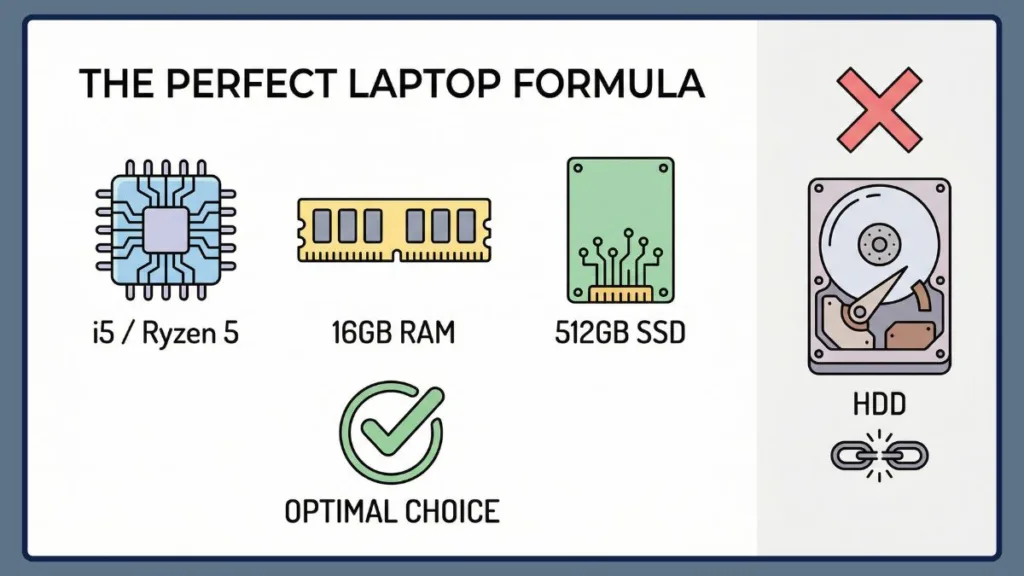
Getting these three right is the difference between a laptop that lasts five years and one that becomes frustratingly slow in six months.
1. The Processor (CPU): Look for Generation, Not Just Tier
A common myth is that an “i7” is always better than an “i5.” This is wrong. In the world of laptops, the generation matters far more than the tier. A newer Intel Core i3 or i5 will often outperform an old i7.
For a smooth personal experience, you want to look for an Intel Core i5 (8th Gen or newer) or an AMD Ryzen 5 (3rd Gen or newer).
“These are the workhorses of the laptop world. They run cool, they are fast enough for anything a home user needs, and they do not cost a fortune.”
If you see a laptop with an Intel “Celeron” or “Pentium” processor, put it back on the shelf. Those chips struggle with modern web browsing and are not worth your money.
2. Memory (RAM): 16GB is the New Standard
For years, 8GB of RAM was the standard advice. In 2026, that advice has changed. While 8GB is technically enough to turn the computer on and check email, it is the bare minimum. As soon as you open a few programs or leave Spotify running in the background, an 8GB laptop will start to “choke.”
Real user data suggests that 16GB of RAM is the safety net you want. It ensures your laptop stays snappy for years, not just months.
Expert Tip: If you want to be incredibly wise and future-proof your purchase, some experts even recommend aiming for 24GB of RAM if you can find it, but 16GB is the reliable target for most.
3. Storage: The SSD is Non-Negotiable
This is the single most important rule of buying a modern laptop: Never buy a computer with a Hard Disk Drive (HDD).
You must get a Solid State Drive (SSD). The difference in speed is massive—an SSD boots Windows in seconds, while an HDD takes minutes.
For size, 512GB is the sweet spot. A 256GB drive fills up faster than you think once you start saving high-resolution photos and backups, while 1TB is often overkill for casual users. Sticking to 512GB gives you plenty of breathing room without overpaying.
The Business Laptop Secret: Why Refurbished Beats New
Here is a secret that tech enthusiasts love to share: the best value for your money often is not found in the “New Arrivals” aisle at big-box stores. It is found in the refurbished business section.
Consumer laptops—the flashy silver ones you see in advertisements—are often built with thin plastic that can crack after a year or two of opening and closing.
Business laptops, like the Lenovo ThinkPad, Dell Latitude, and HP Elitebook series, are different. They are built for corporate road warriors. They have better hinges, spill-resistant keyboards, and chassis made of magnesium or carbon fiber.
“Because businesses lease these laptops and return them after three years, the market is flooded with high-quality, gently used machines.”
You can often find a refurbished ThinkPad T-series with perfect specs (i5, 16GB RAM) for around $500. That same $500 bought new at a retail store usually gets you a flimsy plastic laptop with worse performance. If durability is your priority, buying a certified refurbished business class laptop is the smartest financial move you can make.
Setting Your Laptop Budget: What Your Money Buys
It is helpful to know exactly what you get at different price points so you can manage your expectations.
Under $200: The Danger Zone
Unless you are buying a used machine from a trusted friend, laptops in this price range are often “e-waste” waiting to happen. They are typically slow, have poor screens, and are not designed to last more than a year. Avoid this tier if you can.
$500 Range: The Entry Level
This is where the reliable machines live. At this price, you should be able to find a decent new laptop with sales, or a fantastic refurbished business laptop. This is the minimum investment for a stress-free experience.
$500 to $800: The Sweet Spot
This is where you get the best return on investment. In this range, you start getting better screens (brighter and clearer), lighter designs, and battery life that actually lasts all day.
For most personal users, spending more than $800 yields diminishing returns. You do not need a $2,000 MacBook Pro to check Facebook and edit a Word document.
Brands to Watch and Brands to Avoid
Brand loyalty is less important than model loyalty, but there are trends you should know.
Lenovo is consistently recommended for home users, specifically their:
- IdeaPad series for new buyers.
- ThinkPad series for used buyers.
They are known for having the best keyboards in the industry, which makes typing emails or working on your novel much more pleasant.
On the flip side, be cautious with budget models from other major brands. Users frequently report issues with the trackpads and hinges on lower-end HP consumer laptops (often the “Pavilion” line).
“Always search for reviews of the specific model you are looking at, rather than trusting the brand name blindly.”
How to Inspect a Used Laptop Before Buying
If you decide to go the refurbished or used route, you need to know how to spot a lemon. The most practical tip is the Cleanliness Rule.
Look at the external condition of the laptop:
- Is it sticky?
- Are the vents clogged with dust?
- Is the keyboard grimy?
If the previous owner did not take care of the outside, they definitely did not take care of the inside. A dirty laptop often means a laptop that has overheated and will fail sooner.
Also, watch out for the Urgency Red Flag. If a seller is rushing you, telling you they have “other buyers waiting” or that the “deal ends in ten minutes,” walk away. A good machine stands on its own merits. Take your time to check the screen for dead pixels and ask to see the battery health percentage.
Summary
Buying a laptop does not have to be a gamble. If you stick to the proven formula—an Intel Core i5 or Ryzen 5 processor, 16GB of RAM, and a 512GB SSD—you will end up with a machine that serves you well for years.
Consider looking at refurbished business laptops if you want maximum durability for your dollar, and try to stay in that $500 to $800 sweet spot to get the best value.
The best laptop for personal use is the one you never have to think about. It just works, every time you open the lid.
Frequently Asked Questions
Is 8GB of RAM enough for a personal laptop in 2026? For very basic tasks, yes, but it is becoming obsolete. 16GB is the recommended standard to ensure your laptop stays fast as software updates become more demanding over time.
Do I need a graphics card for everyday use? No. Integrated graphics (built into the processor) are powerful enough today for 4K streaming, photo viewing, and office work. You only need a dedicated graphics card for heavy gaming or professional video editing.
How many years should a laptop last? If you buy a laptop with the recommended specs above, you should reasonably expect 4 to 5 years of smooth performance before it starts showing its age.
Which laptop brand is best for personal use? While opinions vary, Lenovo is widely considered the safest bet for value and reliability, particularly their IdeaPad and ThinkPad lines. Dell’s Latitude series is a close second for durability.
Community Sources & Further Reading
This guide was built by analyzing real user conversations and expert advice from the tech community. If you want to dive deeper into the original discussions, you can read the user experiences on being Overwhelmed by Options, check the specific Recommendations for Home Laptops, or review the technical breakdowns in the 2025 Laptop Purchasing Guide and the Ultimate Laptop Guide.
Visit Our Post Page: Blog Page