
Confused about gaming monitors in 2026? Learn how to choose the right gaming monitor based on refresh rate, resolution, panel type, and your PC—no guesswork.
You are not browsing monitors casually. You are actively comparing tabs, checking specs, opening reviews, and trying to understand why two monitors that look similar on paper behave very differently once you start playing. As you look at refresh rates, resolutions, panel types, and ports, what you actually need is decision clarity—someone standing next to you, pointing at the same listings you are seeing, and telling you exactly what matters in 2026, what to ignore, and what will age badly.
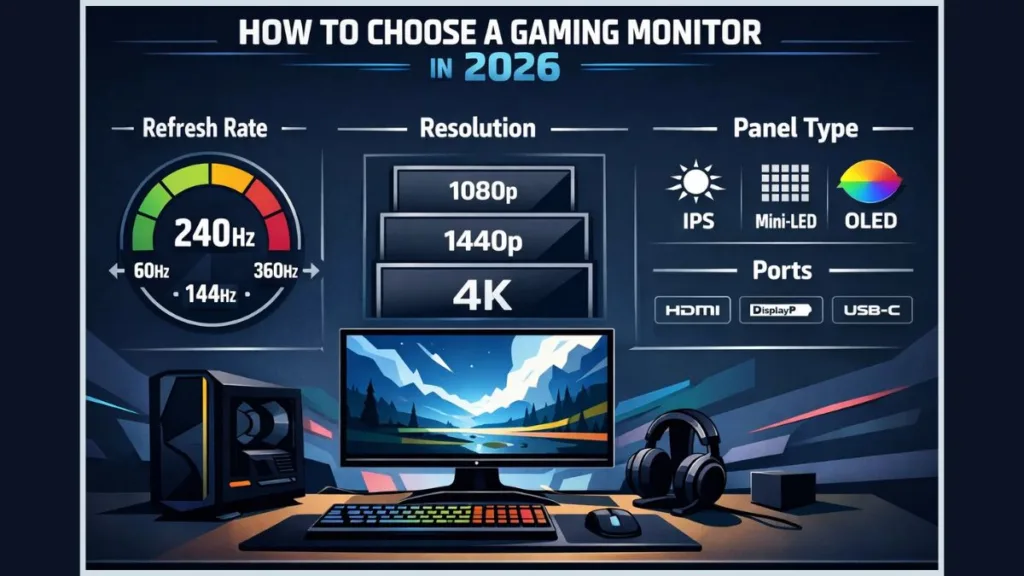
This gaming monitor buying guide is written for that exact moment. You are choosing now. Every explanation ties directly to what you see on screen, how games feel when you move the mouse or controller, and where buyers still get misled by outdated advice or marketing shortcuts.
Start With Your PC First: What Should You Look for in a Gaming Monitor Before Buying?
As you sit there with your system specs open, this is the first reality check you need to make. Your GPU and CPU already define the upper limit of what any gaming monitor can do for you. If your system averages 100–120 FPS in the games you actually play, buying a 240Hz or 360Hz monitor does not create smoothness—it exposes instability.
At this point, look at your real-world performance using tools like MSI Afterburner, not just static benchmark charts. Think about the titles you launch daily, not the one game you tested once. When your GPU dips during explosions or crowded scenes, a higher-end monitor does not hide that—it exposes it. This is why so many people feel disappointed after buying a “high-end” display.
A gaming monitor never fixes performance problems. It magnifies them.
If you choose a monitor that demands more than your PC can reliably deliver, you lock yourself into constant settings changes, driver tweaks, and frustration. The correct move is always to choose a monitor your system can feed comfortably and consistently, not one that looks impressive on a product page.
How Do You Choose the Right Refresh Rate? (Refresh Rate vs Response Time)
Once you anchor your choice to your PC, refresh rate becomes the first real decision you should make. This is where gameplay feel lives.
Why Is 60Hz Still the Biggest Bottleneck?
As you look at a 60Hz display and then switch to anything higher, the difference is immediate. Camera movement feels heavier. Mouse input feels slightly delayed. Fast motion smears together. That happens because at 60Hz, your screen updates only sixty times per second, leaving visible gaps during motion.
You can play like this, but once you move beyond it, going back feels restrictive. In 2026, 60Hz is no longer a gaming standard—it is a limitation.
If you try a fast-paced shooter or racing game, this limitation becomes obvious. You can test this yourself on Blur Busters’ TestUFO site to see how higher refresh rates reduce motion blur in real-time. Once you move past 60Hz, going back feels like playing with a handicap.
Is 165Hz–180Hz the Real Sweet Spot for Gaming in 2026?
This is where the industry has shifted. 144Hz is no longer the sweet spot in 2026—it is the budget floor. Most new gaming monitors, even in lower price tiers, now ship at 165Hz or 180Hz by default. Panel manufacturing has moved on, and refresh rates below this range are now entry-level.
When you switch to 165Hz–180Hz, motion becomes meaningfully smoother than 144Hz, especially in fast camera pans and tracking scenarios. This range delivers a noticeable improvement without demanding extreme hardware. Modern GPUs are well-matched to sustaining 120–180 FPS at 1080p or 1440p in real games, which is why this has become the new practical standard.
If you are buying a gaming monitor in 2026 and settling for 144Hz as your primary target, you are already one generation behind.
When Do 240Hz or 360Hz Gaming Monitors Actually Make Sense?
As you look at 240Hz and above, the benefits become narrower. These monitors exist for competitive players running esports titles where frame delivery is extremely stable. If your system cannot hold those frame rates consistently, the advantage disappears.
At this level, higher refresh rates reduce latency, but they also make frame pacing issues more obvious. Micro-stutters that were hidden at lower refresh rates become visible.
Ultra-high refresh rates reward consistency, not raw numbers.
How Should You Match Resolution With GPU Power and Screen Size?
Resolution is where many buyers overshoot. Every step up multiplies GPU workload, whether the spec sheet warns you or not.
Is 1080p, 1440p, or 4K Better for Gaming Monitors in 2026?
As you compare resolutions, think in terms of sustainability. 1080p remains ideal for competitive gaming and very high refresh rates. 1440p has become the mainstream gaming resolution because it delivers clear image quality without overwhelming modern GPUs. 4K offers incredible sharpness, but only if your GPU can maintain performance without constant compromises.
If you try to force 4K without the hardware to support it, you will spend more time adjusting settings than playing games. That friction is the real cost of chasing resolution too early.
What Is the Best Monitor Size for Gaming Based on Pixel Density?
As you look at screen sizes, resolution only works when pixel density stays balanced. 24 inches pairs best with 1080p, and 27 inches pairs best with 1440p. This combination keeps text sharp, edges clean, and eye strain low.
When size and resolution are mismatched, you notice softness, shimmering, and fatigue over long sessions. When they are matched correctly, the display disappears and gameplay takes over.
Which Panel Type Is Best for Gaming? (IPS vs Mini-LED vs OLED vs VA)
Panel technology defines how your monitor behaves in motion, contrast, and long-term use—not just how it looks in a store preview.
Are IPS Gaming Monitors the Reliable All-Rounder?
As you inspect IPS panels, you notice consistency. Colors remain accurate when you lean back. Viewing angles stay stable. Modern IPS gaming monitors now reach high refresh rates with response times fast enough for competitive play. If you want a monitor that does everything well without major trade-offs, IPS remains the safest choice.
What About Mini-LED? (The HDR King Without Burn-In)
This is the bridge many guides miss. Mini-LED is the solution for gamers who want real HDR brightness without OLED burn-in concerns. Mini-LED monitors use thousands of local dimming zones, allowing them to reach extremely high peak brightness while maintaining strong contrast.
As you game in bright rooms or work and play on the same screen, Mini-LED gives you impactful HDR highlights without the long-term anxiety that comes with OLED. This is why Mini-LED has become a major category in 2026 for high-end IPS-based gaming monitors.
Are OLED Gaming Monitors Still the Motion Clarity King?
When you switch to OLED, the difference is obvious. Blacks are truly black. Motion clarity is unmatched. Response time is effectively instant. Fast camera movement looks surgically clean.
The trade-off is care. OLED requires awareness around static content and long work sessions. If you are comfortable managing that, OLED delivers the best visual experience available today.
Are VA Gaming Monitors Still Worth Considering?
VA panels continue to offer excellent contrast at lower prices, making them attractive for immersive gaming. However, as you move quickly in dark scenes, you may notice smearing or trailing. This is an inherent limitation. VA works best for budget immersion, not competitive precision.
Are TN Gaming Monitors Basically Dead?
For most users, yes. TN panels still exist for extreme budget esports setups, but compared to modern IPS pricing, their poor color quality and narrow viewing angles make them hard to justify. TN is no longer a mainstream recommendation.
How Important Is Response Time? (GtG vs MPRT)
Response time controls how clean motion looks when everything is moving fast.
What Is the Difference Between GtG and MPRT Response Time?
As you read “1ms” on a box, pause. That number usually refers to GtG (Gray-to-Gray) under ideal lab conditions. MPRT (Moving Picture Response Time) better reflects how long a pixel remains visible during motion.
When manufacturers push aggressive overdrive to hit marketing numbers, you often get halos, inverse ghosting, or visual artifacts.
A fast response time that breaks image quality is not fast—it is flawed.
Do You Really Need Adaptive Sync? (G-Sync vs FreeSync)
As your frame rate fluctuates, adaptive sync keeps the monitor aligned with GPU output. Without it, even high-refresh monitors tear or stutter the moment FPS drops.
Whether it’s NVIDIA G-Sync, G-Sync Compatible, or AMD FreeSync, this feature smooths real gameplay far more than chasing higher peak refresh rates.
Which Ports and Cables Matter in 2026?
As you connect your monitor, ports silently decide your limits. DisplayPort 1.4 is still widely used and functional, but DisplayPort 2.1 is the future-proofing standard you should actively look for in high-end monitors. New GPUs in 2026 increasingly support DP 2.1, enabling higher refresh rates at higher resolutions without compression.
HDMI 2.1 remains critical for console gaming, especially for 4K at 120Hz. Using the wrong port or cable can silently cap performance.
A premium monitor paired with the wrong port performs like a budget display.
Gaming Monitor Buying Checklist: How Do You Know You’ve Chosen Correctly?
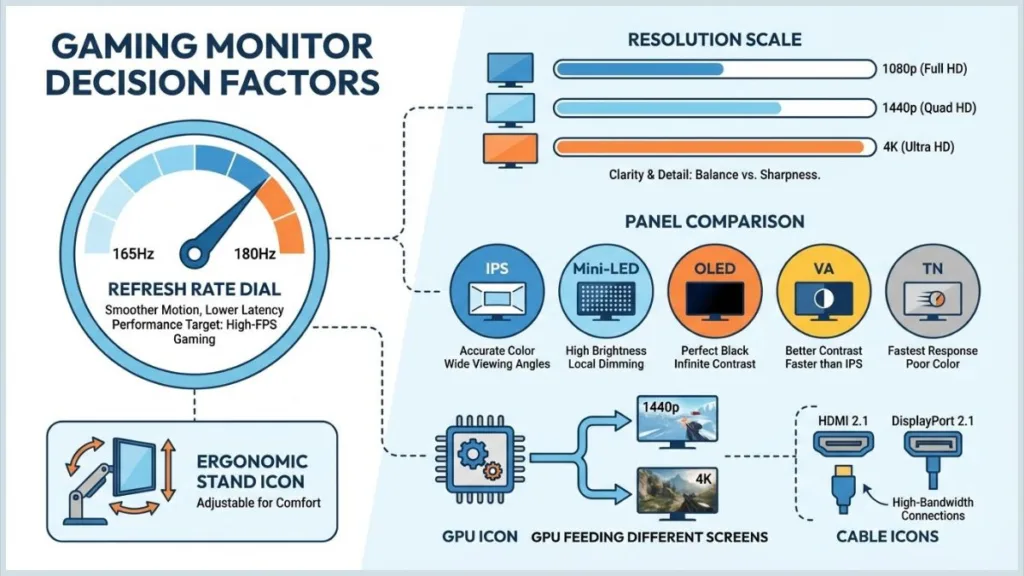
As you finalize your choice, confirm GPU capability, refresh rate target, resolution-size pairing, panel trade-offs, adaptive sync support, ports, and ergonomics. When these align, hesitation disappears.
Best Gaming Monitors in 2026: The Best of the Best Across Every Category
At this point in your buying journey, you’re no longer asking what specs mean—you’re asking which gaming monitor is actually worth buying. This section exists for that exact moment.
You don’t need another generic roundup. You need a best-of-the-best shortlist, pulled from across the gaming monitor market, so you can match a monitor to how you actually play, how much desk space you have, and how much compromise you are willing to accept.
Think of this as the “best of the best,” not by hype, but by how each monitor dominates its own category.
Best Overall Gaming Monitor: Asus ROG Swift PG27AQDP
The Asus ROG Swift PG27AQDP earns its place as the best overall gaming monitor because it hits the balance most gamers are chasing in 2026. You get a 27-inch QHD OLED panel, elite motion clarity, and a 480Hz refresh rate that delivers absurd responsiveness when your system can take advantage of it. It arrives factory-calibrated, so you are not fighting color accuracy on day one. If you want one monitor that handles competitive gaming, immersive single-player titles, and HDR content without feeling like a compromise, this is it.
Check the latest price and availability for the Asus ROG Swift PG27AQDP here
Best Ultra-High Refresh Rate Monitor: Alienware AW2524HF (500Hz)
This monitor exists for one purpose: extreme competitive play. The Alienware AW2524HF pushes refresh rate to 500Hz, but that number only matters if your PC can sustain it. The 25-inch 1080p panel keeps GPU load low so frame rates stay high. If you live in esports titles and care more about latency than image fidelity, this monitor delivers exactly what it promises.
See if the Alienware AW2524HF fits your competitive setup here
Best Value Gaming Monitor: Titan Army P2712V
The Titan Army P2712V stands out because it refuses to lock you into a single use case. You can run it at 4K 160Hz for visually rich games, then switch to 1080p 320Hz when you want speed. That flexibility is what makes it such a strong value choice—you are not forced to choose between resolution and refresh rate at purchase time.
Check out the current deal on the Titan Army P2712V here
Best Curved Gaming Monitor: Alienware AW3423DWF
The Alienware AW3423DWF combines a 34-inch ultrawide format with a QD-OLED panel and an 1800R curve. The result is deep immersion without sacrificing responsiveness. Colors look saturated in both SDR and HDR, the 165Hz refresh rate feels smooth at ultrawide resolution, and Alienware’s build quality shows up in daily use.
View the latest price for the Alienware AW3423DWF here
Best 4K Gaming Monitor: Asus ROG Strix XG32UCWMG
This monitor is built for gamers who want clarity and speed in one package. In standard mode, you get a premium 4K OLED experience. When you need responsiveness, you can switch to 1080p at 480Hz. With HDR brightness reaching up to 1,300 nits, it avoids one of the traditional OLED weaknesses and delivers impactful highlights.
See the Asus ROG Strix XG32UCWMG on Amazon here
Best 3D Gaming Monitor: Acer Predator SpatialLabs View 27 PSV27-2
If you want to experiment with glasses-free 3D gaming, the Acer SpatialLabs View 27 PSV27-2 is the most practical entry point. You are not locked into 3D at all times—you can play standard 2D games normally and enable 3D when supported titles interest you. That flexibility makes it more than a novelty purchase.
Check availability for the Acer SpatialLabs View 27 here
Best Ultrawide Gaming Monitor: LG UltraGear 45GX950A
At 45 inches wide, the LG UltraGear 45GX950A is designed to replace multi-monitor setups entirely. It excels at gaming, movies, and productivity alike. The sheer scale changes how games feel, especially in racing, open-world, and cinematic titles.
Grab the LG UltraGear 45GX950A here if you have the desk space
Best Portable Gaming Monitor: Nexigo NG17FGQ
Portable monitors usually mean compromise, but the Nexigo NG17FGQ breaks that pattern. A 300Hz refresh rate over USB-C and a 17-inch 1080p IPS panel make it surprisingly capable. If you game on laptops or want a secondary high-refresh display without dedicating desk space, this monitor punches far above its size.
See the Nexigo NG17FGQ portable monitor here
Best Gaming Monitor for Consoles: Alienware AW3225QF
For console gamers, the Alienware AW3225QF checks the right boxes cleanly. You get 4K resolution, a 240Hz refresh rate, HDMI 2.1 support, Dolby Vision, and a 32-inch QD-OLED panel. Colors are vibrant, blacks are deep, and build quality is exactly what you expect from Alienware. If you want a premium console experience with minimal setup friction, this is a safe high-end choice.
Check the current price for the Alienware AW3225QF here
How to Choose the Right Monitor From the List Based on Your PC, Console, and Desk Space
At this point, you’re not deciding what is good—you’re deciding what fits. The monitors above are already the best in their categories. Your job now is to map them to your hardware, your desk, and how you actually play. This is where most buyers make the final mistake, so use this section as a hard filter.
If You’re Running a Mid-Range PC (RTX 4060 / RX 7600–7700 Class)
As you look at your system specs, this tier typically sustains 120–180 FPS at 1080p or 1440p, depending on the game. You should not be chasing extreme refresh rates or 4K here.
You are best matched with:
- Titan Army P2712V if you want flexibility, because you can run 1080p at very high refresh for competitive titles and switch to higher resolution when visuals matter.
- Alienware AW3423DWF if immersion matters more than raw FPS, since ultrawide QD-OLED works beautifully at moderate frame rates.
If your GPU cannot consistently exceed 180 FPS, buying a 240Hz+ monitor is wasted headroom, not an upgrade.
If You’re Running a High-End PC (RTX 4080 / RTX 4090 / Next-Gen Equivalent)
This is where premium monitors finally make sense. As you test your system, you’ll notice stable high frame delivery at 1440p high refresh and even 4K in many titles.
You should be looking at:
- Asus ROG Swift PG27AQDP if you want the cleanest competitive + immersive crossover experience with OLED motion clarity.
- Asus ROG Strix XG32UCWMG if you want true flexibility—4K OLED for visuals, 1080p 480Hz for speed.
- Alienware AW2524HF only if you are strictly focused on esports titles and already know you can hit extreme frame rates consistently.
This is the tier where DisplayPort 2.1 support and OLED or Mini-LED panels actually pay off.
If You’re a Competitive Esports-Only Player
As you look at your playstyle, visuals are secondary. You care about latency, clarity in motion, and consistency.
Your match is clear:
- Alienware AW2524HF (500Hz) if your PC can sustain the frame rates.
- Asus ROG Swift PG27AQDP if you want OLED clarity without dropping down to 1080p.
If you play competitive shooters exclusively, ultrawide and 4K displays actively work against you.
If You’re an Immersive / Single-Player / Cinematic Gamer
If you spend most of your time in RPGs, open-world games, racing, or story-driven titles, scale and contrast matter more than extreme refresh rates.
You should be focusing on:
- Alienware AW3423DWF for ultrawide immersion with OLED contrast.
- LG UltraGear 45GX950A if you want maximum scale and are comfortable dedicating desk space.
- Asus ROG Strix XG32UCWMG if you want cinematic 4K without giving up gaming performance.
This is where OLED or Mini-LED panels shine, especially in darker scenes and HDR content.
If You’re a Console Gamer (PS5 / Xbox Series X / Next-Gen Consoles)
As you look at console output limits, HDMI 2.1, 4K, and HDR support matter more than extreme refresh rates.
Your best choice is:
- Alienware AW3225QF, because it cleanly supports 4K, high refresh, HDMI 2.1, Dolby Vision, and OLED contrast without configuration headaches.
Console gaming benefits more from panel quality and HDR than chasing refresh rates above what the console can output.
If Desk Space Is Limited (Small Desk / Bedroom Setup)
Desk constraints should immediately disqualify certain monitors, no matter how good they are on paper.
You should avoid:
- 45-inch ultrawides unless your desk depth is sufficient.
- Super-wide curved displays in tight spaces.
You should consider:
- Asus ROG Swift PG27AQDP for maximum performance in a compact footprint.
- Titan Army P2712V for versatility without physical bulk.
- Nexigo NG17FGQ if you need portability or secondary-screen flexibility.
If You Need Portability or a Secondary Gaming Screen
If you travel, use laptops, or want a second high-refresh display without committing desk space:
- Nexigo NG17FGQ is the clear fit, delivering refresh rates most full-size monitors used to struggle with—over USB-C.
This is not a compromise screen. It’s a purpose-built solution.
Gaming Monitor FAQ: What Do Buyers Ask Most?
What is the best monitor size for gaming? You get the best balance at 27 inches with 1440p.
Is a curved monitor better for gaming? Curved enhances immersion; flat improves precision.
Which panel is best for gaming? IPS is the safest all-rounder. Mini-LED is best for HDR without burn-in. OLED delivers the best visuals if you manage it.
Is 144Hz good for gaming in 2026? 144Hz is now entry-level. 165Hz–180Hz is the modern sweet spot.
Do you really need 4K for gaming? Only if your GPU sustains it comfortably and visuals matter more than frame rate.
Visit Our Post Page: Blog Page