
Learn how to download your ITR by acknowledgement number, find your ITR-V, verify returns, recover login, and track refunds with this complete step-by-step guide.
If you want to download your Income Tax Return (ITR) using the acknowledgement number, it’s important to understand one key fact upfront.
You cannot download the full ITR or ITR-V file using only the acknowledgement number without logging in to the Income Tax e-Filing portal.
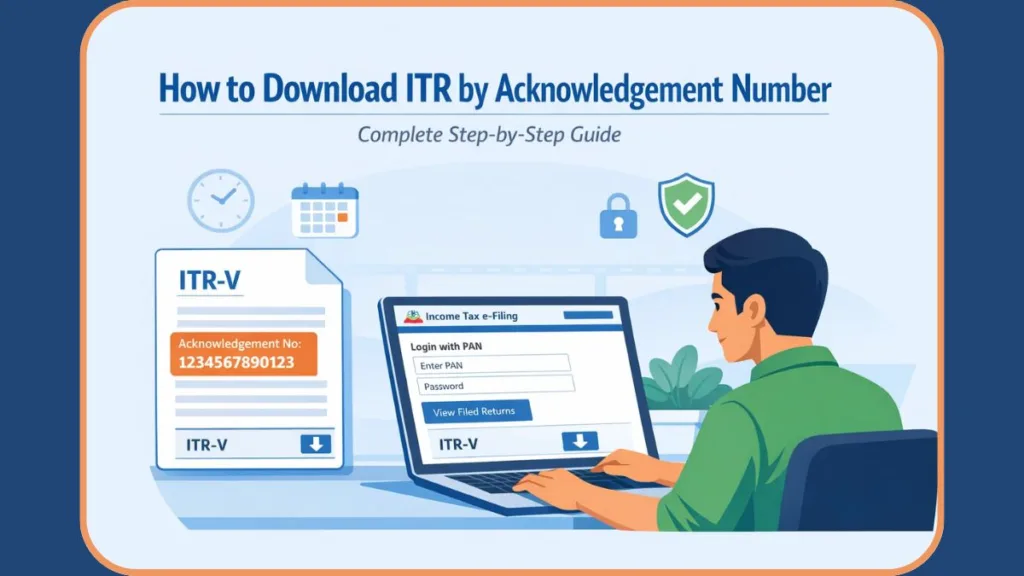
The acknowledgement number alone is not a login substitute. However, it is still extremely useful for tracking your return status and confirming successful filing.
This confusion is very common. Many taxpayers assume the acknowledgement number works like a receipt number that unlocks the file instantly. In reality, the tax portal prioritizes data security, which is why login access is mandatory.
Tip: Think of the acknowledgement number as a reference ID, not a download key.
In this guide, we clearly explain:
- What the ITR acknowledgement number is
- How it is linked to ITR-V
- How to download ITR after logging in
- How to check status without logging in using just the number
- What to do if you can’t log in
By the end of this guide, you’ll have a clear answer on exactly what works and what doesn’t.
Meaning & Importance of the ITR Acknowledgement Number
The ITR acknowledgement number is a unique tracking number generated after you successfully file your income tax return. It serves as official proof that the Income Tax Department has received your return.
In simple terms, this number confirms that your return was submitted properly and entered into the tax system.
You use the acknowledgement number to:
- Confirm successful ITR filing
- Track processing status
- Refer to your return during verification or refund follow-ups
Every filed return has a unique acknowledgement number, making it a critical reference for taxpayers.
In real life, you may need this number when:
- A bank asks for proof of income
- Your employer requests tax documents
- You follow up on a delayed refund
For example, if you filed your ITR for FY 2024-25 (AY 2025-26) through the e-Filing portal, the acknowledgement number will appear on the ITR-V form that the system generates once your return is accepted.
Important: Always save or note down your acknowledgement number after filing. It avoids unnecessary stress later.
ITR-V Form Explained: Where to Find the Acknowledgement Number
ITR-V stands for Income Tax Return Verification Form. It is a one-page PDF document generated when you file your ITR electronically without using a Digital Signature Certificate (DSC).
Since most individual taxpayers don’t use a DSC, this document applies to a large majority of users.
Here’s the key clarification many taxpayers miss: The acknowledgement number is printed directly on the ITR-V.
ITR-V is essentially the receipt for your filed return, and the acknowledgement number is part of that receipt. Once generated, the ITR-V is:
- Sent to your registered email address.
- Available for download from the e-Filing portal.
Many users print this form or store it digitally. This helps later when documents are required for financial verification, government processes, or audits.
Tip: Even if you e-verify online, keep a copy of your ITR-V for records.
When and Where Do You Receive the ITR Acknowledgement?
After you submit your ITR:
- The ITR acknowledgement (via ITR-V) is emailed to your registered email ID.
- You can also access it at any time through the Income Tax e-Filing portal.
- It remains available for both current and previous assessment years.
Sometimes, emails land in spam folders or fail due to storage limits. That’s why relying only on email is not ideal.
Even if you lose the email, the acknowledgement is never lost from the portal. Using the official site ensures you’re getting the genuine ITR-V, not a fraudulent file. (Important: never download tax documents from unofficial sites to avoid scams.)
Safety Tip: Never share your ITR-V or acknowledgement number with unknown callers or emails.
Step-by-Step: How to Download ITR V Online (Login Required)
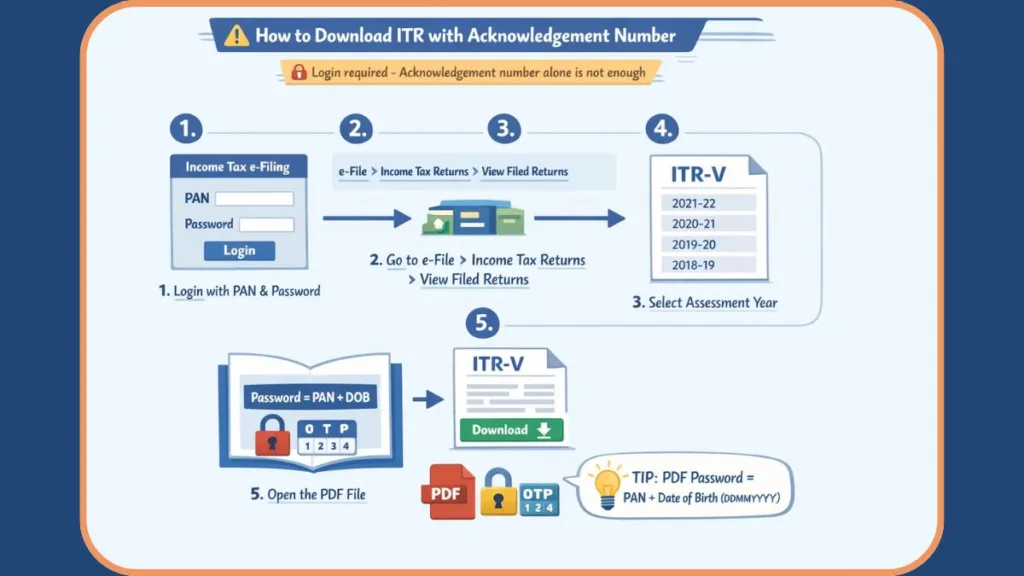
Important: To download your ITR-V or return copy, logging in to the e-Filing portal is mandatory. This step protects your sensitive financial data, including income details and PAN information.
Step-by-step process:
- Log in to the Income Tax e-Filing portal using your PAN and password.
- Go to e-File > Income Tax Returns > View Filed Returns.
- Select the relevant Assessment Year.
- Click Download Form next to the return.
- Open the downloaded ITR-V to view your acknowledgement number and other details.
This section of the portal shows all returns you’ve filed over the years, which makes it easy to retrieve old records when needed.
Tip: Always double-check the assessment year before downloading to avoid confusion.
How to Unlock the PDF: ITR-V Password Format
Many users get stuck here because they use the wrong format. Remember this clearly:
ITR-V PDF password format: PAN (lowercase) + Date of Birth (DDMMYYYY)
Example: If PAN is ABCDE1234F and DOB is 15-08-1990:
- Incorrect (Uppercase): ABCDE1234F15081990
- Correct (Lowercase): abcde1234f15081990
This password system ensures that only the taxpayer can open the file.
Important: Do not use spaces, symbols, or uppercase letters when entering the password.
How to Check ITR Status With Acknowledgement Number (No Login)
If you cannot log in but have your Acknowledgement Number, you can still check if your return is processed. This is one of the few things you can do without a password.
- Go to the Income Tax e-Filing Portal Home Page.
- Look for “Income Tax Return (ITR) Status“ in the “Quick Links” sidebar (usually on the left).
- Enter your Acknowledgement Number and a valid mobile number.
- Enter the OTP sent to your mobile.
- View your current status (e.g., “ITR Verified,” “Processed”).
How to Retrieve a Lost ITR Acknowledgement Number
If you didn’t receive the acknowledgement email, don’t worry. You can still retrieve it online.
You can find your acknowledgement number by:
- Logging in to the e-Filing portal.
- Going to View Filed Returns.
- Checking My Account > e-Filing processing status.
This option is especially useful if you’re searching for older returns or filing confirmations.
Tip: The portal keeps records for multiple years, so you can retrieve past acknowledgements anytime.
Forgot Password? How to Recover Your Income Tax Login
Most people searching for “download ITR by acknowledgement number” are actually locked out of their account. If that’s you, here’s what you should do:
- Use the Forgot Password option on the login page.
- Reset your password using:
- Registered mobile number
- Registered email address
- Aadhaar or bank validation
- Recover access using your PAN as User ID.
Login recovery usually takes only a few minutes if your details are up to date.
Important: Without login access, downloading the full ITR file is not possible under any method.
Why You Must Verify ITR After Downloading the Acknowledgement
Downloading the acknowledgement is not the final step. Your ITR must be verified within 30 days of filing to complete the process. Verification confirms that the return was genuinely filed by you.
If verification is delayed:
- Refunds may be held.
- The return may become invalid.
This 30-day rule is enforced by the tax department to ensure timely completion of the tax filing process.
Tip: Always complete verification as soon as you download the ITR-V.
6 Easy Methods to e-Verify Your ITR Online
You can e-Verify your income tax return using any of the following methods:
- OTP on mobile number registered with Aadhaar.
- Electronic Verification Code (EVC) via pre-validated bank account.
- EVC via pre-validated demat account.
- ATM-generated EVC (offline): Available at ATMs of major banks (SBI, Axis, ICICI, etc.)—swipe your card, select “Create EVC for Income Tax,” and get a code on your mobile.
- Net Banking.
- Digital Signature Certificate (DSC).
Online verification is faster and usually completes the process instantly.
Tip: Aadhaar OTP and net banking are the quickest options for most users.
Using Acknowledgement Number for ITR Refund Tracking
Your acknowledgement number is essential for:
- Checking ITR processing status (even without login, as shown above).
- Tracking income tax refund timelines.
- Communicating with the tax department.
Status updates like “Under Processing” or “Pending for e-Verification” help you understand what action is needed next.
Important: Keep your acknowledgement number handy until your refund is credited.
Key Deadlines: ITR Filing and Verification Timeline
You should always stay updated with:
- Current financial year ITR filing deadlines.
- The 30-day verification rule.
Missing deadlines can:
- Delay refunds.
- Lead to invalid returns.
- Require re-filing.
If you file after the deadline, you can still file a belated ITR, but with penalties and loss of some tax benefits.
Tip: Early filing reduces errors and gives you time to fix issues calmly.
Troubleshooting: Common ITR Download & Password Issues
Here are common problems and why they happen:
- File downloads but doesn’t open: Incorrect PDF password (remember: use lowercase PAN).
- Wrong assessment year selected: Ensure you pick the correct year (e.g., AY 2025-26).
- Filed return not visible yet: Wait for 24 hours if you just filed.
- Login credentials forgotten: Use the “Forgot Password” tool.
Understanding these issues helps you resolve them faster without panic.
Tip: Most problems are account-related, not system errors.
FAQs
Can you download ITR using only the acknowledgement number?
No. You cannot download the ITR or ITR-V using only the acknowledgement number. Logging in to the e-Filing portal is mandatory.
What if I forgot my login password?
Use the “Forgot Password” option and reset it using your registered mobile, email, Aadhaar, or bank details.
Can I download ITR for previous years?
Yes. Previous years’ returns are available under View Filed Returns after login.
Where can I find my acknowledgement number if I lost the email?
You can retrieve it from the e-Filing portal under filed returns or processing status.
Is ITR-V required after e-verification?
No. Once your return is successfully e-Verified, ITR-V submission is no longer required.
How long does it take to get a refund after filing ITR?
Refund timelines vary, but refunds are processed only after successful verification of the return.
Conclusion: Final Thoughts on Downloading ITR
If you want to download your ITR by acknowledgement number, remember this clearly:
The acknowledgement number is essential, but it cannot replace login access.
You must log in to the Income Tax e-Filing portal to download ITR-V or return copies. However, if you are locked out, you can still use the number to check your status via the “ITR Status” tool on the homepage. Once downloaded, ensure timely verification to avoid delays.
We recommend you keep your acknowledgement number, ITR-V, and login credentials secure for future reference.
Visit Our Post Page: Blog Page