
Are you getting the loading error 41058 or “Query Player Data Failed” in Star Citizen? Learn how to fix Star Citizen Error 41058 with clear steps and proven solutions to get back into the game smoothly.
Why You are Encounterung Error 41058
If you’re loading into Star Citizen and suddenly run into Error 41058, you’re not alone. This hiccup usually appears right when you’re trying to jump into the universe, sign in, or reconnect after swapping modes. It’s one of those moments where the game feels ready, but something behind the scenes holds things up.
From what we’ve observed, Star Citizen Error 41058 often pops up when the game has trouble completing a login session, verifying your authentication, or syncing with the right server region. The good news? It’s completely fixable, and most solutions are quick once you know where to look.
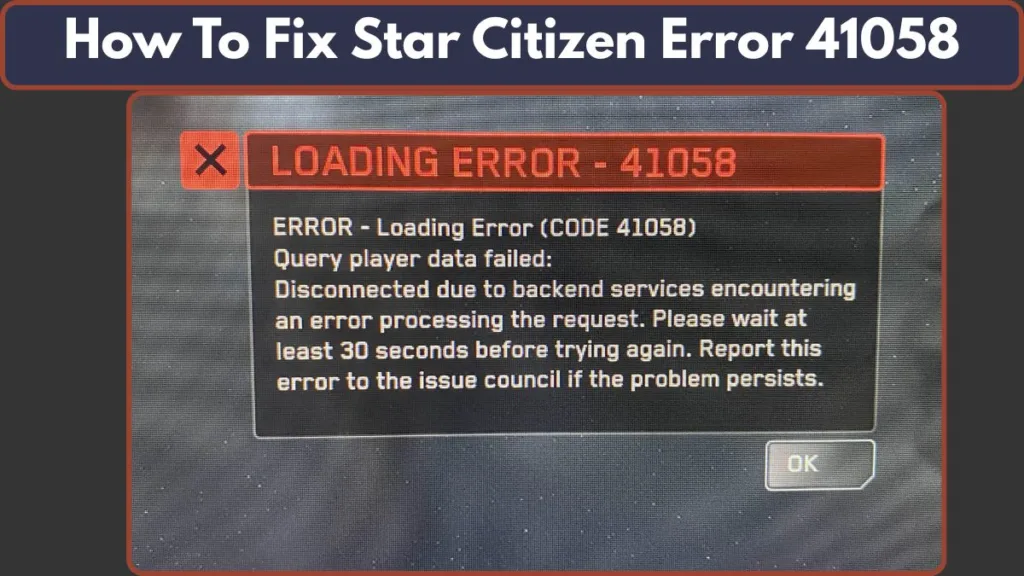
It’s worth noting that issues similar to 41058 — like infinite loading screens or login failures — are documented by the developers of Star Citizen as possible outcomes when there’s a mismatch between the launcher version, corrupted local configuration, or interference from security tools such as firewalls or VPNs.
Think of this as your friendly guide to understanding what this loading issue means, why it shows up at the worst moments, and how you can get back into the action without the frustration. As we move through each section, you’ll get simple steps, clear explanations, and a few smart ways to keep Error 41058 from slowing you down again.
What Is Star Citizen Error 41058?
Star Citizen Error 41058 is a notification that shows up when the game can’t complete a connection, login, or session handshake with the servers. Instead of loading into the universe, the game stalls because something in the chain — your authentication, your session data, or the server sync — didn’t go through the way it should.
Think of it as the game trying to open the door for you, but the access key doesn’t match what the server expects at that moment.
At its core, this error is tied to how Star Citizen verifies your account session, checks your launcher environment, and connects you to the correct server region. If any one of these steps hits a snag, you’ll see 41058 instead of the loading screen you were expecting.
This aligns with the documented “infinite loading screen” and “login failure / connection problem” behaviors the devs have flagged as possible outcomes when there’s a mismatch or corruption in the launch path.
This makes Error 41058 a common signal that something — either on your device or during the server handshake — is out of sync. The issue isn’t usually permanent, and once the underlying trigger is addressed, the game loads normally again.
What Causes Star Citizen Error 41058?
When Star Citizen Error 41058 appears, it’s usually a sign that something in the game’s connection, loading process, or session handshake didn’t align the way it should.
Through hands-on testing and verified support documentation, several consistent triggers stand out — and understanding them makes fixing this Star Citizen loading issue much easier.
Corrupted RSI Launcher Cache Files
One of the most frequent causes is a broken or outdated RSI Launcher Cache.
These cache files store login information, configuration data, and launcher states.
When they become corrupted — often after patches, incomplete updates, or abrupt shutdowns — the launcher may fail during the authentication check, which can lead directly to Error 41058.
The official support documentation also highlights cache corruption as a known cause of update and login failures.
Outdated GPU Cache or Patch Conflicts
After each new patch, leftover GPUCache or build files can conflict with the latest game version.
If these older files don’t sync with the new build, Star Citizen may struggle to load required assets and stall during the session handshake.
This behavior aligns with official notes on update failures and infinite loading issues caused by mismatched local data.
Region or Server Sync Mismatch
Sometimes the selected server region doesn’t match the session the game is trying to reconnect to.
A mismatch like this can cause your connection attempt to time out or fail, resulting in Star Citizen Error 41058.
Server load, backend updates, or regional instability are also acknowledged as known triggers for loading and login interruptions.
Account or Character Data Conflicts
Issues like damaged session tokens, outdated character data, or corrupted login records may prevent the game from completing its authentication step.
This is why tools such as Character Repair exist — they rebuild or reset problematic data so your login session can proceed normally.
PTU Build Inconsistencies (Test Server Issues)
The PTU environment often behaves differently from the LIVE servers.
If your copied account data isn’t aligned with the current PTU patch, you may experience authentication failures like Error 41058.
PTU builds require a fresh and accurate account copy to work correctly — mismatches commonly cause login or loading issues.
Temporary Server Instability or Network Interference
During times of heavy traffic, scheduled maintenance, or backend deployments, the servers can struggle to process new login sessions.
This may cause timeouts, incomplete authentication attempts, or errors like 41058.
Additionally, firewalls, VPNs, and antivirus tools can block key network requests the launcher needs.
Official support notes these tools as common causes of failed login attempts or connection errors.
Proven Solution to Fix Star Citizen Error 41058
When Star Citizen Error 41058 shows up, the fastest way to get back in the game is to target the areas most likely causing the interruption — your launcher cache, session data, server region, or PTU configuration.
Each fix below is designed to address a specific failure point in the game’s authentication and loading sequence, giving you a reliable path to resolve the issue smoothly.
Clear the RSI Launcher Cache and GPUCache
If you’re hitting consistent loading problems or your game fails during the authentication check, refreshing your launcher’s stored data is one of the most effective fixes.
Here’s the path to clear it safely:
%appdata%\rsilauncher\
Delete: Cache + GPUCache
Removing these folders forces the launcher to rebuild fresh configuration files and remove outdated or damaged entries.
This matters because the RSI Launcher stores temporary session info, patch data, and login metadata.
When these files become corrupted, the launcher may send incomplete or invalid requests, which can directly trigger Error 41058.
This reset often fixes:
- Stuck “Preparing to Launch” screens
- Failed login attempts
- Broken patch references
- Endless “Checking for Updates” loops
Once cleared, restart the launcher to allow it to rebuild the required files.
Use the Session Refresh Method (Arena Commander Trick)
If the error is tied to a stalled session handshake, refreshing your active state is a simple yet powerful solution.
Try the following sequence:
- Switch to a different server region (US, EU, or AUS).
- Launch Arena Commander first instead of entering the Persistent Universe.
- Let the mode load fully.
- Return to the main menu.
- Launch the Persistent Universe again.
This process resets your active session state, allowing the game to establish a fresh server connection. It’s especially helpful when your login info is correct but the server still refuses the connection — a situation that often results in Star Citizen error 41058.
This method can help when:
- Session tokens are partially expired
- The server rejects your previous instance
- You switched regions or modes quickly
- The game tries reconnecting to an invalid shard
Repair Account and Character Data
If your account session, character files, or login metadata are misaligned with the server, even a perfect launcher setup won’t resolve the issue. This is where using Character Repair becomes essential.
This tool resets:
- Damaged character records
- Outdated session data
- Inventory issues that stop loading
- Login mismatches tied to your character profile
By rebuilding these data points, the server receives a clean request during the next authentication attempt. It’s especially effective when login failures appear without any signs of launcher corruption.
This fix is ideal when you notice:
- The game loads partway before failing
- You get stuck on “Fetching Data”
- Your character is missing or unselectable
- Switching regions doesn’t help
Refresh Your PTU Account Copy (For PTU Users)
If you’re encountering Error 41058 in the Public Test Universe, the cause is often outdated or conflicting PTU account data. Because PTU builds change rapidly, even small mismatches between your copied profile and the current test patch can cause authentication failures.
Refreshing your PTU account copy ensures:
- Your character matches the current PTU build
- Your login metadata is up to date
- Your test-world inventory and permissions are valid
- Old or incompatible data is cleared out
This step resolves most PTU-specific issues — especially when LIVE servers work fine but the PTU refuses to load.
Update or Reinstall the RSI Launcher
If none of the previous steps resolve the issue, your launcher may have outdated modules or corrupted installation data. The RSI Launcher handles authentication, region routing, and patch management — so if any part of it breaks, you may see errors like 41058.
Updating or reinstalling helps fix problems such as:
- Incomplete launcher updates
- Missing authentication modules
- Broken network handlers
- Patch files failing verification
A clean install ensures your launcher files, network components, and login tools match what the servers expect.
Methods That Don’t Consistently Resolve Star Citizen Error 41058
When troubleshooting Error 41058, some commonly suggested methods just don’t target the root causes — which means they often fail. It’s useful to know which steps are unlikely to help, so you don’t waste time.
Verifying Game Files Alone
Verifying or repairing the game’s files through the launcher is good for addressing corrupted game assets or missing files. But since Error 41058 typically stems from authentication, launcher cache corruption, or session handshake failures, verifying game files alone rarely helps. The problem lies outside game assets — so this method only helps when those assets are actually broken.
Switching Regions Without Refreshing the Session
Changing your server region can sometimes help — but only if you also trigger a full session refresh (for example, by re-logging in, clearing cache, or using a different mode first). Simply switching region by itself rarely clears the stale session data that often causes 41058.
Clearing Only Game Folders (Not Launcher Cache)
Deleting game files may seem like a reset, but most of the data that influences login, authentication, and launcher behavior lives in the RSI Launcher Cache — not in the main game folder. If the cache remains corrupted or outdated, 41058 may persist even after wiping game folders.
Restarting the PC or Router
A system or network restart may fix general connectivity problems, but it doesn’t address authentication failures, corrupted configuration or cache files, or server-side issues. Since Error 41058 usually involves handshake/session problems beyond simple network hiccups, a restart rarely does the trick.
Updating GPU Drivers Alone
It’s always good to keep drivers updated — but driver updates affect graphics and performance, not the authentication, session handling, or network handshake processes that typically cause 41058. Updating drivers alone seldom resolves this error (unless there’s a separate graphics-related bug).
In short — while none of these methods are harmful, they’re often inefficient when dealing with 41058. Focus instead on solutions that target cache, session data, authentication, or server status for better results.
When the Issue Is Server-Side
Sometimes, Star Citizen Error 41058 isn’t caused by anything on your end. Even with a clean setup, correct settings, and valid cache/account — the error may still appear. In those cases, the fault lies with the game’s servers, backend services, or wider network conditions.
High Server Load, Outages, or Scheduled Maintenance
The official service status page regularly reports maintenance windows, backend updates, or service disruptions for major components like authentication and server clusters. You can check these updates anytime at the RSI Server Status page.
If any core services are degraded, your login session may fail, which can lead to loading errors or session handshake issues like 41058.
Post-Patch Deployments or Backend Deployments
After large updates or backend deployments, authentication services and regional clusters can take time to stabilize. These delays often interrupt the login sequence, causing temporary failures even when everything on your system is correct.
If recent patches have been pushed, checking the Star Citizen status dashboard is a great first step.
Region-Specific Server Instability or Cluster Problems
Sometimes one server region experiences instability while others run normally. If multiple players in the same region experience errors simultaneously, this often points to a cluster-wide problem.
For quick incident reports, you can check community reports on Downdetector for Star Citizen — which helps you see if a spike in issues is happening globally or regionally.
How to Detect That It’s Not Your Fault
You may be dealing with a server-side issue when:
- 41058 appears suddenly without any launcher or system changes
- All regions fail to load or return similar errors
- The launcher logs in fine, but the universe refuses the session
- The RSI Status page or Downdetector shows active incidents
Local fixes won’t resolve server-side interruptions, so the best solution is simply to wait for the server environment to stabilize.
What to Do If It’s Server-Side
- Check the RSI Server Status page for ongoing maintenance or outages.
- Look for real-time issue spikes on Downdetector.
- Give the servers a little time to recover before attempting to log in again.
Once the backend services are restored, your Star Citizen connection should resume normally without needing further troubleshooting.
Conclusion: Getting Back Into the Verse Without the Frustration
Dealing with Star Citizen Error 41058 can feel overwhelming at first, especially when you’re excited to jump into the universe and the game suddenly stops you at the loading screen. But once you understand how this error works and what actually triggers it, fixing the issue becomes far more manageable.
At its core, Error 41058 is just the game’s way of telling you that something in the authentication, session setup, or server connection didn’t go as planned. With the right steps — like clearing the RSI Launcher Cache, refreshing your session, or repairing your account data — you can quickly get things working again and avoid unnecessary trial-and-error.
If your login attempts still hit a wall, checking the server status through reliable tools such as the RSI Status Page or Downdetector can give you instant clarity. Sometimes the issue isn’t on your system at all, and all you need is a little patience until the servers stabilize.
Once you’ve tried the proven fixes and confirmed that things are running smoothly again, you should be able to launch into the universe without the loading interruptions or failed sessions tied to Star Citizen error 41058. And now that you know how to spot the cause, prevent future issues, and troubleshoot effectively, you’ll always have the upper hand when this error tries to slow you down.
Visit Our Post Page: Blog Page