
Want to get free rewards faster? Learn how to get Microsoft points fast in 2026 with the ultimate guide to earn free Robux, gift cards, and rewards step by step.
If you want to get Microsoft points fast, you’re definitely not alone. Most people land here because they’re under pressure. Maybe your Game Pass Ultimate renewal is coming up, or maybe you want Robux or V-Bucks without using a credit card. Either way, time matters, and waiting weeks for points isn’t an option.
Here’s the reassurance you need upfront:
You don’t need hacks, bots, VPNs, or risky shortcuts.
When you understand how the Microsoft Rewards loyalty program actually works and follow the right steps in the right order, you can earn points quickly—even if your current balance is low.
In this guide, we walk you through the fastest way to earn Microsoft Rewards points using methods that are safe, legitimate, and proven to work right now, without putting your account at risk.
How Microsoft Rewards Works and How You Earn Points
Microsoft Rewards is a loyalty program designed to reward you for things you already do. You earn points when you search on Bing, complete daily sets on the rewards dashboard, use Microsoft Edge, or participate in Xbox and Game Pass quests.
Microsoft built this system to encourage consistent use of its ecosystem. That’s why you earn more when you spread your activity across search, browser usage, and gaming instead of relying on just one method.
The Critical Role of Status Levels: Why You Need Level 2
All your points appear in the Microsoft Rewards dashboard, but your earning speed is heavily dictated by your “Status Level.” Once you reach Level 2, your daily earning potential increases noticeably. Level 2 unlocks higher Bing search limits and better redemption value, which directly affects how fast your balance grows.
If you are currently at Level 1, your immediate priority must be reaching Level 2. Here is the breakdown of why this matters for speed:
| Feature | Level 1 (Beginner) | Level 2 (Earner) |
| PC Search Limit | ~30-50 Points/Day | 150 Points/Day |
| Mobile Search Limit | ~30 Points/Day | 100 Points/Day |
| Bing Bonus | Standard | Bing STAR Bonus (Up to 2,100/mo) |
| Redemption Discount | None | Up to 10% on Microsoft Rewards |
| Requirement | 0 Points | Earn 500-750 Points/Month |
As you can see, Level 2 members earn nearly 4x to 5x more points per day just from searches.
If you want to earn Microsoft Rewards points quickly, you must understand how points stack across mobile search, PC search, and Xbox-related activities—especially when you’re short on time. By maintaining Level 2 status, you essentially unlock a “multiplier” on your time, ensuring every minute spent searching yields maximum returns.
Fastest Ways to Earn Microsoft Rewards Points Today
If you’re in a hurry, follow this order exactly. We recommend you complete these steps in sequence so every action contributes toward your daily limit.
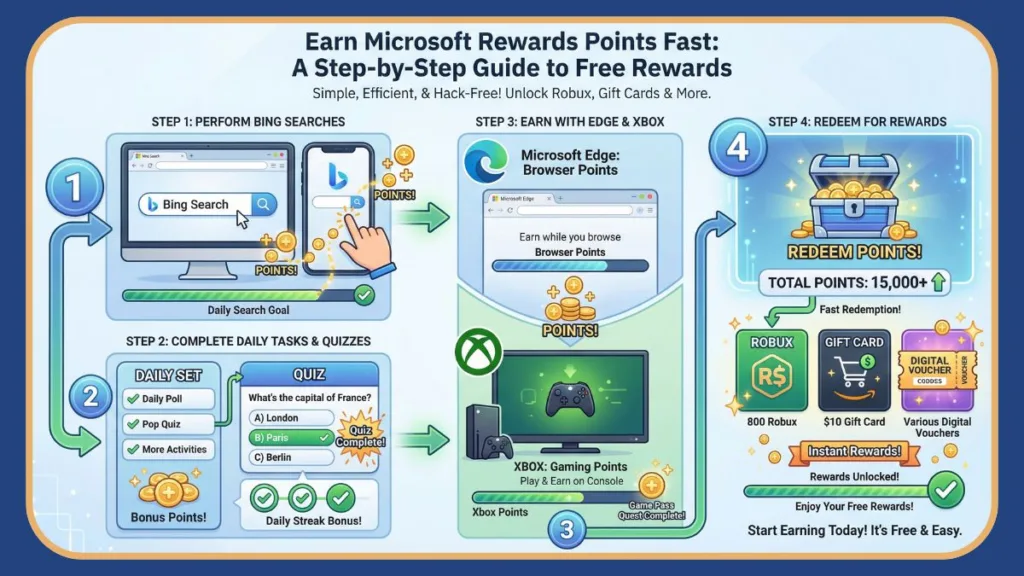
This approach removes guesswork and ensures you’re not wasting effort on low-impact actions.
Step 1: Complete the Microsoft Rewards Daily Set to Earn Points Fast
The Microsoft Rewards daily set is the fastest guaranteed source of points every single day, regardless of where you live. Each daily set usually includes a short poll, a quick quiz, and one clickable activity.
These tasks look simple, but they matter. Completing them daily helps you maintain a daily streak, and streaks unlock bonus point milestones over time. Those bonuses make a real difference to your monthly total.
The “Streak” Math: Why You Cannot Skip a Day
If you are trying to get points fast, you might think skipping a 10-point poll doesn’t matter. You would be wrong. The “Streak Bonus” is where the bulk of your passive income comes from.
- 3-Day Streak: +45 Bonus Points
- 5-Day Streak: +75 Bonus Points
- Daily Streak: +150 Bonus Points (Every 10 days)
If you complete daily sets consistently, you can earn thousands more points per month compared to users who skip days. A user maintaining a streak effectively earns an extra 15 points per day on average, just for showing up.
Tip: Never skip the daily set. Streak bonuses add up much faster than most people expect, especially when combined with Bing searches and Xbox quests. If you break a streak, you reset to zero and lose the “compound interest” of those bonus points.
Step 2: Maximize Bing Search Points on Desktop and Mobile
Search points make up the largest portion of daily Microsoft Rewards earnings, which is why so many people talk about search-based “hacks.” The key is earning these points safely.
Understand the Bing Search Points Daily Limit for Microsoft Rewards
Microsoft sets separate point limits for PC search and mobile search. This setup encourages activity across devices and allows you to earn significantly more points if you complete both.
If your goal is to maximize Microsoft Rewards points, you must do searches on both desktop and mobile.
- PC Search: usually 150 Points (30 searches x 5 points)
- Mobile Search: usually 100 Points (20 searches x 5 points)
- Edge Bonus: usually 20 Points (4 searches x 5 points)
How to Earn Bing Search Points Faster Without Risk (The “Cooldown” Strategy)
In late 2024 and continuing into 2026, Microsoft introduced a “cooldown” or “throttle” on searches for many users. If you search too fast (e.g., “A,” “B,” “C,” “D” in 5 seconds), the system will stop awarding points for 15 minutes.
How to beat the cooldown safely:
Start by opening Bing and going to the News tab. From there, move through different categories and headlines, allowing each page to load fully before switching. Read the headline, maybe scroll slightly.
This behavior matches how real users read news and aligns with how the search engine tracks engagement. Because the activity looks natural, it helps you hit your Bing search points daily limit without raising red flags.
The 15-Minute Rule:
If you notice points stop accumulating, stop searching immediately. Wait at least 15 minutes. Microsoft’s anti-spam filter often resets after this window. A good routine is:
- Do 3-4 searches.
- Complete a Daily Set Quiz (takes 2 mins).
- Check an email.
- Do 3-4 more searches.
Avoid automation tools, bots, or scripts. Microsoft can detect unnatural patterns (like 50 searches in 1 minute), and that can lead to lost points, “cooldown” penalties, or account restrictions.
Step 3: Use Microsoft Edge to Earn Bonus Microsoft Rewards Points
Microsoft rewards you for using its own browser. That’s why Edge searches earn extra points.
To get the Microsoft Edge search bonus, sign in to Edge with your Microsoft account and complete your Bing searches there. If possible, repeat the process on both PC and mobile.
How to Enable This:
- On PC: Open the Edge Browser. Ensure your profile icon in the top left shows your “Rewards” balance. If it doesn’t, you aren’t signed in.
- On Mobile: Download the Microsoft Edge app (distinct from the Bing app). Sign in.
- The Strategy: Do your “PC Searches” inside the Edge browser. You will simultaneously clear your “PC Search” quota AND your “Edge Bonus” quota.
This small change adds up quickly. Simply switching browsers can noticeably increase your monthly rewards without costing you extra time or effort. This is one of the easiest ways to earn more points safely.
Step 4: Earn Microsoft Rewards Points Fast with Xbox and Game Pass
If you use Xbox, Microsoft Rewards can accelerate much faster for you. The “Gaming” sector of rewards has grown significantly in 2025 and 2026, becoming the primary source of points for many users.
Xbox App Daily Login Rewards for Microsoft Points
On some days, simply opening the Xbox app (on PC or Mobile) earns you points. While the amount may seem small, daily login rewards support consistency, which is critical when you want faster results.
Check these hidden tiles in the Xbox App:
- “Tap to Play”: Often, just launching a casual game like Microsoft Jewel inside the Xbox mobile app gives +30 points.
- “Play a PC Game”: Launching any game on PC (even Solitaire) while the Xbox app is open often triggers a +50 point reward.
- “Play with Friends”: Playing a multiplayer lobby on PC often grants +100 points per day. This is one of the single highest daily earners available.
Xbox Game Pass Quests That Give Microsoft Rewards Points
Game Pass quests usually involve playing a game, earning an achievement, or logging in on consecutive days. Weekly and monthly quests stack together, which makes them extremely valuable.
If your goal is to renew Game Pass Ultimate using points, these quests are essential. Many budget-conscious gamers rely on them to avoid paying real money for subscriptions.
Typical Quest Values (Estimates):
- Daily: Play a Game Pass Game (+3 Points)
- Daily: Earn an Achievement (+50 Points – High Value)
- Weekly: Complete 3 Daily Quests (+10-20 Points)
- Monthly: “Quest Completionist” (Complete 30+ quests) can yield +1000 Points.
Pro Tip: If you have Game Pass Ultimate, you often get point multipliers on these quests compared to standard members.
Step 5: How to Reach Microsoft Rewards Level 2 Faster
Level 2 unlocks higher daily earning limits, better redemption value, and faster overall progress. To reach Level 2 quickly, you need to earn points every day, complete searches consistently, and avoid any activity that looks suspicious.
The “Bing STAR Bonus” (2026 Update): New for 2026, Level 2 members in many regions now have access to the “STAR Bonus.” This is an engagement bonus that rewards “authentic” search behavior over the course of a month. If you search naturally every day, you can unlock a lump sum of up to 2,000+ points at the end of the month. This was introduced to combat bots and reward real humans.
If you want to earn Microsoft Rewards points quickly—especially for subscriptions or digital currencies—Level 2 is not optional.
How Many Microsoft Rewards Points Can You Earn Per Day?
Your daily earning potential depends on your region and available offers. However, most users earn 200 to 300 points per day by completing basic tasks. If you include Xbox quests and streak bonuses, that number often increases to 300 to 450 points or more per day.
Here is a realistic breakdown for a “Power User” in 2026:
| Activity | Est. Daily Points | Notes |
| PC Search (Level 2) | 150 | Requires ~30 searches |
| Mobile Search | 100 | Requires ~20 searches |
| Daily Set | 30-50+ | Plus streak bonuses |
| Edge Bonus | 20 | Built into PC search |
| Xbox App Login | 5-30 | Varies by region |
| Play PC Game | 50 | Requires Xbox App on PC |
| Play with Friends | 100 | Requires Multiplayer PC game |
| Total Potential | ~450+ | ~13,500 Points/Month |
There is a daily limit to how many Microsoft points you can earn. Users who reach that limit consistently see the fastest long-term growth. Consistency is what drives results, not shortcuts.
What Are Microsoft Rewards Points Worth When You Redeem Them?
You can redeem Microsoft Rewards points for Xbox gift cards, Amazon gift cards, Robux, V-Bucks, donations, and sweepstakes entries.
The “Exchange Rate” typically hovers around 1,000 Points = $1 USD.
- $5 Gift Card: ~5,000 – 6,500 Points
- $10 Gift Card: ~10,000 – 13,000 Points
- 1 Month Game Pass Ultimate: ~12,000 – 14,000 Points
For example, 5,000 Microsoft points usually cover a smaller gift card value, while $10 gift cards require a higher balance. If you’re aiming for Robux or V-Bucks, Microsoft Rewards works especially well if you don’t have a credit card. Digital codes usually arrive quickly, which makes this ideal for time-sensitive purchases.
The “Auto-Redeem” Hack: How to Save Points
If you are earning points specifically for Xbox Game Pass or Microsoft Gift Cards, do not manually redeem them.
Look for the “Auto-Redeem” option in your dashboard.
- Manual Redemption: 1 Month Game Pass Ultimate might cost 12,000 Points.
- Auto-Redeem: The same month might cost only 10,500 Points.
By turning on Auto-Redeem, Microsoft sends you the code/credit automatically on the 1st of the month for a discount. Over the course of a year, this saves you 18,000 Points—effectively getting you a month and a half for free.
Can You Transfer or Share Microsoft Rewards Points with Family?
Microsoft does not allow free point transfers between accounts (the “Community” tab was removed in previous years). However, limited family sharing may be available in certain situations, and gift cards can be redeemed and shared manually.
Always follow Microsoft’s official rules to protect your account and avoid losing points.
Microsoft Rewards Hacks to Avoid That Can Get You Banned
We cannot stress this enough: The “fastest” way to get points is to not get banned. If you get banned, your speed drops to zero.
You should avoid:
- VPN Usage: Using a VPN to search in other countries (e.g., pretending to be in the US to get US points) is the #1 cause of bans.
- Scripted Bots: Extensions that “automate” Bing searches are easily detected by Microsoft’s 2026 AI monitoring.
- Multiple Accounts: Running 5 accounts on one IP address to “farm” points will flag your household.
If you want speed without risk, legitimate earning methods always outperform shortcuts.
Is Microsoft Rewards Worth It for Free Gift Cards and Subscriptions?
Microsoft Rewards is worth it if you already use Bing or Xbox, want free subscriptions or in-game currency, and prefer a budget-friendly approach to digital spending.
When you stay consistent and follow the rules, Microsoft Rewards remains one of the most reliable loyalty programs available. A dedicated user can easily earn $150 – $200 worth of free stuff per year just by changing their search engine and playing games.
Microsoft Rewards FAQ: Points, Limits, and Expiration
How do I get 10,000 Microsoft points fast?
You won’t earn 10,000 points overnight. However, combining daily sets, Bing searches, Edge bonuses, and Xbox quests gets you there much faster than relying on a single method. A focused user can earn 10,000 points in roughly 20-25 days.
Do Microsoft Rewards points expire?
Yes. Points can expire if your account becomes inactive. Usually, you must earn or redeem at least once every 18 months to keep them. Staying active protects your balance.
Does using a VPN help get more Microsoft points?
No. Using a VPN violates Microsoft’s terms and can lead to account restrictions. It is not a “hack”; it is a trap.
Why did my points stop counting while searching?
You likely hit the “15-minute cooldown” or the “speed limit.” Stop searching for 15-20 minutes, then try again more slowly.
How many days to get 12,000 points in Microsoft Rewards?
For a consistent Level 2 user earning an average of 350-400 points per day, it takes approximately 30 to 40 days to earn 12,000 points. If you utilize Game Pass quests and hit your monthly bonus markers, you can often reach this goal in exactly one month.
How can I get free Microsoft points?
You earn free points simply by using the Microsoft ecosystem. This includes searching on Bing, using the Edge browser, playing games on Xbox, and completing Daily Sets. It is completely free to join and requires no payment, only your time.
What can 1000 Microsoft points get you?
1,000 Microsoft points is roughly equivalent to **$1 USD**. While most gift cards require a minimum of 5,000 points ($5), you can use 1,000 points to enter high-value sweepstakes (e.g., for Surface laptops or Xbox consoles) or make a donation to charity.
How to get 1500 points in Microsoft Rewards Mobile?
To earn 1,500 points strictly on mobile, download the Bing app, Microsoft Start app, and Edge mobile browser. By maximizing your daily mobile search limit (100 points) and completing “Read to Earn” news bonuses, you can earn 1,500 points in roughly 10 to 14 days of consistent mobile usage.
Final Thoughts: The Smartest and Safest Way to Get Microsoft Points Fast
If you want to get Microsoft points fast, focus on daily consistency, legitimate earning methods, and stacking rewards across platforms.
We recommend you treat Microsoft Rewards as a daily routine, not a shortcut hunt.
Wake up, do your daily set, check your Xbox app, and browse the news on Bing.
If you follow this system, we guarantee you’ll earn Microsoft Rewards points faster—without risking your account or wasting time.
Visit Our Post Page: Blog Page