
Learn how to memorialize a Facebook account in 2026 with step-by-step instructions. Submit a memorialization request, set a legacy contact, or delete the account.
Losing someone close to you is never easy. In today’s digital world, grief doesn’t just exist in memories—it often shows up on our screens, too. A sudden birthday reminder, a “Memories” notification, or a tagged photo can make the loss feel jarring all over again.
At some point, many families ask the same question: What should we do with their Facebook account?
This guide walks you through how to memorialize a Facebook account step by step. Whether you want to preserve memories, protect their privacy, or remove the account completely, everything is explained clearly so you can make the right decision for your situation without confusion or stress. Managing a loved one’s digital legacy is an increasingly important part of estate planning, ensuring their online presence is treated with care and respect.
What Does It Mean to Memorialize a Facebook Account?
When you memorialize a Facebook profile, it transforms into a protected digital space where friends and family can remember the person. Instead of functioning like a normal, active account, it becomes a dedicated tribute.
Here is what that means in simple terms:
- The word “Remembering” appears next to the person’s name.
- The account is locked permanently from login access.
- Existing posts, photos, and videos remain visible based on their original privacy settings.
- Friends can share memories and condolences on the timeline (depending on settings).
- The account is protected from unauthorized access or hacking.
- The profile will no longer appear in public spaces like “People You May Know” suggestions, birthday reminders, or advertisements.
In short: Memorialization allows the profile to exist as a secure digital tribute rather than an active account. This approach is part of a growing trend in digital legacy planning to protect online assets from identity theft.
What Happens When a Facebook Account Is Memorialized?
Understanding exactly what changes after memorialization can help you avoid surprises later. Once approved:
- Login is disabled: No one can log into the account, and private messages remain permanently inaccessible.
- Notifications stop: Birthday reminders and “Memories” prompts are turned off.
- Content is preserved: The profile stays visible just as it was.
- Management is limited: A “Legacy Contact” (if the person assigned one beforehand) may manage certain surface-level aspects, like pinning a post or updating the profile picture. (Note: A user must be 18 or older to select a legacy contact, and the contact cannot log into the account directly).
Memorialize vs. Delete Facebook Account: Which Should You Choose?
One of the most important decisions families face is whether to memorialize a Facebook profile or delete it entirely. There is no single “right” answer.
| When to Memorialize | When to Delete |
| You want to preserve photos and shared memories. | You or the family want complete privacy. |
| Friends and family need a digital space to share tributes. | The account is attracting unwanted attention or spam. |
| The profile holds emotional value. | The person would not have wanted an online presence after death. |
| You want to prevent hacking while keeping the content online. | The family prefers complete closure. |
| You want to ensure the account is permanently safeguarded against active phishing or identity theft attempts. | You are using a digital estate platform (such as Trustworthy, or a password manager with emergency digital inheritance features like Keeper or NordPass) to systematically close all their online accounts for estate settlement. |
Key difference: Memorialization preserves everything safely. Deletion permanently removes everything forever.
Before You Memorialize or Delete – Do This First
This is one of the most overlooked but crucial steps. Before submitting any official request to Facebook, pause and save what matters.
- Download photos and videos: Save them directly to your computer or phone.
- Save important posts: Take screenshots of meaningful conversations or timeline messages.
- Check other connections: See if the account is tied to family groups or event pages that others rely on.
- Use Facebook’s built-in tool: If you currently have login access or are the designated legacy contact with archive permissions, navigate to Settings and use the “Download Your Information” tool to secure a full, comprehensive archive of the profile’s history.
Even if you plan to memorialize, having a personal backup ensures you won’t lose meaningful memories if a technical issue occurs or if you decide to delete the account later.
How to Memorialize a Facebook Account (Step-by-Step)
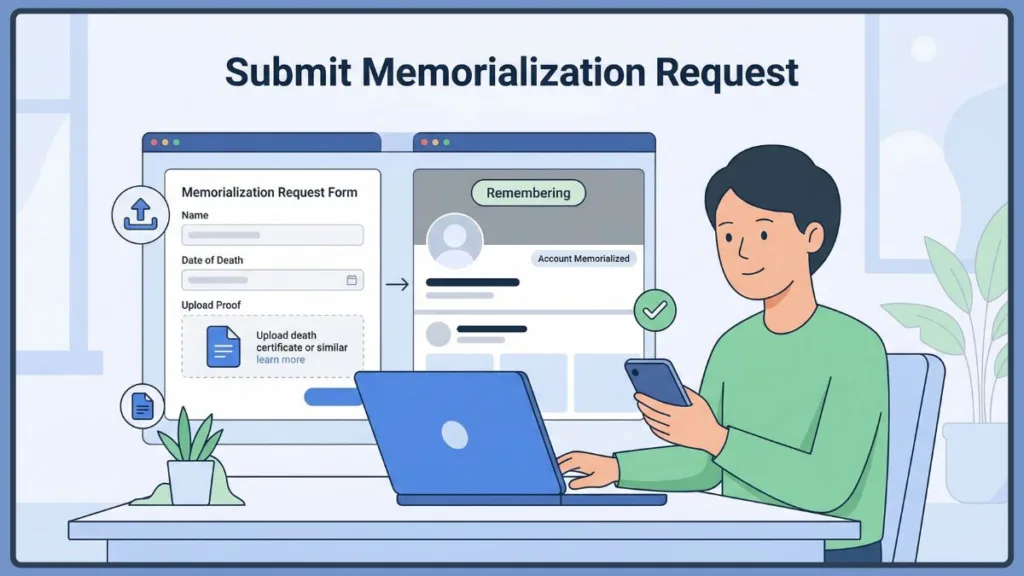
If you’re ready to proceed, here is the exact process to submit a memorialization request.
Step 1: Go to the Facebook Memorialization Form
Go for the official “Facebook memorialization request form” in the Facebook Help Center. It is a dedicated form specifically for this purpose.
Step 2: Enter Profile Information
You will need to provide:
- Full name of the deceased (exactly as it appears on their profile)
- The Facebook profile URL (link to the account)
- The approximate date of death
Step 3: Upload Proof of Death
Facebook requires documentation to verify the request, such as:
- A death certificate (the strongest proof)
- A link to an official obituary
- A memorial card
In many cases, an active obituary link is sufficient for memorialization, whereas full account deletion always requires stricter legal documentation.
Step 4: Submit the Request
Double-check that all details and links are accurate, then submit the form.
Step 5: Wait for Facebook’s Review
Processing time can vary from a few days to a couple of weeks depending on the completeness of your request and Facebook’s current workload. Once approved, the account will display the “Remembering” status.
How to Set a Legacy Contact on Facebook
Planning ahead can make things much easier for your family. A Legacy Contact is someone you choose to manage your memorialized account after your passing.
| What a Legacy Contact Can Do | What They Cannot Do |
| Accept friend requests | Log into your account |
| Pin tribute posts | Read your private messages |
| Update the profile and cover photo | Post as you or alter old posts |
| Manage the tribute section | Remove past friends |
| Download an archive of your photos, posts, and profile information (but only if you explicitly checked the “Data Archive Permission” box when setting them up). |
Tip: Think of a legacy contact as a caretaker for your digital memorial, not an owner. You can set this up in your Facebook settings under “Account Ownership and Control.” To find it quickly on a desktop or mobile app, navigate to Settings & Privacy > Settings > Accounts Center > Personal Details > Account ownership and control > Memorialization.
Can You Delete a Facebook Account Instead of Memorializing?
Yes, you can request permanent removal. However, the process for deletion is stricter than memorialization.
To delete a deceased Facebook account, you must submit a Special Request for Deceased Person’s Account form. You will need to provide proof of death and proof of authority (such as proving you are an immediate family member or legal executor). Acceptable proof of authority includes a Power of Attorney, a Last Will and Testament, or an official Estate Letter.
Once deleted, the account and all its content are permanently gone and cannot be recovered.
FAQs – Facebook Memorialization
How do I memorialize a Facebook account without the password?
You don’t need login access. You just need to submit the official memorialization request form with the required proof of death.
Who can request memorialization or deletion?
Anyone can request memorialization if they have proof of death. However, deletion usually requires immediate family or legal authority.
Can a memorialized account be deleted later?
Yes, but only with proper authorization and legal documentation submitted through the Special Request form.
Can you message a memorialized Facebook account?
No. Messaging is permanently disabled after memorialization.
Is memorialization reversible?
No. Once a profile is memorialized, it cannot return to being a normal, active account.
Does this apply to Instagram as well?
Yes. Because Instagram is owned by Meta, its process is nearly identical. You can request to memorialize or delete a deceased loved one’s Instagram account by submitting similar documentation to Instagram’s Help Center.
Final Thoughts – Choosing What Feels Right
Deciding what to do with a loved one’s Facebook account isn’t just a technical step—it’s an emotional one.
Some families find immense comfort in keeping a memorialized profile as a place to remember, share, and connect. Others prefer the privacy and closure that comes with deleting the account entirely. There is no perfect choice—only the one that brings peace to you and your family.
If you’re unsure, starting with memorialization is often the safest path. It protects the account, preserves the memories, and gives you time to decide what to do next without rushing.
Visit Our Post Page: Blog Page