
Is your FB account hacked? Did the hacker change your email, phone number, and password? Let’s learn how to fix it and recover your Facebook account in 2026.
Discovering you have been locked out of your own digital life is a nightmare scenario. One minute you are scrolling through your feed, and the next, your password does not work. Even worse, when you try to reset it, you realize the recovery code is being sent to a strange email address you do not recognize. If you are reading this, you are likely in that panic phase right now. You need to know: Can I recover my Facebook account if both email and password are changed?
The short answer is yes. While Facebook’s security measures are strict, there are specific “backdoor” recovery protocols designed exactly for this scenario. However, you must act immediately before the hacker permanently disables the account or scams your friends. This guide will walk you through the official steps to recover a hacked Facebook account when email and password changed, verify your identity, and lock the intruder out for good.
Recover Hacked Facebook Account via Compromised Report
If you can still see your profile but cannot log in, your first stop should always be Facebook’s dedicated compromised account tool. This is the fastest way to flag your account to Facebook’s security algorithms.
Facebook hacked and email removed : How to recover immediately
Open a browser on a device you have used to log into Facebook before, like your phone or home laptop. This increases the chance of Facebook recognizing you as the legitimate owner. Navigate to facebook.com/hacked and you will see a prompt asking about your situation. Select “My account is compromised” to begin the automated defense process.
Regain Facebook access after hacker changed login details
Once you click “My account is compromised,” Facebook will ask you to enter your current password. If that has been changed by the hacker, enter an old password you remember using.
Tip: Facebook’s system often recognizes old passwords as a security flag. If valid, it may allow you to bypass the current credentials and start the account securing process.
Recover Facebook Account Without Email or Phone Number
If the hacker was thorough, they likely removed your email and phone number immediately. When you try to reset your password, Facebook says “No account found” or sends the code to the hacker. Here is how to bypass that dead end.
How to recover Facebook account without phone or email access
Go to facebook.com/login/identify.
Important: Do not enter the hacker’s email here. Instead, search for your profile by entering your full name or your username.
You can find your username in your profile URL, for example, facebook.com/yourname. Once you find your account in the search results, select it to proceed.
What if I no longer have access to my Facebook email or phone number?
Facebook will show you a list of contact methods to send a reset code. If all of these belong to the hacker, click the link at the bottom of the list that says “No longer have access to these?”.
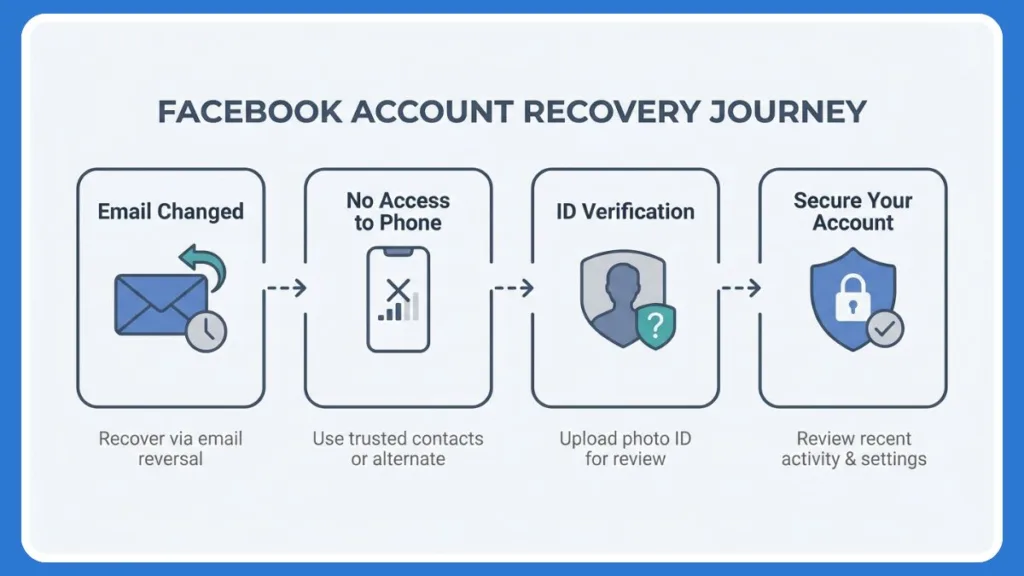
This is the critical step in the recovery chain. Facebook will now ask for a new email address or phone number that they can use to contact you.
Enter a secure email that you have access to and follow the prompts. Facebook may ask you to answer security questions or get help from “Trusted Contacts” if you had set that feature up previously.
Recover Facebook Account Using Government ID Verification
If the automated systems fail, you must prove to Meta that you are the real human behind the screen. This is often the only way to recover Facebook account using government ID.
Recover Facebook account using government ID
If you trigger the manual review process through the “No longer have access” workflow, Facebook will eventually ask you to upload a form of ID. Accepted IDs typically include a driver’s license, passport, birth certificate, or state ID. Take a clear photo of your ID on a flat surface and ensure the name and birthday match the information on your Facebook profile. Upload the file through the secure portal provided by the support tool.
Does Facebook really verify ID for hacked accounts?
Yes, they do, but it is a manual or semi-automated process. Facebook states that your ID is encrypted and stored securely only for the verification process. It is typically deleted from their servers shortly after the case is resolved, usually within 30 days. This is the most reliable method for recovery if the hacker has changed all digital contact info.
How long does Facebook account recovery take?
The timeline depends on the method used. If you can use a phone number or email for an automated reset, it is instant. However, if you have to upload an ID, the review process typically takes 24 to 48 hours. During weekends or high-traffic periods, it might take slightly longer.
Troubleshooting When Facebook Account Recovery Link Doesn’t Work
Sometimes, the recovery loop gets stuck or you run into technical errors. Here is how to troubleshoot those frustrating moments.
What to do if Facebook recovery link doesn’t work?
If you click a recovery link in your email and it says it is invalid or expired, check your device history. Try the recovery process from an Android or iPhone you use daily because Facebook “trusts” devices with a history of successful logins. You should also clear your cache because browser cookies can get confused between the hacker’s session and yours. Try opening the link in an “Incognito” or “Private” window.
Facebook account hacked and disabled recovery
In some cases, hackers post violated content to get your account banned. If you see a “Disabled” message instead of a login screen, you must file an appeal specifically for a disabled account, not just a hacked one. Look for the “My personal account was disabled“ form in the Facebook Help Center.
How do I contact Facebook support for a hacked account?
It is important to know that Facebook does not have a customer support phone number.
Warning: Any number you find on Google claiming to be “Facebook Support” is likely a scam.
The only way to contact them is through the facebook.com/hacked or facebook.com/login/identify forms. Submitting your ID is the closest you can get to “contacting” a human reviewer.
How to Secure Facebook Account After Hack
Once you get back in, you are not safe yet. The hacker may have left “backdoors” open to regain access later.
How to secure Facebook account after hack
Check your active sessions immediately. Go to Settings > Security and Login > Where you’re logged in. If you see any devices you don’t recognize, such as a Windows PC in another country, click the three dots and select Log Out. Next, check authorized apps by going to Settings > Apps and Websites. Remove any apps or games you don’t recognize since hackers often use these to maintain access.
Enable Facebook two factor authentication
This step is non-negotiable for modern security. Go to Settings > Security and Login > Two-factor authentication. Turn it on and use an Authenticator App like Google Authenticator rather than SMS text messages, as SMS is easier to intercept. This ensures that even if a hacker steals your password again, they cannot login without your physical phone.
Prevent Facebook account hacking in the future
Turn on Facebook login alerts for unrecognized logins so you get an email instantly if someone logs in from a new location. You should also change Facebook security settings to regularly audit your email and phone number to ensure the hacker hasn’t added a “backup” email you didn’t notice.
FAQ: FB Hacked Account Recovery
How do I recover my Facebook account if the hacker changed my email?
You must use the facebook.com/login/identify page, search for your account by name, and click “No longer have access to these?” to provide a new email address for Facebook to contact you.
Can I recover my Facebook account if both email and password are changed?
Yes, by using the “Trusted Contacts” feature if you had previously enabled it, or by uploading a government ID to verify your identity through the “No longer have access” workflow.
Can I recover my account using a friend’s account?
Yes. You can ask a friend to visit your profile, click the three dots under your cover photo, and select “Find support or report profile.” They can select “Something Else” then “Recover this account” to trigger a logout for the hacker and start the recovery steps.
Visit Our Post Page: Blog Page