
Can’t find who you follow on Amazon? The following tab may be hidden. Here’s how to access your Amazon follow list and manage it on desktop and mobile in 2026.
If you are trying to figure out how to see who you follow on Amazon and feel like you are chasing a ghost, you are not alone. The interface is a digital maze, and finding your way through it requires a clear roadmap.
The feature to view Amazon following list is one of the most confusingly designed aspects of the entire platform. Over the last few years, Amazon has moved, hidden, renamed, and completely redesigned the interface for accessing your social connections no less than a dozen times. For many users, the “Following” tab simply vanished overnight, leading to searches like “Amazon following list missing” or “Can’t find who I follow on Amazon 2026.”
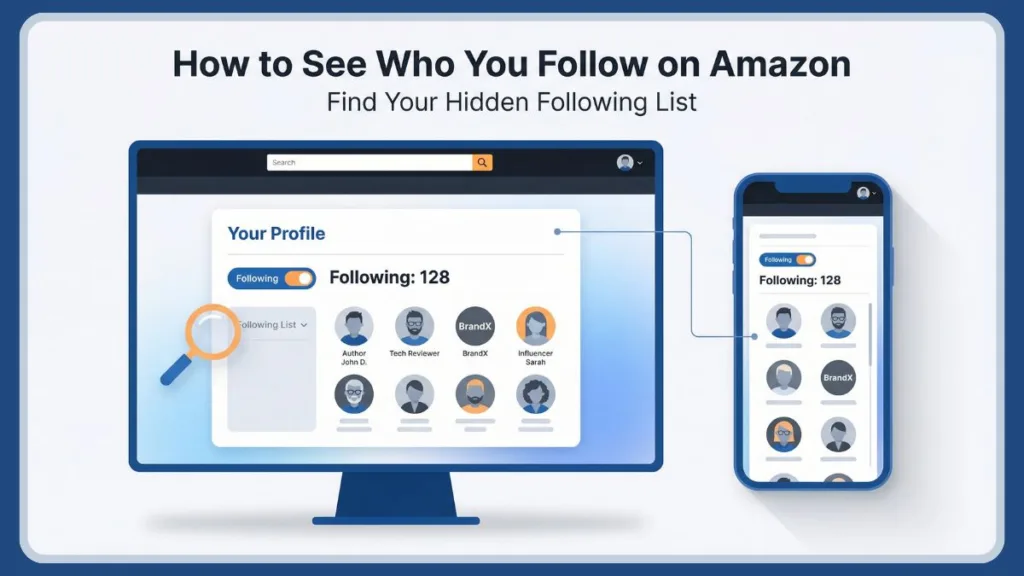
You might remember clicking a Follow button on a favorite author’s page to get Amazon author updates, or following a tech influencer to see their influencer storefronts. But when you want to manage Amazon follow list—to unfollow brands you no longer care about or check if you missed an update—finding the central dashboard can feel impossible.
Is it under Account & Lists? Is it on your Public profile? Is it hidden in the Amazon Live feed?
The short answer is: It depends.
Amazon’s interface changes based on your device, your region, and even your specific account update version. However, the backend data still exists. You do have a following list, and it is affecting your ordering and shopping preferences.
In this comprehensive guide, we will break down exactly how to find who you follow on Amazon on desktop, mobile, and tablet. We will also dive into how to find followed accounts on Amazon, why the list matters for your shopping experience, and how to troubleshoot the dreaded “missing button” glitch.
The Best Direct Shortcut to View Your Amazon Following List on Desktop
Before we dive into the complex navigation menus, let’s solve the problem immediately for desktop users. Efficiency is key to regaining control of your account.
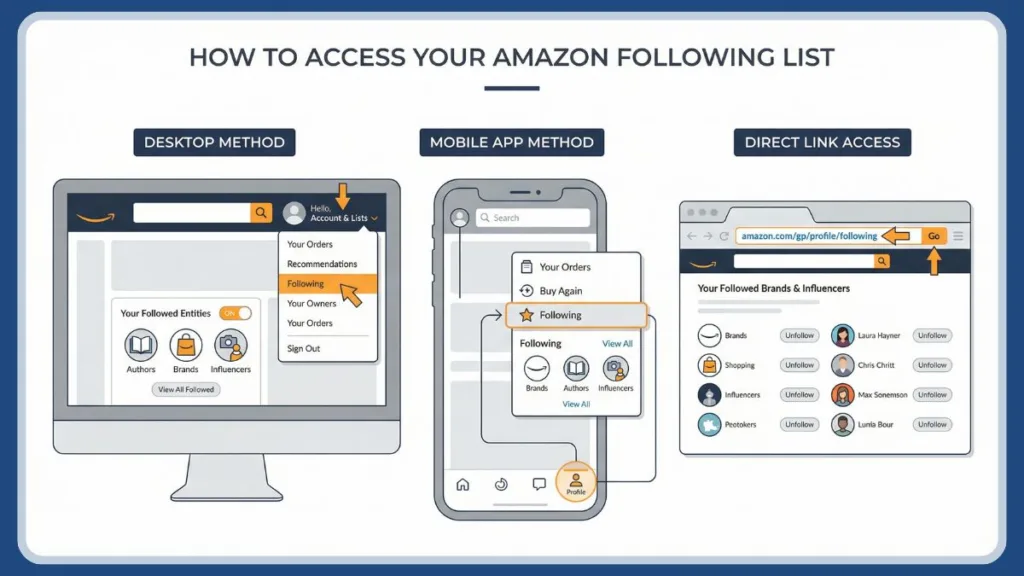
Amazon’s menu system is frequently updated, but the Amazon follow list link structure is permanent. The most reliable way to access your list is to bypass the visual menu entirely and go straight to the source.
The Evergreen Link to Find and Manage Followed Accounts on Amazon
If you are logged into your Amazon account on a browser, click the link below:
Click Here to View Your Amazon Following List
Why this works when other methods fail: This link takes you to the backend Amazon Profile settings page. Even if Amazon’s front-end design team has removed the “Following” button from your dropdown menu, this page remains active because it is the database source for your recommendations.
What you will see on this page:
- Your Follow Count: The total number of people and brands and sellers you follow.
- The Grid View: A visual list of every entity you have subscribed to, usually organized by “People” (Influencers or Authors) and “Interests” (Brands).
- The Unfollow Toggle: A simple button overlay on each profile picture that allows you to unfollow someone on Amazon instantly.
If you are a frequent shopper, we highly recommend bookmarking this link. It is the only “evergreen” way to find followed accounts on Amazon without relying on Amazon’s fluctuating UI.
How to Navigate Amazon Profile Settings for Your Followed Content
If the direct link isn’t an option, or if you prefer navigating through the menu to understand where is the following list on Amazon, here is the full breakdown of the desktop interface.
Accessing Your Public Profile to See Who You Follow on Amazon
This is the standard intended path, though it is frequently hidden for users who haven’t set up a public avatar.
- Log In: Go to Amazon.com and ensure you are logged in.
- Locate the Menu: In the top right corner, hover your mouse over Account & Lists.
- Find “Your Account”: In the dropdown menu, click on Your Account.
- Scroll to “Ordering and Shopping Preferences”: This is where it gets tricky. Depending on your update, you might need to look for a section called “Personalization” or Ordering and shopping preferences.
- Click “Your Profile”: Look for a link that says “Profile,” “Your Public Profile,” or sometimes just “Profile Page.”
- Locate the “Following” Count: Once you are on your public-facing profile page (the one that shows your reviews), look at the header section near your name. You should see two numbers:
- Followers: People following you, usually zero for regular shoppers.
- Following: The number of people you follow.
- Click the Number: Clicking the “Following” count will open the full Amazon profile who you follow list.
Using the Followed Content Menu to Manage Your Brand Preferences
For some users, specifically those with Prime accounts in the US, there is an alternative menu path used to manage Amazon follow list settings.
- Go to Account & Lists.
- Select Account.
- Scroll down to the “Email alerts, messages, and ads” section.
- Look for a link titled “Product availability alerts” or “Followed brands.”
- Clicking this will take you to a segmented list of brands you have flagged for updates.
Note: This specific view is often limited to brands and may not show authors or influencers with storefronts. For the full list, Method A or the Direct Link is superior.
Steps to Find Who You Follow on the Amazon App: Mobile Navigation Paths
Finding your following list on the mobile app (iOS and Android) is significantly more difficult than on desktop. This is because Amazon uses the app to push its “Inspire” feed, and they often bury the following list inside that ecosystem.
Many users ask, “How to see followed brands on Amazon app?” Here are the three distinct paths to find your list on mobile.
Path 1: Viewing Your Amazon Mobile Profile to See Followed Influencers
Best for: Users on the standard app version.
- Open the App: Launch the Amazon Shopping app.
- Tap the “Person” Icon: In the bottom navigation bar, you will see four icons. Tap the Person icon.
- Analyze the Header: You will see your name and profile photo at the top left.
- Look for the “Following” Chip: Under your name, there are usually four buttons: “Buy Again,” “Your Lists,” “Your Account,” and sometimes “Your Profile.”
- Tap “Your Profile”: This will load your public-facing view where you can access Amazon public profile details.
- Find the “Following” Section: Scroll down past your “Hearts” and “Community Activity.” You should see a section titled “Who You Follow.” Tap “See All” to manage the list.
Troubleshooting the Missing Following Button via App Account Settings
Best for: Users whose profile page is missing the button.
If Path 1 didn’t work, your app version has likely hidden the public profile link. This is a common reason why users search for “Why can’t I see my following list on the Amazon app?”
- Tap the Menu Icon (Three horizontal lines) in the bottom right corner.
- Tap the Account button.
- Scroll down to the section labeled Personalization (this is usually near the bottom).
- Look for “Profile” or “Manage your Profiles.”
- Once inside the profile management screen, tap on your name.
- This forces the app to load the Public Profile view, where you can then find the “Following” count.
The Amazon Inspire Feed Method for Social Commerce Following
Best for: Users on the newest “Social Commerce” update.
Amazon is pushing “Amazon Inspire,” a feed of photos and videos from influencers. If you follow influencers, your list might be housed here.
- Tap the “Lightbulb” Icon (Inspire) on the bottom navigation bar if available.
- Tap the Profile/Settings icon within the Inspire feed (usually top right).
- This often bypasses the main account settings and takes you directly to a list of “Creators You Follow.”
Decoding the Amazon Follow Ecosystem: Influencer Storefronts and Brand Discovery
Why does this feature even exist? Amazon is not Instagram. Why would you “follow” a vacuum cleaner brand or a romance novelist?
Understanding the purpose of the feature helps explain why it is designed the way it is. It is less about social connection and more about refining your ordering and shopping preferences.
The Role of the Amazon Influencer Program in Your Follow List
The primary driver of the “Follow” feature in 2026 is the Amazon Influencer Program. Influencers drive traffic to Amazon and receive their own “Storefronts”—curated pages where they list their favorite products.
- When you follow an Influencer: Their new storefront updates appear in your “Inspire” feed, and you may get push notifications when they go live on Amazon Live (Amazon’s livestream shopping platform). This allows you to see followed influencers on Amazon quickly.
Maximizing Author Updates through Kindle Direct Publishing Follows
For book lovers, the follow button is a legacy feature.
- When you follow an Author: You are supposed to receive an email notification when they release a new book. This is one of the most useful aspects of the feature, ensuring you never miss a sequel. It connects directly to Amazon author updates.
How Following Brands and Sellers Influences Your Shopping Feed
Amazon allows brands and sellers (like Anker, Sony, or Nike) to create “Brand Stores.” * When you follow a Brand: Their products get a boost in your search results. Additionally, Amazon’s homepage may display a “Deal from a brand you follow” widget during events like Prime Day.
Key Takeaway: You aren’t following these entities for social updates; you are following them to train the Amazon Algorithm to show you specific products.
Why Your Amazon Following List Is Missing or Hidden: Solving Common Issue
Even with the correct steps, the Amazon follow list is prone to glitches. Here is a troubleshooting guide for the most common errors users face in 2026, targeting specific user intent keywords.
Troubleshooting Disappearing Following Tabs and Regional Account Mismatches
Cause: You are likely logged into the wrong “Marketplace” or Account Profile.
Fix A – Marketplace: If you shop on Amazon.com (USA) but are logged into Amazon.co.uk (UK), your follow list will be empty. Follows do not transfer across regions.
Fix B – Profile: If you share an Amazon Household account, ensure you are viewing your individual profile. Go to Menu > Settings > Switch Accounts to verify.
Technical Fix for When You Can’t Unfollow Someone on Amazon
Cause: This is a common caching error called a “State Mismatch.” You click “Unfollow,” the button changes, but when you refresh, it says “Following” again.
Fix:
- Clear your browser’s cookies and cache.
- Try using a different browser (e.g., switch from Chrome to Firefox).
- If on mobile, uninstall and reinstall the app.
Pro Tip: Use the Amazon follow list link mentioned earlier; it is less prone to this glitch.
Recovering Hidden Following Sections by Updating Your Public Profile
Cause: Amazon has flagged your profile as “Private” or “Incomplete.” This makes it hard to access Amazon public profile features.
Fix: You need to “wake up” your public profile. Go to your Profile page. Click “Edit your public profile.” Add a generic bio or change your public name. Save changes.
Often, this forces the page to re-render properly and restore the “Following” section.
Managing Privacy and Notifications for Your Amazon Follow Activity
A common concern users have is: “Does the person know I am following them?” or “How do I stop getting notifications?”
Adjusting Privacy and Amazon Wish List Settings for Your Follow List
By default, your follow list may be visible on your public profile. This relates to Amazon Wish List privacy settings—if your profile is public, your follows likely are too.
To Hide Your List: Go to Your Profile > Edit your public profile > Edit privacy settings. Check the box for “Hide who I follow” to keep your interests private.
How to Turn Off Notifications and Author Updates without Unfollowing
Authors: They see only total follower counts; they cannot see your name or email.
Influencers: They see aggregate numbers, not your personal identity.
Brands: They receive performance metrics, not your data.
If you want to stay followed but stop the emails:
- Go to Your Account.
- Select Communication Preferences.
- Under Email Preferences, find “Marketing Information.”
- Uncheck “Follow updates” or “Author updates.” This allows you to turn off Amazon follow notifications without losing the algorithmic benefit.
A Pro Guide to Cleaning and Managing Your Amazon Followed Content
If you have been using Amazon for years, your follow list is likely cluttered with brands you no longer use.
Why you should clean your list: An outdated follow list confuses the recommendation engine. If you followed a diaper brand five years ago, Amazon might still be prioritizing baby products in your search results. How to find followed authors on Amazon and remove them is key to refreshing your suggestions.
The Cleanup Strategy:
- Use the Desktop Link: It is much faster than the app.
- Filter by Category: The list is usually chronological (newest first).
- The “Middle-Click” Method: Hover over the profile picture on the list page and click the “Following” checkmark to untoggle it without opening the full page.
- Refresh: After unfollowing several accounts, refresh to ensure the changes stuck.
Conclusion: Mastering Your Personalized Amazon Discovery Experience
The “Following” feature on Amazon is a powerful tool disguised as a forgotten menu item. Our goal is to empower users to master their digital environment.
While Amazon’s interface designers seem determined to hide it, mastering this list is the key to training your recommendations. By curating who you follow, you ensure that your homepage is filled with content you actually trust and want.
Summary Checklist:
- Bookmark the direct link:
amazon.com/gp/profile/follow/recommendations - Check your privacy settings: Ensure your interests aren’t public if you prefer privacy.
- Audit your list yearly: How to unfollow someone on Amazon is a skill you need to keep your feed relevant.
- Don’t panic about the App: If the mobile button disappears, it’s just a UI test. The desktop backend stays the same.
Amazon will undoubtedly change the layout again. But as long as you understand that “Following” is a data signal, you can always find ways to manage it. Happy shopping!
FAQ: Seeing Who You Follow on Amazon
Where is the “Who You Follow” section on Amazon?
It is no longer prominently displayed. Use the direct profile URL or check under the “Profile” icon in the mobile app.
How do I unfollow an influencer on Amazon?
Navigate to their storefront page or your Following list and click the “Following” button to toggle it off.
Why can’t I see my following list on the Amazon app?
Amazon frequently tests interface changes. Update the app or use the “Account Settings” route to find the hidden profile shortcut.
Is there another way to see who I follow in the app besides the profile page?
Yes. If the profile page method fails, try checking the Amazon Inspire feed (the lightbulb icon). Tap the settings/profile icon within the Inspire feed to see a specific list of “Creators You Follow.”
How do I find the list of brands, authors, or creators I follow on Amazon?
To locate the complete list of accounts, you must access your Public Profile. On desktop, go to Account & Lists > Your Account > Profile. On mobile, tap the Person Icon > Your Profile. This section aggregates every account you have followed, including brands, authors, and influencers.
Does Amazon notify someone if you follow them?
No. Following is private and does not generate a social notification for the brand or author.
Why am I still seeing recommendations from brands I thought I unfollowed?
This is often a caching issue or related to your Browsing History. Even if you unfollow a brand, Amazon may still recommend it because you recently viewed their products. To stop this, you must also remove items from your Browsing History.
How do I find my Amazon public profile?
Click “Your Account” under the “Account & Lists” menu, then scroll to “Ordering and shopping preferences” and select “Your Profile.”
Can I check who I’m following through Alexa?
No. Alexa does not display a visual list of your follows. However, Alexa uses your follow history to provide voice notifications (e.g., “I have a notification: An author you follow has released a new book”).
Visit Our Post page: Blog Page