
Frustrated by checkout limits? Learn How to Use Sezzle Spend on Amazon in our Ultimate Guide to Avoid Hidden Fees, featuring a proven secret workaround.
If you are a frequent online shopper, you have likely encountered the frustration of earning a reward balance on your favorite Buy Now, Pay Later app, only to realize your go-to retailer doesn’t have a button for it at checkout.
Thousands of shoppers search for how to use Sezzle on major retail platforms every day, only to hit a brick wall at the Amazon checkout screen.
With the Buy Now, Pay Later (BNPL) industry rapidly expanding—and Sezzle alone serving over 3 million active consumers—it is incredibly common to rack up reward balances.
Yet, checking out with those rewards remains unnecessarily complicated.
If you are currently sitting with a full cart wondering, does Amazon accept Sezzle pay or how to apply Sezzle spend, you are in the right place.
Here at Izoate, we’ve dug into the app mechanics and community troubleshooting to bring you the exact steps.
In this guide, we will cover everything from understanding your spending power to generating a virtual card, plus a clever “gift card” workaround that helps you avoid hidden fees.
What You Need to Know Before Checking Out
Before diving into the tutorial, let’s clear up some common confusion about how this platform actually functions.
Is Sezzle legit? And more specifically, is Sezzle spend legit? The short answer is yes.
It is a verified, publicly traded financial service that allows you to split purchases into four interest-free payments using a soft credit check.
This means the platform verifies your identity through bureaus like Equifax or TransUnion without placing a “hard inquiry” that would lower your FICO score.
What is Sezzle spending power? When you create an account, you are assigned a limit.
This spending power is simply the estimated maximum amount the platform will allow you to borrow at any given time, based on your repayment history and that initial soft credit check.
Izoate Note: Initial spending power usually starts around $50 to $150 for new users, but can scale up to $2,500 as you establish a reliable repayment history over several months.
Is Sezzle spend free money? Not exactly.
While a Sezzle Spend balance acts as a discount or a credit applied to your order, it is not a direct cash loan.
You still have to make a purchase, and you are still responsible for repaying the remaining balance of that transaction.
Compatibility Check: Does Amazon Accept Sezzle?
Let’s directly address the biggest question: Does Sezzle work on Amazon? The reality is, does Amazon accept Sezzle directly on their website? No.
If you look at the payment options, you will quickly notice that Amazon does not feature a native “Pay with Sezzle” integration.
Because Amazon holds highly lucrative, exclusive partnerships with other BNPL providers (such as Affirm), they actively block competitors from appearing natively on their checkout screen.
So, does Amazon not accept Sezzle at all? Actually, there is a verified workaround.
Many users ask, Can you pay with a Sezzle card on Amazon? Yes! The only way to successfully use your account on Amazon is by generating a single-use virtual Visa card directly within the Sezzle app and using it like a standard debit card.
Step-by-Step: How to Use Sezzle Spend on Amazon App & Desktop
The biggest secret to using your rewards balance is understanding that the discount happens entirely on the back end.
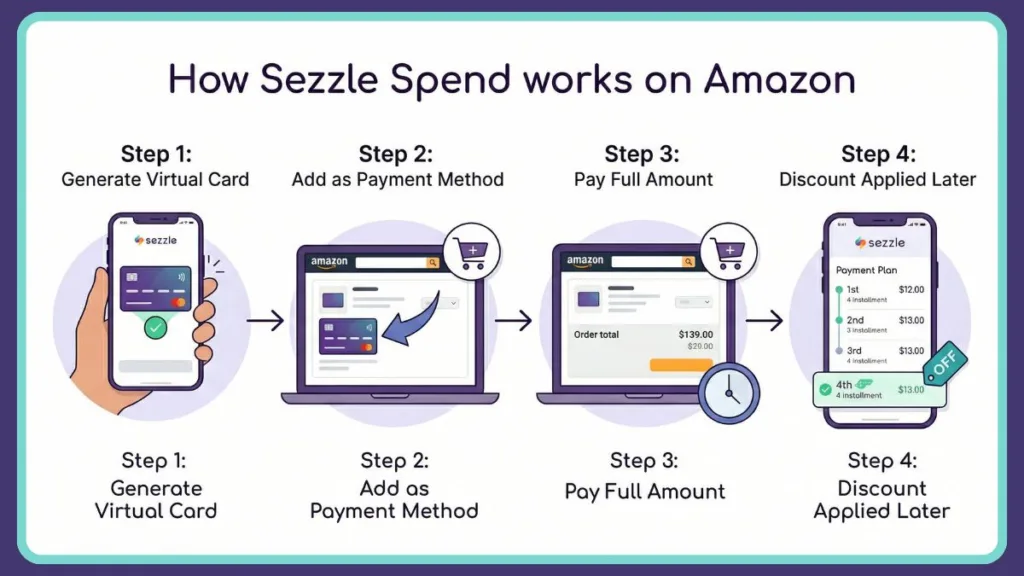
You will not see the discount on the Amazon checkout screen. This process typically takes less than 3 minutes once you know where to look. Here is the exact process for How do I use Sezzle as a payment method at Amazon?
- Generate the Virtual Card: Open your Sezzle mobile app and navigate to the virtual card tab (often labeled “Virtual Card” or “Anywhere”). Request a one-time use Visa card for the estimated amount of your Amazon purchase.
Tip: These virtual cards typically expire within 24 to 48 hours of generation.
- Add to Amazon: Log into your Amazon account. Go to your wallet or the “Add a Payment Method” screen during checkout.
- Checkout Securely: How to checkout with Sezzle on Amazon? Simply enter the 16-digit virtual card number, expiration date, and CVV exactly as they appear in your app.
- Place Your Order: How do I make a purchase with Sezzle? Click submit on Amazon.
Crucial: You must check out on Amazon for the full price of the item.
Where is the Discount?
The most stressful part for shoppers is figuring out how to apply Sezzle spend to an order because there is no promo code box.
Here is exactly how to apply Sezzle spend: You don’t have to do anything manually.
Once Amazon processes the order and captures the funds (which happens when the item ships out of their fulfillment center), the Sezzle app recognizes the transaction.
The system automatically applies your Spend balance to the final installment of your payment plan, rolling backward to earlier payments until the credit is exhausted.
How to Use $20 Sezzle Spend on Amazon: The “Gift Card” Trick
Many users run into a frustrating roadblock: strict minimum purchase limits.
Often, to use a $20 reward, the app requires a minimum transaction of $35. This means you have to spend your own money just to claim a reward.
If you are trying to figure out How to use $20 Sezzle spend on Amazon without paying out of pocket, the Izoate community has found a brilliant workaround: digital gift cards.
Instead of adding random items to your cart to hit a $35 minimum, simply use your virtual card to purchase an exact-amount digital Amazon Gift Card. Amazon allows you to purchase digital gift cards for customized amounts (as low as $0.50).
The Izoate Execution: If you buy a $20 gift card to perfectly match your $20 Sezzle Spend credit, the transaction will process. Amazon digital gift cards are delivered via email almost instantly (usually within 1 to 5 minutes). Once the charge posts, the $20 reward wipes out the entire $20 balance, leaving you with no remaining payments and a gift card ready to use on your Amazon account for future purchases.
The Subscription Hurdle: How to Use Sezzle Spend on Amazon Without Subscription
Recently, the platform introduced a paywall for its virtual card features, known as Sezzle Premium or Sezzle Anywhere.
Many shoppers generate a card only to be hit with a mandatory monthly fee.
The standard cost for Sezzle Anywhere is typically around $12.99 to $17.99 per month, depending on your region and account tier. Mathematically, paying a $17.99 monthly fee to claim a $20 reward makes absolutely zero financial sense.
If you are looking for How to use Sezzle spend on Amazon without subscription, timing is everything.
Look for heavy promotional trials—often advertised at just $0.70 for the first month.
Tip: To bypass the long-term fees, you can sign up for the $0.70 trial, immediately make your Amazon purchase to lock in your Spend credit, and then cancel the subscription in your account settings before the auto-renew charges you for the following month.
Troubleshooting: Sezzle Spend (Amazon Not Working)
Even with the correct steps, transactions can fail. If you are frantically searching Why can’t I use my Sezzle card on Amazon? or Why can’t I checkout with Sezzle?, check these common culprits:
- Taxes and Shipping: When you generate a purchase request in the app, it must cover the exact total, including all hidden taxes and shipping fees. If your virtual card is authorized for $40 but Amazon tries to pull $42.50 after local state taxes are applied, it will decline immediately.
- Expired Authorizations: Amazon does not actually charge your card until the item is preparing to ship. Virtual cards often expire within 24 hours. If your item takes three days to ship, the card will decline.
Tip: If your order declines but Sezzle still shows a pending charge, do not panic. These authorization holds legally must drop off your account within 14 to 21 days.
- The Community Consensus: If you look up How to use sezzle spend on amazon reddit, you will find that a vast majority of declined orders are due to users failing to meet the hidden $35 minimum purchase requirement or not accounting for the $3.49 service fee attached to virtual card generation. Always check the fine print on your specific Spend offer.
Frequently Asked Questions
Can I use my Sezzle spend on Amazon? Yes, but only via a virtual card generated in the app. The discount will appear in your Sezzle account after the purchase is finalized, not on the Amazon checkout screen.
How does Sezzle Spend work? It acts as a rewards credit that rolls backward. It typically reduces your fourth and final installment first, moving to the third installment if there is remaining credit.
Does Sezzle work on Amazon? Yes, but exclusively through the Sezzle Anywhere virtual card feature. Amazon does not offer a direct integration.
Can you pay with a Sezzle card on Amazon? Yes, simply enter the 16-digit virtual card number, expiration, and CVV as a standard debit or credit card at checkout.
How do I make a purchase with Sezzle? Generate a purchase request in the app for your exact cart total (including shipping and tax), copy the virtual card details, and paste them into the retailer’s standard payment portal.
Visit Our Post Page: Blog Page