
Learn how to link Amazon Prime to Earnify and claim 10¢ per gallon in everyday gas savings—or up to 20¢ on Fridays at participating bp, Amoco, ampm, and Thorntons stations.
Want to save money every time you fill up your gas tank? If you’re already an Amazon Prime member, you may be able to enjoy additional fuel savings without purchasing a separate gas rewards membership. Learning how the Amazon Prime gas discount works can help you reduce everyday fuel expenses while making the most of your existing Prime membership.
Amazon has partnered with bp’s Earnify loyalty program to offer Prime members discounts at participating gas stations across the United States. Members can save 10 cents per gallon throughout the year, and a limited-time Fuel Up Fridays promotion currently increases the total discount to 20 cents per gallon every Friday through January 29, 2027.
However, having a Prime membership alone isn’t enough to receive the savings. You must first connect your Amazon account to a free Earnify account and then use an eligible redemption method at a participating gas station.
Fortunately, the setup is relatively simple. Once your accounts are linked, you can use your phone number, an eligible linked payment method, or the Earnify app to claim your discount.
Let’s walk through the entire process, including account activation, pump payments, participating gas stations, additional membership savings, and what to do when the discount doesn’t appear.
For the latest program information, you can also check Amazon’s official announcement about Prime fuel savings.
Why Prime Members May Want to Use This Fuel Benefit
Gas prices can take a significant portion of your monthly budget, especially if you commute daily, travel frequently, or drive long distances.
That’s why taking advantage of the Amazon Prime fuel savings benefit can be helpful. Instead of paying the full advertised fuel price, eligible Prime members can receive savings when purchasing gas at participating locations.
Here are some of the most common reasons people are interested in this benefit:
- Existing Prime membership: You can access an additional fuel benefit without purchasing another paid membership.
- Everyday savings: Members can receive 10 cents off per gallon throughout the year.
- Friday promotions: The current Fuel Up Fridays promotion increases the total savings to 20 cents per gallon.
- Convenient redemption: You can use your registered phone number, eligible linked payment method, or Earnify app at participating stations.
- Family savings: Eligible household members can share many Prime benefits through Amazon Family.
Whether you drive every day or occasionally take road trips, these savings can help reduce your overall fuel expenses.
What Can You Save on a Tank of Gas?
Amazon Prime members can currently receive the following fuel discounts at participating locations:
| Fuel savings | Discount |
|---|---|
| Regular everyday discount | 10¢ per gallon |
| Friday promotional discount | 20¢ per gallon total |
| Friday promotion ends | January 29, 2027 |
It’s important to understand that the Friday promotion increases the regular discount to 20 cents per gallon. It does not add another 20 cents on top of the everyday 10-cent benefit.
For example, here’s how much you could save when filling your tank:
| Gallons purchased | 10¢ discount | 20¢ discount |
|---|---|---|
| 10 gallons | $1.00 | $2.00 |
| 15 gallons | $1.50 | $3.00 |
| 20 gallons | $2.00 | $4.00 |
| 35 gallons | $3.50 | $7.00 |
The difference becomes more noticeable when you regularly purchase fuel. For example, someone who buys 15 gallons every week could save $1.50 per week with the regular discount.
Over 52 weeks, that adds up to $78 in annual fuel savings, assuming every purchase qualifies.
During the Friday promotion, a qualifying 35-gallon transaction can save up to $7 on a single fill-up.
Amazon estimates that Prime members could save nearly $70 per year on fuel based on average U.S. driver statistics and purchases at qualifying locations.
Here’s how that estimate works:
- Average annual fuel consumption: 675 gallons.
- Everyday Prime fuel discount: $0.10 per gallon.
- Estimated annual savings: 675 × $0.10 = $67.50.
That’s approximately $5.63 per month, assuming all 675 gallons are purchased at qualifying locations.
Amazon currently lists standard Prime membership at $139 per year when paid annually. Therefore, the estimated fuel savings represent approximately 49% of that annual membership price.
However, this is an estimate, not a guaranteed saving. Your actual benefit depends on how much fuel you purchase and how frequently you visit participating stations. The fuel discount alone does not cover the full Prime membership cost.
Practical tip: Calculate your expected fuel savings using your own monthly consumption. Someone who drives only occasionally may save much less than a daily commuter. You can review the calculation in Amazon’s official fuel savings announcement.
Is the Amazon Prime Gas Discount Available All Year?
Yes. Amazon Prime offers 10 cents off per gallon year-round at more than 7,500 participating bp, Amoco, ampm, and Thorntons locations across the United States.
The discount is included as an additional Prime membership benefit through Amazon’s partnership with bp’s Earnify loyalty program.
Earnify independently advertises a 5-cent-per-gallon loyalty saving. When the qualifying Amazon and Earnify accounts are linked, the combined everyday benefit is advertised as 10 cents per gallon.
During the current promotional period, members can receive a total discount of 20 cents per gallon on Fridays.
The important distinction is that the regular 10-cent discount is an ongoing benefit, while the additional Friday savings are temporary.
How Does the Amazon and Earnify Partnership Work?
Amazon Prime members save money through a partnership between Amazon and bp’s Earnify loyalty program.
To receive the discount, members must connect their Amazon account with a free Earnify account.
Earnify is the loyalty platform that handles the account connection, station locator, and fuel redemption process. Amazon provides the additional membership benefit through the linked account.
The combined everyday savings are advertised as follows:
- Earnify loyalty saving: 5 cents per gallon.
- Combined Prime and Earnify benefit: 10 cents per gallon.
- Friday promotional benefit: 20 cents per gallon total during the promotional period.
The important figure to look for at the pump is the total qualifying discount, not an assumed collection of separate coupons.
Once the accounts are linked, members can:
- Find participating gas stations through the Earnify app’s station locator.
- Enter their registered phone number at the pump.
- Use an eligible linked payment method.
- Redeem their savings directly through the Earnify app by selecting their location and the pump they are using.
The activation process only needs to be completed once, provided your membership and account connection remain eligible.
Important: Don’t calculate the regular saving as 10 cents from Prime plus another 5 cents from Earnify. The advertised combined everyday benefit is 10 cents per gallon.
Can You Activate Fuel Savings Without a Discount Code?
Many people search online for an Amazon Prime gas discount code because they assume they need a coupon or promotional code to receive the savings.
Fortunately, the standard Prime fuel savings offer does not require a separate discount code.
Instead, you need to activate the offer by connecting your Amazon Prime account to Earnify.
Where to Find the Fuel Savings Offer on Amazon
If you’re already a Prime member, the easiest way to begin is through Amazon’s official Fuel Savings page.
Follow these steps:
- Open a web browser on your computer or smartphone.
- Visit the official Amazon Fuel Savings page.
- Sign in using your Amazon account.
- Make sure your Prime membership is eligible.
- Follow the instructions to activate the fuel savings offer.
- Connect your Amazon account with your Earnify account when prompted.
After completing the activation process, you can begin using your eligible fuel discount at participating gas stations.
The activation is a one-time setup. You don’t have to visit the Amazon page every time you purchase fuel.
Do You Need a Separate Amazon Gas Discount Code?
You do not need to enter a separate coupon code to activate the regular Amazon Prime gas discount.
However, you should understand the difference between these types of savings:
- Prime fuel savings: The standard discount available after linking your Amazon and Earnify accounts.
- Earnify rewards: Additional loyalty offers that may be available through the Earnify program.
- Promotional offers: Limited-time discounts such as the current Fuel Up Fridays deal.
Avoid relying on unofficial websites that claim to provide special Amazon Prime fuel discount codes. The safest way to activate the benefit is through Amazon’s official Fuel Savings page.
Safety warning: Never share your Amazon password, Earnify login credentials, or account verification codes with websites claiming to generate exclusive fuel discount codes.
What You’ll Need Before Getting Started
Before activating your Amazon Prime fuel savings, make sure you have everything required.
The process doesn’t involve complicated paperwork, but you need a few things to get started.
An Active and Eligible Amazon Prime Membership
First, you need an eligible Amazon Prime membership.
Amazon offers different membership options, including standard Prime, Prime for Young Adults, and Prime Access for eligible customers.
Amazon’s 2026 fuel announcement identifies Prime, Prime Access, and paid Prime for Young Adults members as eligible for the everyday 10-cent fuel benefit, subject to account and offer conditions.
The fuel savings program described in this guide is available at participating U.S. fuel stations. An Amazon Prime membership in another country does not automatically provide access to this specific program.
A Free Earnify Account
The second requirement is a free Earnify account.
Earnify is bp’s fuel rewards and loyalty program. It allows members to locate participating stations, redeem fuel savings, and access additional rewards.
You can create an Earnify account without purchasing a separate paid membership.
The official Earnify app is available through the following publisher-verified download pages:
Both listings identify BP as the app publisher. Check the current device compatibility information on the appropriate store page before installing.
A Smartphone or Supported Payment Method
You can use the Earnify mobile app to locate participating stations and redeem your fuel savings.
Alternatively, members can redeem the discount by entering their registered phone number or using an eligible linked payment method at the pump.
The Earnify app also supports securely saved payment cards, making it easier to complete app-based fuel transactions.
You don’t necessarily need to open the Earnify app every time you purchase fuel, provided you use another supported redemption method.
A Gas Station That Participates in the Program
Finally, make sure the gas station you visit participates in Amazon Prime fuel savings.
The offer is available at more than 7,500 bp, Amoco, and participating ampm and Thorntons locations across the United States.
Not every location necessarily participates, so checking beforehand can help you avoid unnecessary trips.
How to Activate and Use Your Amazon Prime Fuel Savings
Now that you understand the requirements, let’s explore the actual activation and redemption process.
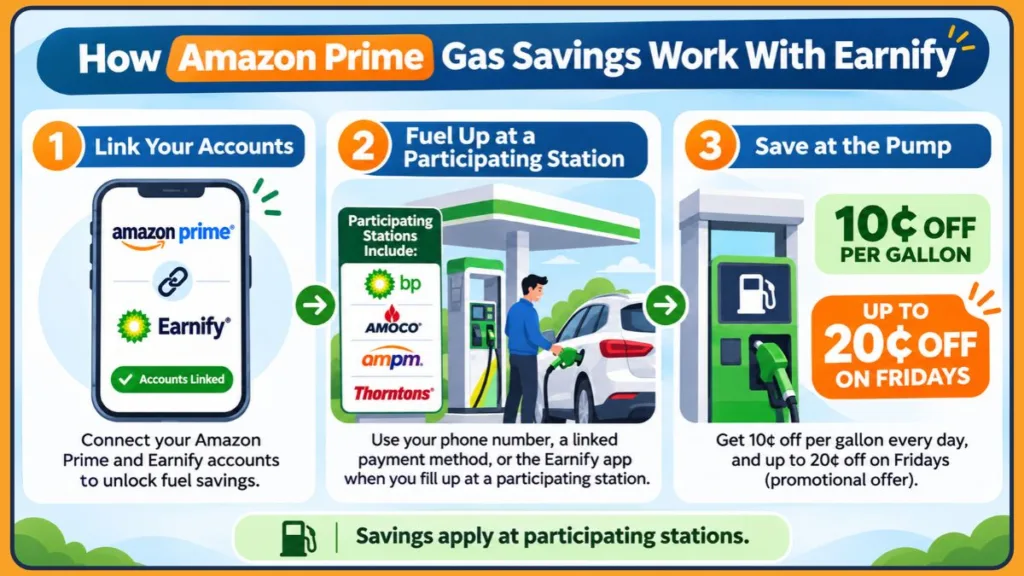
The good news is that you only need to connect your Amazon and Earnify accounts once. After activation, you can use the available redemption methods whenever you purchase fuel at a participating location.
Follow these steps carefully.
Step 1: Download the Earnify App
Start by downloading the free Earnify app on your smartphone.
- Open the Google Play Store or Apple App Store.
- Search for Earnify.
- Select the official app published by BP Products North America Inc.
- Tap Install or Get.
- Open the app after installation.
You can download it directly from the official Earnify Google Play listing or the Earnify Apple App Store listing.
Once the app is installed, you can begin creating your Earnify account.
Step 2: Create an Earnify Account or Sign In
If you’re new to Earnify, you’ll need to register for an account.
- Open the Earnify app.
- Select the option to Create an Account.
- Enter the information requested during registration.
- Provide your phone number and email address.
- Complete the verification process.
- Sign in to your newly created account.
If you already have an Earnify account, simply sign in using your existing credentials.
You don’t need to create a second account just because you’re activating Amazon Prime fuel savings.
A welcome reward is also available to eligible new registrations. BP’s current app listing advertises a 250-point welcome offer. These points can be redeemed for eligible rewards, but they may take up to 24 hours to appear in your account.
Don’t confuse these welcome points with the per-gallon fuel discount. They are separate Earnify rewards.
Step 3: Open Amazon’s Fuel Savings Page
After creating your Earnify account, visit Amazon’s official Fuel Savings page.
- Open your preferred web browser.
- Visit amazon.com/fuelsavings.
- Sign in to your Amazon account.
- Review the Amazon Prime fuel savings offer.
- Follow the instructions to activate fuel savings.
Make sure you’re signed in to the same Amazon account associated with your eligible Prime membership.
Step 4: Connect Your Amazon Account to Earnify
This is one of the most important steps in the entire process.
Amazon needs to connect your Prime membership with your Earnify account before you can receive the fuel savings benefit.
Follow the instructions displayed on the activation page:
- Select the option to Connect Your Earnify Account.
- Sign in to your existing Earnify account when prompted, or create one if you haven’t already.
- Authorize the account connection by following the instructions.
- Confirm the connection between your Amazon and Earnify accounts.
- Complete any additional verification steps displayed on the screen.
Once the linking process is complete, your Amazon Prime fuel savings benefit should be activated.
You can return to the Amazon Fuel Savings page to review the offer and its current conditions.
What should happen after linking? Your Amazon membership and Earnify loyalty account become connected. You can then use the qualifying phone number, linked payment method, or app-based pump process to redeem the savings.
You don’t need to repeat this account-linking process for every fill-up.
Step 5: Find a Participating Gas Station
Now that your accounts are linked, it’s time to find a nearby participating gas station.
The Earnify app includes a station locator that helps users find participating fuel locations.
Here’s how to use it:
- Open the Earnify app.
- Select the Station Locator option.
- Allow location access or use the available location search options.
- Browse the available nearby stations.
- Select a location to review its details.
Look for participating bp, Amoco, ampm, and Thorntons locations.
The participating network includes more than 7,500 locations, according to Amazon, but this does not mean every station belonging to these brands accepts the offer.
Always confirm that the specific location supports the savings before driving there.
Step 6: Redeem Your Savings at the Gas Pump
Once you arrive at a participating gas station, you can redeem your savings using one of the supported methods.
Method 1: Use Your Registered Phone Number
This is a convenient way to redeem the discount without opening the Earnify app during every fuel purchase.
- Drive to a participating gas station.
- Choose an available fuel pump.
- Follow the pump’s loyalty or rewards instructions.
- Enter the phone number associated with your linked Earnify account when prompted.
- Follow the remaining payment instructions.
- Begin fueling once the transaction is authorized.
The phone number identifies your Earnify account. Complete the payment using the eligible linked payment method and follow the station’s prompts.
At locations where the phone-number method uses an Earnify wallet card, make sure your payment card is already saved in the app.
Method 2: Pay Through the Earnify Mobile App
You can also redeem your discount directly through the Earnify app.
- Open the Earnify app.
- Select the participating gas station you are visiting.
- Choose the pump number you are using.
- Follow the in-app payment and redemption instructions.
- Complete the transaction and begin fueling.
For app-based payment, make sure you have added an eligible payment card to your Earnify wallet if requested.
The app lets you select your location and the pump you’re using to redeem the eligible savings.
Method 3: Use an Eligible Linked Payment Method
Amazon also identifies an eligible linked payment method as another redemption option.
If you have already connected a payment method through Earnify, follow the supported payment instructions at the participating pump.
The available payment process can depend on the station and the redemption method you select.
A practical tip: The exact pump menu can differ from one station to another. Follow the prompts displayed on the pump instead of assuming that every location uses identical instructions.
Step 7: Confirm That Your Fuel Discount Was Applied
After completing your fuel purchase, it’s a good idea to confirm that the discount was applied.
Here are a few things you can check:
- Review the transaction details.
- Check your fuel receipt.
- Look for the discount in your Earnify transaction history.
- Confirm that the correct Earnify account was used.
- Check whether the transaction took place during the regular offer or the Friday promotion.
Earnify also supports automatic fuel receipt storage, which makes it easier to review previous fuel purchases.
One important distinction: the fuel discount should be evaluated against the fuel transaction, while loyalty points are credited separately. BP says points can take up to 24 hours to appear, so a delay in points appearing does not necessarily mean the pump discount failed.
If the savings don’t appear, don’t assume the transaction qualified. First, check your account connection, station participation, and redemption method.
Using a Computer or Smartphone to Manage Your Fuel Savings
Amazon and Earnify provide different options depending on the device you’re using.
Understanding these differences can help you complete activation without unnecessary confusion.
Setting Up Fuel Savings on a Desktop Computer
If you prefer using a computer, you can access Amazon’s Fuel Savings page through a desktop browser.
- Open Chrome, Edge, Firefox, Safari, or another supported browser.
- Visit amazon.com/fuelsavings.
- Sign in to your Amazon account.
- Follow the activation instructions.
- Connect your existing Earnify account when prompted.
After completing activation, you can use the Earnify app on your smartphone to find stations and redeem the discount.
You don’t need to download a separate desktop program or browser extension.
Setting Up Fuel Savings on a Smartphone
You can also complete the process using your smartphone.
- Open your mobile browser.
- Visit the Amazon Fuel Savings page.
- Sign in to your Prime account.
- Follow the account-linking instructions.
- Open Earnify and complete the required authorization.
The Earnify app is particularly useful when you’re traveling because you can locate participating stations and select the pump you’re using.
If the station locator cannot identify your location, check whether Earnify has permission to access your device’s location while you’re using the app.
Do You Have to Open Earnify Every Time You Buy Gas?
No. You don’t necessarily need to open the app for every fuel purchase.
Amazon supports entering your linked phone number or using an eligible linked payment method at participating pumps.
You can also use the Earnify app to select your location and pump when you prefer app-based redemption.
The app is optional for the individual pump transaction when another supported redemption method is available, but an active linked Earnify account is still required.
More Ways to Manage Your Earnify Account
If you’re already an Earnify member, you may not need to create another account.
You simply need to connect your existing account with your Amazon Prime membership.
Connecting an Existing Earnify Account
- Open the Amazon Fuel Savings page.
- Sign in to your eligible Amazon account.
- Select the account-linking option.
- Sign in to your existing Earnify account when prompted.
- Follow the authorization instructions.
- Confirm that the accounts have been connected.
After successful activation, you can use your existing Earnify account to access eligible Prime fuel savings.
Creating a New Earnify Account and Linking It to Amazon
If you don’t already use Earnify, create a free account through the app and then complete the linking process on Amazon’s Fuel Savings page.
Make sure you use the correct phone number and email address during registration so you can identify the account when redeeming your savings.
What Happens After Your Accounts Are Connected?
Once your accounts are connected, you can access the eligible fuel savings benefit at participating stations.
You can also use the Earnify station locator to find nearby fuel locations and explore other available Earnify rewards.
The account-linking process does not need to be repeated for every fuel purchase as long as your membership and account connection remain eligible.
What Else Can You Do With the Earnify App?
Besides the Amazon Prime fuel savings offer, Earnify provides its own loyalty rewards and in-app promotions.
According to bp’s current Earnify app listings, eligible members can receive:
- Instant 5-cent-per-gallon loyalty savings.
- A 250-point welcome offer for eligible new registrations.
- 1 point for every dollar spent on fuel.
- 2 points for every dollar spent on eligible convenience-store purchases.
- Additional fuel and convenience-store offers.
- Rewards that can be redeemed at the pump or on eligible in-store purchases.
The app also supports:
- Registration using a phone number and email address.
- Securely stored payment cards.
- An enhanced fuel payment experience.
- Automatic digital fuel receipts.
- A station locator for participating locations.
These are separate Earnify loyalty features. Their availability and conditions depend on participating locations and individual offers.
Newly registered users should also remember that bp says loyalty points can take up to 24 hours to appear.
Remember that the Amazon-linked 10-cent everyday benefit is the combined saving, not 10 cents plus an additional 5 cents from Earnify.
You can check the current features and publisher information on the official Earnify Google Play listing or Apple App Store listing.
Where You Can Use Your Prime Fuel Savings
One of the most common questions people ask is which gas stations accept Amazon Prime fuel savings.
The offer is available at participating bp, Amoco, ampm, and Thorntons locations across the United States.
Amazon reports that the program covers more than 7,500 locations. However, it’s important to understand that not every station belonging to these brands necessarily participates.
Here’s what you should know about each participating brand.
Saving at Participating bp Stations
bp is one of the main fuel partners in Amazon’s Prime fuel savings program.
Prime members can receive their eligible discount at participating bp locations after linking their Amazon account with Earnify.
To use the benefit:
- Find a participating bp location.
- Make sure your Amazon and Earnify accounts are linked.
- Enter your registered phone number or use another supported redemption method.
- Complete your fuel purchase.
Available savings: 10¢ off per gallon throughout the year, with the current Friday promotion offering a total of 20¢ off per gallon.
Using Your Discount at Amoco Stations
Amoco is another participating brand in the Amazon Prime fuel savings program.
Members can use the same Earnify activation process to access their eligible savings.
Before visiting an Amoco location, check the Earnify station locator to confirm participation.
Getting Fuel Savings at Thorntons
Participating Thorntons locations also accept the Amazon Prime fuel savings offer.
If you regularly purchase fuel at Thorntons, linking your Amazon account with Earnify can help you access the available discount.
Use the Earnify app’s locator or Amazon’s offer information to check which nearby locations participate.
Does the Discount Also Work at ampm Stations?
Yes. Amazon Prime members can also receive fuel savings at participating ampm locations.
However, it’s important to check individual station participation before making a purchase.
Finding Participating Gas Stations Near You
If you’ve already activated your fuel savings, the next step is finding a nearby participating gas station.
Fortunately, Earnify makes it easier to locate eligible fuel locations.
Using Earnify to Find Nearby Stations
Follow these steps:
- Open the Earnify app.
- Go to the Station Locator.
- Allow the app to access your location.
- Browse nearby participating stations.
- Select a location to review the available information.
You can also use the Earnify location search options to find stations in an area you plan to visit.
For the best experience, enable location access while using the app. If the locator cannot identify your current position, check the location permission in your phone’s settings.
Checking a Station Before You Visit
Before driving to a station, make sure you verify that the location participates in the program.
Check the following:
- Whether the station is listed in Earnify.
- Whether it belongs to a participating fuel brand.
- Whether the location supports your intended redemption method.
- Whether the Friday promotional offer is still active.
Another useful tip is to check the station’s displayed fuel price before redeeming the discount. A larger discount does not automatically mean a lower final price than a nearby competitor.
For example, if one station advertises fuel at $3.50 per gallon and another advertises it at $3.40, a 10-cent Prime discount at the first location would make both final prices approximately equal at $3.40, before taxes or other applicable charges.
Comparing the final per-gallon price can help you decide where to fill up.
Are All bp and Amoco Locations Included?
No. The offer is limited to participating locations.
Although bp, Amoco, ampm, and Thorntons are included in the program, individual station participation can vary.
Always use the Earnify locator to check before visiting.
Making the Most of the Friday Fuel Promotion
Amazon periodically introduces special fuel savings promotions for Prime members.
One current promotion is Fuel Up Fridays, which gives eligible members an increased fuel discount every Friday.
During this promotional period, Prime members can save a total of 20 cents per gallon at participating locations.
Understanding the Fuel Up Fridays Offer
The Fuel Up Fridays promotion allows eligible Amazon Prime members to receive a total discount of 20 cents per gallon on one qualifying fuel purchase every Friday.
The current promotion began on October 2, 2026, and runs through January 29, 2027.
It applies to participating bp, Amoco, ampm, and Thorntons locations across the United States.
Published coverage of the promotion reports that the offer applies across fuel grades, subject to the participating station and offer conditions.
How Much Can You Save With the Friday Offer?
The Friday promotion provides a total discount of 20 cents per gallon, up to 35 gallons per qualifying transaction.
That means the maximum savings on one qualifying Friday purchase are:
35 gallons × $0.20 = $7.00.
For a more typical 20-gallon fill-up, the saving would be $4.00.
Compared with the regular 10-cent discount, the Friday promotion adds another $2.00 in savings on a 20-gallon purchase.
This is why planning a larger qualifying fill-up on Friday can make the promotion more valuable.
How to Claim Your 20-Cent Friday Savings
You don’t need to activate a completely different membership to access the Friday promotion.
Follow these steps:
- Make sure your eligible Amazon Prime membership is active.
- Link your Amazon account with your free Earnify account.
- Find a participating gas station.
- Purchase fuel on Friday.
- Use your registered phone number, linked payment method, or Earnify app.
- Confirm the fuel transaction.
The promotional savings should be applied when the purchase meets the offer requirements.
When Does the Friday Promotion End?
The currently announced Fuel Up Fridays promotion runs through January 29, 2027.
After the promotional period ends, the regular 10-cent-per-gallon Prime fuel savings benefit is an ongoing membership benefit.
Always check the official Amazon Fuel Savings page for updated promotional details.
Are There Any Limits on Friday Fuel Purchases?
Yes. The current promotional offer is limited to:
- One qualifying fuel purchase every Friday.
- A maximum of 35 gallons per qualifying transaction.
- A total discount of 20 cents per gallon during the promotional period.
The 35-gallon limit applies to the promotional Friday discount, not the regular everyday 10-cent benefit.
Current published offer coverage also describes the regular everyday discount as having no minimum or maximum gallon requirement, unlike the Friday promotion.
Practical tip: If you’re planning to take advantage of the Friday promotion, calculate your expected savings before filling up. A qualifying 35-gallon purchase can save up to $7, while a 20-gallon purchase saves $4.
Make sure you review the current offer terms before completing your purchase.
Special Membership Options for Seniors, Students, and Workers
Many people search for special Amazon Prime gas discounts based on their age, occupation, or membership status.
However, it’s important to understand that Amazon’s fuel savings program and its discounted Prime membership programs are different benefits.
The regular fuel savings offer is connected to eligible Prime membership and Earnify activation. Amazon does not advertise a separate higher per-gallon fuel discount specifically for seniors, students, healthcare workers, or employees.
Here’s what each group should know.
Can Seniors Qualify for Amazon Prime Fuel Savings?
Amazon does not offer a separate fuel discount simply because someone is a senior citizen.
However, qualifying individuals may be eligible for Prime Access, Amazon’s discounted membership program.
Prime Access is available to qualifying government assistance recipients and income-verified customers.
Eligible members can receive Prime benefits for $6.99 per month after a 30-day introductory trial.
To apply:
- Visit the Amazon Prime Access page.
- Review the eligibility requirements.
- Provide the requested income or government assistance verification.
- Complete the membership registration.
- Once your eligible Prime membership is active, follow the regular Earnify activation process.
Prime Access recognizes 13 qualifying government assistance programs and also offers an income-verification route.
These programs include:
- Supplemental Nutrition Assistance Program (SNAP EBT).
- Medicaid.
- Women, Infants, and Children Program (WIC).
- Supplemental Security Income (SSI).
- Direct Express Debit Card (DE).
- Temporary Assistance for Needy Families (TANF).
- National School Lunch Program (NSLP).
- Low Income Home Energy Assistance Program (LIHEAP).
- Tribal Temporary Assistance for Needy Families (TTANF).
- Nutrition Assistance Program (NAP).
- Veterans and Survivors Pension Benefit (VSPB).
- Social Security Disability Insurance (SSDI).
- Federal Public Housing Assistance (FPHA).
You can also qualify through Amazon’s income-verification option without relying on one of these programs.
Members must reverify their eligibility every 12 months to maintain the discounted membership.
Senior citizens who qualify through the applicable eligibility requirements may use this membership option.
Remember, Prime Access reduces the membership cost. It does not provide a separate senior-only fuel discount.
For additional details, read Amazon’s official Prime Access eligibility and membership guide.
Can Students Get a Discounted Amazon Prime Membership?
Students and young adults may be eligible for Prime for Young Adults, which offers discounted Prime membership pricing.
Eligible higher-education students and young adults between 18 and 24 can receive:
- A six-month $0 introductory trial, if eligible.
- Discounted membership pricing afterward.
- Access to eligible Prime membership benefits, including fuel savings once their membership includes that benefit.
To sign up:
- Visit the Prime for Young Adults signup page.
- Select the signup option.
- Verify your age or higher-education student status.
- Complete the registration process.
- Once your membership is eligible for fuel savings, activate the offer through Earnify.
The current advertised price after the introductory trial is $7.49 per month or $69 per year.
Students can verify their eligibility using supported methods, including:
- Age verification with an accepted identity document.
- An eligible .edu email address.
- A student identification card.
- Proof of enrollment, such as an official acceptance letter for an upcoming term.
Important: Amazon’s six-month $0 trial does not include every Prime benefit. Its official Help page identifies certain benefits available during the trial and explains that some benefits are excluded. Fuel savings are not specifically included in that trial benefit list. Check the Amazon Fuel Savings page before assuming that the fuel offer is available during the introductory period.
After the paid Prime for Young Adults membership begins, Amazon identifies this membership category among those eligible for everyday fuel savings.
For more information, see Amazon’s official Prime for Young Adults signup and verification instructions.
Are Special Fuel Discounts Available to Healthcare Workers?
Healthcare workers may also be interested in Amazon Prime fuel savings.
However, Amazon’s published fuel offer does not list a separate healthcare-worker-specific fuel discount or special per-gallon rate.
Healthcare workers who have an eligible Prime membership can use the regular fuel savings program.
They may also qualify for Prime Access if they meet its government assistance or income-verification requirements.
Do Amazon Employees Receive Free Prime Fuel Savings?
Amazon provides eligible U.S. employees with a free Prime membership as part of its employee benefits package.
This membership includes eligible Prime benefits, including fuel savings.
However, this is an employment benefit for eligible Amazon employees, not a general fuel discount for everyone working at another company.
Eligibility for Amazon employee benefits can depend on factors such as job status, scheduled hours, and work location.
If you’re an eligible Amazon employee, check your employee benefits information for instructions on activating your membership.
Once your Prime membership is active and eligible, follow the usual Earnify account-linking process to access fuel savings.
You can review the current Amazon employee benefits information for more details.
How to Make Amazon Prime Membership More Affordable
If you don’t currently have Prime, paying for a full membership just to access fuel savings may not be ideal.
Fortunately, Amazon provides discounted membership options for certain groups.
These options can make Prime more affordable while providing access to eligible Prime benefits.
What Is Prime Access and Who Can Qualify?
Prime Access is a discounted Amazon Prime membership for qualifying government assistance recipients and income-verified customers.
Eligible members receive Prime benefits for $6.99 per month after a 30-day introductory trial.
The standard U.S. Prime membership currently costs $14.99 per month, meaning Prime Access costs approximately 53% less than the regular monthly price.
To apply:
- Visit amazon.com/getprimeaccess.
- Review the qualifying requirements.
- Verify your eligibility through the required documentation or income verification.
- Add an accepted payment method.
- Complete the membership registration.
Once your membership is active, you can connect your Amazon account to Earnify and activate your fuel savings.
Remember that eligibility must be reverified every 12 months.
How Does Prime for Young Adults Reduce Membership Costs?
Amazon’s Prime for Young Adults program offers discounted memberships to eligible higher-education students and young adults aged 18–24.
Eligible new members can receive a six-month $0 trial, followed by a discounted price of $7.49 per month or $69 annually.
The regular U.S. Prime membership costs $14.99 per month or $139 annually.
That means:
- The monthly Young Adults price is approximately 50% lower.
- The annual Young Adults price is approximately 50.4% lower.
After signing up and completing verification, eligible paid members can activate the standard Prime fuel savings offer through Earnify.
However, remember that the six-month introductory trial does not include every Prime benefit. Check your account’s Fuel Savings page to confirm whether the offer is available during the trial.
Sharing Prime Fuel Savings With Another Adult in Your Household
If you share a household with another adult who also uses Amazon, you may be able to take advantage of Amazon Family.
Previously known as Amazon Household, Amazon Family allows two adults living in the same household to share many eligible Prime benefits at no additional membership cost.
This includes eligible fuel savings, provided the account and membership requirements are met.
How Does Amazon Family Sharing Work?
Amazon Family allows the Prime account holder to share many eligible Prime benefits with one additional adult in the same household.
Both adults must have their own Amazon accounts and meet Amazon’s household-sharing requirements.
According to Amazon, this sharing arrangement can also include fuel savings.
Each adult who wants to redeem the benefit needs a separate Earnify account.
Amazon’s current Help information allows an Amazon Family to include:
- Up to two adults, each with a separate Amazon account.
- Up to four teens.
- Up to four children managed through parent or guardian profiles.
Fuel savings are a shareable benefit for the additional adult, not a separate discount automatically extended to every child or teen profile.
Setting Up Amazon Family
If you haven’t created an Amazon Family yet, follow these instructions.
Using a Desktop Browser
- Sign in to your Amazon account.
- Open Accounts & Lists.
- Select Your Account.
- Go to Your Amazon Family.
- Choose the option to add an adult.
- Send an invitation to the other household member or complete the setup together.
- Follow the verification instructions.
- Review the available shared benefits and sharing settings.
You can also start from Amazon’s official Share Your Amazon Prime Benefits Help page.
Using the Amazon Shopping App
If you prefer managing your household through the Amazon mobile app, you can use the official Amazon Shopping app.
After installing the app:
- Open the Amazon Shopping app.
- Tap the Me tab.
- Select Your Account.
- Choose Manage Your Amazon Family.
- Select the option to add an adult.
- Follow the account invitation and verification instructions.
The Amazon Shopping app is optional. You can manage Amazon Family through a web browser without downloading it.
Important: Amazon requires adults sharing Prime benefits to have the same primary residential address and an Amazon Family with payment sharing enabled.
For new Amazon Families, the organizer shares their payment method with the invited adult. The shared payment method is visible to that adult and may be used for purchases within the Family.
This is an important consideration before accepting an invitation.
Amazon changed the payment-sharing process on September 18, 2026. New Family arrangements use one-way payment sharing. The organizer shares their payment method with the invited adult, but the invited adult does not have to share their own payment method in return.
Older Families may retain their previous two-way sharing arrangement until a membership change triggers the transition.
You can review the latest rules in Amazon’s official payment-sharing guide.
Can Both Adults Use Their Own Earnify Accounts?
Yes. Each participating adult needs a separate Earnify account.
To use the fuel savings benefit:
- Set up Amazon Family with the eligible household member.
- Make sure both adults have separate Earnify accounts.
- Follow Amazon’s fuel savings activation instructions for the participating accounts.
- Link the appropriate accounts.
- Complete separate qualifying fuel transactions.
Amazon specifically explains that two adults in an Amazon Family need separate Earnify accounts and must each make a separate fuel transaction.
Important membership restrictions:
- Free-trial Prime members cannot share Prime benefits through Amazon Family.
- Prime for Young Adults and Student membership benefits cannot be shared through Amazon Family.
- Both adults must satisfy Amazon’s household-sharing requirements.
A paid Prime for Young Adults member can still use their own eligible fuel savings benefit; the restriction concerns sharing that membership through Amazon Family.
You can review the latest requirements in Amazon’s official Family Help documentation.
How Can Families Get the Most From Their Fuel Savings?
Families can make the most of this benefit by planning their fuel purchases at participating locations.
For example, two eligible adults sharing a standard Prime membership through Amazon Family can each complete a separate qualifying transaction using their own Earnify accounts.
If both purchases qualify for the regular benefit, each can receive the 10-cent saving.
During the current Fuel Up Fridays promotion, each eligible adult can also make one qualifying Friday fuel purchase, subject to the promotional conditions.
This allows households to receive savings across two separate transactions rather than relying on one fill-up.
Common Problems and How to Fix Them
Sometimes, members complete the activation process but still don’t receive their expected fuel savings.
This can happen because of account-linking problems, inactive memberships, station participation, payment settings, or redemption issues.
Fortunately, there are several things you can check before contacting customer support.
When Your Amazon and Earnify Accounts Aren’t Linked
If your accounts aren’t properly connected, the fuel savings may not appear.
Try the following:
- Visit the Amazon Fuel Savings page.
- Sign in to your Amazon Prime account.
- Review the activation status.
- Follow the instructions to connect Earnify.
- Confirm that you’re using the correct Earnify account.
- Complete any pending authorization steps.
Make sure you’re not accidentally using a different Amazon or Earnify account from the one you originally linked.
When Your Amazon Prime Membership Is No Longer Active
An eligible Prime membership is required for the Prime fuel benefit.
Visit Amazon Prime membership management and check your membership status.
If your membership has expired or been canceled, renew or restore your eligibility before attempting another fuel transaction.
Also check whether you’re using a discounted or introductory membership that has restrictions on certain Prime benefits.
When You Visit a Station That Doesn’t Participate
Not every bp, Amoco, ampm, or Thorntons station necessarily participates.
Open Earnify and use the station locator to find another eligible location.
You can download the official Earnify app for Android or iPhone if you haven’t installed it yet.
Checking participation before driving can save time and frustration.
When the Pump Doesn’t Recognize Your Phone Number
If your registered phone number isn’t recognized, check the number associated with your Earnify account.
Make sure you’re entering the correct number and following the pump instructions.
Also check whether you’re using the same number registered to the Earnify account you linked to Amazon.
You can try another supported redemption method, such as the Earnify app or an eligible linked payment method.
When Your Saved Payment Card Doesn’t Work
If you’re using the app-based payment method, check the card saved in your Earnify wallet.
- Open the Earnify app.
- Navigate to the Payment or Wallet settings.
- Review the saved payment card.
- Make sure the card information is current.
- Replace an expired card if necessary.
- Retry the transaction using a supported method.
The Amazon fuel savings benefit and the actual payment authorization are separate parts of the transaction. A card payment problem does not necessarily mean your Prime membership has lost eligibility.
If the payment still fails, try another accepted payment method rather than repeatedly attempting the same declined transaction.
When the Discount Doesn’t Appear on Your Receipt
If the discount doesn’t appear after your purchase:
- Check whether the station participates.
- Confirm that your accounts are linked.
- Review the redemption method you used.
- Check your transaction details in Earnify.
- Compare the discount with the correct regular or Friday promotional amount.
- Contact Earnify or the station for assistance if the issue remains unresolved.
Keep your receipt and transaction information available when requesting support.
Earnify’s paperless receipt feature can also help you review previous fuel transactions.
Remember that the app’s 24-hour delay applies to loyalty points appearing in your account. It should not be used as a reason to assume that a missing pump discount will automatically be added later.
When the Earnify App Stops Working
If the Earnify app isn’t working, try these basic troubleshooting steps:
- Update the app to the latest version through the Google Play Store or Apple App Store.
- Check your internet connection.
- Close and reopen the app.
- Sign out and sign in again.
- Restart your smartphone.
- Check whether your account is still connected to Amazon.
- Review your phone’s location permissions if the station locator isn’t working.
On iPhone, check Settings > Privacy & Security > Location Services and make sure Earnify has the appropriate permission.
On Android, open Settings > Apps > Earnify > Permissions > Location. The wording may vary depending on your phone manufacturer and Android version.
BP’s app support information recommends allowing location access while using Earnify when the station locator does not work correctly.
Avoid downloading older Earnify installation files or APKs from third-party websites. Use the official app stores to get the current publisher version.
What to Do When Nothing Else Works
If you’ve checked the membership, account connection, payment method, and station participation but still cannot redeem the offer, contact the appropriate support team.
For Earnify account or payment-related issues, BP’s published app support information provides these contact options:
- Email: bpconsumer@bp.com.
- Website: BP’s official U.S. website and support information.
- App support: Check the developer support information on the official Earnify Google Play listing.
Keep the following information ready:
- Your Amazon account and membership details.
- Your Earnify account phone number.
- The participating station’s address.
- The transaction date and time.
- Your fuel receipt, if available.
- The redemption method you attempted.
- Any payment error message displayed by the app or pump.
This information can help the support team investigate the problem more efficiently.
What Other Prime Members Are Saying About Earnify
Some people search Reddit before trying an unfamiliar rewards program.
Reddit can be useful for understanding how other users approach account activation, pump redemption, and fuel savings.
What Reddit Users Say About Activating and Using Earnify
When researching Amazon Prime gas discounts on Reddit, look for discussions about:
- Linking an Amazon account to Earnify.
- Finding participating fuel stations.
- Using a phone number at the pump.
- Redeeming discounts through the Earnify app.
- Selecting the correct pump number.
- Resolving problems when savings don’t appear.
For example, users in this Amazon Prime discussion about Earnify describe selecting a station and pump through the app to begin a fuel transaction.
Other users have reported difficulties with account linking or discount recognition at individual locations.
These discussions can provide helpful practical tips, especially when people describe their own experiences.
However, remember that individual experiences can differ depending on the station, app version, and account status.
Some older discussions may also describe earlier versions of the program. Earnify launched in October 2024, and Amazon has introduced new fuel promotions since then. A post discussing a previous offer may not reflect the current 2026 Friday promotion.
Is Reddit a Reliable Source for Fuel Savings Information?
Reddit can be useful for finding firsthand experiences, but it should not be your only source of information.
For accurate details about discount amounts, expiration dates, eligibility, and activation requirements, always check Amazon’s official Fuel Savings page.
The same applies to Earnify account issues. Use BP’s Earnify support information when you need help with a particular transaction.
Important Rules and Restrictions to Understand
Although Amazon Prime fuel savings can help reduce your everyday fuel expenses, there are a few important limitations to understand.
- United States availability: The fuel savings offer discussed in this guide is for eligible U.S. Prime members.
- Participating locations only: Not every bp, Amoco, ampm, or Thorntons location necessarily accepts the benefit.
- Earnify account required: You must connect an eligible Amazon account to a free Earnify account.
- Active membership: Your Prime membership must remain eligible to receive the offer.
- Friday promotion expiration: The currently announced 20-cent Friday savings end January 29, 2027.
- Friday transaction limit: The promotional offer is limited to one qualifying fuel purchase each Friday, with a maximum of 35 gallons per transaction.
- No automatic occupational discount: Seniors, healthcare workers, students, and employees do not automatically receive a separate higher per-gallon discount simply because of their age, occupation, or employment status.
- Membership-sharing restrictions: Free-trial and Prime for Young Adults memberships cannot share Prime benefits through Amazon Family.
- Separate account requirements: Each eligible adult using Amazon Family fuel savings needs an individual Earnify account and must complete a separate fuel transaction.
- Family payment sharing: New Amazon Family arrangements require the organizer to share a payment method with the invited adult. Review this before joining.
- Points and fuel discounts are different: Earnify loyalty points may take up to 24 hours to appear, but that does not mean a missing fuel discount will automatically be credited later.
Understanding these limitations can help you avoid confusion and make better use of your membership.
Is This Fuel Savings Offer Available Outside the United States?
The Amazon Prime fuel savings offer described in this article is for eligible members at participating U.S. gas stations.
Having an Amazon Prime membership in another country does not automatically provide access to this specific Earnify fuel savings program.
Can You Receive the Discount Without Opening the Earnify App?
You need a free Earnify account linked to your Amazon account to activate the fuel benefit.
However, you don’t necessarily need to open the Earnify app every time you purchase fuel. Amazon also provides phone-number and linked-payment-method redemption options where supported.
Can You Redeem the Regular Fuel Discount More Than Once?
The regular Prime fuel savings benefit is an ongoing membership benefit.
The current Fuel Up Fridays promotion, however, is limited to one qualifying fuel purchase per Friday, subject to the 35-gallon promotional limit.
Always check the current Amazon Fuel Savings offer for any additional restrictions.
Final Thoughts on Saving Money With Amazon Prime Fuel Benefits
Learning how to use the Amazon Prime gas discount is a practical way to make more of your existing Prime membership.
Although the activation process requires connecting your Amazon account to Earnify, you only need to complete the setup once to get started.
To summarize:
- Make sure you have an eligible Amazon Prime membership.
- Download and register for the free Earnify app.
- Visit the Amazon Fuel Savings page.
- Connect your Amazon and Earnify accounts.
- Find a participating bp, Amoco, ampm, or Thorntons location.
- Redeem your savings using your registered phone number, linked payment method, or Earnify app.
- Check your transaction to make sure the discount was applied.
- Use the Earnify station locator before traveling to a fuel station.
- Review promotional restrictions before planning a Friday fill-up.
- Keep your Earnify payment information current.
Remember that Prime members currently receive 10 cents off per gallon throughout the year, with a promotional increase to 20 cents per gallon every Friday through January 29, 2027.
Based on Amazon’s average annual fuel-use assumption, the regular discount could provide approximately $67.50 in annual savings when all qualifying gallons are purchased at participating locations.
Whether you commute every day, travel frequently, or simply want to reduce your fuel expenses, activating Amazon Prime fuel savings can make your existing membership even more useful.
By linking Earnify correctly, keeping your payment information updated, and checking participating stations before visiting, you can make fuel savings a regular part of your everyday routine.
Frequently Asked Questions (FAQ)
Q1: Does Amazon Prime offer gas discounts?
Yes. Eligible Amazon Prime members can receive 10 cents off per gallon at participating bp, Amoco, ampm, and Thorntons locations throughout the year. A limited-time promotion currently increases the total savings to 20 cents per gallon on Fridays through January 29, 2027.
Q2: Does Amazon Prime offer fuel savings?
Yes. Amazon Prime includes fuel savings through its partnership with bp’s Earnify loyalty program. Members must link their Amazon and Earnify accounts to activate the benefit.
Q3: How do I use the Amazon Prime gas discount?
Visit Amazon’s Fuel Savings page, sign in to your Prime account, and connect your free Earnify account. Once activated, redeem your savings at participating gas stations using your phone number, linked payment method, or Earnify app.
Q4: How do I get Amazon Prime gas discount on Amazon?
Visit amazon.com/fuelsavings, sign in to your Amazon account, and follow the instructions to activate and connect Earnify.
Q5: Do I need an Amazon Prime gas discount code?
No. The standard Prime fuel savings offer does not require a separate promotional code. You simply need to connect your Amazon account to Earnify.
Q6: Which gas stations offer Amazon Prime fuel savings?
The benefit is available at participating bp, Amoco, ampm, and Thorntons gas stations across the United States.
Q7: Does the Amazon Prime gas discount work at bp and Amoco?
Yes. Eligible Prime members can receive fuel savings at participating bp and Amoco locations after linking their Earnify account.
Q8: How do I connect Earnify to Amazon Prime?
Visit the Amazon Fuel Savings page, sign in to your Amazon account, and follow the account-linking instructions. Sign in to your existing Earnify account or create a new one when prompted.
Q9: How much can I save with Amazon Prime on gas?
Prime members currently receive 10 cents off per gallon year-round. The current Friday promotion increases the total discount to 20 cents per gallon through January 29, 2027. Based on 675 qualifying gallons annually, the regular discount represents approximately $67.50 in savings.
Q10: How do I get the Amazon Prime Fuel Friday deal?
Activate your Prime fuel savings by linking your Amazon and Earnify accounts. Then purchase fuel on Friday at a participating station and redeem the discount using an available method. The promotion is limited to one qualifying transaction of up to 35 gallons each Friday, providing a maximum saving of $7 per transaction.
Q11: How can I find participating Amazon Prime gas stations near me?
Open the Earnify app and use its station locator. Allow location access or use the available location search options to find participating fuel stations. Download the app through the official Android listing or iPhone listing.
Q12: Can seniors get an Amazon Prime gas discount?
Seniors can use the standard Prime fuel savings benefit if they have an eligible Prime membership. Those who meet the applicable requirements may also qualify for Prime Access, a discounted membership option. Age alone does not qualify someone for the program.
Q13: Can students get Amazon Prime fuel savings?
Eligible higher-education students and young adults aged 18–24 can join Prime for Young Adults. Once their membership is eligible for the fuel offer, they can activate savings through Earnify. The six-month introductory trial does not include every Prime benefit, so check eligibility before relying on fuel savings during the trial.
Q14: Do healthcare workers get a special Amazon Prime gas discount?
Amazon’s published fuel offer does not list a separate healthcare-worker-specific fuel discount. Healthcare workers with an eligible Prime membership can use the standard fuel savings program.
Q15: Do Amazon employees receive free Prime fuel savings?
Eligible Amazon employees in the United States receive a free Prime membership as an employee benefit. This membership includes eligible Prime benefits, including fuel savings. Employee eligibility varies by role, work location, and employment status.
Q16: How can I get a 50% discount on Amazon Prime membership?
Eligible customers can use Prime Access for $6.99 per month after a 30-day introductory trial. Eligible students and young adults can also use Prime for Young Adults at a discounted rate of $7.49 per month or $69 per year after the introductory trial.
Q17: Why isn’t my Amazon Prime gas discount working?
Common reasons include an unlinked Earnify account, an expired or ineligible Prime membership, a nonparticipating gas station, or an incorrect phone number. Check your account connection and station eligibility first. Also review the saved payment card if you’re using app-based payment.
Q18: Can I use the Amazon Prime gas discount without opening the Earnify app?
You still need a linked Earnify account, but you may redeem the savings using your registered phone number or an eligible linked payment method without opening the app for every purchase.
Q19: Can two family members share Amazon Prime fuel savings?
Yes. Two adults living in the same household can share many eligible Prime benefits through Amazon Family. Each person needs a separate Earnify account and must make a separate qualifying fuel transaction. Free-trial and Prime for Young Adults memberships cannot share Prime benefits through Amazon Family.
Q20: How long does the Amazon Prime gas discount last?
The regular 10-cent-per-gallon benefit is an ongoing Prime membership benefit. The current promotional 20-cent Friday savings are scheduled to run through January 29, 2027, subject to the offer terms.
Q21: Does the Amazon Prime gas discount work on all fuel grades?
Published coverage of the current promotion reports that the discount applies across fuel grades at participating locations. Check the station and current offer conditions before purchasing.
Q22: Can I use the Amazon Prime gas discount without a smartphone?
Amazon supports redemption through a linked phone number or payment method at participating pumps, so you do not necessarily need to open the app for every purchase. However, you still need to create and link an Earnify account and should check the available setup and payment options before visiting the station.
Q23: Does Earnify provide additional savings besides Amazon Prime fuel discounts?
Yes. Earnify advertises its own fuel savings, loyalty points, welcome rewards, in-app promotions, and convenience-store offers at participating locations. These rewards have separate conditions and should not be confused with the combined Amazon Prime fuel discount.
Q24: Can I use Amazon Prime fuel savings after canceling my Prime membership?
No. The Amazon-linked Prime benefit requires an eligible Prime membership. If your membership is canceled or no longer eligible, you should not expect to continue receiving the Prime portion of the fuel savings. Earnify’s independent loyalty benefits may remain available under its own terms.
Q25: How long does it take for Earnify rewards points to appear?
According to BP’s app listing, loyalty points may take up to 24 hours to appear in your Earnify account. This timing applies to points, not necessarily to the fuel discount itself. Keep your fuel receipt if you need to investigate a missing discount.
Visit Our Post Page: Blog Page
Discover more from Izoate
Subscribe to get the latest posts sent to your email.