
Looking for a Google Gemini alternative in 2026? Explore the best AI chatbots for writing, coding, research, and productivity, including ChatGPT, Claude, Perplexity, Copilot, Grok, and DeepSeek.
If you’ve been relying on Google Gemini as your go-to AI assistant, you’re probably aware that it does a lot of things well — especially if you live and breathe inside Google Workspace. But maybe Gemini isn’t quite hitting the mark for you anymore. Perhaps you’re running into inconsistent responses, struggling with complex coding tasks, or simply curious whether there’s a better AI chatbot out there for your specific workflow.
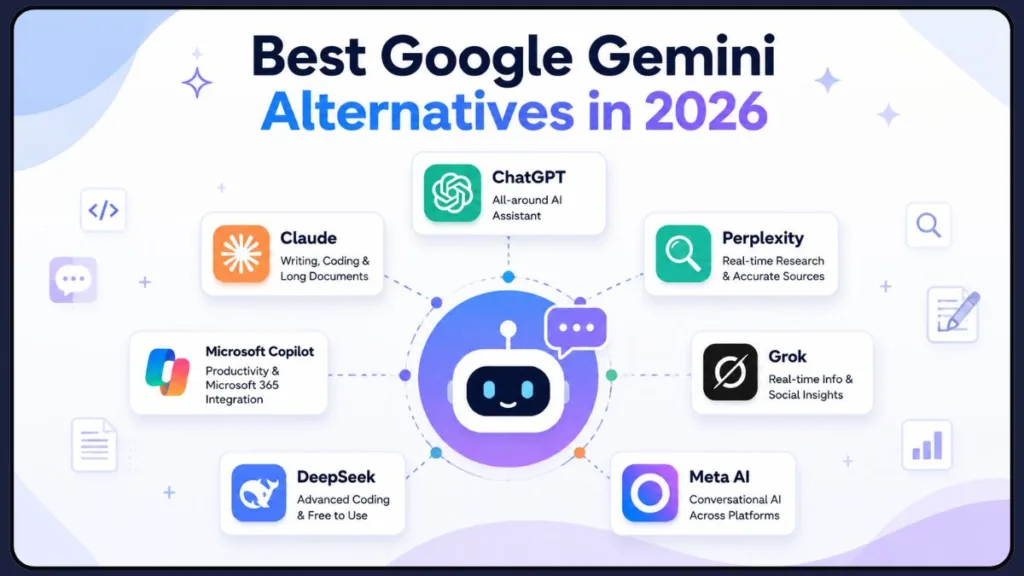
You’re not alone in asking that question. In 2026, the AI landscape looks dramatically different from even a year ago. The market has fragmented into a rich ecosystem of powerful tools, each carving out a distinct niche — whether that’s real-time research, long-form writing, coding assistance, enterprise productivity, or open-source flexibility. There are genuinely excellent Google Gemini alternatives available today, many of which are free to try.
This guide walks you through the best AI chatbots in 2026 that can step in where Gemini falls short, so you can find the right tool for your specific needs.
Why Are People Looking for Google Gemini Alternatives?
Before diving into the alternatives, it’s worth understanding why so many users are searching for a Gemini AI alternative in the first place.
Inconsistency in complex tasks. Discussions across tech communities highlight a common frustration: while Gemini excels as a general-purpose assistant thanks to its deep Google integration, it can struggle with complex logical reasoning, structured coding tasks, and maintaining consistent output quality across similar prompts. As a result, many developers start looking for better coding assistance from tools like Claude and DeepSeek, while writers often seek alternatives that offer better writing quality and more natural long-form content.
Gemini not working and Gemini errors. A growing number of users discover alternative AI chatbots after encountering issues such as Gemini not working, loading failures, temporary outages, rate-limit warnings, or common Gemini errors. When productivity is interrupted, people often need a reliable backup AI assistant they can switch to immediately.
Usage caps and rate limits. Free-tier limits on Gemini can fill up fast during peak hours, which interrupts workflows and pushes users to explore other tools—especially when they simply need to get work done. This has increased interest in free alternatives that provide generous usage limits or lower-cost paid plans.
Privacy concerns. With public wariness around AI data handling growing in 2026, some users actively prefer tools with clearer or stricter data policies. Organizations handling sensitive information often evaluate alternatives that offer stronger privacy controls, self-hosting options, or enterprise-grade security.
Ecosystem lock-in. Gemini is at its best inside Gmail, Docs, and Sheets. If you rely on Slack, Jira, GitHub, Microsoft 365, or other external platforms, you’ll often find purpose-built alternatives integrate far more smoothly into your existing workflow.
Specialized needs. Writers want better long-form output. Researchers need accurate sources and real-time research capabilities with citations. Developers want stronger code generation and debugging support. The simple truth is that no single AI tool wins across every use case—and 2026 is the year people have finally accepted that. Whether you’re searching for a research assistant, coding companion, writing partner, or enterprise productivity tool, there’s likely a Gemini alternative designed specifically for your needs.
Quick Comparison Table: Google Gemini Alternatives at a Glance
Not sure which tool to read about first? Here’s a side-by-side snapshot of every alternative covered in this guide so you can jump straight to the one that fits your needs.
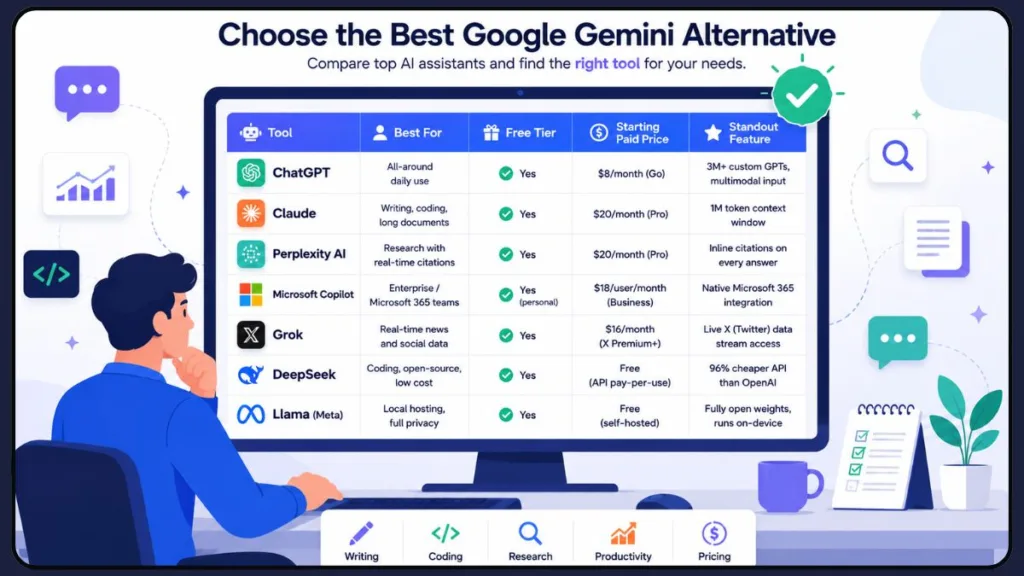
All seven tools offer a free tier, so you can test any of them before spending anything. Scroll down to read the full breakdown for each one.
Top Google Gemini Alternatives in 2026
Here’s a breakdown of the best AI chatbots that can replace or complement Google Gemini, depending on what you’re trying to accomplish.
1. ChatGPT (OpenAI) — Best All-Around Alternative
If you’re looking for one tool that handles the widest range of tasks reliably, ChatGPT remains the strongest all-around alternative to Google Gemini in 2026. Powered by GPT-5.2, it continues to hold its position as the most versatile AI assistant available.
Why it works so well: ChatGPT is the kind of tool that does “almost everything well,” which is exactly what most people need for daily work. Whether you’re writing emails, brainstorming ideas, debugging code, translating documents, or analyzing data, ChatGPT handles it with a consistency that feels intuitive.
Key features:
- Multimodal input — text, voice, image, and vision support in one tool
- Over 3 million custom GPTs in the GPT Store for specialized tasks
- Memory feature that personalizes responses based on your past conversations
- Strong code generation, debugging, and explanation capabilities
- Reliable creative writing and structured output
Pricing: A free tier is available with usage limits. ChatGPT Plus is $20/month and offers a broader set of features including GPT-5.2 access. There’s also a lighter $8/month Go plan for casual users who want model upgrades without the full Plus commitment.
Best for: People who want one reliable AI assistant for general-purpose daily tasks, creative writing, communication, and versatile workflows.
What Real Users Are Saying
Across tech communities and review forums, ChatGPT remains the most widely recommended starting point for anyone switching away from Gemini. Users consistently praise its consistent, intuitive output quality across a wide variety of tasks — from drafting emails to complex data analysis. The ChatGPT Plus plan at $20/month is widely described as worthwhile for power users who rely on AI daily, with reviewers noting that paid tiers unlock early access to new features, higher usage limits, and priority access during peak hours. Casual users tend to find the free tier sufficient for occasional use, especially now that GPT-5.2 Instant is available at no cost. The main complaint among heavy users is that the $200/month Pro plan can feel hard to justify unless you’re running very compute-intensive tasks — most people find Plus hits the sweet spot between capability and cost.
Pros:
- Most versatile all-around AI tool available — handles writing, coding, research, and data analysis reliably
- Largest ecosystem of integrations with 3M+ custom GPTs and 60+ app connections
- Multimodal — accepts text, images, voice, and files in one interface
- Strong memory feature that personalizes responses over time
- Generous free tier now includes access to GPT-5.2 Instant
Cons:
- $200/month Pro tier is hard to justify for most users — Plus at $20/month is the practical ceiling for the majority
- Can feel generic in writing style compared to Claude for nuanced long-form content
- Usage limits on the free tier can interrupt workflows during peak hours
- Less privacy-focused than Claude or open-source alternatives
2. Claude (Anthropic) — Best for Writing, Coding, and Long Documents
If you’re dealing with long documents, writing-heavy tasks, or complex coding work, Claude is consistently the strongest alternative to Google Gemini you can find in 2026. Developed by Anthropic, Claude has become the AI that serious writers and developers genuinely rely on.
Why it stands out: Claude Opus 4.7 leads most major writing and reasoning benchmarks, and its 200K token default context window — with 1M tokens available in beta — makes it uniquely capable of processing entire codebases, lengthy contracts, or sprawling research documents in a single session. Around 70% of developers in recent surveys prefer Claude for complex architectural decisions and multi-file code refactors.
Key features:
- Industry-leading performance on SWE-bench coding benchmarks (80.8%)
- Up to 1 million token context window — ideal for analyzing entire books or large codebases
- Claude Code: an agentic coding tool that reads your codebase, writes code across multiple files, and commits to git
- Consistently praised for the most natural, nuanced writing style among frontier AI models
- Connects to 6,000+ apps through the Model Context Protocol (MCP), including GitHub, Slack, Jira, and Google Drive
Pricing: Free tier available. Claude Pro is $20/month with access to all models. Claude Max at $100–$200/month includes extended usage and full Claude Code access. Claude Team ($25–$30/user/month) adds collaboration features and data privacy guarantees important for professional use.
Best for: Writers, developers, legal professionals, researchers, and anyone working with long documents who needs consistent, high-quality output.
What Real Users Are Saying
Professional developers and writers who’ve made the switch from Gemini to Claude describe it as a genuine upgrade for complex work. Reviewers consistently highlight Claude’s writing quality as the standout — describing its output as notably more natural and nuanced than other frontier models. Developers working on large codebases specifically call out Claude Code’s ability to read the full project, make multi-file changes, and commit directly to git as a workflow game-changer. One recurring theme across G2 and community reviews is Claude’s strong privacy-first positioning — users appreciate that Anthropic’s data policies are clearer and stricter than most competitors. The most common complaint is the free tier’s usage limits, which can feel restrictive if you’re doing heavy document work daily — but users on Claude Pro consistently say the $20/month is well worth it for the quality improvement over Gemini’s writing output.
Pros:
- Best-in-class writing quality — the most natural, nuanced output among frontier AI models
- Industry-leading SWE-bench coding score (80.8%) and preferred by ~70% of developers for complex refactors
- 1 million token context window — handles entire codebases and book-length documents
- Claude Code enables full agentic coding with multi-file edits and git commits
- Strong privacy-first policies — clearer and stricter than most competitors
- Connects to 6,000+ apps via MCP for deep workflow integration
Cons:
- Free tier usage limits can feel restrictive for heavy daily document work
- No native image or video generation (unlike ChatGPT or Grok)
- Claude Max at $100–$200/month is a significant jump for full Claude Code access
- Less established ecosystem of third-party add-ons compared to ChatGPT
3. Perplexity AI — Best for Research with Real-Time Citations
If factual research, source verification, or staying current with fast-moving topics is your priority, Perplexity AI is hands-down the best Google Gemini alternative for that specific workflow.
Why it’s different: While ChatGPT and Claude are primarily generative AI tools, Perplexity functions more like an answer engine. It combines the power of large language models with real-time web search, delivering structured, cited responses rather than a list of links. Every claim comes with an inline citation you can immediately verify — something Gemini’s web-connected mode simply doesn’t match in terms of reliability or structure.
Key features:
- Real-time web search baked into every response
- Inline citations for every key claim, making fact-checking effortless
- Deep Research mode for multi-step research tasks
- Faster and more structured than Gemini for content writing, fact-checking, and source collection
- Free tier available with unlimited basic searches
- Popular for academic research and legal documentation where accurate sourcing is critical
Pricing: Free tier with unlimited basic searches. Perplexity Pro is $20/month, offering Deep Research mode and higher usage limits.
Best for: Students, journalists, content creators, researchers, and anyone who needs to find and verify accurate information quickly with traceable sources.
What Real Users Are Saying
Perplexity has earned genuinely enthusiastic feedback from researchers, content creators, and professionals who need reliable, sourced answers fast. Users frequently describe it as the tool that finally makes AI useful for serious research — the inline citations remove the biggest frustration with tools like Gemini, which can sound confident while being wrong. Tech bloggers and academic users in particular praise the Focus modes (Academic, Reddit, Writing) as powerful filtering tools that let you pre-select your source pool before you even search. The ad-free interface is consistently mentioned as a significant quality-of-life improvement over traditional search. The honest criticism from power users is that Perplexity can still be confidently wrong, especially on nuanced topics — the citations give you accountability, but they don’t make it infallible. For straightforward fact-finding, product comparisons, and research synthesis, though, most users agree it outperforms Gemini’s web-connected mode.
4. Microsoft Copilot — Best Enterprise Alternative for Microsoft 365 Users
If your team lives inside Microsoft 365 — Word, Excel, PowerPoint, Outlook, and Teams — then Microsoft Copilot is the most practical and powerful Google Gemini alternative for enterprise productivity. No other AI assistant integrates as deeply into Microsoft’s suite of tools.
Why enterprises choose it: Copilot doesn’t just sit in a browser tab. It’s embedded directly into the apps your team already uses every day. It draws on your organization’s data through Microsoft Graph, giving it context that external AI tools simply can’t access. With over 90% of Fortune 500 companies already trusting Microsoft 365 Copilot, it’s become the default choice for large-scale organizational AI deployment.
Key features:
- Deep native integration with Word, Excel, PowerPoint, Outlook, Teams, and OneNote
- Access to your organization’s internal data through Microsoft Graph
- Meeting summaries, email drafting, and document automation
- Agent 365 for discovering, governing, and securing AI agents across the organization
- Strong compliance and security controls for regulated industries
Pricing: The Copilot Business plan is $18/user/month (annual) for organizations up to 300 users. The Enterprise plan is $30/user/month. For personal use, Microsoft 365 Personal at $9.99/month now includes Copilot access.
Best for: Corporate teams, enterprise organizations, and professionals already working within Microsoft 365 who want AI capabilities without adding new tools or workflows.
What Real Users Are Saying
Enterprise users and IT professionals consistently describe Microsoft Copilot as the most seamlessly integrated AI assistant for organizations already in the Microsoft 365 ecosystem. The standout praise is for its ability to draft emails, summarize long meeting recordings, generate slide content, and answer questions using your organization’s internal data — all without leaving the apps your team already uses. Teachers and business professionals alike highlight it as an extremely helpful resource for content creation and reducing repetitive work. The honest criticism from verified reviewers is that per-user pricing makes ROI harder to justify for smaller teams, and some users note it can produce occasional glitches on complex or long queries. A few reviewers also describe it as feeling less independently capable than ChatGPT for purely generative tasks — its real power comes from the Microsoft Graph integration, not from standing alone as a chatbot.
5. Grok (xAI) — Best for Real-Time Information and Social Listening
If you need an AI that stays plugged into what’s happening right now — particularly across news, social media, and public discourse — Grok from xAI is in a category of its own as a Gemini alternative.
Why it’s unique: Grok’s defining technical feature is real-time access to X’s (formerly Twitter) live data stream, which no other major frontier AI model offers natively. If you’re a journalist, social media manager, marketer, or news-focused researcher, that real-time edge is genuinely valuable. The latest flagship, Grok 4.3, also delivers significant improvements in coding and reasoning performance.
Key features:
- Real-time access to X’s live data stream for up-to-the-minute information
- DeepSearch mode for web crawling, aggregation, and synthesized research answers
- 1 million token context window on Grok 4.3
- Fewer content guardrails than Gemini or ChatGPT — useful for raw brainstorming
- Big Brain mode for heavy reasoning tasks
Pricing: Free tier available on grok.com with around 50 daily queries. SuperGrok is $30/month with 1,000+ prompts, DeepSearch, voice mode, and image generation. X Premium+ ($16/month) also includes Grok 4 access alongside the ad-free X experience.
Best for: Journalists, social media managers, marketers, and researchers who need real-time social data and current information baked into their AI responses.
💬 What Real Users Are Saying
Grok has developed a loyal following among users who need current, real-world information rather than responses drawn from a static training dataset. The real-time X data integration is consistently cited as the feature that sets it apart — users describe getting up-to-the-minute insights on trending topics that no other AI tool can match. Developers who’ve tried the platform also note that Grok’s Code Fast feature measurably reduces debugging time for common frameworks. One recurring pattern in community discussions is that Grok earns trust by admitting when it doesn’t know something rather than guessing — a behavior users appreciate coming from a tool competing with more polished options. The most honest criticism from the Grok community is around pricing value at the SuperGrok tier — users suggest it’s only worth it if the X data integration is specifically central to your workflow. For general daily use, most community members recommend starting with the free tier or X Premium+ before committing to SuperGrok.
6. DeepSeek — Best Free Open-Source Alternative for Developers
If you’re a developer, researcher, or privacy-conscious user who wants frontier-level AI performance at dramatically lower cost — or the option to self-host entirely — DeepSeek is the most compelling open-source Google Gemini alternative available in 2026.
Why it matters: DeepSeek V4 Pro, released in April 2026, is a 1.6 trillion parameter model that matches GPT-5.5 and Claude Opus 4.7 on most agentic benchmarks at roughly 10–13x lower API cost per output token. It operates under an MIT license, meaning you can download, modify, and deploy it without restrictions — a genuine option for enterprises with data privacy requirements that closed models simply can’t satisfy.
Key features:
- Open weights under MIT license — self-hostable with full data control
- Top-tier performance on coding benchmarks
- 1 million token context window
- Mixture-of-Experts (MoE) architecture for efficient inference
- Available as a free chat interface at chat.deepseek.com
- Ultra-low API pricing: approximately 96% lower cost per token than OpenAI
Pricing: Free to use via chat.deepseek.com. API pricing is extremely competitive. Model weights are free to download and self-host.
Note for enterprises: If your organization has strict data privacy or compliance requirements, DeepSeek’s self-hosting option via MIT license is one of the few truly open alternatives to closed frontier models like Gemini or ChatGPT.
Best for: Developers, data scientists, AI researchers, and enterprises that need powerful AI capabilities with full control over their data, or who want to build on top of a capable open-source foundation.
What Real Users Are Saying
DeepSeek has generated some of the most enthusiastic developer feedback of any AI tool in 2025–2026. Users describe it as surprisingly human-feeling compared to ChatGPT, and the DeepThink reasoning mode — which shows its chain of thought before giving an answer — is frequently highlighted as a transparency feature that builds genuine trust. Digital marketers, researchers, and coders who’ve tested it describe it as budget-friendly without feeling like a budget tool: the interface is clean, fast, and easy to use. Developers specifically praise the code generation speed and quality, with benchmark comparisons placing it alongside much more expensive closed models. The main honest caveat that informed reviewers raise is around data privacy — because DeepSeek is a Chinese-owned platform, some organizations with sensitive data policies choose to self-host the open weights rather than use the hosted chat interface. For users comfortable with self-hosting, or those without strict data residency requirements, the value proposition is considered exceptional.
7. Llama (Meta) — Best Open-Source Alternative for Local Hosting
If you want to run a capable large language model entirely on your own hardware — no API calls, no data leaving your infrastructure — Meta’s Llama 4 is the most accessible open-weight model for local deployment.
Why it’s worth considering: Llama 4 now matches commercial models at a fraction of the cost, making it a practical choice for developers, researchers, and privacy-focused organizations who need open-source AI weights without compromising too much on capability.
Key features:
- Fully open weights available for local hosting and fine-tuning
- Competitive performance with commercial frontier models on standard benchmarks
- No API dependency or vendor lock-in
- Can be fine-tuned for specialized business workflows
- Runs on consumer-grade hardware in smaller parameter variants
Pricing: Free to download and run. Infrastructure costs depend on your hardware setup.
Best for: Developers, AI researchers, privacy-focused organizations, and technical teams that need a capable AI model they can run on their own infrastructure without sending data to external servers.
What Real Users Are Saying
The r/LocalLLaMA community — one of the most active and technically informed AI communities online — is largely enthusiastic about Llama as a foundation for local AI deployment. The consensus recommendation for new users is to start with Llama 3.1 8B via Ollama, which runs well on a standard 8GB VRAM GPU and reaches around 55 tokens per second on modern consumer hardware. More experienced users working with larger tasks step up to the 70B quantized variant for meaningfully better quality. The community consistently highlights zero privacy risk as the fundamental advantage over any cloud-based tool — your prompts never leave your own machine. The honest limitation acknowledged by the r/LocalLLaMA community is that while Llama models are competitive for everyday tasks, they still trail frontier closed models like GPT-5.2 or Claude Opus 4.7 in raw accuracy on highly complex tasks. For most practical local use cases, though, users describe the quality gap as acceptable — especially given that running it costs nothing beyond your own hardware.
How to Choose the Right Google Gemini Alternative for You
With so many strong alternatives to Gemini AI available in 2026, the right choice really comes down to your specific workflow and priorities.
Here’s a practical framework to guide your decision:
- You want the most versatile all-rounder: Go with ChatGPT. It handles the broadest range of tasks reliably and has the largest ecosystem of add-ons and integrations.
- You do a lot of writing, coding, or work with long documents: Claude is worth paying for. Its writing quality, coding benchmarks, and context window are hard to beat.
- You need accurate, source-backed research fast: Perplexity is genuinely the best tool for this — think of it as the AI-powered research assistant that Google Search was supposed to become.
- Your team runs on Microsoft 365: Microsoft Copilot is the obvious choice. The native integration alone makes it more useful than any external AI chatbot.
- You need to know what’s happening right now: Grok’s real-time access to X’s live data makes it uniquely valuable for news-sensitive or social-media-focused workflows.
- You’re a developer who wants open-source AI at minimal cost: DeepSeek gives you frontier-level capability with full data control and dramatically lower API costs.
- You want to run AI entirely on your own hardware: Llama 4 is your best open-weight option.
It’s also worth noting that most power users in 2026 don’t stick to a single tool. Combining two or three complementary AI assistants — one for daily tasks, one for research, one for coding — often delivers better results than any single subscription. Many people also explore multi-model aggregator platforms that let you access ChatGPT, Claude, Gemini, DeepSeek, and others through a single interface at a reduced combined cost.
Pro tip: Start with the free tiers of two or three tools before committing to a paid plan. Most of the alternatives above — including Claude, ChatGPT, Perplexity, and DeepSeek — offer generous free access that lets you evaluate real-world performance before spending a cent.
Frequently Asked Questions
What is the best overall alternative to Google Gemini in 2026?
It depends on your needs, but ChatGPT is the best general-purpose alternative for most people. If writing quality and coding are your priorities, Claude edges ahead. For research with citations, Perplexity is unmatched. For enterprise use inside Microsoft 365, Copilot is the clear winner.
Is there a free AI chatbot that performs better than Gemini?
Yes — several. Claude’s free tier is strong for writing and document analysis. Perplexity’s free tier gives you unlimited basic searches with citations. DeepSeek’s chat interface is completely free and delivers frontier-level coding performance. ChatGPT’s free tier is also a solid starting point for general tasks.
Does Claude outperform Gemini for long-form writing and coding?
According to independent benchmark data in 2026, Claude Opus 4.7 leads on coding benchmarks (80.8% on SWE-bench) and is consistently rated as the most natural writer among frontier models. For long-document tasks, its up-to-1M-token context window is a genuine advantage over Gemini’s standard limits.
Which AI assistant is best for enterprise and office use?
Microsoft Copilot is the strongest enterprise option, especially for organizations already using Microsoft 365. It’s the only AI assistant natively embedded in Word, Excel, PowerPoint, Outlook, and Teams with access to your organization’s data through Microsoft Graph.
How does Perplexity compare to Google Gemini for factual research?
Perplexity consistently outperforms Gemini for research workflows where citations and source verification matter. It delivers real-time, citation-backed answers rather than just generating text, making it far easier to verify the accuracy of what it tells you. Gemini has the edge for deep document analysis and multimodal reasoning, but for fast and trustworthy fact-finding, Perplexity is the better tool.
What is the best AI tool for coding instead of Gemini?
Claude is the top choice for complex architectural decisions and multi-file refactors, with Claude Code offering a full agentic coding experience. DeepSeek is the best free open-source alternative for developers who want strong coding performance at near-zero cost.
Final Thoughts
Google Gemini is a capable AI assistant — there’s no question about that. But in 2026, it’s no longer the only strong option, and for many specific use cases, it’s not even the best one. The good news is that you don’t have to settle.
Whether you need a versatile all-rounder like ChatGPT, a writing and coding powerhouse like Claude, a research specialist like Perplexity, an enterprise productivity layer like Microsoft Copilot, a real-time social intelligence tool like Grok, or a cost-effective open-source solution like DeepSeek — there’s a purpose-built alternative that fits your workflow better than a one-size-fits-all tool.
The smartest approach is to try a few free tiers, identify where each tool genuinely adds value for you, and build your AI toolkit from there. The tools that help you work faster, smarter, and more accurately are worth finding — and in 2026, there’s never been a better time to explore your options.
Have you tried any of these Gemini alternatives? Which one has worked best for your workflow? Drop a comment below and share your experience — we’d love to hear which AI tools are making the biggest difference for you.
Visit Our Post Page: Blog Page
Discover more from Izoate
Subscribe to get the latest posts sent to your email.