
Get the free Sierra Outfit in Control Resonant Twitch Drops. Watch time, claim steps, redeem codes, and fixes for Drops not working — all in one guide.
If you’re watching a Control Resonant stream right now and wondering whether it’s actually earning you anything, here’s the short version: Remedy is running a Twitch Drops campaign that gives you a free, three-piece cosmetic outfit for Dylan Faden — the Sierra Suit, Sierra Vest, and Sierra Helmet — just for watching qualifying streams. No purchase, no separate account creation, nothing extra to buy. You just need to know which streams count, where to check your progress, and how to actually turn a completed Drop into something equipped on Dylan.
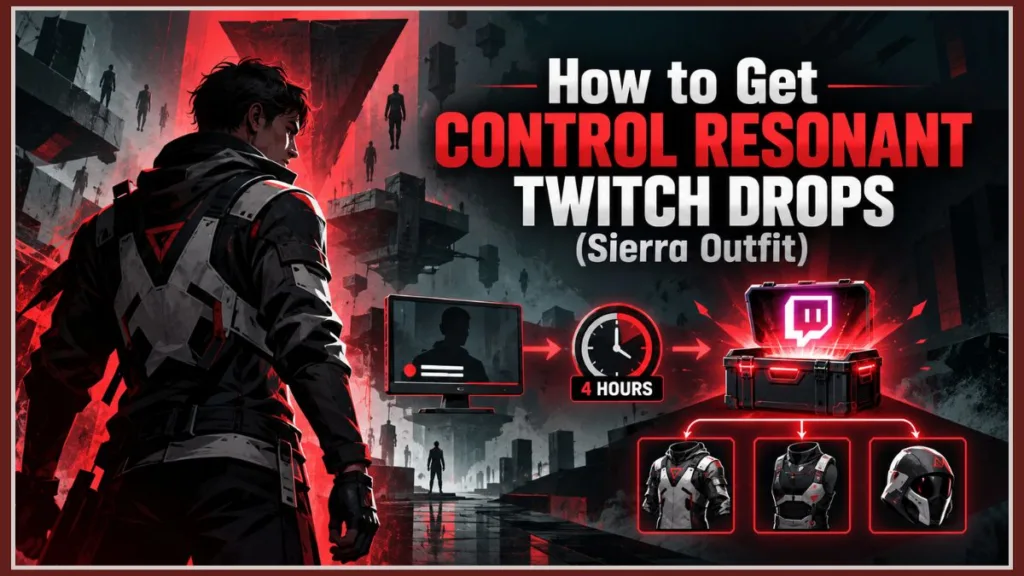
This guide walks you through the full sequence — watch, track, claim, redeem, equip — and covers what to do at every point where that sequence tends to break down, whether that’s a stream that doesn’t actually count, a reward stuck at 100% with no Claim button, or a code that doesn’t seem to match the item you expected.
What Are the Control Resonant Twitch Drops?
The Control Resonant Twitch Drops are a limited-time reward campaign built around the game’s launch. Rather than giving you one item for hitting one watch-time target, Remedy broke the reward into three separate pieces that unlock progressively as your watch time adds up. Together, those three pieces form the Sierra Outfit for Dylan Faden.
The three rewards are:
- Sierra Suit
- Sierra Vest
- Sierra Helmet
Alongside the outfit, the campaign also includes a Twitch badge called “Don’t Eat the Mold.” That badge lives on your Twitch account rather than in Dylan’s wardrobe — it’s a Twitch-side reward, not an in-game cosmetic, so don’t go looking for it in the customization menu.
It’s worth being clear about what these rewards actually are: cosmetic only. The Sierra pieces change how Dylan looks. They don’t add stats, don’t unlock new abilities, and don’t give you any kind of combat advantage.
Good to know: If you’re chasing gear that affects gameplay, this campaign isn’t that. It’s a free skin set for players who want to customize Dylan’s appearance without spending anything extra.
Sierra Outfit Rewards and Watch Time Requirements
Here’s exactly what you’re working toward:
| Reward | Watch Time Required | Piece Unlocked |
|---|---|---|
| Sierra Suit | 1 hour | Suit |
| Sierra Vest | 2 hours total | Vest |
| Sierra Helmet | 4 hours total | Helmet (completes the outfit) |
Each reward is tracked and claimed as its own individual Drop. That matters later when you get to the claiming and redemption steps — you’re not claiming “the Sierra Outfit” once. You’re claiming three separate items, potentially at three separate times, as you cross each threshold.
Control Resonant Twitch Drops: 1 Hour, 2 Hours, and 4 Hours Explained
This is the single most common point of confusion, so it’s worth spelling out clearly: the watch-time requirements are cumulative, not sequential.
That means you are not watching 1 hour for the Suit, then a separate 2 hours for the Vest, then a separate 4 hours for the Helmet. You’re watching one continuous, running total, and each reward unlocks as that total crosses its threshold:
- Reach 1 hour total → Sierra Suit becomes claimable
- Reach 2 hours total → Sierra Vest becomes claimable
- Reach 4 hours total → Sierra Helmet becomes claimable, completing the set
So the entire Sierra Outfit costs you 4 hours of qualifying watch time, start to finish — not 7. If you’ve already watched 2 hours and are wondering how much more you need for the Helmet, the answer is 2 more hours, not another full 4.
Quick gut check: If your Twitch Inventory shows 120 minutes of progress, that’s 2 hours — meaning your Sierra Vest should already be sitting there ready to claim, and your Suit should have been claimable an hour earlier. If it isn’t, that’s a sign to jump to the troubleshooting section below rather than assuming you need to watch longer.
How to Unlock the Sierra Helmet in Control Resonant
Because the Helmet is the final piece and the one that completes the set, it’s the milestone most players are actually chasing. There’s no separate quest, boss encounter, or in-game trigger tied to it — it’s purely a function of reaching 4 cumulative hours of qualifying watch time on an eligible Control Resonant stream during the campaign window.
Once your Inventory shows the Helmet reward at 100%, the process from there is identical to the Suit and Vest: open Drops & Rewards → Inventory, select Claim, and follow whatever redemption instructions Twitch shows you for that specific reward. Reaching 4 hours doesn’t hand you the Helmet automatically — you still have to claim it, the same as the two rewards before it.
Control Resonant Twitch Drops Campaign Dates
The campaign has a defined start and end, and it’s worth noting how it lines up against the game’s actual launch:
| Date | Event |
|---|---|
| September 22, 2026 | Twitch Drops campaign begins |
| September 24, 2026 | Control Resonant launches worldwide |
| October 13, 2026 | Twitch Drops campaign ends |
The full published times are:
- Campaign starts: September 22, 2026 — 7:00 AM PT / 10:00 AM ET / 3:00 PM BST / 5:00 PM EEST
- Campaign ends: October 13, 2026 — 7:00 AM PT / 10:00 AM ET / 3:00 PM BST / 5:00 PM EEST
Notice the campaign begins two days before Control Resonant is even available to play. That means your watch-time progress can start accumulating before you personally own or have launched the game — the Twitch side of this campaign doesn’t require you to already have Control Resonant installed.
Don’t confuse these two dates. September 22 is when the Twitch event opens. September 24 is when the game itself launches. If you’re trying to figure out why Drops appear active before the game shows up in your library, that two-day gap is the reason.
Are Control Resonant Twitch Drops Still Available?
If you’re reading this before October 13, 2026, yes — the campaign is active, and you can still start earning toward the Sierra Outfit or keep building on progress you already have. There’s no indication the campaign will be extended past that date, so treat October 13 as the real cutoff rather than a rough estimate.
If you’re arriving close to the deadline and haven’t started yet, remember the full requirement is only 4 hours — that’s still realistically doable in a single day if you plan around it.
What Happens to Partial Progress When the Campaign Ends?
This is where a lot of the campaign’s fine print actually matters, so it’s worth separating what’s confirmed from what isn’t.
What the campaign material makes clear is that you need to complete your qualifying viewing and claim your rewards within the active campaign window — between September 22 and October 13, 2026. If you’re sitting at, say, 2 hours and 45 minutes of progress when October 13 arrives, that remaining time toward the Helmet doesn’t carry forward. The campaign is scoped to that specific window, and there’s nothing in the official guidance suggesting unfinished progress toward a future milestone gets banked for later.
If you’re close to a milestone as the deadline approaches, prioritize finishing that one over starting anything else. There’s no confirmed mechanism for resuming partial progress after the campaign closes.
How to Get Control Resonant Twitch Drops
Here’s the full sequence from start to finish, along with what should happen at each step so you know whether it’s working correctly.
- Sign in to the Twitch account you want the rewards on. Your watch-time progress is tied to whichever Twitch account you’re logged into while watching — not to your Control Resonant account, your platform account, or an email address.
- Open the Control Resonant category on Twitch. This shows you every channel currently streaming the game.
- Confirm the stream shows the “Drops Enabled” label. This is the step that actually determines whether your watch time counts. A creator can be streaming Control Resonant without having Drops turned on for their channel — and if that’s the case, none of your watch time on that stream contributes to your progress.
- Leave the stream actively playing. A paused video, a muted-and-stopped player, or a fully backgrounded tab won’t register as active viewing.
- Check your progress under Drops & Rewards → Inventory. This is the authoritative place to check progress — not the on-stream notification, which can be easy to miss.
- Claim each reward once it hits 100%. This is a separate action from earning the watch time. Reaching the threshold makes a reward claimable — it doesn’t automatically deliver it.
- Follow the redemption instructions shown with that specific reward. Depending on the Drop, this might be an individual code, or a different kind of delivery instruction.
- Enter the code in-game, if applicable, through Options → Gameplay → Enter Redeem Code, then restart Control Resonant, and check Dylan’s customization menu to confirm the item is there.
You can switch between eligible streams without losing progress. If your streamer wraps up their broadcast, goes offline, or you’d simply rather watch someone else, moving to a different Drops Enabled Control Resonant stream doesn’t reset anything. Your cumulative watch time carries over as long as the new stream also qualifies.
Watching multiple streams at the same time does not add up faster. Opening four Drops Enabled streams simultaneously and expecting four times the progress doesn’t work that way — Twitch tracks your active viewing, not the number of open tabs, so there’s no advantage to running several broadcasts at once.
What Does “Drops Enabled” Mean for Control Resonant?
“Drops Enabled” is the specific label Twitch displays on a streamer’s channel when that broadcaster has opted into the current campaign. You’ll typically see it near the stream title or category information. It’s the single clearest signal that watching this particular channel will count toward your Sierra Outfit progress.
The distinction matters because plenty of creators will be playing Control Resonant around launch without necessarily having Drops enabled on their channel — participation is something the streamer opts into, not something automatic just because they’re playing the right game. If you can’t find the label on a stream, that stream isn’t contributing to your progress, regardless of how good the content is.
Claiming Drops on Different Devices
Your watch-time progress is tied to your Twitch account rather than a specific device, so you can genuinely start a session on one screen and check your Inventory from another later. Where things get more specific is the claiming step — not the watching.
- Desktop browser: fully supported for both watching qualifying streams and claiming completed rewards.
- Supported mobile Twitch apps (iOS/Android): claiming is supported here as well, assuming you’re running a current, supported version.
- Console and TV-based Twitch apps: claiming support is limited here. Even if you were watching through a console or smart TV app, the Claim button may not be available in that environment.
If you’ve been watching on a console or TV app and can’t locate a Claim option once a reward hits 100%, switch to a desktop browser or the mobile app to complete the claim itself.
How to Redeem Your Control Resonant Twitch Drops Codes
Claiming a reward on Twitch and actually seeing it on Dylan are two different milestones, and mixing them up is one of the more common mistakes with this campaign. Here’s the redemption process once a claim is in hand:
- Claim the reward first, under Drops & Rewards → Inventory. The redemption instructions for that specific Drop appear once you’ve claimed it — not before.
- Copy the code exactly, and keep it private. These codes are typically single-use. Posting one in chat, on Discord, in a forum thread, or in a public screenshot risks someone else redeeming it before you do.
- Open Control Resonant and navigate to Options → Gameplay → Enter Redeem Code.
- Enter the code carefully, checking for typos or accidental spaces — manual entry is where most redemption errors happen.
- Restart Control Resonant if the item doesn’t appear immediately after redeeming.
- Check Dylan’s outfit customization menu to confirm the piece is actually there.
If Twitch shows you a different kind of instruction instead of a code — such as an official account-connection prompt — follow that flow exactly as presented on Twitch or through an official Control Resonant source. Never enter your Twitch login credentials on a third-party site that claims to “activate” your reward for you.
Managing Multiple Sierra Codes at Once
Because the campaign is cumulative, it’s entirely possible to come back to your stream after a few hours and find two, or even all three, Sierra rewards sitting claimable at once. When that happens, resist the urge to treat it as one bulk unlock.
Each piece — Suit, Vest, and Helmet — is its own individual Drop with its own individual claim and its own individual redemption instructions. The safer approach is:
- Open Drops & Rewards → Inventory
- Claim one completed reward
- Note and redeem that specific piece in-game before moving to the next one
- Repeat for each remaining reward
Working through them one at a time, rather than claiming all three back-to-back and redeeming codes in a rush, meaningfully reduces the odds of mixing up which code belongs to which piece.
Sierra Suit and Helmet Codes Showing the Wrong Item
Some players have reported, in community discussion, that a Sierra Suit code appeared to unlock the Helmet instead, or that the naming worked the opposite way around.
Important distinction: This is a player-reported observation, not something Remedy has officially confirmed as a bug, so treat it with the appropriate amount of caution rather than assuming it will happen to you.
If you run into something that looks like this mix-up:
- Don’t assume your code is broken or panic and request a replacement immediately.
- Check Dylan’s actual outfit customization screen after restarting the game, rather than trusting the code’s label alone — several players in these discussions found the correct item was present once they actually looked in-game.
- If, after restarting and checking, the wrong item (or no item at all) is genuinely equipped, that’s the point where contacting official support makes sense.
What If Twitch Doesn’t Give You a Code at All?
Not every reward is guaranteed to work through a manually entered code. In some cases, the redemption step Twitch presents may be a different kind of instruction — such as an official connection or delivery prompt — rather than a text code you type in yourself.
If that’s what appears for one of your Sierra rewards, follow that specific flow exactly as Twitch presents it. Don’t search elsewhere for a code that isn’t there, and don’t trust a third-party page claiming to supply one.
Do Claimed Codes Expire When the Campaign Ends?
This is worth answering carefully, because there are two different rules at play here, and conflating them can lead to bad advice.
Twitch’s general platform policy gives players roughly a 14-day window after a campaign ends to claim Drops they’ve already earned. That’s a broad rule that applies across Twitch Drops campaigns generally.
The Control Resonant campaign’s own instructions, however, direct players to claim their completed Drops before the campaign closes on October 13, 2026 — and don’t separately confirm what happens to an already-claimed code once the event is over.
Given that uncertainty, the practical move is the same regardless of which rule technically governs it: claim your reward before October 13, save the code privately, and redeem it as soon as you reasonably can — rather than assuming a 14-day grace period will definitely apply to this specific event.
Can You Redeem a Twitch Drop If You Don’t Own Control Resonant Yet?
This comes up naturally given that the campaign starts two days before launch. The redemption step — entering a code through Options → Gameplay → Enter Redeem Code — happens inside Control Resonant itself, so you’ll need the game installed and running before you can complete that part.
That said, the Twitch side isn’t blocked by not owning the game yet. You can watch eligible streams and claim your rewards on Twitch ahead of purchasing or installing Control Resonant — that part of the process works independently. The redemption step is simply the one that has to wait.
Do You Need a Remedy Account for Control Resonant Twitch Drops?
No — a Remedy account is not required for this campaign. This is a genuinely useful distinction to know up front, because a lot of other Twitch Drops campaigns across different games do require linking your Twitch account to a separate publisher or developer account before anything unlocks. Control Resonant’s campaign doesn’t work that way.
Instead, the process splits cleanly into two independent sides:
- Twitch’s role: track your qualifying watch time and let you claim completed rewards once they’re ready.
- The game’s role: take whatever redemption instruction (typically a code) Twitch provides and apply the corresponding cosmetic to Dylan.
There’s no permanent account-linking step connecting the two. What that means practically is that the account that actually matters throughout the earning phase is your Twitch account — since that’s what your watch-time progress is tied to.
If you switch Twitch accounts partway through the campaign, your accumulated progress stays with the original account and won’t transfer. Pick one account at the start and stick with it for the full four hours.
Which Streams Actually Qualify?
This is worth revisiting on its own, because it’s the root cause behind most “my Drops aren’t working” situations. A stream only counts toward your progress if it meets both of these conditions:
- It’s streaming in the Control Resonant category on Twitch
- It’s displaying the Drops Enabled label
A creator playing Control Resonant without Drops enabled on their channel is not contributing to your progress, no matter how long you watch — the category alone isn’t enough.
When you’re unsure whether a specific stream qualifies, click the purple chest/Drops icon below the chat window. It opens the Drops panel for that channel and shows you exactly which campaign, if any, is currently active there — a much more reliable check than assuming based on the stream title.
Control Resonant Twitch Drops Not Working? Try This
If something in the sequence isn’t behaving the way it should, the fastest path to a fix is identifying which stage is actually stuck, rather than restarting the whole process from scratch. There are several distinct failure points, and each has its own fix.
Progress Isn’t Moving at All
Work through these in order:
- Confirm you’re signed into the correct Twitch account
- Confirm the stream is genuinely showing Drops Enabled
- Confirm the video is actively playing rather than paused
- Refresh both the stream and your Drops Inventory page
- Make sure your Twitch app or browser is up to date
Most stalled progress traces back to one of these.
Twitch Shows 100%, But There’s No Claim Button
At this point the watch-time problem is solved — this is a claiming issue instead.
- Refresh the Inventory page first.
- If that doesn’t surface a Claim button, sign out of Twitch and back in.
- Check whether an earlier Sierra reward is still sitting unclaimed — an unclaimed prior reward can sometimes hold up the next one from displaying properly.
If none of that resolves it, this sits on Twitch’s side of the system rather than Remedy’s, so Twitch Support is the more relevant place to go.
The Reward Says Claimed, but the Cosmetic Isn’t Showing In-Game
Stop troubleshooting the watch timer at this point — the claim already succeeded. Instead:
- Open the claimed reward and follow its exact redemption instructions
- Complete any required code entry or connection step
- Fully close and restart Control Resonant
- Check Dylan’s outfit customization menu again after the restart
The Campaign or a Reward Isn’t Showing Up in Your Inventory
Don’t rely on what a streamer says in chat about your standing.
- Open an eligible stream and click the purple Drops/chest icon to confirm the Control Resonant campaign is genuinely active there
- Check Drops & Rewards → Inventory again directly
- If it still isn’t appearing, try signing out of Twitch and back in
Your Redemption Code Isn’t Working
- First, double-check that you’re entering the code tied to the specific reward you intended — this matters more than it sounds given the multi-code nature of this campaign.
- Watch closely for characters that look similar when typed manually.
- Rather than immediately requesting a replacement, capture a screenshot of the actual error message you’re seeing.
Don’t post a screenshot of an unused code while asking for help troubleshooting — keep the code itself private even while seeking assistance.
What to Have Ready Before Contacting Support
If you’ve worked through every troubleshooting step above and your reward is still missing, have this on hand before you reach out:
- Which reward is missing (Suit, Vest, or Helmet)
- Your platform (PC, PS5, or Xbox Series X|S)
- Your Twitch display name
- Roughly when you claimed the Drop
- A screenshot showing the reward as “Claimed” in your Twitch Inventory
- A screenshot of any redemption error message
Never send your Twitch password, authentication codes, recovery codes, or an unused redemption code to support or anyone else — legitimate support doesn’t need any of those to investigate a missing item.
Can You Finish the Whole Campaign in One Day?
Yes. Because the entire requirement is 4 cumulative hours, there’s nothing structurally preventing you from completing all three Sierra rewards in a single sitting, or spreading that same 4 hours across a morning, an afternoon, and an evening if that fits your day better.
A few things that make a one-day run smoother:
- Pick one verified Drops Enabled stream and let it run rather than hopping around unnecessarily.
- Check your Inventory the moment you expect to hit a milestone, and claim it right away rather than letting it sit.
- If your chosen stream ends or you’d rather switch creators, feel free to — moving to a different eligible stream doesn’t cost you any progress.
Watching in the Background Without Spoilers
If you’d rather bank your watch time without actually seeing story beats or gameplay moments ahead of playing Control Resonant yourself, some players have found a workaround: muting the browser tab itself, rather than pausing or muting the Twitch video player.
The distinction matters. Muting the tab keeps the stream visually and audibly out of the way while it continues playing in the background — and Twitch still registers that as active viewing. Pausing the player, on the other hand, stops playback entirely, which means your watch time stops accumulating too.
This is a community-reported approach, not an official Remedy or Twitch feature, so there’s no guarantee it behaves identically across every browser or device setup. If you’re using it, check your Drops Inventory periodically to confirm progress is genuinely still moving.
Control Resonant Twitch Drops Timeline: September–October 2026
Here’s the full campaign laid out against the game’s actual release, so the sequence of dates is easy to reference at a glance:
| Date | Event |
|---|---|
| September 22, 2026 | Twitch Drops campaign begins (7:00 AM PT / 10:00 AM ET / 3:00 PM BST / 5:00 PM EEST) |
| September 24, 2026 | Control Resonant launches worldwide |
| October 13, 2026 | Twitch Drops campaign ends (7:00 AM PT / 10:00 AM ET / 3:00 PM BST / 5:00 PM EEST) |
The campaign opens before launch, runs through the entirety of the game’s first three weeks, and closes on October 13. If you’re planning your viewing around this event, that’s roughly a three-week window to fit in 4 hours of qualifying watch time — plenty of room, even if you’re not able to jump in on day one.
Frequently Asked Questions
What rewards can I get from Control Resonant Twitch Drops?
The three-piece Sierra Outfit for Dylan Faden — Sierra Suit, Sierra Vest, and Sierra Helmet — plus a separate “Don’t Eat the Mold” Twitch badge.
How many hours of watching do I need for the full outfit?
Four cumulative hours total gets you all three Sierra pieces.
Do I need to connect my Twitch account to a Remedy account?
No. The campaign doesn’t require linking a Remedy account — only your Twitch account matters for earning and claiming.
Can I watch different streamers and keep my progress?
Yes, as long as each stream you move to is also displaying Drops Enabled for Control Resonant.
Does watching multiple streams at once help me finish faster?
No. Twitch tracks your active viewing, not the number of streams open, so running several at once doesn’t multiply your progress.
Are Control Resonant Twitch Drops cosmetic only?
Yes — the Sierra pieces change Dylan’s appearance only, with no stat or gameplay effect.
Is the Sierra Outfit exclusive to this Twitch campaign?
Based on the campaign information, yes — it’s specifically tied to this Twitch Drops event rather than being available through normal in-game progression.
What happens if I don’t claim my reward before October 13?
The campaign’s own guidance is to claim completed Drops before it ends. What happens to an already-claimed but unredeemed code afterward isn’t explicitly confirmed, so the safest approach is claiming and redeeming before the deadline rather than relying on Twitch’s general 14-day post-campaign policy.
Can I claim Drops on console?
Claiming is more reliably supported through a desktop browser or a supported mobile Twitch app. Some console and TV-based Twitch apps have limited or no support for the claim step, even if you watched through one.
Are Control Resonant Twitch Drops still available right now?
Yes, as long as it’s before October 13, 2026 — the campaign remains active through that date.
Can I earn the codes before I own the game?
Yes, the Twitch-side watching and claiming can happen before you own Control Resonant. The in-game redemption step, however, requires the game to be installed and running.
What if my Sierra Suit code seems to unlock the wrong piece?
This has been reported by some players in community discussions, though it isn’t an officially confirmed Remedy issue. Check Dylan’s actual customization menu after restarting the game before assuming something is broken.
Final Thoughts
The Control Resonant Twitch Drops campaign is a genuinely low-friction way to walk away with a free, exclusive outfit for Dylan — no Remedy account to set up, no purchase required, and only 4 cumulative hours standing between you and the complete Sierra set. The parts that actually trip players up aren’t the watching itself; they’re skipping the Drops Enabled check, letting a completed reward sit unclaimed, or assuming a claimed Drop means the cosmetic is already equipped when there’s still a redemption step to finish.
Work through it in order — sign into the right Twitch account, confirm the stream qualifies, watch, check your Inventory, claim, redeem the code in-game, and verify it on Dylan — and there’s no reason not to have the full Sierra Outfit well before October 13.
If you’ve run into a code that didn’t behave the way you expected, found a streamer that’s consistently Drops Enabled, or worked out a claiming quirk of your own, drop it in the comments — it genuinely helps the next reader trying to sort out the same thing.
Discover more from Izoate
Subscribe to get the latest posts sent to your email.