
Confused about the Vault Laser Grid in GTA Online? Learn how to disable it, why no hacking is required, where to activate the 3 power panels, and how to avoid triggering the alarm.
Why the Vault Laser Grid Is the Biggest Stealth Challenge in the Kortz Center Heist
If you’ve reached the vault laser grid in the GTA Online Kortz Center Heist, you’ve already completed one of the most demanding stealth missions in the game. However, the final security checkpoint standing between you and the vault is where many players lose their flawless run. Unlike previous heists that focus primarily on combat or simple hacking, this section tests your timing, movement, and precision under pressure.
The vault laser grid isn’t something you can simply sprint through or disable with a single button press. Instead, you’ll need to carefully navigate multiple moving laser patterns, locate and activate three wall-mounted power panels, and avoid triggering the facility’s security system. Every movement matters because touching even a single laser will sound the alarm, alert guards, and end your stealth approach. While you can continue the heist after being detected, doing so comes with consequences, including tougher enemy resistance and the potential loss of valuable loot.
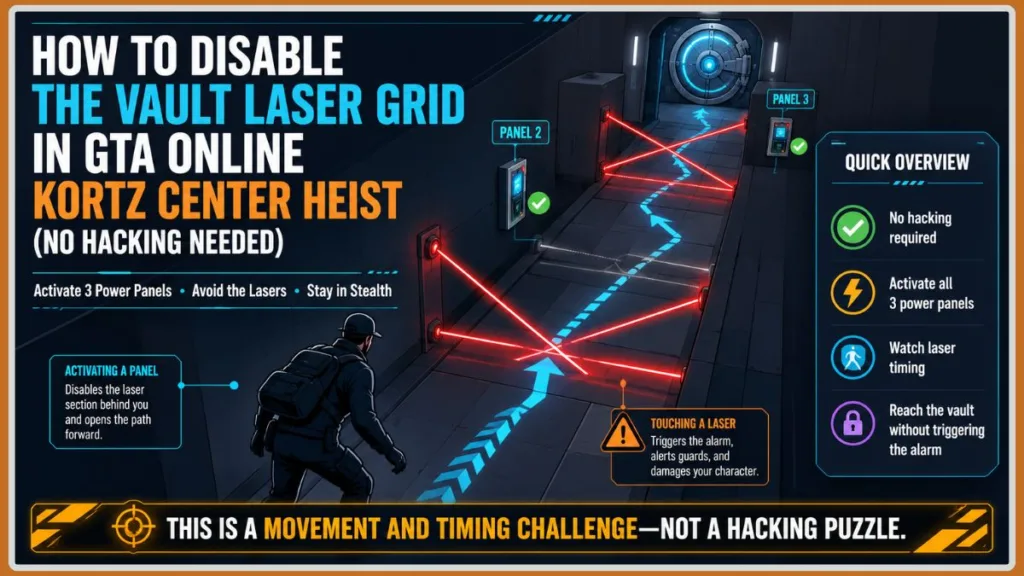
The challenge doesn’t end there. The laser beams also inflict damage, meaning repeated mistakes can quickly drain your health before you even reach the vault. This combination of stealth, precision, and survival has made the laser grid one of the most talked-about sections of the Kortz Center Heist, with many players searching for ways to disable the lasers, avoid detection, or understand why they keep failing.
Important: Quick Restart does not restore stealth. If you trigger the alarm and restart from the checkpoint, the facility remains on alert. To attempt the heist in stealth again, you’ll need to exit the mission and restart it from the planning board.
Community discussions have also revealed that most players aren’t struggling because they can’t find the power panels—they’re struggling with reading the laser patterns, knowing when to jump or crouch, and deciding the safest moment to move. Many experienced players even recommend switching to first-person view because it provides better control and makes navigating the tight laser gaps much easier.
In this guide, you’ll learn how to disable the vault laser grid in the GTA Online Kortz Center Heist, where to find each laser control panel, and the safest way to move through every laser section without triggering the alarm. We’ll also cover practical tips from experienced players, explain common mistakes that cause stealth runs to fail, and show you how to complete this challenging mechanic with confidence—even if it’s your first attempt.
Quick Answer: Fastest Way to Disable the Vault Laser Grid Without Triggering the Alarm
The fastest and safest way to disable the vault laser grid in the GTA Online Kortz Center Heist is to activate the three wall-mounted power panels located throughout the laser room while carefully avoiding the moving laser patterns. Each panel permanently disables the laser section behind you, making it easier to progress toward the vault without accidentally triggering the alarm.
To complete this section successfully, switch to first-person view for better movement precision, watch the laser movement cycle before advancing, jump over low floor lasers, and crouch under sweeping laser beams when necessary. Rather than rushing through the room, focus on timing your movements and reaching each power panel safely.
Quick Tip: Don’t try to dodge every laser at once. Your objective is to safely reach each power panel, as every panel you activate removes the completed laser section behind you and reduces the risk of making a costly mistake.
If you accidentally touch a laser, the security alarm will immediately activate, alerting guards and ending your stealth run. Although you can still continue the heist, the mission becomes significantly more difficult because enemies become aware of your presence, and valuable loot—such as paintings—may lose part of its value after the alarm is triggered.
Warning: Using Quick Restart after triggering the alarm does not reset the stealth state. The facility remains on alert, so if you want another silent attempt, you’ll need to leave the heist and restart it from the planning board.
Many players initially believe there’s a hacking puzzle that disables the entire laser grid. In reality, the challenge is movement and timing, not solving a traditional hacking minigame. The key is to identify safe openings between the laser patterns, move with patience, and activate all three power panels in sequence to clear the path to the vault.
How the Vault Laser Grid Works in the GTA Online Kortz Center Heist
Before attempting to cross the vault security room, it’s important to understand how the vault laser grid works. Unlike a traditional hacking sequence where you solve a puzzle to unlock the vault, this mechanic is a movement-based stealth challenge. Your objective is to safely navigate through multiple laser patterns while activating three wall-mounted power panels that gradually disable the security system.
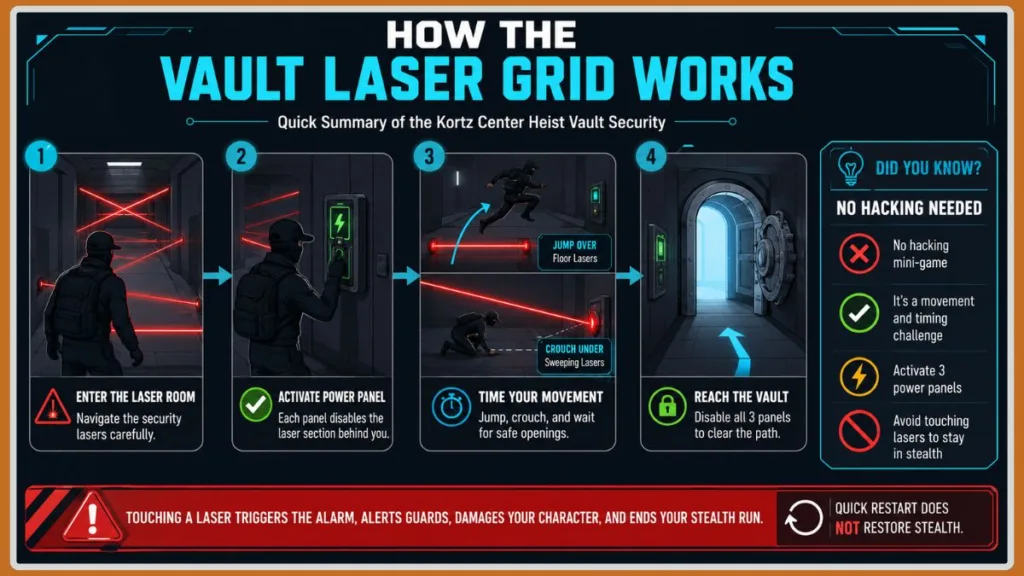
The laser room is divided into three sections, and each section contains a power panel mounted on either the left or right wall. Every time you successfully interact with one of these panels, the laser section you’ve just passed is permanently deactivated. This means you don’t have to worry about accidentally triggering those lasers if you need to reposition or if your teammates are following behind.
Important: Each power panel only disables the laser section behind you. You’ll still need to carefully navigate the remaining laser patterns until all three panels have been activated.
Although the overall objective remains the same, each section introduces a different laser pattern, requiring you to adjust your movement instead of relying on a single strategy throughout the room.
First Laser Section
The opening section introduces diagonal “X”-shaped lasers that create small gaps for you to pass through. This area helps you understand the timing mechanic before you reach the first wall panel.
Second Laser Section
After disabling the first panel, the challenge becomes more difficult. Along with the diagonal laser pattern, you’ll encounter a moving floor laser that sweeps across your path. You’ll need to wait for the right moment to move or jump over the floor laser before reaching the second power panel.
Final Laser Section
The last section is widely considered the hardest part of the vault laser grid. Here, you’ll need to combine everything you’ve learned by:
- Waiting for a safe opening between the diagonal lasers.
- Crouching under a sweeping laser beam at the correct moment.
- Moving through another opening before activating the final wall-mounted power panel near the vault door.
This combination of timing and movement is why many players fail repeatedly during their first few attempts.
Tip: Patience is more important than speed. Watch at least one complete laser movement cycle before making your move. Waiting a few extra seconds is much better than triggering the alarm and losing your stealth run.
What Happens If You Touch a Laser?
The laser grid is designed to punish mistakes. If any laser comes into contact with your character, several things happen immediately:
- The security alarm is triggered.
- Guards and police are alerted to your presence.
- Your stealth approach ends, forcing you into a combat-focused escape.
- Valuable loot, including paintings, may lose part of its value after detection.
- The laser can also deal damage to your character, making repeated mistakes dangerous.
While the heist doesn’t end immediately after detection, completing the remaining objectives becomes much more challenging.
Why Players Find This Mechanic So Difficult
Community feedback shows that most players don’t struggle because they can’t find the power panels—they struggle because they rush through the room without learning the laser timing. Others mistakenly expect a hacking puzzle or assume they need to avoid every laser in the room without realizing that each activated panel permanently clears the section behind them.
Experienced players also recommend switching to first-person view, as it offers better visibility and movement precision when navigating tight spaces, especially during the second and third laser sections.
Before You Enter the Vault Laser Room: Preparation Tips for a Successful Stealth Run
Successfully navigating the vault laser grid begins before you step into the laser room. While the challenge depends on timing and precision, taking a few moments to prepare can significantly increase your chances of reaching the vault without triggering the alarm.
Many players who fail this section don’t necessarily make mistakes inside the laser grid—they enter the room unprepared, rush their movements, or use camera settings that make the laser patterns harder to read. Following these preparation tips will help you approach the challenge with greater confidence.
Switch to First-Person View
One of the most common recommendations from experienced GTA Online players is to switch to first-person view before entering the laser room.
Compared to third-person, first-person provides:
- Better visibility between narrow laser gaps.
- More precise movement when positioning your character.
- Easier timing for jumping over floor lasers.
- Improved control when crouching under sweeping laser beams.
While you can complete the section in third-person, many players find first-person much more comfortable for the tight movement required during the second and third laser sections.
Pro Tip: If you’re struggling to judge distances or keep clipping the lasers, try switching to first-person mode before your next attempt. Many players report that it makes navigating the laser grid noticeably easier.
Learn the Essential Movement Controls
The vault laser grid isn’t about speed—it’s about using the right movement at the right time.
Before entering the room, make sure you’re comfortable with:
- Walking instead of constantly sprinting.
- Jumping over low-moving floor lasers when needed.
- Crouching under sweeping laser beams.
- Moving through small openings between diagonal laser patterns.
These simple actions become increasingly important as you progress toward the final power panel.
Important: Don’t spam the jump button or repeatedly change directions. Wait for a safe opening, then make one deliberate movement.
Watch the Laser Pattern Before Moving
One of the biggest mistakes players make is running into the laser room as soon as they see an opening.
Instead, spend a few seconds observing the laser movement cycle.
Watching one complete cycle helps you:
- Identify safe openings.
- Understand how fast the lasers move.
- Know when to jump or crouch.
- Plan your route to the next power panel.
In most cases, patience is safer than rushing, especially during the second and third sections where multiple laser patterns overlap.
Best Practice: Watch the lasers complete one full cycle before taking your first step. This simple habit can prevent unnecessary mistakes.
Coordinate With Your Team in Co-op
If you’re completing the Kortz Center Heist with teammates, good communication is just as important as precise movement.
Rather than having everyone move through the lasers at the same time:
- Let one player clear each section first.
- Allow them to activate the next power panel.
- Once the previous laser section is disabled, the remaining teammates can follow with a much lower risk of triggering the alarm.
Trying to squeeze multiple players through the same opening often leads to accidental collisions with the lasers and can quickly end a stealth run.
Stay Calm and Avoid Rushing
It’s easy to panic once you’re surrounded by moving lasers, especially near the final section. However, the vault laser grid rewards careful timing, not fast reactions.
Many experienced players recommend treating each section as a separate challenge:
- Reach one power panel.
- Wait and observe the next laser pattern.
- Plan your movement.
- Then continue to the next section.
Breaking the room into smaller objectives makes the entire sequence feel much more manageable.
Remember: Waiting two or three extra seconds is far better than triggering the alarm and restarting the entire heist.
Know the Consequences of a Mistake
Before you begin, it’s worth remembering what’s at stake.
If you touch a laser:
- The alarm immediately sounds.
- Guards become alerted.
- Your stealth run ends.
- Valuable loot may lose part of its value.
- The laser can also damage your character, making survival more difficult.
Perhaps most importantly, using Quick Restart won’t restore stealth. If your goal is to complete the heist silently, you’ll need to leave the mission and restart it from the planning board after being detected.
How to Disable the Vault Laser Grid in GTA Online (Step-by-Step Walkthrough)
Once you enter the vault laser room in the GTA Online Kortz Center Heist, your objective is straightforward: activate all three wall-mounted power panels while safely navigating the moving laser patterns. Each activated panel permanently disables the laser section behind you, making the remaining journey to the vault progressively safer.
Although the route is linear, each section introduces a new obstacle that requires different movement techniques. Instead of rushing from one panel to the next, focus on reading the laser patterns, moving at the right moment, and staying calm throughout the sequence.
Important: The goal isn’t to avoid every laser in the room forever. Your objective is to safely reach each power panel, which gradually clears the path behind you.
Step 1: Reach and Activate the First Wall Panel on the Left Side
The first section serves as your introduction to the vault’s laser security system. You’ll encounter diagonal X-shaped laser patterns that create temporary openings as they move.
After the cutscene ends, head toward the left side of the room and stay close to the wall. Rather than running immediately, watch the laser movement for a moment to identify a safe opening.
As you move forward, you’ll notice the first wall-mounted power panel on the left wall. Although you may reach it quickly, don’t interact with it immediately if moving lasers are still crossing your path. Wait until the nearby laser movement clears, then activate the panel.
Once activated, the first laser section behind you is permanently disabled, giving you a safer route if you need to reposition or if teammates are following behind.
Pro Tip: Stay close to the left wall instead of moving through the center of the room. This provides a more predictable route to the first power panel.
Common Mistake
Many players sprint toward the panel without waiting for a safe opening, causing them to collide with the first X-shaped laser pattern and instantly trigger the alarm.
Avoid This: Watch the laser movement first, then move with confidence. Waiting a second or two is much safer than rushing into the lasers.
Step 2: Navigate the Floor Laser and Disable the Second Wall Panel
After disabling the first panel, continue toward the right side of the room, where you’ll find the second power panel.
This section becomes noticeably more challenging because it introduces a moving floor laser in addition to the diagonal laser pattern. You’ll need to manage both hazards at the same time.
As you approach the center of the room, look for the opening between the X-shaped lasers while also keeping an eye on the floor laser sweeping across your path.
You have two safe options:
- Wait until the floor laser disappears before moving.
- Carefully time a jump over the floor laser if the opportunity presents itself.
Once the floor is clear, move quickly through the opening and interact with the second wall-mounted power panel on the right side.
Activating this panel disables another section of the laser grid, making it much easier to continue toward the vault.
Expert Tip: Many experienced players recommend focusing on the moving floor laser first. Once it’s out of the way, reaching the second panel becomes much less stressful.
Common Mistake
A large number of players focus entirely on reaching the panel and forget about the sweeping floor laser. As a result, they successfully avoid the diagonal lasers only to trigger the alarm by stepping directly into the moving beam.
Remember: Watch the floor as much as the walls. The moving floor laser is responsible for many failed stealth attempts in this section.
Step 3: Safely Reach the Final Wall Panel and Unlock the Vault Path
The third and final section is widely regarded as the hardest part of the vault laser grid. It combines multiple laser movements that require careful timing rather than quick reactions.
After leaving the second panel, move toward the center of the room and look for a safe gap between the diagonal laser patterns. Don’t rush into the opening—wait until there’s enough space to pass through safely.
Once you’re through the first gap, you’ll encounter a slow-moving sweeping laser approaching your position.
Immediately crouch beneath the beam and remain crouched until it has completely passed.
Standing up too early is one of the most common reasons players trigger the alarm during this section.
After the sweeping laser moves away, wait for another safe opening between the remaining diagonal lasers before continuing toward the left wall near the vault door.
There, you’ll find the third and final power panel.
Activate it to disable the remaining laser security, clearing the path to the vault entrance.
Important: Stay crouched until the sweeping laser has fully passed. Standing up even a moment too early can trigger the alarm.
Community Insight
Many experienced players recommend breaking this final section into three simple actions instead of trying to complete it in one continuous movement:
- Wait for the diagonal opening.
- Crouch under the sweeping laser.
- Move through the final opening and activate the last panel.
Thinking about the sequence in smaller steps makes it much easier to stay calm and avoid mistakes.
What Happens After Activating the Third Panel?
Once you’ve activated the final power panel, the vault laser grid is fully disabled, allowing you to safely approach the vault door and continue the heist without breaking stealth.
If you’ve avoided every laser along the way, you’ll preserve your stealth approach, making the remainder of the mission significantly smoother and helping protect the value of the loot inside the vault.
How to Navigate the Vault Laser Grid Successfully Without Triggering the Alarm
Knowing where the three power panels are located is only half the challenge. The real test is learning how to navigate the vault laser grid without touching the moving laser beams. This section is designed to reward patience, observation, and precise movement rather than speed.
If you’ve been repeatedly triggering the alarm, the problem usually isn’t the route—it’s timing. The following techniques will help you move through the laser room more consistently and improve your chances of completing the Kortz Center Heist in stealth.
Learn the Laser Patterns Before Making Your Move
Every laser section follows a predictable movement cycle. Instead of rushing forward the moment you see an opening, take a few seconds to watch how the lasers move.
Observing one complete cycle helps you:
- Identify safe gaps between laser beams.
- Learn when the floor laser disappears.
- Recognize the best time to jump or crouch.
- Plan your route to the next power panel.
Many failed attempts happen because players react too quickly instead of letting the laser pattern reveal the safest path.
Best Practice: Watch one complete laser cycle before moving. Spending a few extra seconds observing the pattern is much faster than restarting the entire heist after triggering the alarm.
Why First-Person View Makes the Laser Grid Easier to Complete
Although you can navigate the vault laser room in either camera mode, many experienced players recommend switching to first-person view before entering.
First-person offers several advantages:
- Better visibility through narrow laser gaps.
- More accurate character positioning.
- Improved control while jumping over floor lasers.
- Easier movement when crouching under sweeping lasers.
- Better awareness of your surroundings in tight spaces.
Community discussions also suggest that first-person movement feels more responsive during this section, making it easier to avoid clipping the laser beams.
Tip: If you’ve failed multiple attempts in third-person view, try switching to first-person mode. It’s one of the most frequently recommended strategies from experienced GTA Online players.
When to Jump Over Floor Lasers Without Getting Detected
The moving floor laser introduced during the second section is responsible for many failed stealth runs.
Rather than jumping immediately when you see it, wait until you’ve confirmed the timing.
When dealing with floor lasers:
- Watch the laser’s movement before reacting.
- Jump only when you’re confident you’ll clear the beam.
- Land in a safe area before continuing toward the next panel.
- Avoid repeatedly pressing the jump button, as mistimed jumps can place you directly into another laser.
Some players also report that facing the wall before performing a small hop over low lasers makes the jump feel more consistent. While this isn’t an official mechanic, it’s a community tip that some players have found helpful.
Community Tip: If you’re struggling with low laser jumps, try facing the nearby wall before hopping over the beam. Some players find this improves movement consistency, although timing remains the most important factor.
When to Crouch Under Sweeping Lasers Safely
The final laser section introduces a slow-moving laser beam that requires you to crouch underneath it.
This part is less about speed and more about patience.
To avoid triggering the alarm:
- Wait until you’ve reached the correct position.
- Crouch before the laser reaches you.
- Stay crouched until the beam has completely passed.
- Stand up only after you’ve confirmed the path is clear.
One common mistake is standing up too early, causing the laser to clip your character at the last moment.
Important: Remain crouched until the sweeping laser has fully passed. Standing up even a fraction of a second too early can immediately trigger the security system.
Why Patience Is the Key to Completing the Laser Room
One lesson appears repeatedly in community discussions: players who rush usually fail, while players who slow down and observe the laser patterns tend to complete the section much more consistently.
Rather than treating the room as one continuous obstacle, divide it into smaller goals:
- Reach the first power panel.
- Observe the next laser pattern.
- Safely reach the second panel.
- Pause again before entering the final section.
- Complete the last laser sequence and activate the final panel.
Breaking the challenge into smaller steps helps reduce pressure and makes the movement feel much more manageable.
If you’re playing with friends, avoid sending everyone through the lasers at once. Let one teammate clear each section first, activate the power panel, and then allow the others to follow after the previous laser section has been disabled. This simple strategy greatly reduces the risk of someone accidentally triggering the alarm.
Expert Advice: Slow, deliberate movement is more reliable than sprinting through the laser room. Waiting just a few seconds for the right opening is often the difference between reaching the vault undetected and losing your stealth bonus.
By combining careful observation, precise movement, and the right camera settings, you’ll greatly improve your chances of clearing the vault laser grid on your first attempt. Next, let’s answer a common question many players ask: Can you bypass the vault laser grid without disabling the power panels?
Can You Bypass the Vault Laser Grid Without Disabling the Power Panels?
If you’re searching for a shortcut, you’re not alone. Many GTA Online players wonder whether it’s possible to bypass the vault laser grid entirely instead of carefully navigating the room. After all, it’s one of the most challenging sections in the Kortz Center Heist, and repeated failures often lead players to look for an easier alternative.
The short answer is no.
There is no legitimate way to skip or completely bypass the vault laser grid during the heist. The laser room is a required security checkpoint, and the intended progression is to navigate the laser patterns while activating the three wall-mounted power panels in sequence. Each panel disables the completed section behind you until the entire laser grid has been cleared.
Important: You cannot disable the entire laser grid with a single switch or hacking minigame. The only intended method is to activate all three power panels while avoiding the moving lasers.
Is There a Hidden Shortcut?
Based on the current version of the Kortz Center Heist, there is no alternate entrance, secret route, or hidden switch that lets you avoid the laser room altogether.
Although players continue experimenting with different approaches, the vault security system is designed to make everyone complete the same sequence before reaching the vault.
If you come across videos claiming to skip the laser room entirely, keep in mind that they may:
- Feature temporary glitches that could be patched.
- Show behavior from an older game version.
- Use methods that aren’t intended by Rockstar Games.
Because these techniques aren’t officially supported, they may stop working after future game updates.
Note: Community-discovered tricks may occasionally appear online, but they shouldn’t be considered reliable long-term strategies since Rockstar can fix unintended exploits in future patches.
Can You Ignore the Lasers and Continue?
Technically, yes—but with significant consequences.
If you touch a laser:
- The security alarm activates immediately.
- Guards and police are alerted.
- Your stealth run ends.
- The laser can damage your character.
- Valuable loot, including paintings, may lose part of its value after detection.
While the heist doesn’t fail instantly, continuing after detection makes the remaining objectives much more difficult because you’ll be dealing with alerted enemies instead of maintaining a stealth approach.
For players aiming to maximize rewards and complete the mission cleanly, triggering the alarm is something you’ll want to avoid whenever possible.
Can Quick Restart Restore Stealth?
This is another common misconception.
Many players assume that selecting Quick Restart after triggering the alarm will reset the laser room and let them try again silently.
Unfortunately, that’s not how the mechanic works.
Once the alarm has been triggered:
- The facility remains on alert.
- Restarting from the checkpoint does not restore stealth.
- If you want another silent attempt, you’ll need to leave the heist and restart it from the planning board.
Warning: If your goal is a full stealth completion, don’t rely on Quick Restart. Exiting and restarting the heist is currently the only way to reset the stealth state after being detected.
The Best Strategy Is to Master the Mechanic
Instead of looking for ways to skip the vault laser grid, it’s far more effective to learn how the mechanic works.
Once you understand:
- Where each power panel is located,
- How the laser patterns move,
- When to jump or crouch, and
- Why patience is more important than rushing,
the vault laser room becomes much more manageable—even on repeat runs.
Many players who initially found this section frustrating report that after learning the laser timing and movement patterns, they were able to complete it consistently without triggering the alarm.
What Happens If You Trigger the Vault Laser Grid Alarm?
Accidentally touching one of the vault laser beams doesn’t immediately end the Kortz Center Heist, but it does have serious consequences that can make the remainder of the mission much more difficult. If your goal is to complete the heist in stealth and maximize your rewards, avoiding the alarm should be one of your highest priorities.
The vault laser grid is designed as the final security checkpoint before the vault. Once the security system detects you, the mission immediately switches from a stealth-focused approach to an active combat encounter.
Warning: Touching any laser instantly triggers the security alarm. Even a brief contact with a moving laser beam is enough to alert the entire facility.
Guards and Police Are Immediately Alerted
The most noticeable consequence is that the facility’s security system goes into lockdown.
Once the alarm is triggered:
- Guards become aware of your location.
- Police are alerted to the break-in.
- Your carefully planned stealth approach immediately ends.
- You’ll have to fight your way through the remaining objectives instead of quietly completing the heist.
Although the mission remains playable, losing stealth usually makes every objective after the vault significantly more challenging.
Your Loot May Lose Value
Being detected doesn’t just increase combat—it can also affect your potential rewards.
If the alarm is triggered during the vault sequence, valuable loot, including paintings, may lose part of its value before you successfully escape. This means a single mistake can reduce the amount of money your crew earns at the end of the heist.
For players attempting to maximize their payout, maintaining stealth until the vault is one of the most effective ways to protect the value of the loot.
Important: A clean stealth run isn’t just easier—it can also be more profitable. Avoiding the alarm helps preserve the value of the items you’re stealing.
The Lasers Can Damage Your Character
Many players focus only on avoiding detection, but the lasers also present a direct survival risk.
Touching an active laser doesn’t simply activate the alarm—it can also damage your character’s health.
While a single mistake may not be fatal, repeated contact with the lasers can quickly leave you with very little health before you even reach the vault, making the remaining combat sections much more dangerous.
Quick Restart Doesn’t Reset the Alarm
One of the biggest misconceptions surrounding the vault laser grid is how Quick Restart works.
Many players expect restarting from the checkpoint to restore the stealth state and allow another silent attempt.
Unfortunately, that’s not the case.
If you trigger the alarm and choose Quick Restart:
- The facility remains on alert.
- Stealth is not restored.
- The alarm state carries over into the restarted checkpoint.
If you want another opportunity to complete the heist without detection, you’ll need to:
- Leave the current heist.
- Return to the planning board.
- Start the heist again from the beginning.
Warning: Quick Restart only resets your position—it does not reset the facility’s security status. To regain a full stealth attempt, you must restart the heist from the planning board.
Can You Still Finish the Heist After Triggering the Alarm?
Yes.
Triggering the vault laser alarm does not automatically fail the Kortz Center Heist.
You can continue the mission and eventually reach the vault, but you’ll need to deal with alerted enemies and the additional pressure that comes with losing stealth.
Whether you continue or restart depends on your objective:
- If you’re simply trying to complete the heist, continuing may be the quickest option.
- If you’re aiming for a clean stealth run, maximum loot value, or a personal challenge, restarting from the planning board is usually the better choice.
Should You Restart or Keep Going?
If you’re playing casually or learning the heist for the first time, continuing after the alarm can help you become familiar with the remaining objectives.
However, if you’re farming the heist for the best possible payout, it’s generally worth restarting and attempting the laser section again without triggering the alarm.
Many experienced players recommend treating the vault laser grid as a skill that improves with practice. Once you understand the timing of each laser pattern and the location of every power panel, maintaining stealth becomes much more consistent.
Common Vault Laser Grid Mistakes That Cause Players to Fail the Heist
Even after learning where the three power panels are located, many players still trigger the alarm because of small mistakes in movement or timing. Based on gameplay mechanics and community discussions, most failed stealth attempts happen for the same reasons.
The good news is that these mistakes are easy to avoid once you know what to look for. Here’s what commonly goes wrong and how to prevent it.
| Common Mistake | What Happens | How to Avoid It |
|---|---|---|
| Rushing into the laser room immediately | You misjudge the laser timing and trigger the alarm. | Watch at least one complete laser cycle before making your first move. |
| Playing in third-person view | It’s harder to judge distances and move through narrow gaps. | Switch to first-person view for better visibility and more precise movement. |
| Ignoring the moving floor laser | You avoid the diagonal lasers but get caught by the floor laser. | Keep an eye on both the floor and wall lasers before moving. |
| Standing up too early while crouching | The sweeping laser clips your character and activates the alarm. | Stay fully crouched until the laser has completely passed. |
| Focusing only on the power panel | You run directly into a laser while trying to reach the panel quickly. | Focus on laser movement first, then move toward the panel when the path is safe. |
| Everyone moving together in co-op | One teammate accidentally trips the laser, ending the stealth run for everyone. | Let one player clear each section first, then have the rest of the team follow after the panel is activated. |
| Assuming Quick Restart restores stealth | The checkpoint reloads, but the facility remains on alert. | If you want another stealth attempt, restart the heist from the planning board instead. |
Mistake #1: Rushing Instead of Watching the Laser Pattern
One of the biggest reasons players fail is trying to complete the laser room as quickly as possible.
While speed might seem like the safest strategy, the vault laser grid is designed around timing, not sprinting.
Take a moment to observe how the lasers move before entering each section. Once you understand the pattern, the safest route becomes much easier to identify.
Best Practice: Patience beats speed. Waiting a few seconds for a safe opening is much faster than restarting the entire heist after triggering the alarm.
Mistake #2: Forgetting That Each Section Is Different
Some players expect every laser section to behave the same way.
In reality:
- The first section focuses on navigating diagonal X-shaped lasers.
- The second section adds a moving floor laser that requires careful timing or a well-timed jump.
- The final section combines diagonal lasers with a sweeping laser that requires you to crouch.
Treating every section the same often leads to unnecessary mistakes.
Mistake #3: Not Using the Right Movement
The vault laser grid requires more than simply running forward.
Depending on the obstacle, you’ll need to:
- Walk carefully through narrow openings.
- Jump over low floor lasers when appropriate.
- Crouch under sweeping laser beams.
- Pause and wait when the path isn’t clear.
Many players repeatedly fail because they try to sprint through every obstacle instead of adapting to each laser pattern.
Mistake #4: Misunderstanding How the Power Panels Work
Some players believe they need to dodge every laser in the room from start to finish.
In reality, each activated power panel permanently disables the laser section behind you.
This means you only need to focus on the current obstacle, not the entire room.
Remember: Your goal isn’t to avoid every laser forever—it’s to safely reach the next power panel. Each activated panel makes the rest of the room easier to navigate.
Mistake #5: Ignoring Community-Tested Tips
Experienced GTA Online players have shared several practical strategies that can make the laser room much easier.
Some of the most helpful suggestions include:
- Switching to first-person view for better movement precision.
- Watching a full laser cycle before advancing.
- Letting one teammate clear each section first in multiplayer.
- Staying calm instead of trying to rush every opening.
- Some players also report that facing the wall before hopping over low lasers makes the jump feel more consistent, although this is a community tip rather than an official mechanic.
These small adjustments may seem minor, but together they can greatly improve your chances of completing the vault laser grid without triggering the alarm.
Expert Tip: If you’ve failed several attempts in a row, don’t keep repeating the same strategy. Slow down, observe the laser timing, and adjust your movement. Most players improve dramatically after learning the laser patterns instead of relying on quick reactions.
Avoiding these common mistakes will make the vault laser grid far less intimidating and help you maintain a clean stealth run all the way to the vault. In the next section, we’ll share the best vault laser grid tips from experienced GTA Online players, including practical strategies that can help you complete this challenging sequence more consistently.
Best Vault Laser Grid Tips Shared by Experienced GTA Online Players
By the time you reach the vault laser grid, you’ve already invested significant time into the Kortz Center Heist. The last thing you want is to lose your stealth run because of a simple movement mistake.
Beyond the official mechanics, experienced GTA Online players have shared several practical strategies that make this section much easier. These aren’t exploits or shortcuts—they’re habits that improve consistency and help you complete the laser room with fewer mistakes.
Switch to First-Person Before Entering the Laser Room
One of the most frequently recommended tips from the GTA Online community is to play the laser section in first-person view.
Many players find that first-person offers:
- Better depth perception when moving through narrow laser gaps.
- More accurate positioning around walls.
- Easier timing for jumping and crouching.
- Better visibility when approaching each power panel.
If you’ve failed several attempts using the default camera, switching to first-person may immediately make the room feel more manageable.
Pro Tip: Try switching to first-person mode before entering the vault laser room instead of changing cameras midway through the sequence.
Watch One Complete Laser Cycle First
The biggest difference between experienced and first-time players is patience.
Instead of reacting to the first opening you see, watch the lasers complete one full movement cycle.
Doing this helps you:
- Predict where the next safe opening will appear.
- Understand the timing of the moving floor laser.
- Prepare for the sweeping laser in the final section.
- Move with confidence instead of guessing.
Once you understand the rhythm of the lasers, the room becomes much less stressful.
Expert Advice: Observation is part of the puzzle. Spending a few seconds learning the laser timing is often the fastest route to the vault.
Focus on One Section at a Time
The vault laser room can seem overwhelming when viewed as a single obstacle.
Instead, divide it into three smaller objectives:
- Reach the first power panel.
- Disable the second laser section.
- Carefully navigate the final lasers and activate the last panel.
Breaking the challenge into smaller steps helps you stay focused and reduces the temptation to rush.
Let One Player Lead in Multiplayer
If you’re playing the Kortz Center Heist with friends, avoid having everyone move through the laser room together.
A safer approach is to:
- Let one player clear the current section.
- Have them activate the power panel.
- Wait until the previous laser section is disabled.
- Then allow the remaining teammates to follow.
This strategy minimizes accidental laser contact caused by multiple players trying to squeeze through the same opening.
Team Tip: Good communication is just as important as good movement. Waiting for your teammate to clear a section can save the entire stealth run.
Stay Calm During the Final Laser Section
The third laser section is where most players lose their stealth run.
Instead of trying to move continuously:
- Wait for the diagonal laser opening.
- Move into position.
- Crouch under the sweeping laser.
- Stay crouched until it’s completely safe.
- Continue to the final power panel.
Trying to rush this sequence almost always leads to mistakes.
Don’t Panic After a Small Delay
Some players become impatient if they miss an opening and immediately try to force their way through the lasers.
This usually results in triggering the alarm.
Remember that the laser patterns repeat continuously.
If you miss one opportunity, simply wait for the next safe cycle instead of taking unnecessary risks.
Remember: Missing one opening costs only a few seconds. Triggering the alarm can cost your stealth run, reduce your loot value, and make the rest of the heist significantly harder.
Consider Community-Tested Movement Tips
The GTA Online community has also shared a few additional techniques that some players find helpful.
For example, some players report that:
- Facing the wall before performing a small jump over low lasers can make the movement feel more consistent.
- Slowing down near the second power panel helps avoid accidentally stepping into the moving floor laser.
- Treating each laser pattern individually is more reliable than trying to memorize the entire room.
While these aren’t official mechanics, they’ve helped many players improve their consistency.
Community Insight: Every player has a slightly different movement style. If one technique doesn’t work for you, experiment with your timing and camera settings until you find an approach that feels comfortable.
Practice Makes the Laser Room Much Easier
The vault laser grid can feel intimidating during your first few attempts, but it becomes much easier once you understand how each section works.
Most experienced players agree that success comes from:
- Learning the laser timing.
- Using first-person view.
- Watching the movement cycles.
- Activating each power panel carefully.
- Remaining patient throughout the entire sequence.
With a little practice, what initially feels like the hardest part of the Kortz Center Heist quickly becomes a predictable sequence that you can complete consistently without triggering the alarm.
Frequently Asked Questions About the GTA Online Vault Laser Grid
How many wall panels disable the vault laser grid?
There are three wall-mounted power panels that you must activate to disable the vault laser grid.
Each panel is located in a different section of the laser room:
- First panel: Located on the left wall after the opening laser pattern.
- Second panel: Located on the right wall after navigating the moving floor laser.
- Third panel: Located on the left wall near the vault door, after passing the final laser sequence.
Each activated panel permanently disables the laser section behind you, making it safer to continue toward the vault.
Can you bypass the vault laser grid without activating the panels?
No.
There is no official shortcut or alternate route that lets you skip the vault laser grid.
To reach the vault while maintaining stealth, you’ll need to:
- Navigate each laser section.
- Activate all three power panels.
- Avoid touching the moving laser beams.
While community videos sometimes showcase glitches or unintended methods, these aren’t reliable and may stop working after future game updates.
Tip: The fastest way through the laser room is to learn the laser patterns, not look for a shortcut.
Why do the alarms keep going off?
If the alarm keeps activating, one of these situations is usually responsible:
- You touched a diagonal laser.
- You were hit by the moving floor laser.
- You stood up too early while crouching under the sweeping laser.
- A teammate accidentally triggered one of the lasers.
- You rushed before waiting for a safe opening.
Watching the laser movement for one complete cycle before advancing is one of the easiest ways to avoid these mistakes.
Does Quick Restart restore stealth?
No.
Using Quick Restart reloads the checkpoint but does not reset the facility’s alert status.
If you trigger the alarm:
- The facility remains on alert.
- Guards continue searching for you.
- Your stealth run is already lost.
If you want another silent attempt, you’ll need to leave the heist and restart it from the planning board.
Important: Quick Restart resets your position—not the stealth state.
Should I use first-person or third-person view?
Both camera modes work, but first-person view is generally recommended for the vault laser grid.
Many players find that first-person provides:
- Better visibility through narrow openings.
- More precise movement.
- Easier timing for jumps.
- Better control while crouching.
If you’re repeatedly triggering the alarm, switching to first-person is worth trying.
Can teammates trigger the laser for everyone?
Yes.
During a multiplayer heist, any teammate who touches the lasers can activate the alarm and end the stealth approach for the entire crew.
For that reason, many experienced teams let one player clear each section first before everyone else follows after the power panel has been activated.
Good communication can make a significant difference during this part of the heist.
Does the laser pattern change between heist attempts?
The overall layout and objective remain the same, but players have reported that some laser movements and patterns may vary slightly between fresh heist attempts.
Instead of memorizing a single sequence, focus on:
- Watching the laser timing.
- Identifying safe openings.
- Reacting to the current pattern rather than relying on memory.
This approach is more reliable, especially if the laser behavior changes between runs.
Does touching the laser damage your character?
Yes.
In addition to triggering the security alarm, active laser beams can also damage your character.
Repeated contact with the lasers can leave you with low health before reaching the vault, making the remaining combat sections much more dangerous.
Avoiding unnecessary damage is another reason why patience and careful movement are so important.
Tip: Treat the lasers as both a security system and a hazard. Avoiding them helps you preserve stealth, health, and the value of your loot throughout the heist.
With these common questions answered, you should have a clear understanding of how the vault laser grid works, how to navigate it successfully, and what to do if things don’t go as planned. Let’s wrap up with the key takeaways from this guide.
Conclusion: Master the Vault Laser Grid and Complete the Kortz Center Heist in Stealth
The vault laser grid is one of the most demanding stealth mechanics introduced in the GTA Online Kortz Center Heist, but it’s far from impossible once you understand how it works. Rather than relying on luck or rushing through the room, success comes from reading the laser patterns, using the correct movement, and activating all three wall-mounted power panels in the correct order.
Remember that the vault laser grid is not a traditional hacking puzzle. Instead, it’s a test of timing, patience, and precision. Every power panel you activate permanently disables the laser section behind you, making it easier to progress toward the vault while maintaining your stealth approach.
To maximize your chances of success:
- Switch to first-person view for better movement and visibility.
- Watch at least one complete laser cycle before advancing.
- Jump over low floor lasers only when it’s safe.
- Crouch under sweeping laser beams and remain crouched until they’ve completely passed.
- Activate all three power panels to fully clear the vault path.
- Avoid rushing, especially during the second and final laser sections.
- Coordinate with teammates if you’re playing in multiplayer to reduce the risk of accidental detection.
Final Tip: Patience is your greatest advantage. Taking a few extra seconds to observe the laser patterns is far better than triggering the alarm, losing your stealth run, and reducing the value of your loot.
If you do make a mistake, remember that Quick Restart won’t restore stealth. To attempt a completely silent run again, you’ll need to restart the heist from the planning board. While you can continue after the alarm is triggered, staying undetected makes the mission smoother, helps preserve valuable loot, and delivers the full stealth experience the Kortz Center Heist is designed to offer.
With the strategies, movement techniques, and community-tested tips covered in this guide, you’ll be well prepared to disable the vault laser grid, reach the vault safely, and complete one of GTA Online’s toughest stealth challenges with confidence.
If Rockstar Games updates the Kortz Center Heist or changes the vault laser mechanics in future patches, we’ll keep this guide updated with the latest information and strategies to help you stay ahead.
Visit Our Post Page: Blog Page
Discover more from Izoate
Subscribe to get the latest posts sent to your email.