
Tired of messy chests? Learn how to make a Copper Golem in Minecraft! Discover the simple 2-block recipe to spawn your own automated storage assistant today.
If you are tired of returning to your base with a chaotic inventory and nowhere to put your loot, you are in luck! Every Minecraft player knows the struggle of coming home from a massive mining session, only to face a wall of unorganized chests. Dumping everything into a single box is tempting, but the Copper Golem is an adorable, automated housekeeper designed to solve your storage woes once and for all.
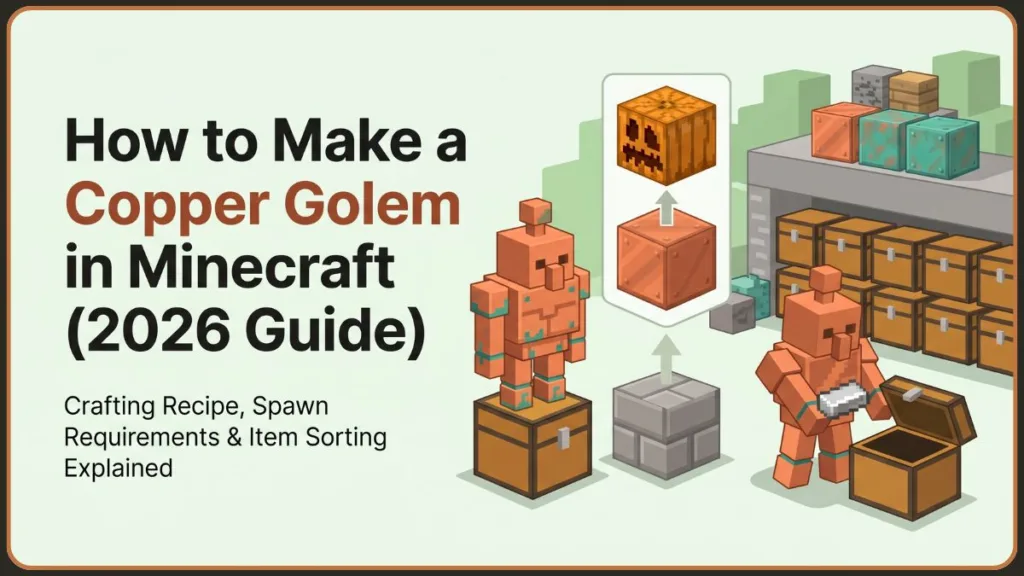
These handy little companions help organize items automatically, acting as a tireless sorting system for your messy resource rooms. The best part? You can build one yourself using just a single Copper Block and a Carved Pumpkin (or Jack o’Lantern). It is an incredibly cheap and rewarding project for any survival world.
In this comprehensive guide, we will walk you through everything you need to know, from gathering the right materials to understanding exactly how to put your new friend to work. If you want to optimize your base for efficiency and never worry about sorting cobblestone from diamonds again, let’s dive into the details!
What Is a Copper Golem in Minecraft? Meet Your New Sorting Assistant
If you are wondering, what do copper golems do, the answer is all about true base automation. These helpful mobs act as automated storage helpers, taking the tedious manual labor out of inventory management. Think of them as tiny, walking hoppers that actually know where your items belong!
So, how does a copper golem work? When you create one, the copper block you use to build its body magically transforms into a Copper Chest. This chest becomes the golem’s primary collection point. You simply dump your raw materials, mob drops, and treasures into it, and the golem will pull them out and neatly sort them into your nearby ordinary storage chests!
Having copper golems in minecraft is a massive time-saver, especially for players who love building massive bases. However, because they are made of metal, they also introduce unique oxidation mechanics—meaning they will weather and change color over time as they patrol your base.
Is the Copper Golem Available in Minecraft Yet? Release Details & Experimental Features
Because this is a highly anticipated feature, many players are currently asking, is copper golem in minecraft yet? The answer depends entirely on which version of the game you are playing. Currently, they are slated for the third game drop of 2025, which is a massive copper-focused update.
Minecraft Bedrock Edition: Enabling the Copper Golem
If you want a minecraft bedrock copper golem right now, you can access them early via experimental features! Because they do not spawn naturally in the wild, you must actively enable experiments in your world settings to test them out.
Depending on your device, here is how you can get access:
- Windows PC and Xbox: You will need to download the Minecraft Preview app from the Microsoft Store or your Game Pass app. On PC, make sure your Minecraft Launcher is set to “latest preview” instead of the default release.
- iOS: Download the Testflight app and follow the on-screen instructions to grab an available testing slot.
- Android: Open the Google Play Store, navigate to your installed Minecraft app, scroll down, and select “Join the Beta.”
Pro Tip: Always make a backup of your favorite survival world before turning on experimental features, as beta updates can occasionally cause bugs!
Minecraft Java Edition: When to Expect the Copper Golem
Currently, these golems are unavailable on the default Java release. However, Mojang has promised that they will be added on Java Snapshots very soon. Once available, you will just need to open your Minecraft Launcher, click the drop-down menu on the left, and select “Latest Snapshot” before hitting the play button.
Materials Needed to Make a Copper Golem: A Simple Two-Block Recipe
You will be happy to know that the copper golem spawn requirements are extremely simple, especially compared to the iron-heavy cost of an Iron Golem. Unlike complex redstone sorting machines that require dozens of comparators and hoppers, you only need two basic blocks to meet the copper golem minecraft requirements.
Here is the exact crafting recipe for copper golem materials:
| Item | Quantity | Description |
| Copper Block | 1 | The base body of your golem. Requires 9 copper ingots to craft. |
| Carved Pumpkin OR Jack o’Lantern | 1 | The head of your golem. Regular uncarved pumpkins will not work! |
Remember, you only need one of the head items. Either head item works perfectly and yields the exact same adorable mob, so feel free to use whichever you have on hand!
How to Get a Copper Block in Minecraft: Mining and Smelting
Before starting your copper golem creation, you need the base material. Copper is incredibly plentiful in the Overworld, but you still need to process it. Here is how to get copper golem body parts ready for the build:
Step 1: Mine Raw Copper Ore
First, grab a Stone Pickaxe (or a higher tier like iron or diamond) and head underground to find copper ore. You are looking for grey stones heavily dotted with orange and greenish specks. Mining these will drop Raw Copper.
Step 2: Smelt Copper Into Ingots
Once you have collected at least 9 pieces of raw copper, place them into a furnace or a blast furnace. Fuel it with coal, wood, or charcoal and wait for the smelting process to finish. You will receive shiny Copper Ingots in return.
Step 3: Craft a Copper Block
Open your crafting table and place one Copper Ingot in each of the 9 grid slots. This will yield exactly 1 Copper Block.
How to Carve a Pumpkin in Minecraft: Preparing the Golem’s Head
A normal, round pumpkin straight from the dirt will not work for this build, so you must carve a face into it first. If you are a beginner and unsure how to carve a pumpkin in minecraft, just follow these quick, easy steps:
- Step 1: Find a Pumpkin: Look for them spawning naturally in grassy biomes (like plains or forests). Break one to harvest it.
- Step 2: Use Shears on the Pumpkin: Place the pumpkin back down on the ground. Next, craft a pair of shears using two iron ingots. Equip the shears and “use” them on the pumpkin. It will instantly become a Carved Pumpkin, dropping pumpkin seeds for you to plant later!
- Step 3: Optional Jack o’Lantern Crafting: If you prefer a glowing aesthetic, you can combine your new Carved Pumpkin with a single torch in your crafting menu to make a Jack o’Lantern.
How to Make a Copper Golem in Minecraft: The Complete Build Process
Now that you have your two essential materials, here is the official minecraft copper golem build. Note that there is no spawn egg for this mob in Creative Mode, and you cannot make it in a crafting menu. It is a direct in-game physical build, meaning you construct it right in the Overworld!
- Step 1: Place a Copper Block: To start learning how to craft a copper golem in minecraft, place your single Copper Block flat on the ground exactly where you want your sorting station to be.
- Step 2: Place a Carved Pumpkin or Jack o’Lantern on Top: Equip your carved headpiece in your right hand. Aim at the top of the Copper Block and place the head directly on top of it.
- Step 3: Watch the Copper Golem Spawn: As soon as you place the head, you will successfully learn how to create copper golems! A Copper Golem spawns immediately, jumping to life.
At that exact moment, pay attention to the ground: the Copper Block you just placed magically transforms into a Copper Chest! The golem will now stand on top of it, ready to begin looking for items to sort.
Congratulations! You now know exactly how to make a copper golem.
Troubleshooting: Why Can’t I Make a Copper Golem in Minecraft?
If you are following the steps, feeling frustrated, and asking, “why can’t i make a copper golem in minecraft?“, don’t panic. Check these common causes to ensure you have met every single copper golem spawn condition:
- Using a regular pumpkin: This is the most common mistake! You must use shears on the pumpkin first. Uncarved, blank pumpkins will never trigger the spawn sequence.
- Experiments not enabled: Remember, these are experimental features tied to the upcoming Copper Age drop. If you did not explicitly toggle experiments on in your world generation settings, the physical build will just sit there lifelessly.
- Wrong Minecraft version: Ensure you are playing on the correct Bedrock Preview, Android Beta, or Java Snapshot version. Retail versions of the game do not have the code for this mob yet.
- Copper Golems unavailable in current version: Depending on when you are playing, later availability may vary by version as Mojang updates the beta builds.
Automated Sorting: How Do Copper Golems Work?
So, you have spawned one. Now, how do i use a copper golem in minecraft? Think of them as your personal, walking inventory management system.
To fully grasp how do copper golems work, you need to understand Copper Chest behavior. The unique chest that spawned underneath your golem acts as a mandatory collection point. When you return from mining or exploring, simply drop your messy resources into this Copper Chest.
The golem will then take those items out, scurry around, and move them into nearby ordinary storage chests where matching items already exist. For example, if you drop a mix of iron ore and wooden planks into the Copper Chest, the golem will pull them out and neatly organize those resources automatically into the ordinary chests where you usually keep your ores and wood!
Collection Points: Can Copper Golems Use Other Copper Chests?
Yes, absolutely! If you accidentally destroy their original chest or want to relocate your base, your golem will intelligently look for and use any nearby Copper Chest as a new collection point. Just remember this golden rule of minecraft copper chest sorting: the starting point must be a copper chest, but the final storage destinations must be ordinary chests. They will ignore items placed in regular chests!
Aesthetics & Weathering: How to Change a Copper Golem’s Color
As part of any complete copper golem spawning guide, it is vital to understand their aging process. These aren’t just useful mobs; they are fantastic decorative elements for your base!
Understanding the Copper Oxidation Stages
Just like copper blocks, roofs, and stairs, your golems will oxidize over time. They slowly shift from a shiny, bright reddish-brown to a fully aged, beautiful green-blue copper patina.
Don’t worry—this only changes their visual appearance. Their item-sorting performance is completely unaffected by the rust! Interestingly, a copper golem creation will inherit the exact oxidation level of the block you used to build it. If you build your golem using a fully green oxidized copper block, the golem will spawn fully green!
Preserving the Shine: How to Wax a Copper Golem
If you love the shiny new look and want to freeze their color to prevent further oxidation, you can wax them. Simply hold a Honeycomb in your hand and interact directly with the golem. This applies wax to them, locking in their current color forever.
Important Note: Using a pre-waxed copper block to build them won’t work to spawn a pre-waxed golem. You must apply the honeycomb wax manually after the golem has already spawned!
The Final Verdict: Is a Copper Golem Worth It?
With all this effort required to get the beta versions running, is a copper golem worth it? For the vast majority of players, the answer is a resounding yes!
Top Benefits of the Copper Golem
The automatic item organization and convenient storage management are incredibly useful. For large bases that constantly deal with cluttered loot after long expeditions, having a designated “dump chest” (the Copper Chest) that a golem empties for you is a massive quality-of-life upgrade. It saves you from manually clicking through a dozen different boxes.
Potential Drawbacks to Keep in Mind
The main limitations are that they rely on experimental feature limitations (for now, meaning potential bugs) and require you to set up a specific Copper Chest system to function properly. You can’t just expect them to clean up items thrown directly on the floor.
Frequently Asked Questions: Copper Golems in Minecraft
How do you summon a Copper Golem in Minecraft?
There are no spawn eggs or commands needed for normal survival. You physically build them in the Overworld by placing a single Copper Block on the ground and putting a Carved Pumpkin or Jack o’Lantern directly on top of it.
How do you make a Copper Golem in Minecraft Bedrock?
Ensure you are on a Preview or Beta version of the game. Before loading your world, enable experimental features in your world settings. Then, use the simple 2-block physical recipe mentioned above.
Can you use a normal pumpkin to create a Copper Golem?
No, you must use shears on the pumpkin first to carve it. A completely round, faceless pumpkin will not bring the golem to life.
What does a Copper Golem do?
They act as a living item sorter! They automate inventory management by taking items from a designated Copper Chest and neatly storing them away in your regular wooden chests.
How to stop copper golem from oxidizing?
Equip a honeycomb in your hand and use it directly on the golem. This “waxes” the metal, freezing it in its current visual state and stopping any future green patina from forming.
Do Copper Golems oxidize?
Yes, they will slowly turn green-blue over time due to weather and air exposure unless you wax them with a honeycomb. However, their speed and sorting ability are completely unaffected by this rust.
Can Copper Golems sort items automatically?
Yes, that is their primary, built-in function! As long as you provide a Copper Chest as an inbox and regular chests as an outbox, they will handle the rest.
How do I wax a Copper Golem?
Simply walk up to your active golem while holding a honeycomb and right-click (or use the interact button) on them.
Why is my Copper Golem not moving?
Many players think their Copper Golem is broken when it appears idle. Don’t worry, it isn’t glitched! Copper Golems only become active when there are items available to sort and when a valid Copper Chest is nearby for them to interact with.
What happens if I break a Copper Chest?
Players frequently worry about losing functionality after moving or removing the original Copper Chest that spawned with the golem. The good news is that Copper Golems can seamlessly use another nearby Copper Chest if one is available as their new collection point.
Can Copper Golems use multiple chests?
Yes! When organizing items, Copper Golems interact with Copper Chests as their single inbox, but they will happily sort and distribute those items into multiple ordinary storage chests across your room based on where matching items are already stored.
Do Copper Golems work in Survival Mode?
Absolutely. Many players assume they are Creative-only because of their experimental status. However, they can be used in Survival Mode just like any other feature, as long as the correct version and experimental features are enabled in your world settings.
What is the correct Copper Golem recipe in Minecraft?
There is significant confusion online due to older concepts and community suggestions from past mob votes. The official and correct Copper Golem recipe is placing exactly 1 Copper Block on the ground and placing 1 Carved Pumpkin (or Jack o’Lantern) on top of it.
Do I need a Lightning Rod to make a Copper Golem?
No! This is one of the most common misconceptions discussed in community forums. A lightning rod is not used in the building process at all; you only need the copper block and the carved pumpkin.
Can Copper Golems use barrels or shulker boxes?
Storage-focused players often ask whether Copper Golems work with alternative storage options. Currently, their primary function is designed around moving items from Copper Chests into ordinary storage chests.
Does oxidation affect Copper Golem performance?
No, oxidation only changes their appearance from copper to green-blue. Their sorting speed and overall performance remain completely unaffected.
Can I change the oxidation level of a Copper Golem?
While you cannot easily reverse oxidation once it happens, you can control the starting point and prevent future changes. A Copper Golem inherits the oxidation level of the block used to build it. If you like how it looks, you can freeze it at that exact level by waxing it with a honeycomb.
Is a Copper Golem better than an Iron Golem?
They cannot really be compared because they serve completely different purposes! An Iron Golem is a heavy-hitting base defender meant to fight off hostile mobs, whereas a Copper Golem is a peaceful helper designed strictly for automated item storage.
Conclusion
To recap, making a Copper Golem is an incredibly simple and rewarding process: just place a Carved Pumpkin on top of a single Copper Block! These tidy little companions will save you hours of tedious manual sorting by automatically transferring your hard-earned loot from Copper Chests into your standard storage boxes.
If you are tired of chaotic chests and losing track of your diamonds, we highly encourage you to enable experimental worlds in Bedrock Edition and try this highly anticipated feature out for yourself. It is the perfect blend of base decoration and functional redstone-free automation.
Have you built your own automated sorting room yet? Let us know how you are using Copper Golems to upgrade your Minecraft base in the comments below!
Visit Our Post Page: Blog Page
Discover more from Izoate
Subscribe to get the latest posts sent to your email.