
Wondering how to use Amazon Prime Audible in 2026? Discover free audiobooks, Prime Reading, Audible benefits, membership options, and easy ways to start listening.
If you’re an Amazon Prime member, you may be wondering whether Audible is included with your subscription and how to start listening to audiobooks without paying extra. The answer isn’t completely straightforward. While Audible requires a separate membership, Prime members still receive several audiobook-related benefits that many users completely overlook.
Audiobooks are a fantastic way to read more without having to carve out extra time in your busy schedule. Whether you want to make your daily commute more enjoyable, keep the family entertained on a long drive, or learn something new while tackling household chores, understanding how to use Amazon Prime Audible can help you build an incredible listening library.
In this guide, we will walk you through exactly how to set up your account, which free audiobook perks you already have access to, how the different subscription options work, and how to troubleshoot common issues so you can get the most value out of your Prime membership.
Can You Use Audible With Amazon Prime?
Yes, Amazon Prime members can use Audible and access several audiobook benefits, including Prime Reading titles with Audible narration, enhanced Audible free trials, special promotions, and audiobook access through Amazon Music Unlimited. However, a full Audible membership is not included with Amazon Prime and requires a separate subscription.
Key Takeaways
- Audible is not fully included with Amazon Prime. You need a separate subscription to unlock the entire library.
- Prime members can access select free audiobooks through Prime Reading.
- New Prime members often receive enhanced Audible trial offers, typically giving two free credits instead of one.
- Amazon Music Unlimited includes one Audible audiobook per month as a special perk for subscribers.
- Amazon Household allows eligible users to share purchased Audible books with family members to save money.
- Audible books purchased with credits remain yours permanently, even if you cancel your membership later.
| Feature | Amazon Prime | Audible |
| Audiobooks Included | Limited | Yes |
| Prime Reading | Yes | No |
| Audible Credits | No | Yes |
| Ownership | Borrowed | Permanent |
| Monthly Cost | Prime Fee | Separate Fee |
Is Audible Included With Amazon Prime?
Understanding the Difference Between Audible and Amazon Prime
Let’s address the most common question right away: Audible is a separate subscription service and is not fully included with your Amazon Prime membership.
It is incredibly easy to assume they come bundled together because you use the exact same login details for both. But it helps to look at what each service actually provides. When you pay for Amazon Prime, you are getting a broad, everyday membership that covers free shipping, movie streaming through Prime Video, and a rotating selection of books through Prime Reading.
If you listen to audiobooks regularly, Audible gives you access to one of the largest audiobook libraries available, including major bestsellers, full-cast audio dramas, podcasts, and exclusive releases. Because producing high-quality audiobooks with professional voice actors is expensive, Audible operates as its own separate service. Giving every Prime member full, unlimited access to every audiobook ever made would make the cost of Prime skyrocket.
However, just because you need a separate subscription for unlimited listening doesn’t mean you are left empty-handed. Prime members get a taste of the Audible experience through some highly valuable perks that are absolutely worth exploring.
What Audible Benefits Do Prime Members Get?
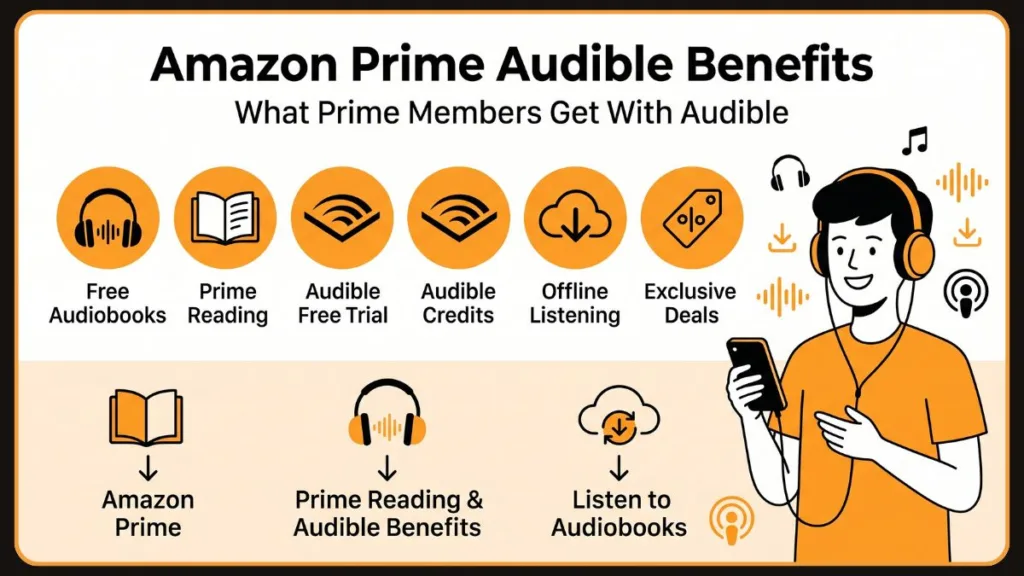
Even without paying for a separate Audible subscription, you can get a lot of value out of your Amazon Prime membership through these exclusive audiobook perks.
1. Upgraded Audible Free Trials
Normally, when someone signs up to try Audible, they get 30 days of access and one free credit. If you are an Amazon Prime member, you get a much better deal. Prime members typically receive an upgraded 30-day trial with two free credits.
This means you can pick out two audiobooks—whether they are newly released biographies or massive 40-hour fantasy epics—and get them completely free. Because an Audible credit can be redeemed for any book regardless of its cash price, those two free credits can easily be worth $40 to $60. And the best part? The books you buy with your free credits are yours to keep forever, even if you decide not to continue with the subscription.
2. Prime Reading Books With Narration
Your Prime membership automatically includes Prime Reading, which gives you access to a rotating library of over a thousand popular eBooks, magazines, and comics. The hidden gem here is that a select number of these eBooks come with free Audible narration.
This means you can borrow an eBook to read on your Kindle, and seamlessly switch to listening to the audiobook version on your phone while you drive to work. The app remembers exactly where you left off.
3. Amazon Music Unlimited Audiobook Benefits
If you subscribe to Amazon Music Unlimited (which Prime members can already access at a discounted monthly rate), you get an amazing bonus. Amazon Music Unlimited Individual and Family plan subscribers can now listen to one Audible audiobook per month directly through the Amazon Music app at no extra charge.
This is an incredible way to listen to major releases without paying for a separate Audible membership. Keep in mind that you do not permanently own this audiobook—if you pick a new one the following month or cancel your music subscription, you lose access to it—but it is a fantastic way to enjoy one great book every month.
4. Exclusive Promotions and Sales
If you are a Prime member, keep an eye on your inbox. You will frequently receive targeted promotions for Audible, especially during major shopping events like Prime Day or Black Friday. You might see offers for three months of Audible completely free, or heavily discounted subscription rates for your first few months. You will also get access to exclusive cash sales on popular titles throughout the year.
What Is Amazon Prime Audible and How Does It Work?
When people search for “Amazon Prime Audible,” they are usually trying to figure out how to get started. There isn’t a separate app called “Prime Audible.” Instead, you simply use the standard Audible app, and log in using your Amazon Prime email and password.
Audible is available on virtually every device, including your iPhone, Android phone, iPad, Fire Tablet, and Alexa-enabled smart speakers. All of your audiobook purchases, credits, and listening history are saved to your account automatically, so you can start a book in your car and finish it in your living room.
Audible Membership Options Explained
If you decide to subscribe, Audible offers several membership options, each designed for different listening habits. Here is how they generally work:
- The Plus Catalog: Think of this like a streaming service for audio. It includes thousands of Audible Originals, podcasts, and select audiobooks. You can listen to as much as you want, but you do not permanently own the titles. When you cancel, you lose access to them.
- The Credit System: This is the classic way to use Audible. You receive a certain number of credits every month (usually one). You use that credit to permanently buy an audiobook. It stays in your library forever, even if you cancel your subscription.
Amazon Prime Reading Audiobooks: What Can You Access for Free?
If you’re looking for free audiobooks with your Prime membership, Prime Reading is the best place to start.
Prime Reading With Audible Narration
Amazon curates a list of over 1,000 titles that rotate in and out of the Prime Reading program every few months. While many of these are text-only eBooks, a healthy percentage of them include free Audible narration.
This means you get to listen to the exact same high-quality audio recording that is sold in the main Audible store, completely free of charge, for as long as you have the book borrowed. It is a fantastic way to see if audiobooks fit into your daily routine without spending any money.
How to Find Prime Reading Audiobooks
Finding these specific audio-enabled books takes just a few clicks:
- Open the Amazon App or Website: Log in with your Prime account.
- Navigate to Prime Reading: You can find this in the main menu under “Kindle E-readers & Books,” or simply type “Prime Reading” into the search bar.
- Filter Your Search: Once you are on the Prime Reading page, look for the filtering options. Check the box that says “Books with Audible Narration.”
- Look for the Icon: As you browse, look for titles that display a “Read and Listen for Free” badge or a small headphone icon next to the Prime logo.
- Borrow the Book: Click “Read and Listen for Free.” The book will instantly be added to your Amazon account.
When you open the free Audible app on your phone (making sure you are logged in with the same Amazon account), that borrowed book will automatically appear in your library, ready for you to hit play.
How to Use Amazon Prime Audible: Step-by-Step Guide
Getting set up with Audible using your Amazon account is simple and only takes a few minutes. Because your accounts are linked behind the scenes, you do not need to create a new profile. Here is exactly how to get started on your smartphone or tablet.
Download the Audible App
Head to your device’s app store—the Google Play Store for Android devices, or the Apple App Store for iPhones and iPads. Search for “Audible: Audio Entertainment” and download the free app. If you are using an Amazon Fire Tablet, the app is likely already pre-installed on your home screen.
Sign In Using Your Amazon Account
Launch the Audible app and tap “Sign In.” You will be prompted to enter your email address and password. It is crucial that you use the exact email and password associated with your Amazon Prime account. This ensures the app recognizes your Prime status and instantly syncs any Prime Reading titles you have borrowed.
Browse Available Audiobooks
Once you are logged in, tap the Discover tab at the bottom to browse by genre, view current bestsellers, or explore new releases. You can also use the Search magnifying glass to look for a specific author, narrator, or book title you have been wanting to read.
Find Prime-Eligible Audiobooks
If you are looking for the free titles you borrowed via Prime Reading, head straight to your Library tab. If you signed up for the Prime free trial and have your two free credits, you can browse the main store. When you find a book you want to own, simply click the “Buy with 1 Credit” button.
Download Audiobooks for Offline Listening
Audiobook files can be quite large, which can eat up your mobile data plan if you stream them directly. A simple way to avoid this is to download them while you are at home. Go to your Library while connected to Wi-Fi, find the book you want to listen to, and tap the download icon (a downward-pointing arrow) on the book’s cover art. The book will save directly to your phone for flawless offline listening.
Start Listening and Customize Playback
Tap the downloaded book cover to open the player and hit play. Audible offers fantastic ways to customize your experience. You can tap the speed icon to adjust the playback speed if the narrator is speaking too slowly, tap the clock icon to set a sleep timer so the book automatically stops if you fall asleep, or use the Car Mode icon for a simplified, distraction-free screen while you are driving.
Audible Plus vs. Audible Standard vs. Audible Premium Plus: Which Membership Is Right for You?
If you try out the free audiobooks and decide you want more, you will need to pick a membership plan. Audible offers three main options, so you can choose the one that makes the most sense for your budget and reading goals.
| Feature | Audible Plus | Audible Standard (New for 2026) | Audible Premium Plus |
| Monthly Cost | ~$7.95 / month | ~$8.99 / month | ~$14.95 / month |
| Plus Catalog Access | Yes (Unlimited streaming) | Yes (Unlimited streaming) | Yes (Unlimited streaming) |
| Premium Audiobooks | 0 | 1 selection per month | 1 credit per month |
| Ownership of Books | Lose access if canceled | Lose access if canceled | You keep credit purchases forever |
| Best For… | Podcast lovers and casual listeners | Those who want 1 bestseller a month but don’t care about keeping it | Avid readers who want to build a permanent digital library |
Breaking Down the Options
Audible Plus is a great entry-level choice. It gives you unlimited streaming access to thousands of Audible Originals, sleep tracks, meditation programs, and older audiobooks. However, you will not find the latest major bestsellers included here.
Audible Standard is a middle-tier option. For slightly more money, you get access to the Plus Catalog, plus the ability to choose one major premium audiobook from the store each month to listen to. The catch? You do not own it. If you cancel your subscription, that premium book disappears from your library.
Audible Premium Plus is the most popular choice for a reason. For $14.95 a month, you get the Plus Catalog and one credit every month. You can use that credit to buy any book on the platform, and that book is yours forever, even if you cancel your subscription the very next day. You also get a 30% discount if you want to buy additional books with a credit card.
Who Should Consider Audible?
With multiple subscription plans and Prime perks available, you might wonder if Audible actually fits your lifestyle. It is a brilliant tool for anyone looking to optimize their time or embrace a more immersive form of storytelling.
You will likely get incredible value out of Audible if you fall into one of these categories:
- Daily Commuters: Turn a frustrating hour in traffic or a crowded train ride into the highlight of your day by diving into a captivating thriller or a self-improvement guide.
- Road Trip Travelers: Keep the driver awake and the whole family entertained for hundreds of miles without relying on screens.
- Busy Professionals: Listen to business strategies, leadership books, and productivity guides while running errands, walking from the parking lot, or working out at the gym.
- Students: Review historical texts, classic literature, and biographical works in an engaging format that gives your eyes a break from heavy textbooks.
- Podcast Listeners: If you already love audio content, upgrading to the polished, ad-free experience of a professionally narrated audiobook is a natural next step that you will thoroughly enjoy.
- Book Lovers With Limited Reading Time: If you love stories but simply cannot find the time to sit down with a physical book, Audible lets you “read” while folding laundry, cooking dinner, or walking the dog.
Amazon Prime Reading vs Audible: What’s the Difference?
When deciding how to get your audiobook fix, it helps to view Prime Reading as a local public library and Audible as a massive, fully-stocked retail bookstore.
| Feature | Prime Reading | Audible (Premium Plus) |
| Included With Prime | Yes, automatically included at no extra cost | No, requires a separate monthly subscription |
| Audiobook Selection | A small, rotating curated list of a few hundred titles | Over 500,000 premium titles |
| Narrated Books | Select eBooks only; you must filter for them | Almost all major traditional publishers and indie hits |
| Offline Listening | Yes, via the Kindle or Audible app | Yes, via the Audible app |
| Ownership | Borrowed (the book disappears when it rotates out of the program) | Owned forever (if purchased with an Audible credit) |
If you are someone who only listens to an audiobook once or twice a year during a vacation, Prime Reading is likely all you need. But if you want to listen to audiobooks weekly while commuting or doing chores, you will quickly run out of Prime Reading titles that interest you. At that point, upgrading to a paid Audible subscription makes perfect sense.
Audible vs Kindle Unlimited: Which Is Better?
Beyond Prime Reading, Amazon offers another subscription service called Kindle Unlimited. Many users get confused about whether they need Audible, Kindle Unlimited, or both. Here is a clear breakdown to help you decide.
| Feature | Audible | Kindle Unlimited |
| Audiobooks | Yes | Limited |
| eBooks | No | Yes |
| Ownership | Credit purchases stay forever | Borrowed |
| Monthly Cost | Higher | Lower |
Which One Should You Choose?
Choose Kindle Unlimited if you are a fast reader who primarily prefers text. While Kindle Unlimited does offer some free audiobooks (thousands of titles come with audio narration), its main draw is its massive library of over 4 million borrowable eBooks. It is the ultimate service if you read a lot of indie romance, sci-fi, and thrillers.
Choose Audible if audio is your preferred format and you want the biggest, best, and newest releases. Kindle Unlimited rarely includes major traditional bestsellers or high-profile celebrity memoirs in its audio section. Audible gives you the freedom to pick exactly what you want from the entire global library and keep it forever.
How to Get an Audible Free Trial With Amazon Prime
Taking advantage of the Prime-exclusive free trial is the best way to experience everything Audible has to offer without risking any money. It only takes a minute to set up.
Eligibility Requirements
To qualify for the enhanced trial, you just need to meet two simple criteria:
- You must have an active Amazon Prime membership (even if you are currently just on a Prime free trial yourself).
- You must be a new Audible subscriber. If you have had an Audible membership in the past 12 months, you generally will not qualify for the free trial again, though Amazon does occasionally send out special offers to returning customers.
How to Claim the Trial
- Make sure you are logged into Amazon.com with your Prime account.
- Go to “Audible Free Trial“ page directly or navigate to the Audible section of the site.
- You should see a large promotional banner offering a 30-day free trial with two free credits (if you weren’t a Prime member, you would only see an offer for one credit).
- Click the prompt to accept the terms. You will need a valid credit card on file, but you will not be charged today.
- Your two credits will instantly appear in your account. You can immediately spend them on any two audiobooks in the store!
What Happens After the Trial Ends?
If you love the service and do nothing, your subscription will automatically renew at the end of the 30 days into a standard Audible Premium Plus plan, and your card will be charged the standard monthly fee (typically $14.95).
Do You Keep Your Audiobooks?
Yes! This is the most important and reassuring thing to know about Audible. Any audiobook you purchase using your monthly credits is considered a permanent purchase. If you use your two free Prime credits to buy two books and then cancel your subscription before the 30 days are up, those two books will remain in your Audible library forever. You can still log into the free app and listen to them years from now.
How to Use Amazon Household to Share Audible Books
If you share your home with another adult or have children, you do not need to purchase multiple copies of the same audiobook. Amazon offers a brilliant feature called Amazon Household that allows you to easily share Audible books with family members, saving you a significant amount of money over the year.
What is Amazon Household?
Amazon Household is a free feature for Prime members that links your Amazon accounts together. It lets you share Prime delivery benefits, streaming video, and digital content like Kindle eBooks and Audible audiobooks with the people you live with.
Who Can Use Amazon Household?
An Amazon Household can contain up to:
- Two adults (each keeping their own separate Amazon account and login details).
- Up to four children (using specialized child profiles managed by the adults).
Benefits of Sharing Audible Books
The primary benefit is keeping your money in your pocket. If you use an Audible credit to purchase a bestselling thriller, your partner can listen to that exact same book on their own phone, using their own Audible app. Because you are on separate profiles, the app tracks your listening progress independently—meaning you won’t accidentally lose your bookmark if they start listening while you are at work.
Limitations of Audible Sharing
While Amazon Household Audible sharing is fantastic, there are a few practical limitations to keep in mind:
- Purchased Content Only: You can only share books you have actually purchased (either with cash or credits). You cannot share titles you are streaming for free from the Audible Plus Catalog.
- No Credit Sharing: You cannot share unspent Audible credits with the other adult in your household. They will need to log into your account if they want to spend your credits.
- Regional Restrictions: Full Household sharing for Audible is heavily supported in the US, but users in regions like the UK often find Audible sharing restricted or completely unsupported.
How to Create an Amazon Household and Add an Adult Account
- Go to the Amazon Household page on the Amazon website (just search “Amazon Household” in the search bar).
- Click Add Adult.
- Enter the name and email address of the second adult you wish to invite, and follow the prompts to send them an email invitation.
- They will have 14 days to accept the invitation and link their account to yours.
How to Enable Content Sharing
Once the accounts are linked, you need to explicitly tell Amazon to share your audiobooks.
- Go to Manage Your Content and Devices on Amazon.com.
- Select the Preferences tab, then Households and Family Library.
- Toggle on sharing for “Audiobooks.” From that point forward, any eligible purchased Audible titles will automatically populate in the second adult’s Audible app Library, ready for them to download and enjoy.
Common Amazon Household Sharing Issues and Fixes
- “Missing” Shared Books: If a book isn’t showing up for your partner, double-check that it was an actual purchase (bought with a credit) and not just a book you downloaded from the Plus Catalog.
- Marketplace Mismatch: Both adult accounts must be registered to the same regional Amazon marketplace (for example, both must be on Amazon.com, not one on Amazon.com and one on Amazon.ca).
- Children’s Access: Sharing with child profiles usually requires the child to listen on a designated Amazon Kids device (like a Fire Tablet Kids edition or Echo Dot Kids) rather than a standard smartphone app.
How to Find the Best Audiobooks for Road Trips
Once you have your Prime benefits set up and understand how to share your library, it is time to put Audible to its best use: travel. Audiobooks are ideal for road trips because they keep the driver alert, entertain the whole car simultaneously, and make long stretches of boring highway disappear.
How to Choose Road Trip Audiobooks
Selecting the perfect Audible road trip book requires a slightly different strategy than choosing a book for solo listening in your living room. You need to consider the environment of the car and the people riding with you.
Factors to Consider
- Narrator Quality: A poor narrator can ruin a great book, especially when their voice is amplified through car speakers over the sound of road noise. Always listen to the 5-minute audio sample on the Audible app before using your credit to ensure the voice is engaging, clear, and easy to hear.
- Book Length: Try to match the book length to your drive. A 10-hour drive is perfectly suited for a single, fast-paced thriller. A multi-day cross-country move is perfect for a massive 40-hour epic fantasy.
- Series vs Standalone Titles: Standalone titles are great because they provide satisfying closure when you reach your destination. However, starting a series is fantastic for round trips—you can listen to book one on the way there, and look forward to book two on the way back.
- Family-Friendly Listening Options: If you are traveling with kids, you need a story that engages adults without any inappropriate content. Look for stories that work on multiple levels so the adults don’t get bored.
Recommended Audiobook Categories for Travel
- Mystery and Thriller: The absolute best genre for keeping the driver awake. The constant suspense and the need to solve the puzzle make the miles fly by.
- Fantasy and Science Fiction: Perfect for long-haul trips. These genres often feature exceptional world-building and full-cast narrations that feel like listening to a blockbuster movie.
- Biography and Memoir: Memoirs read by the author (especially comedians or actors) feel like you have a fascinating guest riding shotgun with you, telling you stories about their life.
- Self-Help and Business: Great for solo drives when you want to arrive at your destination feeling motivated, educated, and ready to tackle your goals.
- Comedy: Stand-up specials and humorous essays keep the mood light and relieve the stress of heavy traffic or bad weather.
- Family and Kids: Cross-generational stories are classics for family road trip audiobooks because they genuinely entertain everyone in the vehicle.
Best Audible Books for Road Trips
If you are struggling to make a choice, here are a few universally beloved audiobooks that excel during travel thanks to their incredible pacing and outstanding narration quality:
- Project Hail Mary by Andy Weir: Narrated by Ray Porter, this sci-fi thriller is incredibly engaging, smart, and impossible to pause. Porter’s performance makes the complex science easy and fun to understand.
- Harry Potter and the Sorcerer’s Stone by J.K. Rowling: Narrated by Jim Dale, this is the ultimate crowd-pleaser. Dale creates distinct, memorable voices for every single character, bridging the gap between kids and adults perfectly.
- The Martian by Andy Weir: A survival story that relies heavily on the protagonist’s humor, making it a fantastic, upbeat listen for long stretches of road.
- Born a Crime by Trevor Noah: Read by the author, this memoir is hilarious, heartwarming, and deeply insightful. Hearing Noah tell his own life story with perfect comedic timing makes the miles fly by effortlessly.
- Atomic Habits by James Clear: An outstanding choice for solo travelers looking to arrive at their destination feeling productive, inspired, and ready to build better routines.
If you are looking for even more ways to use your Prime-enhanced credits, check out our guide on the 10 best Audible books to spend credits on according to Reddit.
Tips for Downloading Audiobooks Before Travel
Nothing ruins a road trip faster than hitting a dead cell zone and losing your audiobook stream. Always download your audiobooks for offline listening before you leave the house.
- Open the Audible app while connected to your home Wi-Fi.
- Tap the download arrow on the book cover in your Library.
- Wait for the progress bar to reach 100%.Offline listening improves long-distance trips significantly because it saves your mobile data plan and guarantees flawless, buffer-free playback even when driving through rural areas or mountains with zero cellular service.
How to Return a Book on Audible
What happens if you use a credit on an audiobook, get an hour into it, and realize you absolutely hate the narrator’s voice or the story is just painfully slow? You don’t have to worry about wasting your money. Audible offers a very generous return policy designed to let you take risks on new authors with total peace of mind.
Audible Return Policy
Audible’s “Great Listen Guarantee” allows active Audible Premium Plus members to return an audiobook they are unhappy with within 365 days of purchase. You can return the book for practically any reason—whether you bought it by accident, didn’t like the narrator, or simply didn’t enjoy the plot.
When Audiobooks Can Be Returned
You are eligible to return an audiobook if:
- You purchased it with an Audible credit or a credit card.
- It has been less than one year since the exact date you bought it.
- Your Audible membership is currently active and in good standing.
When Returns May Be Restricted
This policy is intended to protect you from bad purchases, not to act as a free rental service. If Audible’s automated systems notice that you are returning a very high volume of books (for example, returning 10 books in a single month), or if you consistently listen to entire 20-hour books and then return them, they will restrict your return privileges. If you hit this limit, the automated return button will disappear from your account, and you will have to contact customer service directly to explain why you need a refund.
How to Return an Audible Book on Desktop
- Go to Audible.com and log into your account.
- Hover over your name in the top right corner and click Account Details.
- On the left-hand menu, click Purchase History.
- Find the book you wish to return and click the Return this title button next to it.
- Select a reason for the return (like “Didn’t like the narrator”) and confirm.
How to Return an Audible Book from a Mobile Browser
A helpful tip: You cannot return a book directly from within the Audible mobile app. You must use a web browser.
- Open Safari or Chrome on your phone and go to Audible.com.
- Tap the menu icon (three lines) in the top left corner, then tap your name to open Account Details.
- Select Purchase History.
- Tap the book you want to return, select your reason, and confirm the return.
What Happens After a Successful Return?
The moment you confirm the return, the audiobook will immediately disappear from your digital library across all your devices, and you will no longer be able to listen to it. If you purchased the book with a credit, you will get your Audible credit back instantly, allowing you to pick out a new book right away. If you paid with a credit card, the refund will typically process back to your bank within 5 to 7 business days.
Common Problems When Using Audible With Amazon Prime
Technology doesn’t always cooperate exactly how we want it to. If you are struggling to get your Prime benefits working with Audible, here are a few of the most common issues and how to fix them quickly.
- Can’t Sign Into Audible or Accounts Aren’t Linking: The most common cause of this is having multiple Amazon accounts. Many people have an old Amazon account tied to an old email address, and a newer one that actually holds their active Prime membership. Make sure you are using the exact email address tied to your active Prime account when you log into the Audible app.
- Audible Books Not Showing Up in Your Library: You just bought a book or borrowed one via Prime Reading, but your Audible app is empty. First, pull down on the Library screen in the mobile app to force a manual refresh. If that fails, log out of the app and log back in to force the system to sync.
- Prime Reading Audiobooks Are Missing: Remember that not all Prime Reading books include audio narration. You must specifically use the “Books with Audible Narration” filter when browsing the Amazon store. If a book does not have that specific tag, you only borrowed the text version.
- Subscription Confusion and Unexpected Charges: You thought you were using the free Prime benefits, but you see a $14.95 charge from Audible on your bank statement. You likely signed up for the 30-day free trial and forgot to cancel it before the renewal date hit. If you haven’t used the new credit that generated the charge, you can often contact Audible customer service or use the return policy to get a refund. To check your subscription status, log into Amazon, go to “Account & Lists,” and click on “Memberships & Subscriptions.”
How to Cancel Your Audible Membership Through Amazon
Canceling your Audible membership directly through the Amazon website is quick and easy. Since your Audible and Amazon accounts are linked, you can manage your subscription right from your main Amazon dashboard.
Here is the step-by-step process to cancel through Amazon:
Step 1: Go to Your Amazon Account
- Open a web browser (do not use the mobile app) and go to Amazon.com.
- Sign in using the email address and password associated with your Audible account.
Step 2: Navigate to Memberships & Subscriptions
- Hover your mouse over the “Account & Lists” menu in the top right corner of the screen.
- From the drop-down menu, click on “Memberships & Subscriptions“.
Step 3: Find Audible and Cancel
- You will see a list of all your active Amazon subscriptions. Scroll until you locate your Audible Membership.
- Click the “Cancel Subscription” button next to it. (Depending on your region, this button might say “Audible Membership Settings,” which will redirect you to the cancellation page).
- Amazon and Audible will likely show you a few screens offering discounts or options to pause your membership instead of canceling.
- To finalize the cancellation, you must keep clicking “Continue to cancel” until you reach the final screen that confirms your membership has been successfully canceled. You should also receive an email confirmation shortly after.
Important Things to Know Before You Cancel
Third-party billing: If you originally signed up for Audible using the Apple App Store on your iPhone or the Google Play Store on your Android, you will not see the cancel option on Amazon. You must cancel through your phone’s respective subscription settings.
Spend your credits first! If you have any unused Audible credits sitting in your account, you will lose them the moment your billing cycle ends. Be sure to spend them on audiobooks before you cancel.
You keep your purchased books: Any audiobook you purchased with a credit or a credit card is yours to keep forever. You can still log into the free Audible app and listen to them even after your membership ends.
Tips to Get the Most From Amazon Prime Audible
Want to become an audiobook power user? Here are several actionable tips to help you maximize your listening experience while keeping your costs as low as possible.
- Use Prime Reading First: Before you ever spend a dime on an Audible subscription, exhaust the free narrated books available in your Prime Reading catalog. It is the perfect way to train your brain to listen to audiobooks and determine if the format works for you on your daily commute.
- Look for Whispersync Deals: If you buy a Kindle eBook outright (or borrow it through Kindle Unlimited), Amazon often offers you the ability to “Add Audible narration” for a heavily discounted price—often between $1.99 and $7.49. This is a brilliant trick because it is frequently much cheaper than spending an Audible credit or paying full retail price.
- Use the Sleep Timer: The Audible app has a fantastic built-in sleep timer. Set it for 15 or 30 minutes before you go to bed so you don’t lose your place in the story if you drift off to sleep.
- Return Responsibly: Make full use of Audible’s generous return policy when a narrator doesn’t click with you, but respect the system so you don’t lose your return privileges.
- Watch for Prime Day Deals: If you are patient, you can often snag deals like three or even four months of Audible Premium Plus completely free during Amazon’s major summer sales events.
Frequently Asked Questions
Is Audible free with Amazon Prime?
No, a full, unrestricted Audible membership is not completely free with Amazon Prime. However, Prime members get access to a curated selection of free narrated books via Prime Reading, plus an upgraded two-credit free trial for new users to help them get started.
Can I share Audible books with family members?
Yes. If you live in a supported region (like the US), you can use the Amazon Household feature to link two adult Amazon accounts. Once linked and sharing is enabled, you can share purchased Audible audiobooks with your partner so you both can listen on your own devices. You cannot, however, share titles from the Plus Catalog or unspent credits.
Do Prime members get Audible credits?
Prime members do not get recurring free credits every month just for having a Prime membership. However, when signing up for a free trial, Prime members receive two initial credits instead of the standard one, giving you a great head start.
Can I return an Audible audiobook and get my credit back?
Yes. If you are an active Audible Premium Plus member, you can return any audiobook purchased with a credit within 365 days of purchase if you didn’t enjoy it. Once you process the return via the Audible website’s Purchase History section, your credit is restored instantly to your account.
Can I listen to audiobooks without an Audible subscription?
Yes. You can listen to free narrated eBooks through Prime Reading. Additionally, if you subscribe to Amazon Music Unlimited, you can stream one premium Audible audiobook per month directly through the Amazon Music app without needing a dedicated Audible membership.
What are the best audiobooks for road trips?
The best road trip audiobooks keep the driver engaged and entertain everyone in the car. Fast-paced thrillers and mysteries are excellent for preventing highway hypnosis, while full-cast fantasy epics are perfect for multi-day drives. If traveling with kids, cross-generational series like Harry Potter ensure the adults won’t get bored either.
What books are free with Amazon Prime?
Prime members can borrow from a rotating list of over a thousand eBooks, magazines, and comics through the Prime Reading program. A specific subset of these includes free audio narration. You must use the filter for “Books with Audible Narration” to easily find them.
Can I keep Audible books after canceling?
Yes. Any audiobook you purchase using an Audible credit or buy with cash is yours to keep forever, regardless of your subscription status. You can continue to use the free Audible app to listen to them. You will, however, lose access to the streamable Audible Plus catalog.
How do I download Audible books?
Open the Audible app on your smartphone or tablet, navigate to your Library, find the title you want to listen to, and tap the download arrow on the book’s cover art. Ensure you are connected to Wi-Fi for faster downloading and to save your mobile data.
Does Prime Reading include audiobooks?
Yes, but only a limited selection. You must look for Prime Reading eBooks that explicitly state “Read and Listen for Free.”
What is the difference between Prime Reading and Audible?
Prime Reading is a free perk included with Amazon Prime that offers a small, rotating library of borrowable eBooks and audiobooks. Audible is a separate, premium subscription service offering a massive library of over 500,000 audiobooks, where you use credits to permanently purchase titles.
Does Amazon Prime include Audible Premium Plus?
No. Amazon Prime does not include an Audible Premium Plus subscription. Audible Premium Plus is an entirely separate membership that costs $14.95 per month and grants you one credit monthly for premium audiobooks.
Can I use Audible without Amazon Prime?
Absolutely. You do not need an Amazon Prime membership to use Audible. Anyone can create a free Amazon account and sign up for an Audible subscription or purchase audiobooks directly at retail price.
Is Audible worth it if I already have Prime?
Yes, especially if you listen to audiobooks regularly. While Prime offers a great introductory taste through Prime Reading, an Audible membership is worth the investment if you want access to the newest bestsellers, massive fantasy epics, and a limitless catalog that simply isn’t available through standard Prime perks.
Can I listen to Audible on Alexa?
Yes! Audible is seamlessly integrated with the Amazon platform. You can simply say, “Alexa, read my book,” and your Echo device will immediately start playing your most recently listened-to Audible audiobook right where you left off on your phone.
Can two people use the same Audible account?
Technically, yes. You can log into the Audible app on multiple devices using the same account credentials. However, if two people try to listen to the same book at the same time, it will mess up your saved bookmarks. The better, frustration-free solution is to link two separate accounts using the Amazon Household sharing feature.
Why Amazon Prime Audible Is Worth Exploring
Whether you’re curious about audiobooks, trying to make your daily commute more enjoyable, or looking for a way to read more books without finding extra time in your busy day, Amazon Prime and Audible offer several fantastic ways to get started.
While it is easy to be initially disappointed that Audible is not fully included with your Prime membership, the reality is that the two services work together beautifully to offer a highly flexible audio experience. Amazon provides multiple avenues to explore audio storytelling without immediately committing to a hefty monthly fee.
Here is the best way to move forward based on your needs:
- If you are a casual listener: Stick to your existing Prime benefits. Utilize the Prime Reading catalog to borrow free narrated books, and treat yourself to the occasional Whispersync deal when you buy a Kindle eBook. This is the most budget-friendly way to enjoy a few books a year.
- If you already subscribe to Amazon Music: Take full advantage of the Amazon Music Unlimited perk. Getting one free premium audiobook a month directly through the music app is an unbeatable value for fans of both music and literature who want to stay current on new releases.
- If you are an avid reader or commuter: It is time to upgrade. A full Audible Premium Plus subscription is incredibly worth it for daily listeners, road trippers, and book lovers who want permanent ownership of the hottest new releases and massive epics.
Begin with the free Prime Reading audiobooks available through your membership to see if you like the format. From there, explore the Audible free trial if you want a larger selection and two free books to keep forever. Whatever route you take, you are just a few clicks away from turning your next drive or chore session into a great adventure.
Visit Our Post Page: Blog Page
Discover more from Izoate
Subscribe to get the latest posts sent to your email.