
Looking for a true Java heap space error solution? Learn the root causes of java.lang.OutOfMemoryError and step-by-step methods to fix memory leaks for good.
What Is the Java Heap Space Error and Why Should You Care?
Java is one of the most popular, portable, and scalable programming languages in the world. However, its automatic memory management is not bulletproof. Even with a highly efficient garbage collector, applications are not immune to resource exhaustion. Finding a reliable java heap space error solution is a critical skill, as java.lang.OutOfMemoryError: Java heap space remains one of the most frequently encountered and mishandled errors in Java development.
Recent industry data reveals that up to 60 percent of Java performance issues and 45 percent of production incidents in distributed systems stem from suboptimal JVM memory management. Mastering how to fix java heap space error is not just about writing code; it is about ensuring the stability of your entire infrastructure.

While there are actually nine different types of OutOfMemoryError in Java, the heap space variation is by far the most prevalent and the most misunderstood. When this error fires, the consequences are immediate and severe: application crashes, unplanned downtime, deep user frustration, and potential data loss.
Faced with this crash, the instinct of most developers is to immediately increase the application’s heap size. But here is the critical problem: blindly adding memory is only the right fix in one specific scenario. In many cases, adding memory actually makes the problem worse by delaying the crash and causing longer, more disruptive garbage collection pauses.
In this post, we will explore exactly when increasing memory helps and when it is a fatal mistake. We will cover how the JVM uses memory, the real root causes of heap exhaustion, and a comprehensive, step-by-step roadmap to diagnose and permanently resolve the Java heap space error.
What Is Java Heap Space and How Does the JVM Use It?
To fix memory issues, you must first understand how memory is allocated. Java heap space is the dedicated portion of memory that the JVM allocates to a running Java application at runtime. Every time you create an object using the new keyword, that object is stored in the heap.
However, the JVM memory landscape is much broader than just the heap. Understanding these JVM memory regions is essential for accurate diagnostics:
- Young Generation: This is where all newly created objects are initially stored. It is subdivided into the Eden space and two Survivor spaces (S0 and S1).
- Old Generation: Application objects that survive multiple garbage collection cycles in the Young Generation are promoted here. The Old Generation holds long-lived objects.
- Metaspace: Introduced in Java 8 to replace PermGen, this region stores class definitions, method definitions, and other necessary metadata.
- Other Regions: The JVM also utilizes memory for Threads (thread stacks), the Code Cache (compiled native machine code), Direct Buffers (used for efficient I/O operations), Garbage Collection overhead, and JNI (Java Native Interface).
When discussing the various regions, it is worth noting that proper java memory allocation across these areas is crucial. For instance, while Metaspace handles class metadata, modern containerized environments often restrict native memory, causing a java metaspace error if the region size is misconfigured.
It is crucial to clarify that OutOfMemoryError: Java heap space specifically fires when the combined objects in the Young and Old Generations (the Heap) exceed the maximum allocated memory limit, defined by the -Xmx flag.
This is distinct from a Metaspace error, which occurs when class metadata exhausts its specific allocation. Many developers confuse the two, leading to wasted hours tweaking the wrong JVM flags. Knowing that the heap—and only the heap—has filled up narrows down your investigation to your application’s object creation and retention lifecycle.
The Real Reasons Your Java Application Throws OutOfMemoryError
Traffic Volume Spikes
When your application experiences a sudden surge in request volume, more objects are created per unit of time. If the object creation rate dramatically outpaces the garbage collector’s ability to clean them up, the heap will inevitably fill up. This is a legitimate capacity problem, not a bug in your code.
Memory Leaks from Buggy Code
A memory leak java developers often face occurs when code inadvertently retains references to objects that are no longer needed. Because these references exist, the garbage collector assumes the objects are still in use and cannot reclaim their memory. Over time, these unused objects accumulate, eventually exhausting the available heap space.
Beyond simple collections, a java memory leak fix often involves tracking down rogue thread-local variables that remain alive indefinitely within thread pools, or complex bi-directional references that trick the object reference java garbage collector into preserving unnecessary data.
To illustrate how quickly a leak can crash an app, consider this MapManager infinite loop code example:
Java
public class MapManager {

   private static HashMap<Object, Object> myMap = new HashMap<>();

   public void grow() {
      long counter = 0;
      while (true) {
         if (counter % 1000 == 0) {
            System.out.println("Inserted 1000 Records to map!");
         }
         myMap.put("key" + counter, "Large stringgggggggggggggggggggggggg" + counter);
         ++counter;
      }
   }
}
In this example, the infinite loop continuously populates the HashMap. Because myMap is a static collection holding references to every new string, the garbage collector cannot clean them up. The HashMap memory footprint grows until the heap fills completely, triggering the OutOfMemoryError.
Improper JVM Configuration
Sometimes, the code is perfectly fine, but the JVM configuration is simply inadequate. If the -Xms (initial heap size) and -Xmx (maximum heap size) parameters are set too low for the application’s baseline operational needs, the JVM will run out of room during normal execution.
A significant factor contributing to these configuration failures is the reliance on defaults in containerized deployments. Analysis of cloud environments shows that a large majority of workloads run with default settings, often restricting the heap to just a small percentage of the total container memory limit. This artificially triggers a JVM out of memory error even when physical container RAM is abundant.
Inefficient Code and Large Data Structures
Even without a true memory leak, inefficient code can consume heap space rapidly. Creating unnecessary duplicate objects, loading oversized collections entirely into memory, or pulling full database tables into large data structures at once will overwhelm the heap limits.
The Critical Distinction
Notice the fundamental difference in these causes. Two of them—traffic spikes and improper configuration—are legitimate capacity issues fixed by increasing heap size. The other two—memory leaks and inefficient code—are underlying flaws. If you increase the heap size for a memory leak, you do not fix the problem; you only delay the next crash while wasting server resources. Matching the solution to the root cause is the key to stability.
How to Diagnose Java Heap Space Error the Right Way
Read the Error Message First
Before you change a single line of code or server config, read the exact stack trace. The JVM always specifies which memory region ran out. “Java heap space,” “GC overhead limit exceeded,” and “Metaspace” each point to radically different problems. Confirming it is specifically a heap space issue is your mandatory first step.
For example, a standard heap exhaustion is vastly different from a GC overhead limit exceeded error, which specifically means the garbage collection java process is taking more than 98 percent of the execution time but recovering less than 2 percent of the memory space.
Capture a Heap Dump
A heap dump java diagnostic file is a full snapshot of your application’s memory at an exact point in time. It shows what objects are present, their sizes, what they reference, who holds references to them, and whether they are eligible for garbage collection.
To ensure you catch the exact moment of failure, add these JVM flags to your startup script: -XX:+HeapDumpOnOutOfMemoryError -XX:HeapDumpPath=/opt/tmp/heapdump.bin
Warning: Heap dump files can be as large as your entire JVM memory allocation. If your JVM -Xmx is set to 8GB, the heap dump file will be roughly 8GB. If your disk does not have equivalent free space, the act of generating the dump will crash your server completely. Always verify available disk space first.
Analyze the Heap Dump
Once you have the .bin file, you need tools to read it. Popular options include HeapHero, Eclipse MAT (Memory Analyzer Tool), VisualVM, and JHat.
When choosing between cloud-based and on-premise analysis (like HeapHero’s dual offerings), remember that heap dumps contain highly sensitive production data, including potential SSNs, credit card numbers, or VAT figures held in memory. Uploading dumps to a cloud tool should be a deliberate, security-approved decision.
During analysis, look for the “Largest Objects” view. In our earlier code example, the analysis tool would show MapManager consuming 99.96% of memory. You would then trace the incoming references back up the chain to pinpoint exactly which class is holding the data hostage.
Monitor GC Logs
Garbage Collection (GC) logs reveal how frequently the collection process runs and how much memory is reclaimed per cycle. If your GC logs show the collector running constantly but reclaiming almost no memory, that is a massive red flag indicating a memory leak rather than a simple capacity issue.
Use Profiling Tools
Do not wait for production crashes. Use profiling tools like JProfiler or YourKit during development and staging. These live memory monitors help you identify which objects consume the most memory so you can optimize them before they trigger an error in front of users.
Complementing a dedicated java profiler tool, command-line utilities like jstat -gc can monitor garbage collection in real time, helping to confirm your suspicions before generating a massive dump file.
Java Heap Space Error Solutions — Matching the Fix to the Actual Cause
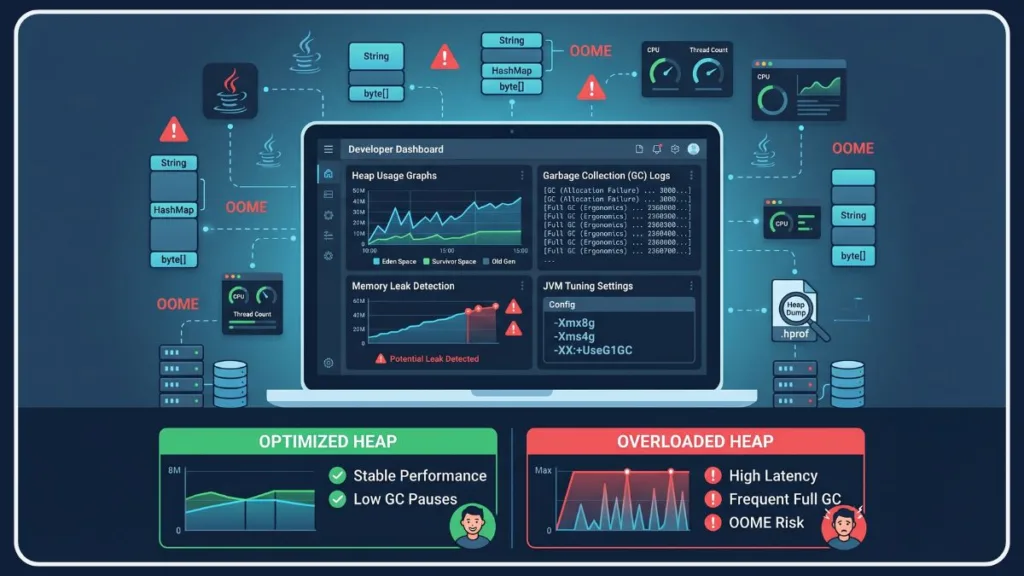
Fix 1: Increase Heap Size (Only When Appropriate)
If profiling confirms you do not have a memory leak, and the error was caused by a legitimate traffic volume spike or improper baseline configuration, you should allocate more memory. You can increase java heap size using the -Xms (initial) and -Xmx (maximum) flags.
java -Xms512m -Xmx2048m -jar your-application.jar
When NOT to use this: If a memory leak is present, increasing the heap is detrimental. It merely masks the bug, delays the crash, and results in catastrophic, multi-second garbage collection pauses when the massive heap finally fills up.
Fix 2: Find and Fix the Memory Leak
If your heap dump reveals a leak, you must fix the code. Locate the objects that should have been garbage collected but are still referenced. Audit your static fields and global collections, as these are the most common unintentional reference holders. Ensure objects are properly dereferenced when no longer needed, and utilize WeakReference wrappers where long-term, hard retention is not required.
Fix 3: Optimize Code and Data Structures
Write memory-conscious code to ease the burden on the JVM. Use primitive types (int, double) instead of wrapper objects (Integer, Double) wherever possible to reduce memory overhead. Set initial capacities on collections like ArrayList and HashMap to avoid the memory churn of internal resizing and excess array reallocation. Finally, avoid object creation inside tight loops or frequently called methods; reuse objects where the business logic allows.
If you are dealing with a spring boot OutOfMemoryError tied to heavy database operations, reducing internal framework caches—such as lowering the Hibernate query plan cache size—is an incredibly effective technique to fix OutOfMemoryError without increasing heap size.
Fix 4: Tune the Garbage Collector
If your application experiences heavy object churn, you may need to experiment with different garbage collection algorithms. Depending on whether your priority is raw throughput or low pause times, switching to G1GC (-XX:+UseG1GC) or ZGC (-XX:+UseZGC for Java 11+) can drastically improve memory management. Always review your GC logs after making a switch to confirm the new collector fits your application’s traffic pattern.
Choosing the right algorithm is a core pillar of java memory tuning. While G1GC provides an excellent balance of memory efficiency and throughput for standard microservices, upgrading to Generational ZGC in modern Java versions can practically eliminate pause times for latency-sensitive applications, provided you have sufficient memory headroom.
Fix 5: Reduce the Memory Footprint
Reevaluate how your application handles data. Instead of loading entire database tables into a List, utilize streaming data java APIs to process records one by one. Use external storage or file-based processing for massive datasets rather than keeping them resident in the JVM heap. If data must remain in memory, consider compressing it before storage to shrink its footprint.
Fix 6: Move Caching Out of the JVM
Applications relying on large in-memory caches will inevitably fight for heap space. Offload these caches to out-of-process, distributed solutions like Redis caching or Memcached. Moving this data out of the JVM entirely frees up massive amounts of heap space without sacrificing your application’s caching capabilities or performance.
How to Prevent OutOfMemoryError: Java Heap Space Before It Happens
Preventing a memory crash requires a shift from reactive firefighting to proactive engineering.
Implementing java heap size best practices means setting baseline alerts for heap utilization. If your old generation space consistently stays above 80 percent after full collection cycles, proactive investigation is required before a critical failure occurs.
First, monitor memory usage continuously in production using Application Performance Monitoring (APM) tools. This allows you to detect gradual heap growth over days or weeks, giving you time to intervene before a slow leak becomes an outright crash.
Second, integrate memory profiling into your active development cycle, not just after deployment. Catching inefficient object allocation on a developer’s local machine costs exponentially less time and money than debugging a production outage.
Third, perform rigorous load testing before major releases. Simulating traffic spikes validates that your JVM heap configuration actually holds up under real-world, high-concurrency conditions. Furthermore, treat GC tuning as a routine maintenance task rather than a set-and-forget fix; as you add new features to your application, its memory allocation behavior will change.
Ultimately, design with memory efficiency as a first-class concern. Choose appropriate data structures, prevent unnecessary object retention, and heavily favor data streaming over batch-loading. The developers who encounter heap space errors the least are not the ones running servers with the most RAM—they are the ones writing cleaner, memory-aware code from the start.
Stop Guessing — Fix Java Heap Space Error the Right Way
The OutOfMemoryError: Java heap space crash is an intimidating problem, but it ultimately boils down to two distinct categories: capacity problems and code problems. A capacity problem simply needs more room to breathe, while a code problem requires surgical debugging.
Blindly increasing the -Xmx limit without first generating and analyzing a heap dump is the single most common, and most destructive, mistake developers make when troubleshooting this error. By capturing the data, reading the incoming references, and matching the specific fix to the verified root cause, you can stabilize your application permanently.
Frequently Asked Questions About Java Heap Space Error
What is the difference between -Xms and -Xmx in Java?
The -Xms flag sets the initial amount of heap memory allocated to the JVM at startup. The -Xmx flag sets the absolute maximum amount of heap memory the JVM is allowed to request from the operating system.
Does increasing heap size always fix OutOfMemoryError?
No. If the application has a memory leak, increasing the heap size will only delay the inevitable crash. It allows the application to hoard more unused objects for a longer period, which also results in longer, application-freezing garbage collection pauses.
What is a heap dump and how do I generate one?
A heap dump is a file containing a snapshot of all objects residing in the JVM memory at a specific moment. You can generate one automatically upon a crash by adding -XX:+HeapDumpOnOutOfMemoryError to your JVM startup arguments.
How do I know if my Java app has a memory leak?
If your GC logs show the garbage collector running constantly but failing to reclaim significant memory, or if your application’s baseline memory usage slowly but steadily climbs upward over several days without dropping, you likely have a memory leak.
What is the difference between Java heap space error and Metaspace error?
A heap space error occurs when your application creates too many objects (data) and exhausts the Young/Old generation limits. A Metaspace error occurs when the JVM loads too many classes or method definitions (metadata) and exhausts the separate Metaspace memory region.
Is the Java heap space error the same as a stack overflow?
No. A heap space error means you ran out of memory for storing objects. A StackOverflowError means a specific thread ran out of memory in its dedicated thread stack, almost always caused by an infinite or excessively deep recursive method call.
What is Java heap space?
The Java heap space is the designated pool of memory allocated by the JVM at runtime to store your application’s objects and classes. Every time a new object is created during execution, it consumes a portion of this specific memory area.
What does “out of memory error Java heap space” mean?
This error signifies that your application attempted to allocate memory for a new object, but the JVM could not fulfill the request because the heap space is completely full and the garbage collector cannot free up any existing space.
How do I fix a Java heap space error?
Fixing the error depends on the root cause. If it is caused by a massive data load or traffic spike, you can fix it by increasing the maximum heap size (-Xmx). If it is caused by a memory leak, you must capture a heap dump, locate the stuck objects, and patch your code to release them properly.
How to increase the Java heap space?
You can increase the heap space by adding specific parameters to your JVM startup command. Use the -Xmx flag followed by the memory size (e.g., -Xmx4g for 4 Gigabytes) to raise the absolute maximum memory the application is permitted to use.
How to free Java heap space?
Developers do not manually free memory in Java. The JVM handles this automatically via Garbage Collection. To ensure space is freed, you must structure your code so that it removes references to objects once they are no longer needed, allowing the garbage collector to reclaim them.
What is the heap size for 16GB?
By default, the JVM typically reserves one-fourth (25%) of the system’s physical memory for the maximum heap size. Therefore, on a machine with 16GB of RAM, the default maximum Java heap size is automatically set to roughly 4GB, unless manually overridden with the -Xmx flag.
Why is Java Oom heap space not working?
If you have increased your heap space to combat an Out Of Memory error but your application still crashes, you almost certainly have a memory leak. In this scenario, adding more memory simply gives the leak a larger container to fill up, which delays the crash rather than fixing it.
Visit Our Post Page: Blog Page
Discover more from Izoate
Subscribe to get the latest posts sent to your email.