
Wondering why Activate Skill does nothing in ARC Raiders? Learn how Weapon Bash and Bull Rush work, check your keybinds, and fix control issues before your next raid.
Just updated ARC Raiders to Frozen Trail 2.0, loaded into a raid, and noticed a new Activate Skill action in your control settings? You press the button while moving or fighting, but nothing happens.
Before blaming your keyboard or controller, check your Skill Tree.
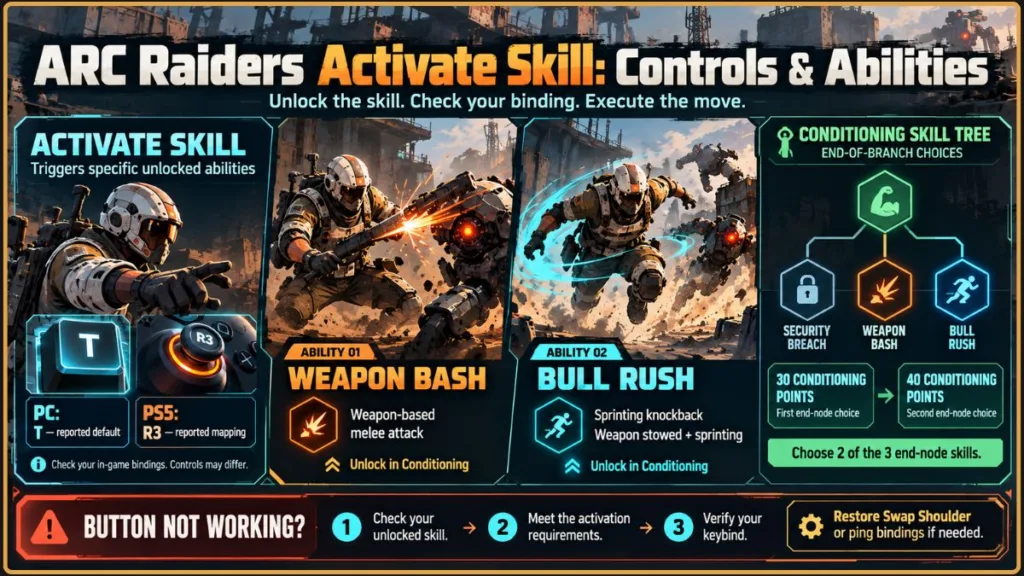
Activate Skill is a dedicated input for activating specific unlocked abilities, including Weapon Bash and Bull Rush. It does not automatically trigger every skill or give your Raider a special ability from the start. If you have not unlocked a skill that uses this action, pressing the button will not perform the move you expect.
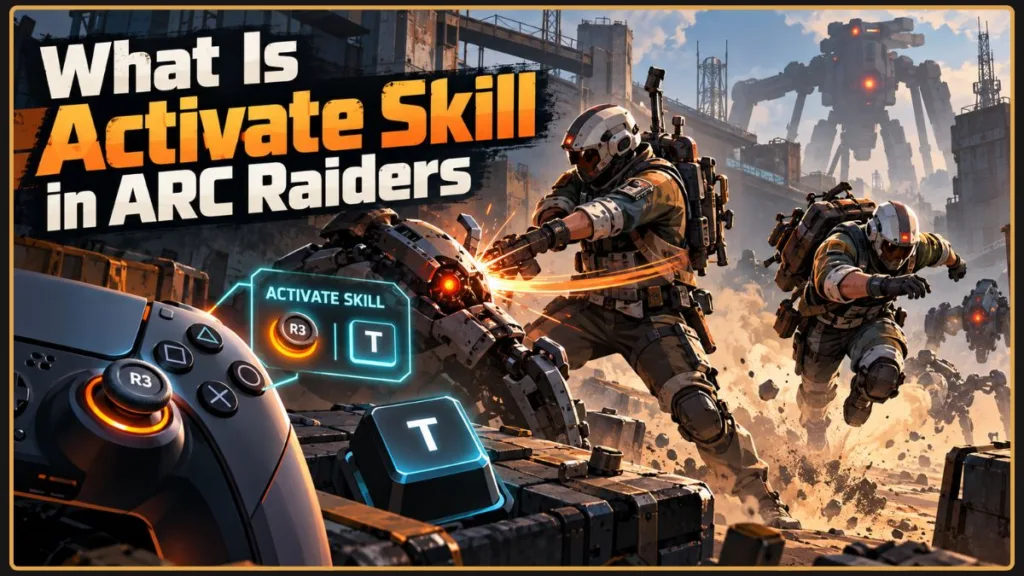
The confusion comes from the Frozen Trail 2.0 update, released on October 8, 2026, which revamped the Skill Tree and changed the default gamepad mapping.
Here’s what Activate Skill actually does, which abilities use it, how to check your controls on PC and console, and how to restore your preferred button layout without sacrificing an important combat action.
Quick Answer: What Does Activate Skill Do in ARC Raiders?
The Activate Skill button triggers specific abilities unlocked through the Skill Tree.
The two main abilities associated with this input are:
- Weapon Bash: Performs a melee attack using your equipped weapon.
- Bull Rush: Lets you knock back players and ARC while sprinting with your weapon stowed.
Both abilities are available through the end-of-branch choices in the Conditioning Skill Tree.
A commonly listed default PC binding is T. Some PS5 players have reported that Activate Skill is assigned to R3 following the update. These are not guaranteed bindings for every platform, preset, or custom layout, so check your actual in-game settings before changing anything.
Quick Tip: Open your Skill Tree and check whether you have unlocked Weapon Bash or Bull Rush. If neither is unlocked, you may not need a dedicated Activate Skill binding for your current build. Restore your preferred controls if the new assignment interferes with Swap Shoulder or another essential action.
Which Abilities Use Activate Skill in ARC Raiders?
The main reason to keep the Activate Skill input assigned is to use Weapon Bash or Bull Rush. Both are Conditioning end-of-branch choices, but they serve different purposes.
| Skill | What it does | Uses Activate Skill? |
|---|---|---|
| Weapon Bash | Performs a melee attack with your equipped weapon | Yes |
| Bull Rush | Knocks back players and ARC while sprinting with your weapon stowed | Yes |
| Security Breach | Allows you to breach Security Lockers | No separate Activate Skill action identified |
| Quick Roll | Changes your Dodge Roll into a faster, lower-stamina-cost version that covers less distance | No separate Activate Skill action identified |
Quick Roll is a Survival skill, not another melee ability tied to Activate Skill. It modifies an existing movement action rather than functioning like Weapon Bash or Bull Rush.
Important Information: Not every Skill Tree ability requires a dedicated activation button. Some skills modify existing actions, while others unlock new abilities. Always check the individual skill description before assuming it uses Activate Skill.
Weapon Bash: A Close-Range Melee Attack
Weapon Bash lets you attack an enemy at close range using your equipped weapon.
This provides another option when an enemy gets too close for comfortable gunplay. Instead of relying exclusively on your firearm, you can use the melee action when the situation calls for it.
For example, imagine an ARC unit closing the distance in a narrow passage or a rival Raider pushing into your position. Weapon Bash gives you another close-range response, although you still need to consider your positioning, timing, and the risk of fighting at short range.
How to unlock Weapon Bash:
- Open the Skill Tree.
- Select the Conditioning branch.
- Invest enough Skill Points to reach its end-of-branch choices.
- Unlock Weapon Bash when it becomes available.
- Check that Activate Skill is assigned to a usable input.
- Test the action before relying on it in a dangerous raid.
Weapon Bash becomes available as an end-of-branch choice after investing 30 points in Conditioning. You must select it; simply reaching the threshold does not automatically unlock every available skill.
Practical Tip: If you want Weapon Bash specifically, check your Conditioning choices before spending more Skill Points. Reaching the required threshold does not guarantee that you selected the ability.
Bull Rush: Knock Back Enemies While Sprinting
Bull Rush lets you knock back players and ARC while sprinting with your weapon stowed.
The weapon-stowed requirement is important. If you are trying to activate Bull Rush while holding your weapon ready, you may not be meeting the conditions needed to perform the move.
Bull Rush serves a different purpose from Weapon Bash. Rather than making a conventional weapon-based melee attack, it lets you charge into nearby threats and displace them.
Imagine a rival Raider blocking a narrow route or an ARC enemy pressuring your position. Bull Rush can help you disrupt that threat and create an opportunity to reposition. It is not a guaranteed escape, however; charging into an exposed area can leave you vulnerable to other enemies or incoming fire.
How to unlock and use Bull Rush:
- Open the Conditioning branch in your Skill Tree.
- Invest the required Skill Points to reach its end-of-branch choices.
- Select Bull Rush when it becomes available.
- Check the Activate Skill binding in your control settings.
- Stow your weapon and begin sprinting.
- Trigger Bull Rush using your assigned input when the situation calls for it.
If the move does not activate, confirm that you unlocked Bull Rush and are meeting its sprinting and weapon-stowed requirements before troubleshooting your controls.
Combat Tip: Do not treat Bull Rush as a guaranteed escape. Check your surroundings before charging, because another Raider or nearby ARC enemy can still punish you while you reposition.
Do You Need Both Weapon Bash and Bull Rush?
Not necessarily. Your choice depends on how you prefer to handle close-range encounters.
Weapon Bash is the more direct choice if you want a melee attack with your equipped weapon. Bull Rush is worth considering if you want a sprinting knockback maneuver.
The updated Conditioning branch has three end-of-branch choices:
- Security Breach: Allows you to breach Security Lockers.
- Weapon Bash: Unlocks the weapon-based melee attack.
- Bull Rush: Unlocks the sprinting knockback ability.
The first choice becomes available after investing 30 points in Conditioning, and the second becomes available at 40 points. You can select two of these three skills, not all three.
If you choose Weapon Bash and Bull Rush, you give up Security Breach from that set of choices. Consider that trade-off before spending your Skill Points.
Build Information: Choose your end-of-branch skills based on your preferred playstyle. Weapon Bash and Bull Rush offer combat options, while Security Breach provides access to Security Lockers. The best choice depends on what you value during raids.
Why Does the Activate Skill Button Do Nothing?
If pressing Activate Skill produces no visible result, work through these checks before assuming your controls are broken.
1. You Haven’t Unlocked an Applicable Ability
This is the first thing to check.
Your Raider does not automatically receive Weapon Bash or Bull Rush when starting the game. You must invest in Conditioning and select the relevant ability.
If you have neither unlocked, pressing Activate Skill will not trigger either move. You can continue using your existing abilities without assigning a dedicated input to an action you do not currently need.
Quick Tip: Check your unlocked skills before changing several keybinds. If you have not unlocked an ability associated with Activate Skill, the lack of a visible action may be expected rather than a control problem.
2. You Chose a Different Conditioning Skill
Reaching the end of Conditioning does not automatically give you every available ability.
For example, if you select Security Breach and Weapon Bash, you will not also have Bull Rush. Similarly, picking Bull Rush does not automatically unlock Weapon Bash.
Open the Skill Tree and check the abilities you actually selected, rather than assuming that your total Conditioning investment guarantees a particular move.
3. You Aren’t Meeting the Ability’s Requirements
The two active abilities work differently.
- Weapon Bash: Check that Weapon Bash is unlocked and that you are using the assigned Activate Skill input.
- Bull Rush: Confirm that Bull Rush is unlocked, your weapon is stowed, and you are sprinting before triggering it.
If the conditions are wrong, changing your keybind alone will not solve the problem.
Troubleshooting Information: When an ability fails to activate, check three things in order: whether it is unlocked, whether you are meeting its activation requirements, and whether the correct input is assigned. This helps you avoid changing controls unnecessarily.
4. Your Keybind Is Missing or Conflicting
If the skill is unlocked and you are meeting its requirements, inspect your control settings.
Your Activate Skill assignment may conflict with another action, particularly if you restored an older controller layout after Frozen Trail 2.0. A button may also be different from the one you remember using before the update.
Find Activate Skill in your bindings, confirm its current assignment, and try another available input if necessary.
Practical Tip: Change one binding at a time, apply the change, and test it. This makes it easier to identify whether a missing action is caused by the keybind or by an ability requirement.
How to Change Activate Skill on PC, PS5, and Xbox
The Frozen Trail 2.0 update introduced revised default gamepad mapping. For players who have built their muscle memory around the old layout, this can be more disruptive than the new skill itself.
The goal is simple: keep the buttons you use regularly for movement, aiming, and combat comfortable, and assign Activate Skill somewhere that works for your build.
Fix Activate Skill on PS5 and Xbox
Follow these steps to review your controller bindings:
- Open ARC Raiders and navigate to the settings menu.
- Open the controller or control-binding settings.
- Locate the Activate Skill action.
- Check which button is assigned to it.
- Review any conflicts with Swap Shoulder, ping, or another action you regularly use.
- Select a different supported input if the current mapping interferes with your layout.
- Apply the change if prompted, then test both actions before entering another raid.
Some PS5 players have reported seeing R3 assigned to Activate Skill after the update. If you previously used R3 for Swap Shoulder, you may want to restore that function and assign Activate Skill elsewhere.
For Xbox, check your actual controller preset instead of assuming its default mapping matches PS5.
Control Warning: Do not assume R3 is the default Activate Skill binding on every console. Check your current preset first, especially if you have customized your controls.
What If the Right D-Pad Button Won’t Accept the Binding?
If the game refuses to assign Activate Skill to Right on the D-pad, try another available D-pad direction or a different supported input.
You can also consider a spare controller paddle if your controller supports custom mappings and those mappings are compatible with the game.
First verify whether the game accepted the assignment. If it did not, the issue is with the mapping, not necessarily with the ability itself.
Troubleshooting Tip: If Right on the D-pad does not work as an assignment, test another supported input. Do not assume the same binding issue affects every controller or every game version.
Fix Activate Skill on PC
A commonly listed default PC binding for Activate Skill is T, but your controls may differ if you use a custom configuration or restored older bindings.
To check or change it:
- Open the in-game settings.
- Find the keyboard-and-mouse control bindings.
- Locate Activate Skill and inspect its assigned key.
- Check whether that key is already assigned to another action.
- Assign a different available key if needed.
- Apply the change and verify your essential movement and combat controls.
A dedicated key can work well if you frequently use Weapon Bash or Bull Rush. A spare mouse thumb button is another option if your mouse supports it and the placement feels comfortable.
PC Tip: Choose a key or mouse button you can reach comfortably while moving. If your current T binding conflicts with ping, select an available alternative rather than disrupting an action you use more often.
Can You Unbind Activate Skill If You Don’t Use It?
If you have not unlocked Weapon Bash or Bull Rush and do not intend to use them, you may not need a dedicated Activate Skill button for your current build.
You can leave it unassigned if your current control settings allow that option. Otherwise, assign it to a spare input that does not interfere with an action you use regularly.
This is particularly useful if the updated mapping displaced Swap Shoulder or another familiar controller command.
There is no need to sacrifice a comfortable aiming layout for a skill you have not unlocked. If you decide to use Weapon Bash or Bull Rush later, you can assign Activate Skill again and test it before your next high-risk raid.
Important Information: Leaving Activate Skill unassigned may be suitable for your current build, but confirm that the game permits the change and that you have not disabled an action you actually use. You can revisit the binding when your build changes.
Is Activate Skill Required for Gadgets and Grenades?
No. Do not confuse Activate Skill with your ordinary equipment controls.
Grenades, deployable gadgets, and other equipment use their corresponding equipment or deployment inputs. Activate Skill is intended for specific character abilities such as Weapon Bash and Bull Rush.
You do not need to unlock either of those abilities just to use your regular grenades or deploy your usual equipment.
Similarly, not every Skill Tree upgrade requires its own dedicated activation button. Some skills improve existing actions, while others unlock additional abilities or utility.
If you’re unsure about a particular skill, read its description in the current Skill Tree and check whether it uses a separate action.
Remember: Skill activation and equipment deployment are different actions. Check the assigned controls for your grenades and gadgets separately instead of trying to use Activate Skill for every ability or item.
Frequently Asked Questions
What Is the Default Activate Skill Button in ARC Raiders?
A commonly listed PC default is T. Some PS5 players have reported R3 assigned to Activate Skill after Frozen Trail 2.0. Check your in-game settings because defaults, presets, and custom bindings can differ. Verify Xbox mappings directly rather than assuming they match PS5.
Why Does Activate Skill Do Nothing?
The most likely explanation is that you have not unlocked a skill that uses this action. Check the Conditioning branch for Weapon Bash or Bull Rush. If you have unlocked one, verify your binding and meet the ability’s requirements.
Quick Answer: Check the unlocked ability first, then its activation requirements, and finally your keybind.
Can You Unbind Activate Skill in ARC Raiders?
You may leave Activate Skill unassigned if your current settings permit it. Otherwise, move it to a spare input. Make sure the new layout does not interfere with Swap Shoulder, ping, or another important action.
Does Quick Roll Use Activate Skill?
Quick Roll modifies your Dodge Roll, making it faster and less stamina-intensive while covering a shorter distance. It is a Survival skill, not one of the two main abilities associated with Activate Skill.
Is Weapon Bash Better Than Bull Rush?
Neither is universally better. Weapon Bash provides a melee attack using your equipped weapon, while Bull Rush is a sprinting knockback maneuver that requires your weapon to be stowed. Choose based on your preferred combat style and which ability fits your build.
Can You Unlock Weapon Bash, Bull Rush, and Security Breach Together?
No. These are the three Conditioning end-of-branch choices, and the updated tree lets you choose two of them. You unlock the first choice at 30 Conditioning points and the second at 40, so plan your selection around the abilities you actually want.
Conclusion: Restore Your Controls Before Your Next Raid
The Activate Skill input can look confusing after the ARC Raiders Frozen Trail 2.0 update, especially if it appears on a controller button you previously used for aiming.
The explanation is straightforward: Activate Skill triggers specific abilities you’ve unlocked through the Skill Tree. Weapon Bash and Bull Rush are the two main abilities to understand, and both require investment in Conditioning.
If you haven’t unlocked either one, check your bindings and restore your preferred control layout if necessary. If you plan to use them, assign Activate Skill to a comfortable input and make sure you understand each ability’s activation requirements.
Final Tip: Before heading topside, check your Skill Tree, confirm your bindings, and make sure your essential controls still work. There’s no reason to lose a fight because you sacrificed an important button for an ability you haven’t unlocked yet.
For the full list of changes introduced with Frozen Trail 2.0, see the official ARC Raiders update notes.
Visit Our Post Page: Blog Page
Discover more from Izoate
Subscribe to get the latest posts sent to your email.