
Portal down? Don’t panic. Discover 4 stress-free ways to check your EPF balance in 2026 using the EPFO portal, UMANG app, SMS, or missed call.
Monitoring your Employee Provident Fund (EPF) account is one of the most fundamental financial habits for any salaried professional in India. Whether you want to verify that your employer is consistently depositing their mandatory monthly contribution, calculate how much you can withdraw through an advance claim (Form 31) for an emergency, or simply watch your long-term retirement savings compound, knowing your exact balance is essential.
Yet, anyone who has navigated the digital infrastructure of the Employees’ Provident Fund Organisation (EPFO) knows that an inquiry is rarely as simple as clicking a button. Between unexpected 503 Service Unavailable errors, delayed one-time passwords (OTPs), server synchronization lags, and sudden portal blackouts, checking your balance can quickly turn into an exercise in patience.
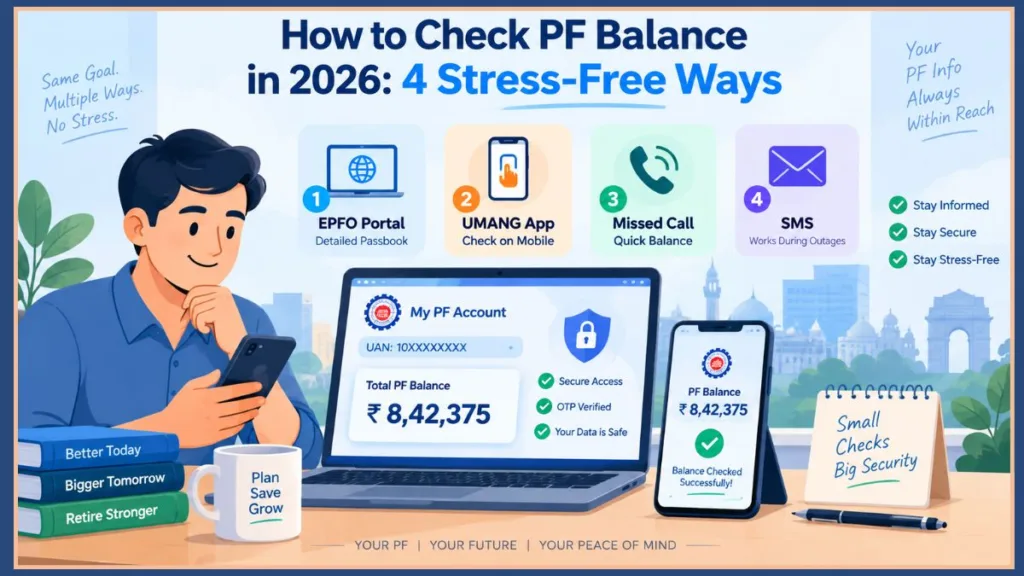
This comprehensive operational guide walks you through every verified way to check your PF account balance—both online and offline. It covers the initial setup requirements every first-time employee must complete, explains how to interpret the figures on your statement, and details exact workarounds for when official servers go offline during time-sensitive background verifications.
Before You Start: Activating Your Universal Account Number (UAN) and Setting Your Password
If you are starting your career or checking your provident fund records online for the very first time, you cannot immediately log into the passbook portal.
Even if your monthly salary slip clearly displays a 12-digit Universal Account Number (UAN), that number remains dormant by default until you complete the initial registration.
Process Flow: Salary Slip Shows UAN > Activate on Member e-Sewa > Wait 6–24 Hours > Access Passbook Portal
How to Complete Your Online UAN Activation
- Go directly to the official EPFO Member e-Sewa portal at
unifiedportal-mem.epfindia.gov.in. - Locate the Important Links panel on the bottom-right corner and select Activate UAN.
- Input your 12-digit Universal Account Number, full legal name, date of birth, and identity credentials exactly as they appear in official records.
- Enter your contact number, solve the security captcha, and click Get Authorization PIN.
- Submit the authentication OTP received on your mobile phone to activate your profile and set a permanent password.
The Critical Pitfall: The Mobile Number Mismatch
The single most frequent reason first-time users fail to activate their UAN is entering the wrong phone number.
Many employees maintain two mobile numbers: one shared with their company’s HR department for routine communications, and another tied to their Aadhaar record.
Crucial Rule: The EPFO server validates your identity against the national identity repository in real time. You must enter the phone number currently linked to your Aadhaar card when activating your account. If you enter a secondary number given only to your employer, the backend authentication fails immediately, and your activation OTP will never arrive.
Debunking the “Default Password” Myth
A widespread misconception among new employees is that their employer or the EPFO assigns an initial default password. There is no pre-assigned password.
You must establish your own credentials during the activation workflow described above.
Practical Advice: If your organization’s payroll department activated the account on your behalf without sharing your login details, go to the Member e-Sewa login screen, select Forgot Password, verify your identity via the mobile OTP linked to your Aadhaar, and generate a new password.
The 6-to-24-Hour Synchronization Delay
Once you complete activation and set your credentials, do not attempt to log into the passbook portal right away.
The EPFO maintains two distinct database environments:
- The Member e-Sewa Portal: Manages user profiles, KYC seeding, service history, and authentication.
- The Member Passbook Portal: Handles financial ledgers, transactional accounting, and statement rendering.
Important Note: It takes anywhere from 6 to 24 hours for newly activated credentials to replicate across these distributed servers. Attempting an immediate login triggers frustrating alerts like “Invalid UAN / Password” or “Member ID Passbook not available for this UAN.” Give the system sufficient time to complete its backend sync before checking your statements.
Method 1: Check PF Account Balance Online via the EPFO Portal Login (Passbook)
When you need a detailed financial accounting—such as verifying individual monthly deposits, checking accumulated interest credits, or securing a signed PDF statement for visa processing or a home loan application—the web portal is the most thorough channel.
Process Flow:
passbook.epfindia.gov.in> Login (UAN + Password) > Select Member ID > View / Download PDF
Step-by-Step Login Instructions for Your EPFO Passbook Balance
- Visit the dedicated passbook server at
passbook.epfindia.gov.in/MemberPassBook/Login. - Enter your 12-digit UAN, your active password, and the alphanumeric captcha displayed on the screen.
- After landing on the main dashboard, locate the Select Member ID menu. If you have changed organizations throughout your career, each company is represented by a separate Member ID tied to your primary UAN.
- Highlight the relevant establishment ID and click View Passbook (New: Entire Session) to review the ledger on-screen, or click Download Passbook to save an official PDF record.
Troubleshooting Common Web Portal Errors
1. “503 Service Unavailable” or Persistent Gateway Timeouts
- The Root Cause: The central passbook cluster experiences massive traffic surges during standard corporate business hours (between 10:00 AM and 6:00 PM IST), as well as mid-month when enterprise payroll teams file their monthly contribution schedules.
- The Workaround: Log in during off-peak traffic windows—ideally before 8:30 AM or after 9:30 PM IST. If you require immediate confirmation during business hours, bypass the browser entirely and use the offline missed-call or SMS protocols detailed below.
2. “Passbook Service Disabled for this Establishment”
- The Root Cause: You are employed by an Exempted PF Establishment. Many prominent enterprises (such as TCS, Infosys, Wipro, and various public-sector banks) manage their own internal, government-approved PF trusts rather than routing funds through the central EPFO corpus.
- The Workaround: Because exempted corporate trusts maintain private accounting ledgers, your financial data is not hosted on the public EPFO passbook servers. To view your accumulated balance and monthly deductions, access your organization’s internal HR payroll software or contact your corporate PF trustee helpdesk directly.
Method 2: UMANG App PF Balance Check (How to Check PF Balance on Mobile)
If you prefer managing administrative tasks from your smartphone, the Indian Government’s unified mobile platform provides a secure digital route to your provident fund records without requiring desktop browser access.
Step-by-Step Navigation Using the UMANG App
- Download and install the official UMANG app from the Google Play Store or Apple App Store.
- Complete your mobile registration and launch the app.
- In the primary search bar, enter EPFO.
- Tap Employee Centric Services from the results and select View Passbook.
- Input your 12-digit UAN and select Get OTP.
- Enter the six-digit verification code sent to your registered mobile number and tap Submit.
- Choose the appropriate establishment Member ID to review your monthly deposits and running balance.
Troubleshooting Mobile App Issues
1. OTP Delivery Delays and Failures (Why UMANG App OTP is Not Coming)
- The Root Cause: Regulatory telecom filters, active Do-Not-Disturb (DND) profiles, or high server load on governmental SMS gateways.
- The Workaround: Wait at least three minutes before tapping the resend button to avoid triggering security rate limits. Verify that your device is not auto-blocking transactional sender headers (such as
VM-EPFOHOorAD-EPFOHO). If the problem persists, clear the application cache from your device settings or switch from Wi-Fi to mobile data.
2. “Technical Glitch” or “Session Expired” Errors
- The Root Cause: The UMANG application connects directly to EPFO backend application programming interfaces (APIs). If the main EPFO database enters maintenance mode, UMANG cannot retrieve your records and displays a generic session termination warning.
- The Workaround: This is an external API communication drop, not an issue with your phone. Avoid clearing out or reinstalling your app repeatedly; simply rely on the direct SMS fallback channel instead.
Method 3: EPF Balance Check Missed Call Number (Zero-Data Offline Inquiries)
When you only need a quick balance snapshot and do not have an active internet connection or the patience to navigate login captchas, the official missed-call facility is the most convenient tool available.
Process Flow: Dial
9966044425> Auto-Disconnects (2-3 Rings) > Receive Automated SMS with Balance & KYC Status
What is the Missed Call Number for PF Balance Check in 2026?
| Parameter | Specification |
| Official Service Number | 9966044425 |
| Call Cost | Completely Free (Toll-Free) |
| Internet Connection Required? | No |
| Data Delivered | UAN, Name, DOB, Total Balance, Last Deposit, KYC Linkages |
Step-by-Step Instructions
- Open your phone’s keypad and dial
9966044425. - Let the call connect. The line will ring two or three times before the automated exchange disconnects the call.
- Within two to five minutes, you will receive an official notification from sender ID EPFOHO.
- The text message summarizes your vital account details: your registered full name, date of birth, total accumulated balance, details of the most recent employer deposit, and verification indicators confirming whether your Aadhaar, PAN, and bank accounts are properly seeded.
Why the Missed Call May Fail to Trigger an SMS
If the system hangs up but you receive no response message, the issue typically traces back to one of two structural causes:
- Dual-SIM Slot Confusion: You placed the outgoing call from SIM 2, while your UAN profile is associated with the carrier profile in SIM 1. Always double-check that your outgoing call originates from the specific cellular number registered on the EPFO Member Portal.
- Incomplete KYC Verification: The automated telephony engine only queries and returns data for profiles that have completed mandatory identity verification. If your Aadhaar, Permanent Account Number (PAN), or bank account details are missing or marked as “Pending Employer Approval” on the central portal, the telephony engine blocks automated message delivery.
Method 4: How to Check EPF Balance Through SMS Format (The Reliable Outage Lifeline)
During major digital outages, web portals and mobile applications often drop offline simultaneously because they share modern web application firewalls and cloud endpoints.
However, the dedicated SMS gateway operates over a different, legacy infrastructure route. It can often retrieve your ledger balances from cached internal mirrors even when every web screen returns an error.
Process Flow: SMS Syntax:
EPFOHO <12-Digit UAN> <Language Code>> Send to7738299899
PF Balance Check SMS Number and Step-by-Step Syntax
| Parameter | Specification |
| Official Destination Number | 7738299899 |
| Required Format (English) | EPFOHO <UAN> ENG |
| Carrier Tariff | Standard outgoing SMS charges apply based on your cellular plan |
Step-by-Step Messaging Syntax
- Open your phone’s default SMS application.
- In the recipient field, enter
7738299899. - In the message draft area, type the exact command structure using your unique 12-digit UAN:
EPFOHO 10XXXXXXXXXX ENG(For example, if your personal UAN is 100987654321, your message must read:EPFOHO 100987654321 ENG) - Send the message from your registered phone number.
- You will receive an automated reply showing your current employer’s name, your cumulative balance, and the most recent monthly credit details.
Language Configuration Reference (What is the EPFO SMS Format?)
You can customize the last three letters of the SMS syntax to receive your account summary in any of ten supported regional languages:
| Language | Identifier Code | Exact Syntax Format |
| English | ENG | EPFOHO 10XXXXXXXXXX ENG |
| Hindi | HIN | EPFOHO 10XXXXXXXXXX HIN |
| Bengali | BEN | EPFOHO 10XXXXXXXXXX BEN |
| Gujarati | GUJ | EPFOHO 10XXXXXXXXXX GUJ |
| Marathi | MAR | EPFOHO 10XXXXXXXXXX MAR |
| Kannada | KAN | EPFOHO 10XXXXXXXXXX KAN |
| Telugu | TEL | EPFOHO 10XXXXXXXXXX TEL |
| Tamil | TAM | EPFOHO 10XXXXXXXXXX TAM |
| Malayalam | MAL | EPFOHO 10XXXXXXXXXX MAL |
| Punjabi | PUN | EPFOHO 10XXXXXXXXXX PUN |
Common SMS Gateway Syntax Error
If the service returns an “Invalid Keyword” notification, verify the text format carefully:
- The prefix
EPFOHOmust be written entirely in capital letters. - Use a single space between each segment:
[EPFOHO][Space][12-Digit UAN][Space][Language Code]. - Remove all hyphens, brackets, or commas from the number string.
What to Do During Extended Outages and Background Check Deadlines
Every year, scheduled system overhauls, database migrations, or infrastructure failures can take down employee-facing portals for days—or even weeks—at a time.
While inconvenient for day-to-day balance checks, this outage can become a major obstacle if you are transitioning between companies:
The Background Verification (BGV) Standoff:
When switching employers, hiring teams and independent background verification agencies frequently require a current EPF passbook or an official electronic service certificate to confirm previous employment dates, salary history, and organizational integrity. If the public passbook portal is down, your onboarding workflow can stall.
The Workaround: Leveraging the Employer-Tier Portal
When individual-facing portals are unresponsive, do not wait idly for the public servers to recover. Work directly with your company’s payroll department:
- Reach out to the Human Resources or Payroll Operations desk at your current or immediate past employer.
- Explain that the public passbook servers are inaccessible, and provide your active UAN alongside your internal Employee ID.
- Ask the payroll team to pull your records using the EPFO Employer Unified Portal (
unifiedportal-emp.epfindia.gov.in). - Why this works: The administrative employer portal operates on a dedicated enterprise infrastructure isolated from consumer traffic spikes. Your company’s authorized administrators can generate certified contribution schedules, pull historical remittance forms, and print establishment-level service records that background screening agencies accept as official proof of employment.
Making Sense of Your Passbook: How Contributions Are Calculated
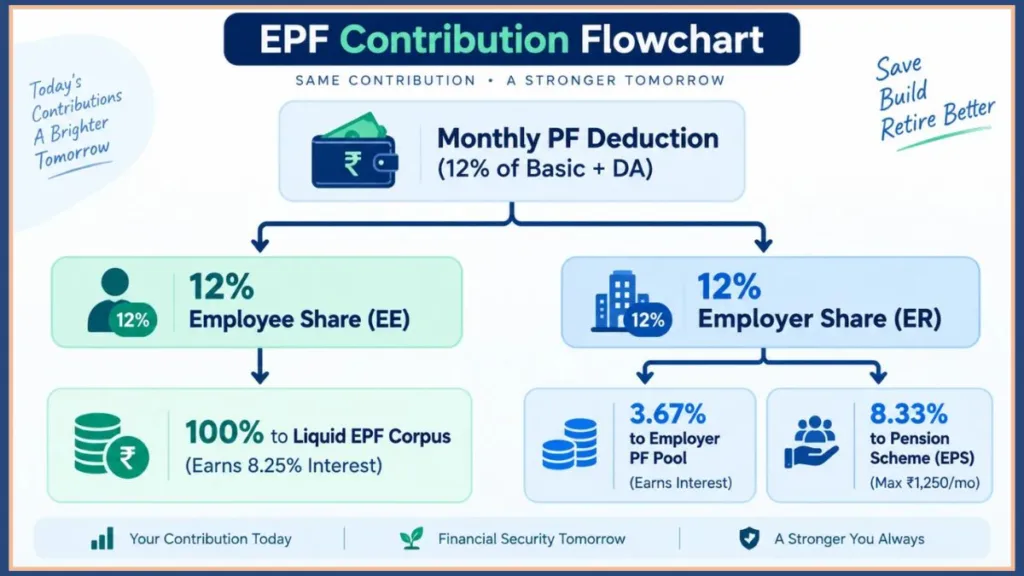
Opening your passbook reveals a ledger broken into three distinct contribution columns. Understanding how your monthly deductions are routed helps you track your savings accurately and avoids unnecessary concern over your balance:
The Three Contribution Pillars Explained
- Employee Share (EE): This column reflects the exact 12% deducted directly from your monthly basic salary and dearness allowance. The entirety of this pool compounds annually based on the statutory rate announced by the central government (set at 8.25% for the 2023–24 fiscal cycle and sustained into subsequent financial reviews).
- Employer Share (ER): Although your employer matches your 12% contribution, that money is split. Only 3.67% is deposited into this liquid PF reserve. Like your personal contribution, this segment earns annual compounding interest.
- Pension Scheme (EPS): The remaining 8.33% of your employer’s statutory matching contribution is diverted into the national pension framework. This contribution is capped against a statutory wage ceiling of ₹15,000 per month, limiting standard employer pension remittances to a maximum of ₹1,250 per month.
Warning on EPS Withdrawals: The EPS pool does not accumulate interest. It forms a defined-benefit pension corpus rather than an individual savings account. You cannot withdraw funds from this column through ordinary partial advances. You can claim an EPS lump-sum settlement (via Form 10C) only if your cumulative employment history is under ten years. After completing ten full years of eligible service, your balance converts into a Scheme Certificate, entitling you to an ongoing monthly pension (via Form 10D) once you reach retirement age.
Debunking the Sudden Balance Drop Panic (Why is My PF Balance Showing Zero?)
A frequent source of panic on community forums like Reddit’s r/epfoindia is a sudden drop in an employee’s visible balance—such as an account showing ₹18 Lakhs on a Friday evening, only to display ₹1.5 Lakhs by Monday morning.
If you ever see a sudden, unexpected drop in your numbers, keep these factors in mind:
- Interest Accrual and Server Consolidation: When regional accounting offices recalculate annual compound interest or run maintenance scripts, the display software often resets temporarily, showing only the current fiscal year’s contributions rather than your historical total.
- Member ID Dropdown Resets: Web browsers and mobile interfaces frequently default back to the first Member ID on your profile, which may belong to an older or short-lived job. Double-check that your active company is selected in the account dropdown menu.
The Bottom Line: Your employer cannot unilaterally withdraw money from your account once it has been deposited. Unless an official withdrawal claim (Form 31, Form 19, or Form 10C) is logged on your personal tracking dashboard, large balance drops almost always point to a temporary server rendering glitch rather than missing funds.
Why Your Latest Deduction Isn’t Showing Up
If your company processes salary deductions on the 30th or 31st of the month, you might expect your passbook to reflect that deposit on the 1st. When it doesn’t appear, you might worry your employer missed the payment.
Under the provisions of the Employees’ Provident Funds and Miscellaneous Provisions Act, companies have a statutory grace period. Employers are legally required to file their Electronic Challan cum Return (ECR) and transfer withheld wages by the 15th of the following month.
Practical Advice: The provident fund deducted from your January paycheck does not have to be deposited with the government until February 15th. Therefore, it is best to review your passbook after the 20th of every month to confirm that your latest deposit has processed correctly.
How to Check Your Balance Without a UAN (Finding a Lost UAN)
If you have lost your records or changed jobs and your previous company never provided your credentials, you can retrieve your account information online through the central identity gateway without having to visit a regional EPFO office:
Process Flow:
unifiedportal-mem.epfindia.gov.in> Know Your UAN > OTP Verification > Enter Identity Details > UAN Dispatched via SMS
- Navigate to the EPFO Member e-Sewa homepage at
unifiedportal-mem.epfindia.gov.in. - Scroll to the bottom right of the page and select Know your UAN.
- Enter your active mobile phone number, complete the image captcha, and click Request OTP.
- Input the six-digit authorization code received on your phone and complete the verification.
- In the retrieval form, enter your full legal name, date of birth, and your Aadhaar number or Permanent Account Number (PAN).
- Click Show My UAN. Your registered 12-digit number will appear on your screen and will also be sent to your phone as an SMS record.
- With your UAN retrieved, return to the activation steps outlined in Section 1 to set a password and access your passbook.
Frequently Asked Questions
Why does the passbook portal say “Invalid Login” right after I changed my password?
The authentication database takes time to distribute updated security credentials to all auxiliary nodes. There is a built-in sync delay of approximately two to six hours before a revised password updates across both the Unified Portal and the Passbook servers. Avoid repeatedly requesting password resets; wait a few hours and try again.
Can I view the balance of my previous jobs in my current passbook?
Yes, but they will not automatically merge into a single sum. On the Member Passbook portal, the Select Member ID dropdown will show a different account ID for every establishment you have worked under. To combine older balances into your active company’s account, you must file an online transfer request (Form 13) via the Unified Portal.
My salary was deducted on the 30th, but the passbook does not show this month’s deposit. Why?
Under the EPF and MP Act, employers are granted a statutory grace period. Companies are legally required to remit monthly employee deductions to the EPFO by the 15th of the following month. For example, PF deducted from your January salary slip is generally deposited by your employer on or before February 15th. Check your passbook after the 20th of every month to confirm prompt deposits.
Can I check my PF balance with my mobile number alone without activating my UAN?
No. While the missed call and SMS methods do not require logging in with a web password, they both depend on your phone number being mapped to an active, KYC-seeded UAN in the EPFO database. Completing the initial activation process is required before offline query systems can locate and return your records.
Quick Reference: Comparing the Four Ways to Check Your Balance
| Method | Speed | Internet Required? | Setup Prerequisite | Best For |
| Web Passbook Portal | 2–5 Mins | Yes (Desktop/Mobile) | Active UAN + Password | Complete PDF passbook download, yearly interest audit |
| UMANG Mobile App | 1–2 Mins | Yes (Mobile App) | Active UAN + Aadhaar OTP | On-the-go checks, smartphone users |
Missed Call (9966044425) | ~1 Min | No (Works on feature phones) | Approved KYC + Registered SIM | Instant balance snapshot, zero data needed |
SMS Service (7738299899) | 2–5 Mins | No (SMS syntax required) | Approved KYC + Registered SIM | Reliable balance fallback when online portals fail |
Final Thoughts: Keeping Your Account Readily Accessible
Checking your EPF balance does not have to be an ordeal. The key is setting up your profile correctly from day one: ensure your UAN is activated using the phone number linked to your Aadhaar card, confirm that your employer has approved your primary KYC details, and remember that credentials take several hours to sync across systems.
When public web portals face peak-hour traffic slowdowns, save yourself the hassle of refreshing broken web pages. Use the missed-call service at 9966044425 or send a structured text to 7738299899 to get the balance details you need directly on your phone.’
Visit Our Post Page: Blog Page
Discover more from Izoate
Subscribe to get the latest posts sent to your email.