
Wondering how many subscribers you need to make money on YouTube? Learn the exact 500 and 1,000 subscriber requirements, watch hour thresholds, what each monetization tier unlocks, and how to start earning from your channel in 2026.
Short answer: 500 subscribers can unlock YouTube’s lower monetization tier, and 1,000 subscribers is the number most people actually mean when they ask how to get paid on YouTube. But neither number pays you on its own. To unlock ad revenue, you also need a set amount of public watch hours or Shorts views, and your channel still has to pass YouTube’s review process. Subscribers open the door — they don’t hand you a paycheck.
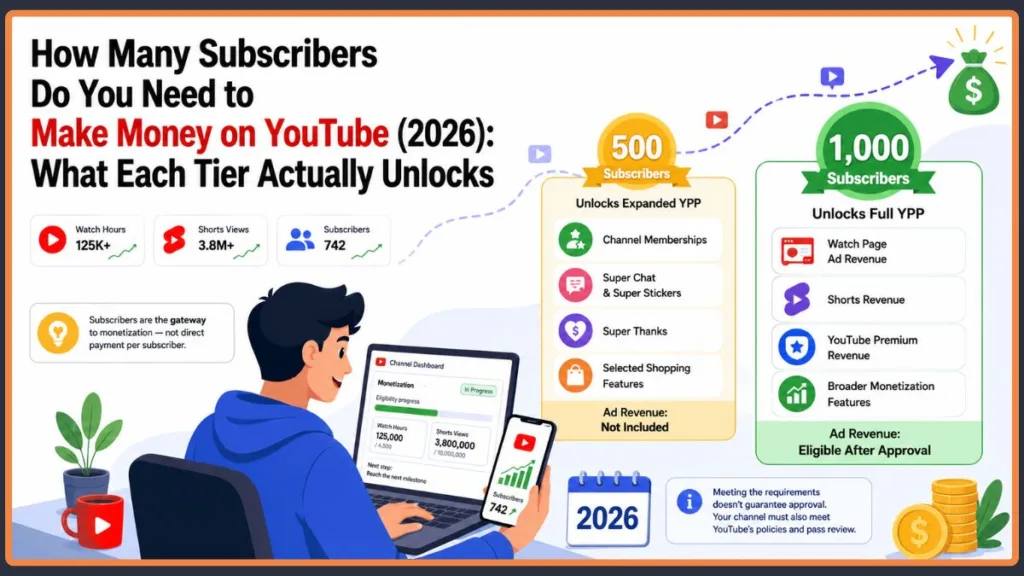
Here’s What You Actually Need to Get Monetized on YouTube
| Goal | Subscribers | Additional requirement |
|---|---|---|
| Expanded YPP (fan funding) | 500 | 3 public uploads in last 90 days + 3,000 valid public watch hours in last 12 months, or 3 million valid public Shorts views in last 90 days |
| Full YPP / ad revenue | 1,000 | 4,000 valid public watch hours in last 12 months, or 10 million valid public Shorts views in last 90 days |
Those are the current 2026 requirements. We’ll break down exactly what each tier unlocks, how YouTube pays creators once you’re approved, and how to start building toward real income from your channel.
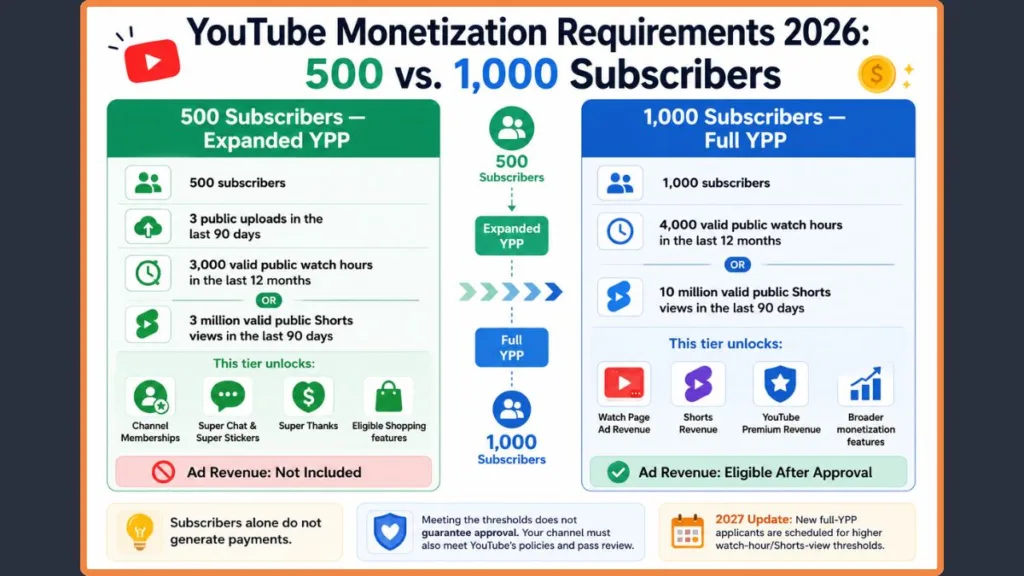
How Many Subscribers Do You Actually Need to Monetize YouTube?
YouTube’s Partner Program (YPP) — the official system that lets creators monetize their channels — has two entry points, not one.
500 Subscribers: What the Early YPP Tier Actually Gets You
The first tier opens at 500 subscribers. To qualify, your channel needs:
- 500 subscribers
- 3 public uploads in the past 90 days
- Either 3,000 valid public watch hours in the past 12 months, or 3 million valid public Shorts views in the past 90 days
- To meet YouTube’s other Partner Program requirements, which we’ll cover in full a little further down
Once you’re approved at this level, you can turn on:
- Channel memberships — fans pay a recurring monthly fee for perks like badges or member-only content
- Super Chat and Super Stickers — paid, highlighted messages fans can send during your live streams
- Super Thanks — a one-time tip option viewers can use on your regular uploads
- Eligible YouTube Shopping features — selected Shopping features may be available depending on your channel, country, and the specific feature’s requirements
This tier does not include ad revenue. It’s a real milestone, and it’s genuinely useful if you have a loyal audience willing to support you directly — but it’s a different kind of income than what most people picture when they think about getting paid on YouTube.
1,000 Subscribers: This Is Where Ad Revenue Actually Starts
This is the number most people are actually asking about when they search “how many subscribers do I need to get paid on YouTube.” To unlock full monetization — ad revenue plus a share of YouTube Premium revenue — you need:
- 1,000 subscribers, and
- Either 4,000 valid public watch hours on long-form videos in the past 12 months, or 10 million valid public Shorts views in the past 90 days
This is the threshold that makes you eligible to apply for ad-revenue sharing, provided your channel also passes YouTube’s review and meets the other requirements. Subscribers are the gate. They’re not the paycheck.
Heads-up about announced 2027 changes: YouTube has announced that the entry thresholds for new creators applying for full YPP will rise starting February 1, 2027 — to 8,000 valid public watch hours or 20 million valid public Shorts views, while the 1,000-subscriber requirement stays the same. YouTube says creators already in the full YPP will not be affected by this entry-threshold change. For the 500-subscriber expanded YPP tier, YouTube’s current documentation continues to list the existing fan-funding requirements and features. These are announced future changes for new applicants, not current 2026 requirements. YouTube has also announced additional changes to Shorts monetization beginning February 1, 2027; check the latest YouTube guidance before relying on the current thresholds.
Here’s how the two current tiers compare side by side:
| Feature | 500-subscriber YPP | 1,000-subscriber YPP |
|---|---|---|
| Channel memberships | Eligible, subject to requirements | Yes |
| Super Chat & Super Stickers | Eligible, subject to requirements | Yes |
| Super Thanks | Eligible, subject to requirements | Yes |
| Shopping | Selected features may be available | More features may be available |
| Watch Page ad revenue | No | Yes |
| YouTube Premium revenue | Not part of this tier | Yes |
How Many Watch Hours Do You Need Before YouTube Will Monetize You?
You need 3,000 valid public watch hours for the 500-subscriber tier, and 4,000 valid public watch hours for full ad-revenue eligibility. Both counts are measured over the trailing 12 months — YouTube looks at a rolling year, not your all-time total, so hours from three years ago have already dropped off.
Not every minute someone spends watching your channel counts toward that number, though, and that’s the part that trips creators up.
What Actually Counts as a Valid Public Watch Hour?
For YPP eligibility, valid public watch hours come from eligible public long-form videos during the required 12-month period. Watch time only counts if:
- The video is set to public, not private or unlisted
- The video is still live on the platform (deleted videos stop counting)
- The views aren’t coming from paid ad campaigns promoting the video
- It’s a long-form upload, not a Short
Watch time from unlisted live streams, deleted live streams, or streams you haven’t converted into a regular video doesn’t count either. If you want to track exactly where your channel stands, your rolling 12-month watch-hour total is visible in YouTube Studio’s Channel Analytics.
Do Shorts Watch Hours Count Toward Your 4,000-Hour Goal?
No — and this catches a lot of Shorts-first creators off guard. Watch time from Shorts doesn’t add to your long-form watch-hour total, no matter how many hours people spend watching your Shorts. Instead, YouTube gives Shorts a completely separate qualifying route, based on views rather than hours.
How Many Shorts Views Do You Need to Get Monetized on YouTube?
If your channel runs mostly on Shorts, you’re not locked out of monetization just because you’re not racking up long-form watch hours. YouTube gives you an alternate path to both tiers, measured in views instead of hours:
- For the 500-subscriber tier: 3 million valid public Shorts views in the past 90 days
- For the 1,000-subscriber tier: 10 million valid public Shorts views in the past 90 days
YouTube counts valid public Shorts views from eligible public Shorts toward this threshold. Views from sources or content that don’t qualify under YouTube’s rules won’t count.
Long-Form vs. Shorts: Which Route Is Right for Your Channel?
Neither path is objectively better. It depends on what you actually make.
| Long-form route | Shorts route | |
|---|---|---|
| What it measures | Watch hours | Views |
| 500-subscriber tier | 3,000 hours / 12 months | 3 million views / 90 days |
| 1,000-subscriber tier | 4,000 hours / 12 months | 10 million views / 90 days |
| Best suited for | Tutorials, vlogs, reviews, and other longer-form content | Channels built primarily around Shorts |
If you post both formats, you’re not locked into one lane — YouTube counts whichever route you clear first.
The Full List of YouTube Monetization Criteria (Not Just Subscribers)
Subscribers and watch hours (or Shorts views) get you to the door, but they’re not the entire checklist. Here are the main requirements for joining the applicable YPP tier — though individual monetization features can have additional eligibility rules of their own:
- Live in an eligible country or region. The Partner Program isn’t available everywhere. Check your specific eligibility in YouTube Studio’s Earn tab, since availability can shift over time.
- Follow YouTube’s Channel Monetization Policies, covering everything from content originality to advertiser-friendliness.
- Post original, authentic content. Reused clips, templated uploads, and compilations without meaningful commentary don’t qualify.
- Keep your channel in good standing and resolve any Community Guidelines or copyright issues that could affect monetization.
- Turn on two-step verification for the Google Account tied to your channel.
- Link an active AdSense for YouTube account — Google’s system for actually paying out your revenue — or set one up during the application.
- Avoid artificial engagement. Bought subscribers, view-bots, and sub-for-sub schemes can block approval or get you removed later.
- Pass YouTube’s channel review. Even when every number checks out, a review process still looks at your whole channel before approving you.
Hitting the numbers only gets you in line for review — it isn’t the finish line by itself. Shopping, memberships, fan funding, and other individual features may also have their own additional requirements beyond these main YPP criteria.
Does YouTube Actually Pay You Per Subscriber?
No. YouTube does not pay you a fixed amount for each subscriber. There’s no per-subscriber rate, no bonus for round numbers, and no direct line between your subscriber count and your bank balance.
Subscribers are an audience and growth metric — they tell you, and any brand you might work with, how many people have chosen to follow your channel. Earnings come from a different equation entirely: views, RPM, and whichever monetization features you have turned on.
That distinction explains a pattern that surprises a lot of new creators: a channel with 2,000 subscribers who rarely watch anything can easily earn less than a channel with 900 subscribers whose videos keep pulling in new viewers through search or recommendations. Subscribers who don’t watch don’t generate ad impressions, and ad impressions are what actually produce revenue.
RPM — revenue per mille, or per 1,000 views — is a creator-facing metric that shows how much revenue you earn per 1,000 views after YouTube’s share, based on the revenue sources included in the calculation. It’s not the same as CPM (which reflects what advertisers pay before YouTube takes its cut), and it’s not a fixed payment for every 1,000 monetized views. RPM varies by channel, audience location, content type, niche, and revenue mix, which is exactly why two channels with identical subscriber counts and identical view counts can land in very different places earning-wise.
Tip: Focus on building an audience that actually watches your videos. A higher subscriber count means little if those subscribers never watch or interact with your content.
So How Much Does a YouTube Channel Actually Make Per Month?
There’s no single honest number here, and any article that gives you one flat figure is guessing. Monthly YouTube income depends on a combination of factors:
- Monthly views
- RPM, which varies heavily by niche
- Content category and niche
- Audience location
- Content format — long-form versus Shorts
- Advertiser demand at the time
- Seasonality, since ad rates typically shift around the holidays
- Which monetization methods you have active
A Rough Idea of What Creators Earn at Each Stage
Rather than promising dollar figures, here’s how earning potential generally shifts as a channel grows:
1,000–10,000 subscribers. You’ve just cleared full YPP eligibility. Ad revenue is available but usually modest here, and fan-funding features like memberships and Supers can add to it if your audience is engaged.
10,000–100,000 subscribers. Ad revenue potential grows alongside your view count, and this is typically where memberships, affiliate marketing, and smaller sponsorship deals start becoming realistic additional income sources.
100,000+ subscribers. Multiple revenue streams — ads, memberships, sponsorships, affiliate income, and sometimes products — can add up to something significant. Even at this size, a smaller channel in a high-paying niche can out-earn a much bigger channel in a lower-paying one.
The Simple Formula Behind YouTube Ad Revenue
The math behind ad earnings is straightforward, even though the inputs vary a lot from channel to channel:
Estimated ad revenue = (Views ÷ 1,000) × RPM
As an illustration only: if a video earns a $4 RPM and gets 10,000 views, that works out to roughly $40 in estimated ad revenue (10,000 ÷ 1,000 × $4 = $40). Change the RPM or the view count, and the number moves substantially — a gaming channel and a personal-finance channel with identical view counts can land in very different places. Treat this as an illustration of the mechanics, not numbers to expect on any particular timeline.
Every Way YouTube Creators Actually Make Money
Ads are the most talked-about YouTube revenue source, but for a lot of established creators, they’re not the only significant one. Here’s the fuller picture:
- YouTube advertising. Once you’re in the full YPP tier and turn on Watch Page ads, you keep 55% of the net ad revenue generated on your videos’ Watch Page (the standard video-viewing screen), with the rest going to YouTube. Note that this 55% Watch Page revenue-share model does not apply to Shorts, which use a separate revenue-sharing system.
- YouTube Premium. When Premium subscribers watch your content, you earn a share of their subscription fee based on their watch time — separate from ad revenue entirely.
- Channel memberships. Viewers pay a recurring monthly fee for perks like badges, emojis, or member-only content.
- Super Thanks, Super Chat, and Super Stickers. Fans can tip on individual videos through Super Thanks, or highlight messages during live streams with Super Chat and Super Stickers.
- YouTube Shopping. Eligible creators can tag products directly in videos and live streams, subject to feature-specific requirements.
- Sponsorships. Brands pay creators directly for dedicated segments or full videos — this sits entirely outside YouTube’s own payment system, and doesn’t require YPP approval.
- Affiliate marketing. Creators link products in descriptions or pinned comments and earn a commission on resulting sales.
- Products and services. Merchandise, courses, coaching, and other offerings let creators sell directly to their audience instead of relying only on ad-based revenue.
Most channels earning a meaningful income aren’t relying on just one of these. They’re usually combining two or three, so a slow month in one area doesn’t sink the whole thing.
Can You Actually Make Money From YouTube Community Posts?
Community Posts are an engagement feature, not a direct revenue source. They’re the text, image, poll, and GIF-style posts you can publish to your channel’s Community tab, separate from your actual videos.
Publishing a Community Post by itself doesn’t generate advertising revenue — there’s no ad placement inside a post the way there is on a video’s Watch Page. What Community Posts can do is support the monetization features you already have:
- Promote a members-only perk to drive channel membership sign-ups
- Point viewers toward a live stream where Super Chat and Super Stickers are active
- Link to a product you’re tagging through YouTube Shopping
- Send traffic back to a video that’s still accumulating watch hours and ad views
Posting to the Community tab also counts as channel activity, which matters because YouTube can pull monetization from channels that haven’t uploaded a video or posted to the Community tab in six months or more.
Community Post Ideas That Actually Support Your Revenue
A few formats that tend to work well for supporting monetization:
- “New video is live” — a direct link back to a video that can still earn ad revenue and count toward your watch-hour total
- “Which tutorial should I make next?” — a poll that boosts engagement while gathering ideas for future content
- “Members-only update” — a post reminding free subscribers what they’re missing, aimed at growing memberships
- “Product recommendation” — a post supporting an affiliate link or a YouTube Shopping tag
Think of Community Posts as a megaphone for your other revenue streams, not a revenue stream on their own.
How to Create a YouTube Channel and Start Earning Money
Creating a YouTube channel costs nothing and takes minutes. Earning from it is the part that takes real work. Here’s the realistic path from zero to your first payout:
- Create a Google account, if you don’t already have one — this is what your channel will be tied to.
- Create your YouTube channel through YouTube Studio or the YouTube app, using a name that reflects what you’ll actually make content about.
- Choose a clear niche so viewers can quickly understand what your channel is about and why they should subscribe — it’s worth spending real time on this before you upload your first video.
- Customize your channel — add a profile picture, banner, and description so new visitors understand what you do at a glance.
- Publish useful videos on a consistent schedule. This is the stage that actually builds your numbers, and there’s no shortcut around it.
- Build subscribers and watch time by focusing on content people are actively searching for and sticking around to watch.
- Meet YPP requirements for whichever tier you’re targeting — 500 or 1,000 subscribers, plus the matching watch-hour or Shorts-view threshold.
- Apply through YouTube Studio, in the Earn section, once you’ve cleared the threshold.
- Set up AdSense for YouTube, linking your payment details and tax information.
- Turn on the monetization features available to your channel once you’re approved.
Remember: Creating a YouTube channel is free, but earning from it requires building a real audience and meeting the applicable monetization requirements. Nobody gets paid just for signing up.
What Actually Happens After You Hit 1,000 Subscribers?
Reaching 1,000 subscribers opens the door to applying — it doesn’t flip a switch. Here’s what actually happens next:
- Check whether you’ve also met the watch-hour or Shorts-view requirement.
- Open the Earn section in YouTube Studio to confirm your eligibility status.
- Apply for the YouTube Partner Program once the Apply button becomes available.
- Accept the required terms, including the base Partner Program agreement.
- Link AdSense for YouTube, or set up a new account if you don’t already have one.
- Wait for channel review. YouTube checks your whole channel against its monetization policies — this typically takes about a month.
- Receive approval or rejection. You’ll get an email update, and you can check your status anytime in Studio.
- Enable the monetization features available to your channel, such as Watch Page ads, Shorts Feed ads, memberships, and Shopping.
If you’re rejected, it isn’t the end of the road. You can review what went wrong and reapply.
Why YouTube Might Reject Your Monetization Application
Meeting the subscriber and watch-time numbers does not guarantee approval. YouTube’s review looks at your whole channel against its monetization policies, not just your stats. Policy violations, copyright problems, artificial engagement, reused content, or other channel-level issues can affect YPP eligibility or monetization. Common reasons applications run into trouble include:
- Reused content — reposting other creators’ videos, or compilations without meaningful added commentary
- Mass-produced or repetitive content — videos that look templated or interchangeable with each other
- Copyright problems — using music, clips, or footage you don’t have rights to
- Artificial engagement — bought subscribers, bought views, or sub-for-sub arrangements
- Low-value or non-original content — stock-footage slideshows, minimal-effort uploads, or content that doesn’t offer viewers much
- Other YPP policy violations — anything that conflicts with YouTube’s Channel Monetization Policies
If you’re rejected, YouTube generally allows you to reapply 30 days after your first rejection, and 90 days after any rejection that follows. Use that time to actually fix whatever caused the rejection, rather than just waiting out the clock.
Can You Really Make Money With Just 500 Subscribers?
Yes — with 500 subscribers, you can potentially earn money on YouTube, provided you also meet the other requirements for the early YPP tier. What you can’t do at 500 subscribers is earn ad revenue. This tier unlocks fan-funding features only: channel memberships, Super Thanks, Super Chat, Super Stickers, and selected eligible Shopping features. Whether that adds up to meaningful income depends almost entirely on whether your audience actually uses those features — a highly engaged audience of a few hundred people who tip and join regularly can out-earn a much larger, passive one.
Outside YouTube’s own monetization system, creators at this stage can also pursue sponsorships and affiliate income, neither of which requires YPP approval. A brand doesn’t check whether you’ve hit 1,000 subscribers before reaching out; they care whether your audience is a good fit for their product.
Can You Make Money on YouTube Without Reaching 1,000 Subscribers?
You don’t need 1,000 subscribers to start earning something from your content — you just need to look beyond ad revenue. Options available before you reach full YPP eligibility include:
- The 500-subscriber YPP tier, if you qualify, for memberships and fan-funding features
- Sponsorships, since brands work directly with creators regardless of YPP status
- Affiliate marketing, linking products you genuinely use or recommend
- Merchandise, sold through your own store or a print-on-demand service
- Products and services, like guides, courses, or consulting, if your niche supports it
None of these routes are automatic, and all of them still depend on having an audience that trusts you enough to act on your recommendations.
How Long Does It Actually Take to Get Monetized on YouTube?
There’s no fixed timeline. Some channels clear 1,000 subscribers and 4,000 watch hours within a few months; plenty of others take well over a year, and many channels that stop uploading never get there at all.
What actually moves the timeline:
- Topic demand — whether people are actively searching for what you make
- Upload consistency — sporadic posting slows growth on both fronts
- Search traffic — videos that rank in YouTube search tend to accumulate watch hours steadily over time, rather than spiking once and fading
- Audience retention — how long people actually stay once they click
- Click-through rate — how often your thumbnails and titles get chosen over the alternatives
- Video quality — production value matters less than whether the content delivers on its title
- Long-form vs. Shorts strategy — each has a different growth pattern and a different qualifying route
- Existing audience — creators bringing an audience from another platform typically move faster
The practical takeaway: Focus less on reaching a subscriber number quickly, and more on creating videos people actually want to watch. The number tends to follow from that, not the other way around.
The Best Ways to Reach YouTube Monetization Faster
Pick Topics People Are Already Searching For
Help each video solve a specific problem someone is actively typing into YouTube or Google search. Content built around real search demand keeps accumulating watch hours long after the upload date, instead of spiking once and fading.
Make Your Titles and Thumbnails Work Harder
A better title or thumbnail lifts your click-through rate without changing the video itself, and that lift applies every time the video gets recommended. Learning how to design better YouTube thumbnails is one of the higher-leverage things you can do early on — just stay on the right side of misleading: a thumbnail that doesn’t match the content hurts retention and can hurt your YPP application later.
Keep People Watching Longer
Getting viewers to stay longer helps you accumulate watch time faster per view, and retention is one of the strongest signals YouTube uses when deciding whether to recommend your videos to more people.
Build a Series, Not Just Individual Videos
A numbered or themed series gives viewers a reason to come back and subscribe, rather than watching once and moving on.
Use Shorts to Bring in New Viewers
Shorts are good at reaching people who’ve never seen your channel before. Use them to introduce new viewers to your channel and funnel interested ones toward your long-form content.
Show Up Consistently
A library of videos gives you more chances to rank in search and get recommended, and it protects you from relying on a single viral hit that might not repeat.
Let Your Analytics Tell You What’s Working
Regularly check which videos are actually driving views, watch time, and new subscribers, and lean into what’s working instead of guessing.
Don’t Chase Fake Growth
Don’t buy subscribers, buy views, or take part in sub-for-sub schemes. It causes more problems than it solves — more on that next.
What You Should Never Do When Trying to Get Monetized
The shortcuts below tend to backfire badly. Avoid:
- Buying subscribers. Purchased accounts don’t watch your videos, so they inflate your subscriber count without adding any real watch time, and YouTube’s systems are good at spotting the pattern.
- Buying views. Fake views don’t convert to genuine engagement or ad revenue, and they can flag your channel for review.
- Sub-for-sub schemes. Mutual-subscribe arrangements produce subscribers who never actually watch, which drags down your engagement ratios instead of helping them.
- Reuploading other people’s videos. This is a direct Community Guidelines and copyright issue, not just a monetization one.
- Mass-producing low-value videos. Churning out near-identical, low-effort uploads to pad your numbers tends to get filtered out during review.
- Misleading thumbnails. Clickbait that doesn’t match the video hurts retention and invites rejection.
- Copyright violations. Using music, footage, or clips you don’t have rights to can block monetization even when everything else checks out.
The goal was never to make a number on a dashboard read 1,000. The goal is to build a real, engaged audience that can actually support a monetized channel — the subscriber count is just a byproduct of doing that well.
YouTube Monetization Requirements at a Glance
| Question | Answer |
|---|---|
| Minimum subscribers for lower YPP tier | 500 |
| Subscribers for full ad revenue | 1,000 |
| Watch hours for lower tier | 3,000 (past 12 months) |
| Watch hours for full tier | 4,000 (past 12 months) |
| Shorts views for lower tier | 3 million (past 90 days) |
| Shorts views for full tier | 10 million (past 90 days) |
| Does YouTube pay per subscriber? | No |
| Does reaching 1,000 subscribers guarantee approval? | No |
Note: YouTube has announced that new applicants pursuing full YPP from February 1, 2027 will need 8,000 watch hours or 20 million Shorts views instead of the 4,000 / 10 million shown above. YouTube says creators already approved for full YPP will not be affected by this entry-threshold change. For the 500-subscriber expanded YPP tier, YouTube’s current documentation continues to list the existing fan-funding requirements and features. YouTube has also announced additional changes to Shorts monetization beginning February 1, 2027; check the latest YouTube guidance before relying on the current thresholds.
Subscribers Are the Gate — Not the Paycheck
You don’t get paid simply because a number on your channel page reads 1,000. The 500-subscriber tier can open some fan-funding features, and 1,000 subscribers plus the matching watch-hour or Shorts-view requirement makes you eligible to apply for ad-revenue sharing — provided your channel also passes YouTube’s review and meets the other requirements. From there, what you actually earn depends on your views, your RPM, your niche, and however many of the other revenue streams you’ve built alongside ads.
Subscribers are the gate. They’re not the paycheck.
If you’re working toward monetization right now, the most useful thing you can do is stop treating the subscriber count as the finish line. Focus on making videos people genuinely want to watch, publish consistently, and follow YouTube’s policies without cutting corners. Do that well, and the subscriber number — along with the income that eventually follows it — tends to take care of itself.
Frequently Asked Questions
How many subscribers do you need to monetize a YouTube channel? You need 500 subscribers for YouTube’s early monetization tier, which covers fan funding only, or 1,000 subscribers for full ad-revenue sharing. Both tiers also require a matching watch-hour or Shorts-view threshold, plus meeting YouTube’s other Partner Program requirements.
What is the minimum number of subscribers for YouTube monetization? The minimum is 500 subscribers, which opens the early YPP tier for channel memberships, Super Thanks, Super Chat, Super Stickers, and selected eligible Shopping features. You’ll also need 3 public uploads in the past 90 days and either 3,000 watch hours or 3 million Shorts views. Ad revenue isn’t included at this level.
How many watch hours do you need to monetize YouTube? You need 3,000 valid public watch hours in the past 12 months for the 500-subscriber tier, or 4,000 valid public watch hours for the full, ad-revenue-eligible tier. Only long-form videos set to public count. YouTube has announced that new applicants will need 8,000 hours for full YPP from February 1, 2027, though YouTube says creators already in YPP won’t be affected by this entry-threshold change.
Can you monetize YouTube with 500 subscribers? Yes, if you also meet the other requirements: 3 public uploads in the past 90 days, and either 3,000 watch hours or 3 million Shorts views. This unlocks fan-funding features like memberships, Super Thanks, Super Chat, and selected Shopping features — but not ad revenue. Full ad-revenue sharing requires the 1,000-subscriber tier instead.
Does YouTube pay per subscriber? No. There’s no fixed payment for gaining a subscriber. Subscribers are an audience metric, not a revenue source. Your actual earnings come from views, RPM, and whichever monetization features you have active, which is why a smaller, more engaged channel can sometimes out-earn a larger, less active one.
How much does a YouTube channel make a month? There’s no reliable fixed answer — earnings depend on monthly views, RPM, niche, audience location, and which monetization methods you’re using. Two channels with the same subscriber count can earn very different amounts. The rough formula is (views ÷ 1,000) × RPM, but RPM itself varies significantly by content category, audience, and revenue mix.
How many subscribers do you need to make money on YouTube? Technically, 500 subscribers can unlock fan-funding income if you meet the other requirements. But most people mean the 1,000-subscriber threshold, since that’s what makes you eligible to apply for ad-revenue sharing — one of the main revenue sources available through the full YPP tier — combined with the required watch hours or Shorts views.
Can you make money on YouTube without 1,000 subscribers? Yes. The 500-subscriber tier offers fan-funding options, and sponsorships, affiliate marketing, and merchandise sales don’t require YPP approval at all. None of these are guaranteed income, but they don’t require the 1,000-subscriber ad-revenue threshold the way Watch Page ads do.
Can YouTube Community Posts be monetized? Not directly — Community Posts don’t carry ads or generate revenue on their own. What they can do is support monetization indirectly, by driving traffic back to your videos, promoting memberships or live streams, or highlighting products you’re linking through Shopping or affiliate marketing.
Does YouTube pay for views or subscribers? Views, not subscribers. Ad revenue is calculated from monetized views and RPM, not from your subscriber count. Subscribers help you get views over time by growing the pool of people who see your new uploads, but there’s no revenue tied to the subscriber number itself.
How long does it take to get monetized on YouTube? There’s no fixed timeline. Some channels reach 1,000 subscribers and 4,000 watch hours within months; others take well over a year. It depends heavily on topic demand, upload consistency, retention, and whether you’re pursuing the long-form or Shorts route. Focus on watchable content over speed.
What happens after you reach 1,000 subscribers? Reaching 1,000 subscribers means you can apply for full YPP once you’ve also met the watch-hour or Shorts-view requirement. You apply through YouTube Studio’s Earn section, accept the terms, link AdSense, and wait for channel review, which typically takes about a month.
Discover more from Izoate
Subscribe to get the latest posts sent to your email.