
Want to poke a friend on Facebook in 2026? Learn where to find the Poke button, send a Poke, check Pokes, and Poke friends back.
Remember when poking someone on Facebook was one of the easiest ways to get their attention? You could visit a friend’s profile, tap Poke, and wait to see whether they poked you back.
The feature may feel like a relic from Facebook’s early days, but Facebook Pokes are still around in 2026. What has changed is how easy they are to find. The Poke option is no longer consistently presented where older Facebook users remember it, so finding the dedicated Pokes area is often the first step.
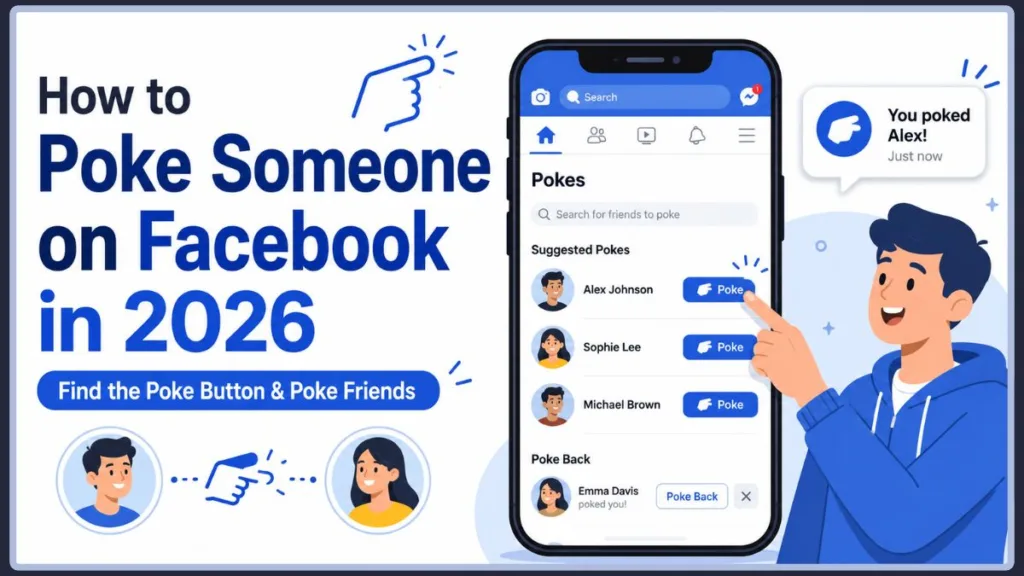
Facebook has actually been making efforts to bring the feature back into the spotlight. In March 2024, Meta said it had improved Poke suggestions and made the Pokes page easier to find through search; those changes were followed by a reported 13x increase in poking activity. In September 2025, Facebook also introduced a dedicated Poke button on some profiles and added features such as Poke counts.
So, what is a Facebook Poke, where is the Poke list, and how do you actually send one today? This guide walks you through everything you need to know.
Quick Answer: To poke someone on Facebook, open the Facebook app or website, search for Pokes, and open the Pokes page. Search for the person you want to poke and select Poke beside their name. On a computer, you can also go directly to facebook.com/pokes.
So, What Is a Poke on Facebook?
A Facebook Poke is a simple way to get another person’s attention without sending them a message. When you poke someone, Facebook sends them a notification about the interaction.
That’s what makes the feature different from a comment, reaction, or Messenger conversation. There’s no text to write and no post to share. It’s basically a quick digital nudge.
Facebook introduced Pokes when the platform launched in 2004. The company intentionally kept the feature vague rather than giving it a specific purpose, which helped users give Pokes their own meaning over time. Facebook later described the Poke as a feature whose meaning was left open to interpretation.
Today, Pokes are much less prominent than they were in Facebook’s early years, but the basic idea is still the same: send someone a quick, low-effort signal that you’ve noticed them.
What Makes a Facebook Poke Different?
Unlike other Facebook interactions, a Poke doesn’t require you to create anything.
- No message: You don’t have to write anything.
- No public post: A Poke isn’t a normal Feed post.
- No explanation: You can send one without explaining why.
- Quick interaction: It takes only a moment to send.
- Open to interpretation: The recipient may see it differently depending on your relationship.
That simplicity is part of what has allowed the feature to stick around for so long.
What Does Poking Actually Mean on Facebook?
There’s no single Facebook poke meaning.
Depending on the person and the situation, a Poke can mean:
- Hello: A quick way to greet a friend.
- Get my attention: A digital tap on the shoulder.
- Reconnect: A playful way to reach out to someone you haven’t spoken to recently.
- Have some fun: Sometimes a Poke doesn’t need a deeper explanation.
- Flirt: In some relationships, a Poke can be interpreted as playful flirting.
- Nostalgia: Long-time Facebook users may simply enjoy bringing back an old feature.
So, what does poking mean on Facebook? Usually, it means whatever the sender and recipient understand it to mean. A Poke by itself doesn’t automatically indicate friendship, flirting, or romantic interest.
That’s also why one person may see a Poke as completely harmless while another person interprets it differently.
A Poke Doesn’t Have One Universal Meaning
The same Poke can communicate different things depending on who sends it.
For example:
- A longtime friend may send one simply to say “Hey.”
- Someone you haven’t spoken to in years may be trying to reconnect.
- A person you’re interested in may be using it as a playful or flirty signal.
- A friend may send one as part of an old-fashioned Poke war.
- Someone may simply be experimenting with a feature they just rediscovered.
The important point is that Facebook doesn’t give every Poke a fixed meaning. The context matters more than the button itself.
Are Facebook Pokes Still Around in 2026?
Yes. Facebook Pokes are still available in 2026.
The confusion usually comes from the fact that the feature has moved around and become much less visible over the years. In the older Facebook experience, Pokes were much easier to find from a person’s profile. Modern Facebook has also provided a dedicated Pokes page where users can find friends to poke and see who has poked them.
Facebook has even been trying to make the feature relevant again. In 2025, Meta added a dedicated profile Poke button for some users and introduced a poke count that increases as friends poke each other.
That means your Facebook interface may not look exactly like someone else’s. The feature can be surfaced differently depending on the version of Facebook, device, and account.
So if you’re searching for poke in Facebook 2025 or wondering whether the feature disappeared completely, the answer is no. It survived; Facebook simply made it less obvious.
Facebook Has Actually Tried to Bring Pokes Back
The Poke feature hasn’t just quietly survived. Meta has made several attempts to increase its visibility.
- In March 2024, Facebook improved its Poke suggestions.
- It also made the Pokes page easier to discover through search.
- Facebook added the ability to Poke a friend after searching for them.
- Meta said those changes produced a 13x spike in Poking during the following month.
- In 2025, Facebook added a dedicated Poke button to some profiles and introduced Poke counts.
So, while Pokes are an old Facebook feature, they aren’t necessarily forgotten or abandoned.
How Do You Get the Poke Feature on Facebook?
You normally don’t need to download a separate app or switch on a special Poke setting.
Instead, look for Facebook’s dedicated Pokes area.
On the current search-based experience, one of the most useful ways to find it is through Facebook’s search function:
- Open Facebook.
- Tap or click Search.
- Enter Pokes.
- Look for the Facebook Pokes result.
- Open it to reach the Pokes page.
From there, you can find people to poke and see Pokes you’ve received. Facebook specifically made the Pokes page easier to discover through search in 2024.
Tip: Don’t worry if you don’t see Poke on a friend’s profile. The profile-based option is not consistently available, so searching for Pokes is often the easier route.
Finding Pokes in the Facebook App
On Android and iPhone, start with the Facebook app’s Search function.
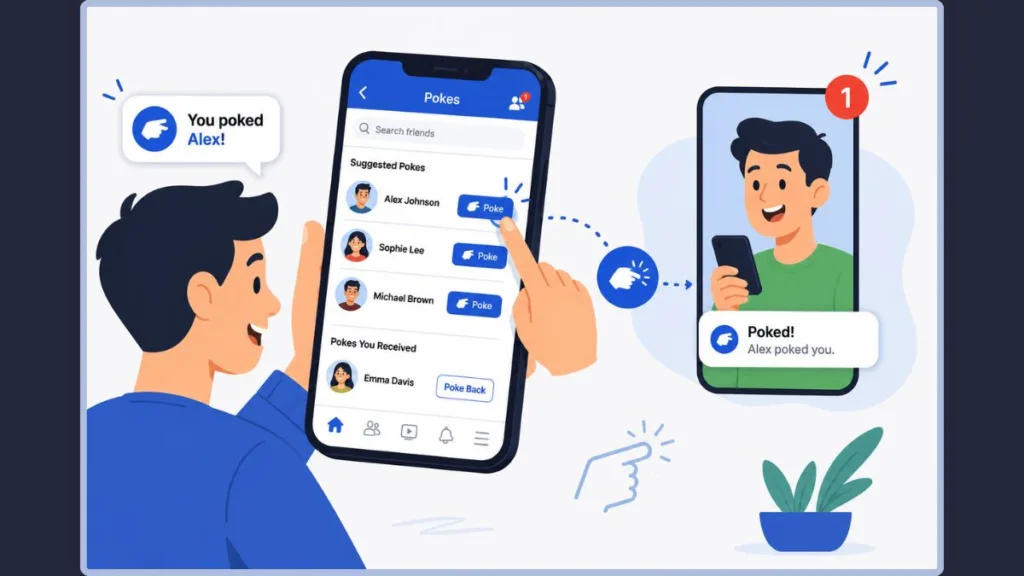
Search for Pokes, then open the result that refers to Facebook’s Pokes feature. The Pokes page can show recent Pokes, suggested people, and a search option for finding another Facebook contact.
If Facebook’s interface displays a dedicated Poke button on someone’s profile, you may also be able to use that shortcut. Meta has been making this button more prominent for some users.
Finding Pokes on Facebook From a Computer
On a desktop browser, you can search Pokes from Facebook or use the dedicated Pokes address:
The page takes you directly to the Pokes area, where you can search for people and interact with existing Pokes. Facebook has specifically used this page for finding friends to poke and checking incoming Pokes.
Where Did the Poke List Go on Facebook?
Looking for the old list of Pokes? It’s now found through the dedicated Pokes area rather than being a feature you can always spot while browsing a friend’s profile.
The Pokes page can include:
- People you’ve recently poked
- People who have poked you
- Suggested Pokes
- A search option for finding friends
- Options to Poke or Poke Back where available
- Poke activity between you and friends on supported versions
In 2025, Facebook also added a Poke count that can increase as two friends continue poking one another.
So, when someone asks “Where is the poke list on Facebook?”, the easiest answer is: search Facebook for Pokes and open the dedicated Pokes result.
How to Check Pokes on Facebook
To check Pokes on Facebook, start with the Pokes page rather than searching individual profiles one at a time.
You can use it to:
- See who has poked you.
- Find people Facebook suggests you poke.
- Search for another friend.
- Poke someone directly.
- Poke Back after receiving a Poke.
- Dismiss a Poke when you don’t want to return it.
This makes the dedicated Pokes area more useful than simply looking for a hidden button on someone’s timeline.
How Do You Send a Poke to Someone on Facebook?
Now for the part you’re probably here for.
How to Poke Someone Using the Facebook Mobile App
The current search-based method is straightforward:
- Open the Facebook app on your Android phone or iPhone.
- Tap Search.
- Type Pokes into the search field.
- Select the Pokes result.
- Look through the suggested people or use the search field to find the friend you want.
- Tap Poke next to their name.
Your friend can then receive a notification that you’ve poked them.
What You’ll See on the Pokes Page
Depending on your version of Facebook, you may see several different groups or actions.
- Suggested Pokes: Facebook may suggest friends you can Poke.
- Search: You can search for a particular Facebook contact.
- Poke: Send a new Poke.
- Poke Back: Return a Poke someone has already sent you.
- Poke activity: See recent interactions and, on supported versions, your Poke count.
Facebook’s 2024 changes specifically included better suggestions and the ability to Poke someone after searching for them.
How to Poke Someone on Facebook From a Desktop
On a computer:
- Open Facebook in your browser.
- Go to facebook.com/pokes, or use Facebook’s search field and search for Pokes.
- Open the Pokes page.
- Find the person you want to poke.
- Click Poke next to their name.
The same page also provides options for responding to Pokes you’ve received.
What About the Three-Dot Poke Option?
You may still find guides telling you to open someone’s profile, click the three dots, and choose Poke.
That describes an older workflow, and Facebook has changed where Pokes appear over time. Some newer Facebook experiences have brought a dedicated profile Poke button back, while other accounts may primarily access the feature through the Pokes page.
Tip: For that reason, searching for Pokes is the safer general method when the Poke option isn’t visible on someone’s profile.
Someone Poked You—How Do You Respond?
Getting a Poke notification doesn’t mean you have to respond.
Depending on the current interface, you can generally choose to interact with the person by using Poke Back, or simply leave the Poke alone. Facebook’s Pokes area is designed to let users see who poked them and interact with those Pokes.
Poke Them Back
See the person who poked you in the Pokes area and select Poke Back next to them when that option is available.
This turns the one-way interaction into a back-and-forth Poke.
For friends who enjoy the feature, this can become a modern version of the old Poke war, where each person keeps responding to the other.
Ignore the Poke
You don’t have to return every Poke you receive. You can simply leave it unanswered.
This is useful when:
- You don’t know what the person meant.
- You don’t want to interact.
- You’d rather send a message instead.
- You simply aren’t interested in the feature.
Remove or Dismiss the Poke
Facebook can also provide an option to dismiss a Poke rather than responding. The exact wording can differ with the interface, but the basic idea is the same: you aren’t required to Poke Back.
Facebook’s newer Poke experience specifically includes the ability to dismiss Pokes when you don’t want to reciprocate.
Why Would You Poke Someone on Facebook?
So, why poke someone on Facebook when you can simply send a message?
Sometimes that’s exactly the point.
A Poke is more casual than a message. It doesn’t demand a conversation or require you to think about what to say.
You might poke someone to:
- Say a quick hello
- Get a friend’s attention
- Reconnect with an old friend
- Start a playful interaction
- Bring back some Facebook nostalgia
- See whether someone responds
- Give a lighthearted signal without writing a message
For many people, the simplicity is the appeal.
You can send a message when you actually have something to say. A Poke is useful when you just want to say “Hey, I’m here.”
Why Do People Still Use Pokes?
The continued use of Pokes is partly about nostalgia, but it isn’t only older Facebook users.
Meta said in 2024 that more than half of Pokes were coming from people aged 18 to 29 at the time, and that its changes to improve discoverability had produced a significant increase in Poking.
That suggests the feature has found a second life as a simple, playful interaction rather than merely surviving as an old Facebook relic.
What Happens When You Poke Someone?
When you send a Poke, Facebook can notify the recipient that you poked them.
The recipient can then choose how to respond. They can Poke you back, dismiss the interaction, or simply leave it alone. The Poke experience is designed as a lightweight interaction rather than a full conversation.
The dedicated Pokes page can also show the people you have interacted with through Pokes and, on supported experiences, a count of repeated Pokes between friends.
What Happens if Someone Pokes You Back?
A Poke Back essentially continues the interaction.
This can be:
- A simple hello
- A playful exchange
- A nostalgic callback to the old Facebook days
- The start of a longer Poke exchange
- A harmless way to acknowledge that you noticed the person
You don’t need to send a message afterward unless you actually want to continue the conversation.
How Long Does a Facebook Poke Last?
How long an unanswered Poke remains visible can vary with Facebook’s implementation. Some current guides report that an unacknowledged or dismissed Poke disappears after two days, so this is best treated as interface behavior rather than a permanent rule.
The important point is that a Poke isn’t designed to remain as a permanent public Facebook post.
Can’t Find the Poke Option? Here’s What to Check
Can’t see Poke anywhere? Don’t assume Facebook removed the feature.
Here are the first things to check.
You’re Looking on the Profile
The old profile-based Poke workflow isn’t consistently available. Try searching Pokes instead.
At the same time, some users may now see a dedicated Poke button directly on a person’s profile because Meta has been making the feature more prominent again.
Facebook’s Interface Has Changed
Meta has changed the visibility and location of Pokes over time.
That’s why one Facebook account might show:
Profile > Poke
while another may require:
Search > Pokes > Poke
The difference doesn’t necessarily mean anything is wrong with your account.
Your App Looks Different
Facebook frequently tests and rolls out interface changes. What you see on Android or iPhone may not exactly match screenshots from an older guide.
That is particularly important with Pokes because Meta has actively experimented with different ways of surfacing the feature.
Search for Pokes Directly
This is usually the best first troubleshooting step:
Facebook > Search > Pokes > Pokes page
The discoverability improvements introduced in 2024 were specifically intended to make the Pokes page easier to find through search.
Try the Desktop Pokes Page
On a computer, facebook.com/pokes can provide a direct route to the feature.
If Facebook’s normal navigation isn’t showing what you’re looking for, this is a useful alternative.
Check Whether Facebook Offers the Feature for That Person
If you can find the Pokes page but don’t see a Poke button beside a particular person, Facebook may not currently offer that interaction for that account.
Don’t assume the entire feature is broken just because one person doesn’t appear as expected.
Who Can You Poke on Facebook?
Pokes aren’t simply another public Facebook interaction like a reaction or comment.
Current guides generally describe Pokes as an interaction between Facebook friends, and the people shown in your Pokes area can depend on your account and Facebook’s current interaction rules.
If the person you’re looking for doesn’t appear in the Pokes area, don’t assume you’ve done something wrong. Their account relationship with you, Facebook’s current interface, or feature availability can affect what options you see.
Blocking can also prevent the normal interaction from taking place.
Can You Poke Someone Who Isn’t Your Friend?
The availability of Pokes depends on Facebook’s current interaction rules and the accounts involved.
If someone doesn’t appear in your Pokes search or isn’t offered a Poke button, Facebook isn’t currently allowing that interaction for those accounts.
The safest approach is to use the Pokes page and check whether Facebook actually provides the Poke option.
A Little Poke Etiquette: When Should You Send One?
Poking is supposed to be lighthearted, but that doesn’t mean every person will appreciate it.
A few simple rules make sense:
- Use it casually: A Poke works best as a playful interaction.
- Don’t repeatedly poke someone: If they aren’t responding, take the hint.
- Think about your relationship: A Poke from a close friend can feel very different from one from someone you barely know.
- Use a message when you need to communicate: Important conversations are better suited to Messenger.
- Respect someone’s boundaries: If they don’t want to interact, leave it there.
The beauty of a Poke is that it doesn’t have to mean much. That also means you shouldn’t assume it means something huge.
When Might You Avoid Poking?
There are situations where a normal message is a better choice.
For example:
- You need to ask someone an important question.
- You’re discussing work or something serious.
- You don’t know the person well.
- The person has previously ignored or dismissed your Pokes.
- You need to communicate something that shouldn’t be left open to interpretation.
A Poke is deliberately vague. That’s fun when you’re joking around, but not ideal when clarity matters.
Does a Facebook Poke Mean You’re Flirting?
Not necessarily.
One of the reasons the Facebook Poke has lasted so long is that it was never tied to a single official meaning. Facebook originally presented it as a feature with no specific purpose, leaving users to interpret it themselves.
That means a Poke could be:
Friendly: “Hey, what’s up?”
Playful: “I’m messing with you.”
Nostalgic: “Remember when we used to do this?”
Flirty: “I’m trying to get your attention.”
Random: “I just felt like poking you.”
So, what does it mean to poke someone on Facebook? It depends on the context.
A Poke from your best friend probably means something completely different from a Poke from someone you’ve been talking to romantically.
Is a Facebook Poke a Sign Someone Likes You?
Not by itself.
A Poke can be part of flirting, but it can also mean absolutely nothing beyond wanting to get someone’s attention.
Look at the wider context instead:
- How well do you know the person?
- Have you talked recently?
- Do they normally interact with you?
- Did they follow the Poke with a message?
- Have they been using Pokes playfully with other friends?
The button itself doesn’t provide a definitive answer.
Facebook Poke History: From 2004 to Today
The Poke feature has been around almost as long as Facebook itself.
It was introduced in 2004, when Facebook was still in its early days. Rather than giving Pokes a fixed purpose, Facebook allowed users to decide what they meant. That ambiguity helped create everything from friendly greetings to flirting and competitive Poke wars.
Over the years, the feature has gone through several stages:
- Early Facebook: Pokes were easy to access and became a recognizable part of the platform.
- Later years: The feature became less visible and was moved away from prominent profile interactions.
- Poke page era: Facebook maintained a dedicated area for seeing and responding to Pokes.
- 2024: Facebook improved suggestions, search discoverability, and friend Poking.
- 2025: Meta began making Pokes more prominent again through dedicated profile buttons and Poke counts.
- 2026: The feature remains part of Facebook while its exact placement can vary across the current interface.
Why Did Pokes Become Less Popular?
The feature simply became less central as Facebook added more ways to communicate.
Messages, reactions, comments, Stories, GIFs, and other social features made a Poke seem unnecessary to many users.
Still, its simplicity is also what allows it to come back. Facebook has been experimenting with Pokes again because they offer a lightweight way to interact without starting a full conversation.
Facebook Pokes vs. Other Ways to Get Someone’s Attention
A Poke isn’t the only way to interact with someone on Facebook.
You can also:
- Send a Messenger message when you actually want to have a conversation.
- React to a post when you want to acknowledge something they’ve shared.
- React to a Story when you want to respond to specific content.
- Comment on a post when you want to interact publicly.
- Share a Memory when you want to reconnect around an older moment.
The Poke sits somewhere in between doing nothing and starting a conversation.
That’s exactly why it can be useful: it’s a small interaction for when a full interaction feels unnecessary.
Facebook Poke FAQs
What is poke on Facebook?
A Facebook Poke is a lightweight way to get someone’s attention without sending a message. The recipient can receive a notification and decide whether to respond.
What does poking mean on Facebook?
Poking generally means sending someone a quick, playful signal or getting their attention. It doesn’t have one universal meaning.
How do you get the poke feature on Facebook?
You normally don’t need to install anything. Search for Pokes inside Facebook and open the dedicated Pokes area. The exact interface can vary between accounts and devices.
Where is the poke list on Facebook?
Search for Pokes using Facebook’s search function. The resulting Pokes page is where you can find people to poke and view incoming or recent Poke activity.
How do you send a poke?
Open Facebook, search for Pokes, open the Pokes page, find the person you want, and select Poke next to their name. On desktop, you can also use facebook.com/pokes.
How do you respond to a Facebook poke?
Open your Pokes area and select Poke Back next to the person who poked you when that option is available. You can also choose not to respond.
What does it mean to poke someone on Facebook?
It usually means you’re getting their attention in a casual way. It could be friendly, playful, nostalgic, or even flirtatious depending on the people involved and the context.
Why poke someone on Facebook?
You might Poke someone because you want to say hello, get their attention, reconnect, or simply have a little fun without starting a full conversation.
Are Facebook Pokes still used?
Yes. Pokes still exist, although they’re far less prominent than they were in Facebook’s early years. Meta has even been making the feature more visible again, including a dedicated Poke button for some profiles and Poke counts.
Can you still poke someone on Facebook in 2026?
Yes. The dedicated Pokes page remains available, although the exact entry point can differ between Facebook versions and accounts.
Why can’t I find the Poke option on Facebook?
The Poke option may no longer appear where older guides tell you to look. Search Facebook for Pokes and open the dedicated Pokes page instead. Some accounts may also have a profile Poke button depending on the current interface.
Can I poke someone who isn’t my Facebook friend?
The availability of Pokes depends on Facebook’s current interaction rules and the accounts involved. If someone doesn’t appear in your Pokes search or isn’t offered a Poke button, Facebook isn’t currently allowing that interaction for those accounts.
Can I poke someone more than once?
Facebook’s Poke experience has historically allowed repeated Poking through back-and-forth interactions, and the newer Poke system can track a Poke count between friends. The exact rules around repeat Pokes can depend on the current version of the feature.
Do Facebook Pokes appear publicly?
A Poke is intended as a direct interaction rather than a normal Feed post. The recipient is notified about the Poke, while the dedicated Pokes area is used to manage and view Poke activity.
Facebook Pokes Aren’t Gone—They’re Just Hidden
Facebook has changed dramatically since Pokes first appeared, but the little feature has managed to stick around.
The important thing to remember is that Facebook Pokes still exist in 2026. You just may not find them in the same place you remember from years ago.
For most users, the easiest route is:
Open Facebook > Search for “Pokes” > Open Pokes > Find the person > Tap or click Poke.
From there, you can check your Poke activity, respond to someone who poked you, or send a playful nudge to a friend.
And as for the Facebook poke meaning, there isn’t a complicated secret code behind it. Sometimes a Poke is simply a Poke—a quick way to say “Hey.”
For longtime Facebook users, there’s also something fun about seeing the feature survive after so many years. And with Meta actively experimenting with ways to make Pokes more visible again, this old-school interaction may not be as forgotten as it once seemed.
Visit Our Post Page: Blog Page
Discover more from Izoate
Subscribe to get the latest posts sent to your email.