
Discover how to enable Additional Account Creation on Twitch Mobile, manage multiple Twitch accounts with one verified email or phone number, and troubleshoot verification and phone number issues.
Trying to create a second Twitch account on your phone but can’t find the Additional Account Creation option? Or perhaps Twitch throws a frustrating error saying your phone number is already linked to another account?
You are not alone.
Many Twitch users run into these exact roadblocks when trying to manage multiple channels. Typically, we seek multiple accounts on the same platform when we have different needs to meet—like keeping your streaming separate from your casual viewing. The good news is that you don’t need to go through the painful chore of creating five different email addresses just to avoid an “email ID already exists” error.
Twitch actually has a built-in feature called Additional Account Creation that allows you to link alternate profiles to the exact same verified email address or verified phone number. In this guide, you’ll learn how to enable this setting on mobile, walk through the signup process, and fix the most common glitches that keep the option hidden.
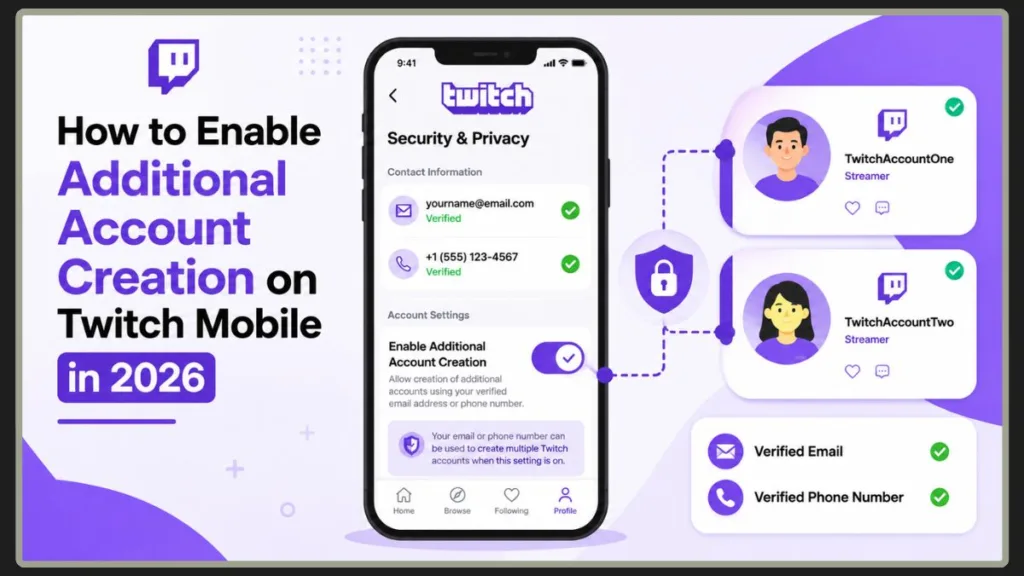
Understanding how to enable additional account creation twitch mobile can completely change how you use the platform. Whether you want to start a secret streaming channel or just need an alternate twitch account for modding, knowing your way around your twitch mobile app settings is essential.
Quick Answer
To enable Additional Account Creation on Twitch Mobile:
Open Twitch and tap your profile picture. Go to Settings > Security & Privacy. Verify your email address or phone number, then enable the “Additional Account Creation” toggle.
Once enabled, you can create multiple Twitch accounts using the same verified email address or phone number.
Tip: If the Additional Account Creation option does not appear, verify your email address and phone number before attempting any other troubleshooting steps. Completing your twitch account verification is always the mandatory first step.
Understanding Additional Account Creation on Twitch (What It Really Means)
Additional Account Creation is a native setting designed to simplify account management. Instead of forcing you to log in and out of entirely separate email inboxes or acquire secondary SIM cards, Twitch permits you to hold multiple accounts under one centralized, verified identity.
This brilliant approach to twitch account management means you don’t have to keep track of a dozen different passwords and inboxes. Everything routes back to your primary verified email address or verified phone number, keeping your twitch login settings clean, simple, and incredibly secure.
| Method | Requires Verification | Can Create Multiple Accounts |
| Verified Email | Yes | Yes |
| Verified Phone Number | Yes | Yes |
| Unverified Email | No | No |
| Unverified Phone Number | No | No |
Best Practice: We always recommend setting up twitch two-factor authentication on your main account before linking an alternate twitch account for maximum twitch account security.
What does Enable Additional Account Creation mean on Twitch?
Simply put, it means giving the platform permission to approve new registration requests tied to your current, active credentials. When you turn this toggle on, you are telling Twitch’s security system that any future profile built with your current email or phone number is authorized by you, bypassing the standard security block that prevents duplicate data entry.
By utilizing twitch additional account creation, you essentially create an umbrella under which all your subsequent profiles safely live.
Top Reasons Why Users Create Multiple Twitch Accounts
Maintaining a separate “alt account” is incredibly common, much like switching profiles on Instagram or managing separate handles on X (Twitter). If you are wondering why someone might want to create another twitch account, the reasons usually come down to organization and privacy.
Separate Personal and Streaming Accounts
If you stream professionally, you probably don’t want your personal viewing habits, followed channels, or chat history cluttering your public creator dashboard. An alt account keeps your private life private.
When you create second twitch account credentials for casual viewing, you can freely watch your favorite creators, chat in different streams, and subscribe to channels without worrying about your professional audience seeing your every move. It provides a healthy boundary between work and play.
Managing Different Communities
You might interact with vastly different gaming communities or niches. Having separate profiles ensures your sub badges, channel points, and recommendations remain relevant to what you are doing at that exact moment.
For example, if you run a fast-paced esports channel but occasionally like to stream quiet, cozy art sessions, having multiple twitch accounts allows you to cultivate two entirely different viewer bases without confusing the algorithm or your current subscribers.
Moderator or Staff Accounts
If you work as a moderator for a high-profile streamer, using a dedicated mod account keeps your personal inbox clean and ensures your mod actions carry a level of professional separation from your casual viewing profile.
A secondary twitch account is practically mandatory for heavy moderation work. It ensures you don’t accidentally leak sensitive moderator commands or whispers when you are just trying to enjoy a stream as a regular viewer. It also helps manage specific twitch account permissions granted by the broadcaster.
Testing Stream Layouts and Bots
Creators frequently use secondary accounts to test out complex stream layouts, custom overlays, alert variations, and chatbot commands in a live environment without broadcasting notifications to their actual subscriber base.
If you are trying to figure out how to create second twitch account environments for backend testing, this feature is a lifesaver. It is the absolute safest way to ensure your live channel doesn’t suddenly break or display broken code during an important broadcast.
Keeping Gaming Content Separate
You might want one channel dedicated entirely to competitive first-person shooters and another reserved for casual, cozy simulation games. Multiple profiles give you complete control over your content styling. You can effectively build unique brands for every genre you play, giving you ultimate flexibility over your digital footprint.
Essential Requirements Before Enabling Additional Account Creation
Don’t worry if the option isn’t visible in your app just yet. Before Twitch opens the doors for you to create multiple profiles, you must complete the preliminary security checks. The platform is very strict about twitch account verification to prevent bots from flooding the servers.
Verify Your Email Address
To ensure your main profile is secure, you must have a verified email address attached to your account.
- Open your Twitch mobile app.
- Tap your Profile Picture Icon in the upper corner of your screen.
- Go to Settings, then navigate to your account details.
- Check if a checkmark appears next to your email address. If it states “unverified,” click the verification link and input the secure code sent to your inbox.
Important: A verified email is required to create multiple Twitch accounts using the same email address. This step is absolutely crucial. Email verification proves to Twitch that you are a real human, allowing them to safely unlock the enable additional account creation twitch toggle.
Verify Your Phone Number
If you prefer using SMS credentials, a verified phone number is equally mandatory to prevent platform abuse.
- Head over to your Security & Privacy settings menu.
- Add your phone number to the contact field.
- Ensure you choose the correct country code from the dropdown menu to avoid system errors.
- Enter the 6-digit verification code sent directly to your phone to confirm ownership.
A verified phone number ensures account security and allows reuse across multiple accounts.
Note: Phone verification is one of the strongest ways to secure your account. Once completed, your number acts as a reusable phone number for future profile creations, provided you toggle the right settings.
Step-by-Step Guide to Enable Additional Account Creation on Twitch Mobile
Because mobile interfaces update frequently, navigating to this specific toggle inside the native phone app can feel like a maze. Follow these steps to unlock the twitch account settings directly from your smartphone.
- Open the Twitch App: Launch the official application on your iOS or Android device. Make sure you are logged into your primary profile.
- Tap Your Profile Picture: Located in the top corner of your screen. This opens your main dashboard.
- Open Settings: Scroll down through the menu list and tap on Settings.
- Select Security & Privacy: Navigate to the security section. This is where all your sensitive twitch login settings live.
- Locate Contact Settings: Find the specific section where your email and phone details are listed.
- Find Enable Additional Account Creation: Look for the toggle option beneath your contact info.
- Turn the Toggle On: Enable the feature. The toggle should instantly fill in, turning a solid purple color with a distinct tick mark.
- Confirm Verification If Prompted: Complete any required verification steps or biometric scans to save these changes securely.
Important: Always make sure you are looking inside your twitch contact settings when hunting for this toggle. It will not appear under general profile preferences or channel aesthetics.
Expected Result: Once enabled, you will be able to create additional Twitch accounts using the same verified email or phone number without hitting a security wall.
How to Check If Additional Account Creation Is Enabled
After enabling the setting, it’s always smart to double-check that the system actually saved your preference. Return to your Security & Privacy menu and look for the purple toggle next to “Enable Additional Account Creation.”
If the toggle remains active and purple after refreshing the page, the feature is successfully enabled and you can begin creating additional Twitch accounts using the same verified email address or phone number.
Troubleshooting Tip: If the toggle immediately flips back to gray after you turn it purple, your app might be experiencing a syncing issue. Try completely closing the app and reopening it, or double-check your twitch account verification status to ensure your email didn’t accidentally become unverified.
How to Create a Second Twitch Account Using the Same Email Address Easily
Once Additional Account Creation is enabled on your primary profile, creating another account becomes incredibly simple. You don’t need to hunt for a workaround; you just go through the normal signup flow.
- Open your app settings and log out of your current account entirely.
- Tap Sign Up on the Twitch welcome screen.
- Enter a new, unique username that fits your new channel’s theme.
- Use your existing verified email address in the email field.
- Complete the verification process with the new 6-digit code sent to your inbox.
This method allows you to create multiple Twitch accounts with one email without needing separate inboxes. You can now switch back and forth between these accounts easily, managing twitch multiple accounts same email without ever needing to monitor a secondary inbox.
Using One Phone Number for Multiple Twitch Accounts (Complete Guide)
Twitch allows phone number reuse once Additional Account Creation is enabled. If you prefer securing your accounts via SMS rather than email, follow these steps to link everything to your smartphone:
- Verify your phone number on your primary account.
- Enable the Additional Account Creation toggle under your phone settings.
- Log out and tap Sign Up to create a new account.
- Input your verified mobile phone number into the registration form.
- Confirm ownership via the 6-digit verification code texted to your device.
This ensures secure access while allowing multiple accounts linked to the same number. Mastering twitch multiple accounts same phone number setups is highly recommended for users who prefer text-based security alerts over email. It keeps all your twitch account management tied to the device directly in your hand.
Additional Account Creation Option Missing on Twitch Mobile? Here’s How to Fix It
Many users report that the Additional Account Creation option is not visible. If you are hunting through your mobile app and the toggle switch is completely missing, don’t panic. The twitch security and privacy settings deliberately hide this option until certain criteria are met. Here is how to fix it:
Your Email Address Is Not Verified
Twitch hides the multi-account toggle entirely if your primary email address isn’t fully authenticated. Verify your email in your account settings. Look for the prompt asking for a 6-digit code. If you didn’t get it, check your spam folder. Twitch security and privacy settings strictly require this before revealing advanced options.
Your Phone Number Is Not Verified
If you are logged into Twitch using a phone number without an attached backup email, add and verify your phone number. The system needs concrete proof of identity before it allows a reusable phone number to trigger.
You’re Using an Older Version of the Twitch App
Outdated applications frequently suffer from rendering bugs that hide the newest UI elements. Update the app from the App Store or Google Play Store to force the latest twitch mobile app settings to load.
The Setting Has Not Loaded Correctly
Cached data can prevent real-time account permissions from refreshing. Restart the app, or log out and log back in. Sometimes your phone just needs a quick software nudge to recognize that your email verification was successful.
Try Accessing Twitch From a Mobile Browser
Sometimes the setting appears in the browser version when the native app hides it. Open a mobile browser (like Chrome or Safari), head to Twitch, sign in, and request the desktop site to bypass the app’s limitations.
Fix “This Phone Number Is Linked to Another Account” on Twitch (Complete Troubleshooting)
Seeing the message “This phone number is linked to another account” can be frustrating, especially if you don’t remember creating another Twitch profile. Fortunately, the problem is usually fixable. When dealing with a twitch phone number already in use error, here is exactly what to do:
You Previously Used the Number on Another Twitch Account
If you used the number on an old account, log into that old account and remove the phone number. Many users forget they made a profile years ago. If you can access it, simply delete the digits from the twitch contact settings of that old profile.
The Number Is Attached to a Forgotten Account
If you don’t remember the username holding your number hostage, use the official Twitch account recovery tool to regain access. This tool will text you a list of every single username associated with your phone line.
Tip: Twitch account recovery is the most powerful tool for solving duplicate number issues. Always start here before contacting customer support.
The Account Was Deleted But Still Associated
If you recently deactivated an old profile, its connection to your phone number might still be lingering in the database. Contact Twitch support to unlink the number manually, as deleted accounts hold onto credentials for a short grace period.
Your Number Was Recycled by Your Mobile Carrier
Because mobile service providers regularly cycle old phone numbers to new clients, a previous owner might have linked your current phone number to their channel. Provide proof of ownership (like a phone bill) to Twitch support to clear the old user’s data.
Recover the Account Linked to the Phone Number
Use the “Forgot Password” option with your phone number and follow the recovery steps to gain entry. Once inside, you can delete the profile or remove the number to free it up for your new secondary twitch account.
Contact Twitch Support
If all else fails and you cannot remove the lock, submit a support request directly to Twitch. Recovering the original account is often faster than trying to remove the phone number manually, but support agents can bypass glitches that you cannot see.
Why Can’t I Create Another Twitch Account? Common Reasons Explained
If you have carefully followed the steps above and the signup screen still rejects your attempts, fixing these common issues usually resolves account creation problems. Twitch’s backend security is robust, and it might flag your attempt for several logical reasons:
- Email not verified: You skipped the inbox confirmation step on your main profile.
- Phone number not verified: You entered a number but didn’t type in the SMS confirmation code.
- Additional Account Creation disabled: You forgot to turn the toggle purple, or a glitch flipped it back to gray.
- Username already taken: The exact handle you want belongs to someone else. You must pick a unique name.
- Account restrictions: If you have IP bans or recent moderation strikes on your primary profile, Twitch will halt new signups to prevent bad behavior from spreading.
- Verification errors: Requesting too many SMS codes too quickly will trigger a temporary 24-hour cooldown. Just wait a day and try again.
Can You Have Multiple Twitch Accounts? Twitch Policy Explained
Yes, Twitch explicitly permits its community members to own and operate multiple accounts. Users can create alternate accounts for streaming, moderation, or personal use, as long as they follow Twitch guidelines and do not misuse the platform.
Here are the official rules to keep in mind:
- Twitch allows alternate accounts. You are free to separate your digital identities.
- Ban evasion is prohibited. You cannot use an alt account to sneak back into a channel where you were banned.
- Suspended users cannot use alternate accounts to bypass restrictions.
Warning: Doing so will result in a permanent termination of all accounts tied to your verified identity. Twitch tracks IP addresses and linked credentials, meaning if one of your multiple twitch accounts breaks a major rule, every profile sharing that verified email address will face the same consequence.
Frequently Asked Questions About Twitch Additional Account Creation
Can I have two Twitch accounts with the same email?
Yes, if Additional Account Creation is enabled. This is the exact purpose of the feature, allowing seamless twitch account management without needing separate Google or Yahoo accounts.
Can I use one phone number for multiple Twitch accounts?
Yes, after verification and enabling the feature. As long as the toggle is active, your device becomes a reusable phone number for platform registrations.
How many Twitch accounts can I have?
Twitch does not specify a strict limit but expects responsible use. Building an excessive number of accounts in a single day can trigger automated spam filters and result in temporary IP blocks.
Why is Additional Account Creation not showing on Twitch Mobile?
It may be due to missing verification (unverified email or phone) or an outdated app version. Always check your twitch security and privacy settings to confirm your master account is fully authenticated first.
Do I need a phone number to enable Additional Account Creation?
No, you can verify and use an email address instead if you prefer not to link your phone number. Twitch gives you the flexibility to choose your preferred twitch account security method.
Can I create a second Twitch account without a new email?
Yes. Once you enable the Additional Account Creation feature, you can use your existing verified email for the new profile without seeing a duplicate error warning.
Can I remove my phone number from a deleted Twitch account?
Yes, but you may need to log back into the deactivated account to remove it, or contact Twitch support to have it manually unlinked if the deactivation period has already passed.
Does Twitch allow alternate accounts?
Yes, as long as they follow community guidelines. The platform actively encourages creators to build secondary twitch account profiles for testing and moderation.
Can streamers have multiple Twitch accounts?
Yes, many streamers use multiple accounts for different purposes, like testing layouts, moderating chat, or just playing off-stream without their community watching.
Why does Twitch say my phone number is already in use?
It is likely linked to another older or forgotten account. This is the infamous twitch phone number already in use error, which is almost always solved by using the official account recovery tool.
Can I remove a phone number from another Twitch account?
Yes, by accessing that account and updating the twitch contact settings, or by contacting support if you no longer have access to the old login details.
Final Thoughts on Managing Multiple Twitch Accounts Efficiently
To successfully manage multiple Twitch accounts without headaches, remember these core steps:
- Enable Additional Account Creation in your security menu.
- Verify your email and phone number fully.
- Use the same credentials for multiple accounts to save time.
- Troubleshoot missing settings by checking your app version.
- Resolve phone number issues using the account recovery tool.
Once enabled, managing multiple Twitch accounts becomes simple and efficient, whether you’re streaming, moderating, or organizing different types of content. Mastering your twitch mobile app settings gives you total control over how you present yourself online, allowing you to enjoy the platform exactly the way you want!
Visit Our Post Page: Blog Page
Discover more from Izoate
Subscribe to get the latest posts sent to your email.