
Getting a Nest Thermostat E74 error? Learn what “No power to Rh wire detected” means and how to troubleshoot HVAC power, wiring, fuses, drains, and float switches.
If your Nest Thermostat suddenly displays E74 with a message saying “No power to Rh wire detected,” your heating or cooling system may stop working. Before you assume that your Nest thermostat has failed, you should know that E74 usually points you toward a power problem somewhere in the thermostat or HVAC circuit.
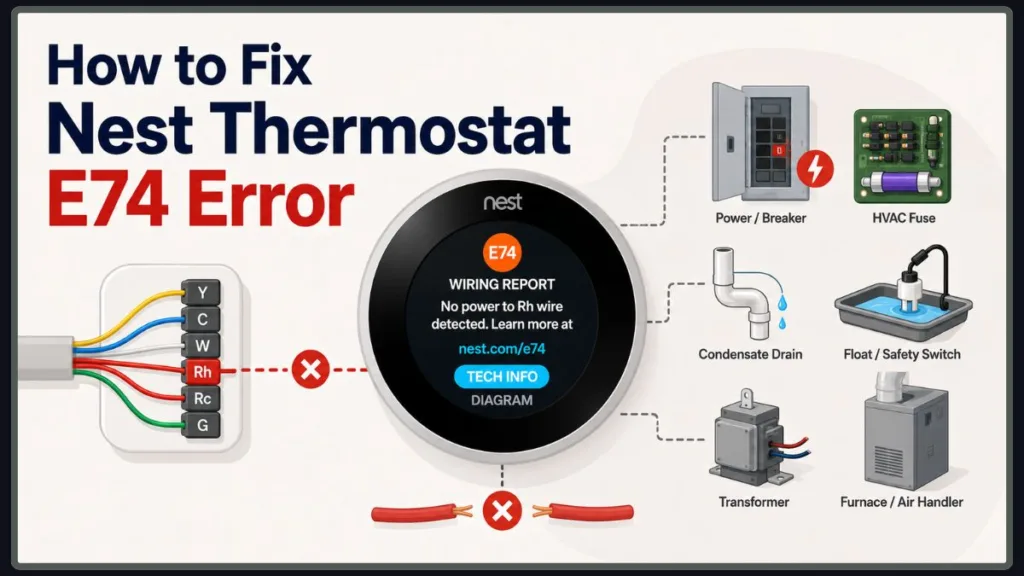
E74, along with related codes such as E4 and E24 on certain Nest models, indicates that the thermostat is not detecting the expected power on the Rh wire. Nest’s E74 troubleshooting guide explains the error and the recommended troubleshooting path.
The problem can come from a simple power interruption or loose thermostat connection, but you can also encounter an HVAC fuse, condensate-drain problem, safety switch, transformer, relay, control-board, or another system-level fault.
The most effective way to troubleshoot the Nest Thermostat E74 error is to start with the easiest checks and work toward the more advanced possibilities. That way, you don’t spend time testing complicated HVAC components when something as simple as a loose wire or tripped breaker is responsible.
The goal is simple: find where the Rh power signal is being interrupted, correct the underlying problem, and get your Nest Thermostat and HVAC system working again.
Safety first: Turn off power to your heating and cooling system before inspecting thermostat wiring or HVAC components. Even when you are working with low-voltage thermostat wiring, shutting down the HVAC system before handling connections is the safer approach. See Google’s thermostat wiring safety guidance.
Before you start: If E74 appeared right after your AC stopped during hot weather, check the condensate drain and float switch early in the troubleshooting process. If E74 appeared immediately after installing or rewiring your thermostat, check the Rh connection first.
What Does the Nest Thermostat E74 Error Mean?
The Nest Thermostat E74 error means no power to the Rh wire is detected.
The Rh wire is part of the low-voltage control circuit that connects your thermostat to your HVAC system. When your Nest cannot detect the expected power on Rh, it cannot properly communicate with and control the connected heating or cooling equipment.
In practical terms, your Nest is telling you:
“The Rh circuit is expected to provide power, but that power is not being detected.”
That doesn’t automatically mean that the Rh wire itself is broken. The wire can be securely connected while the HVAC equipment on the other end has lost power or developed another fault.
This distinction is important when you troubleshoot Nest E74, because replacing the thermostat without finding the underlying power problem may leave you with exactly the same error.
What Is the Rh Wire on a Nest Thermostat?
The Rh wire is generally associated with power for the heating side of a thermostat system. Depending on your HVAC setup and Nest model, you may have an Rh wire, an Rc wire, or a single R wire.
Nest models handle these terminals differently, so you should follow the wiring diagram provided for your particular system rather than assuming that every Nest installation uses exactly the same configuration. Nest thermostats also don’t use traditional jumper wires between Rh and Rc. See Google’s Nest wiring guide.
You will often hear people refer to the Rh wire as the red wire, because thermostat wiring commonly uses red insulation for the R circuit. However, the wire’s color isn’t what makes it an Rh wire. The terminal where the wire is connected and the wiring configuration of your HVAC system matter more than color alone.
In a conventional low-voltage HVAC system, the R circuit supplies the thermostat with low-voltage power from the HVAC equipment.
If that power is interrupted, your Nest can detect the problem and display an E74 wiring report.
What Happens When the Rh Wire Has No Power?
When the Nest cannot detect power on Rh, it can report E74 and your heating or cooling system may stop operating normally.
You may notice several symptoms at once:
- Nest Thermostat E74 error
- “No power to Rh wire detected”
- Heating doesn’t start
- Air conditioning doesn’t start
- Your HVAC system stops responding normally
- The Nest battery becomes low
- The thermostat eventually shuts down
Your Nest can use power from the HVAC wiring to keep its internal battery charged. When the HVAC system stops supplying that power, the thermostat can eventually develop low-power symptoms as well. You can review Google’s Nest power and battery guidance for more information.
That is why you should focus on finding the original power interruption instead of treating the low battery as automatically being the root cause.
What Causes the Nest Thermostat E74 No Power to Rh Wire Error?
You can encounter the Nest E74 error code for several different reasons:
- Your HVAC system has lost power.
- The Rh wire is loose, damaged, or incorrectly connected.
- Your thermostat is experiencing a power or battery issue.
- Your condensate drain is clogged.
- Your condensate safety or float switch has shut down the HVAC system.
- Your HVAC control-board fuse has blown.
- Your transformer, relay, control board, or another HVAC component has failed.
You can make troubleshooting much easier by separating these possibilities into two groups.
Thermostat-side problems include loose, damaged, corroded, or incorrectly installed wires.
HVAC-side problems include lost system power, a condensate safety shutdown, a blown fuse, a transformer problem, a control-board issue, or another electrical fault.
This matters because your Rh wire can look perfectly connected while the HVAC equipment still fails to supply the power your Nest is expecting.
HVAC System Has Lost Power
Your HVAC system may have lost power because of a tripped circuit breaker, switched-off service switch, blown fuse, or another power interruption.
If the indoor HVAC equipment isn’t receiving power, the Nest can report a power-related error even though the thermostat itself is functioning correctly.
Start by checking the obvious power sources before you remove thermostat wiring or open HVAC equipment. Depending on your system, you may have a main HVAC breaker, a nearby service switch, or other power controls.
Loose or Incorrect Rh Wire Connection
A wire that isn’t fully inserted into the thermostat base may not make a reliable electrical connection.
Check the Rh connection carefully, especially if you recently installed the Nest, replaced a thermostat, or worked on the HVAC wiring.
Look for:
- A wire that has pulled loose
- A wire that isn’t fully inserted
- Corrosion
- A damaged wire end
- A wire inserted into the wrong connector
The wire end should be clean, straight, and properly seated in the connector. You can also review Google’s Nest thermostat wiring instructions.
Don’t concentrate exclusively on Rh. A wiring mistake elsewhere can also affect the way the HVAC system operates, so inspect the other thermostat connections while you’re there.
Thermostat Power or Battery Issue
Your Nest uses power from the HVAC system to maintain its internal battery.
If your HVAC system loses power for a long enough period, the battery can become low.
A low battery can therefore occur because of the original HVAC power problem, rather than being the reason that E74 appeared in the first place. See Google’s Nest power troubleshooting information.
If your thermostat has been without stable HVAC power, give it time to recharge once you restore the system.
Depending on your HVAC configuration and Nest model, a C wire or Nest Power Connector can also be relevant when the thermostat doesn’t receive sufficient continuous power. See Google’s Nest Power Connector guidance.
Clogged HVAC Condensate Drain or Float Switch
If your E74 error appeared while you were using your air conditioner, pay particular attention to the condensate drain and float switch.
Your air conditioner removes moisture from the air as it runs. That moisture becomes condensate and normally drains away through a condensate line.
When the drain becomes clogged, water can back up into the drain pan.
Many HVAC systems have a safety or float switch that reacts to rising condensate levels and shuts the equipment down to help prevent water damage.
That shutdown can interrupt the HVAC power path that your Nest relies on.
For additional background on this troubleshooting path, see Google’s E74 troubleshooting instructions.
Blown HVAC Fuse
Your HVAC control board can contain a low-voltage fuse designed to protect electrical components.
When that fuse blows, power to the thermostat circuit can be interrupted, which can result in an E74 no power to Rh wire message.
A blown fuse shouldn’t automatically be treated as an isolated problem. A fuse can fail because another component or electrical fault has caused an overcurrent condition.
Transformer or Other HVAC Electrical Problem
If the Nest wiring is correct and the HVAC system appears to have power, but your Nest still cannot detect Rh power, you may be dealing with a problem deeper inside the HVAC system.
A transformer, relay, control board, wiring fault, or another electrical component can interrupt the low-voltage power reaching your thermostat.
At this point, you’re no longer troubleshooting just the Nest Thermostat. You’re diagnosing the HVAC system’s low-voltage control circuit.
How to Fix Nest Thermostat E74: Check HVAC Power and Electrical Components
Work through these checks in order. Once the Nest E74 error disappears and your HVAC system works normally, you can stop.
Starting with the simplest checks makes the troubleshooting process faster and safer.
1. Check the HVAC Circuit Breaker for Power Loss
Start by checking whether your heating and cooling system is actually receiving power.
Go to your electrical panel and identify the breaker supplying your HVAC equipment.
If the breaker has tripped, reset it using the normal procedure for your electrical panel. Also check whether your HVAC equipment has a nearby service switch and make sure it hasn’t accidentally been turned off.
After restoring power, give your HVAC system some time to restart and then check your Nest Thermostat.
If the E74 error code is still present, continue with the wiring check.
Important: If the breaker trips again, don’t keep resetting it. Repeated breaker trips can indicate an underlying electrical or HVAC fault that needs professional diagnosis.
2. Check the HVAC Control Board Fuse for a Blown Fuse
If your HVAC system has power but the Nest still displays E74, the system’s low-voltage fuse may be the next thing to investigate.
A blown fuse can interrupt power to the thermostat circuit.
If you inspect or replace an HVAC fuse, turn off power to the HVAC system first and use only the correct replacement type and rating specified for the equipment.
Never install a fuse with a higher rating simply because the original fuse keeps blowing.
If the replacement fuse blows again, stop replacing it. Repeated fuse failure usually means another problem still needs to be diagnosed.
For the official Nest troubleshooting flow around system power and fuses, see Google’s E74 support page.
How to Check the Rh Wire Connection on a Nest Thermostat
Before handling thermostat wiring, turn off power to your heating and cooling system.
Remove the Nest display from its base and inspect the wiring.
Pay particular attention to the Rh connection, but check the other thermostat wires as well.
Look for:
- A wire that has pulled loose
- A wire that isn’t fully inserted
- Corrosion
- A damaged wire end
- A wire inserted into the wrong connector
The wire should be straight, clean, and fully inserted. The connector should remain down when the wire is properly seated. See Google’s thermostat wiring instructions.
If your Nest was recently installed, compare the wiring with the wiring diagram provided during setup.
Don’t assume a wire is correct simply because its color looks right. Your Rh terminal, Rc terminal, R wire, and other thermostat terminals must match the actual HVAC configuration.
Nest thermostats also don’t require traditional jumper wires between Rh and Rc. Follow the wiring configuration provided for your particular model. See Google’s Nest wiring guide.
Once you’ve checked the connections, put the Nest display back on its base, restore HVAC power, and check whether Nest E74 has disappeared.
What If the Rh Wire Looks Fine?
Don’t assume your Nest thermostat is defective just because the Rh wire looks perfectly connected.
A wire can be physically inserted into the terminal while the HVAC system still fails to provide the expected electrical power.
If the Rh wire is secure but you’re still seeing “No power to Rh wire detected,” move your troubleshooting to the HVAC side.
That is an important point: the E74 code tells you what power is missing, not necessarily which component caused it to go missing.
For a more detailed explanation of checking thermostat connections, see Google’s Nest wiring troubleshooting instructions.
How to Check the Nest Thermostat’s Power or Battery
If your HVAC system recently lost power, your Nest may have relied on its internal battery while the system was offline.
Depending on your model, check the thermostat’s power or battery information.
If the battery is low, allow the Nest time to recharge after you restore the HVAC power problem. Your thermostat can use system-wire power to maintain its internal battery. See Google’s Nest power troubleshooting guide.
For supported Nest models, temporary USB charging can also help bring the display back when the battery is depleted. However, charging your Nest is only a temporary step if the HVAC system is still failing to provide the required power.
When Is the C Wire Relevant?
The C wire, or common wire, can become relevant when your Nest isn’t receiving enough consistent power from the HVAC system.
Some systems may require a C wire or Nest Power Connector depending on the equipment and thermostat configuration. See Google’s Nest Power Connector information.
That doesn’t mean you should automatically install a C wire because you’ve encountered E74.
First determine whether the HVAC system is actually supplying Rh power and whether the thermostat wiring matches the system.
How to Check the Condensate Drain and Float Switch
If Nest E74 appeared after your AC stopped working, especially during hot weather, check the condensate system before moving into advanced electrical troubleshooting.
Your air conditioner produces condensate during normal operation. That water needs somewhere to go.
For the official Nest troubleshooting path for E74 after AC use, see Google’s E74 help page.
Look for Water in the Drain Pan
Locate your indoor HVAC equipment and look for standing water around the drain pan.
If you find significant water accumulation, your condensate system may not be draining properly.
A full pan is an important clue because a rising water level can activate the HVAC’s safety mechanism.
Check for a Clogged Condensate Drain
A blocked condensate drain can cause water to back up into the system.
Depending on the HVAC design, a float switch, safety switch, drain switch, or condensate safety device may shut down the equipment when the water level rises.
If your system’s condensate drain is accessible and you’re comfortable clearing it safely, follow the manufacturer’s instructions.
An accessible condensate line can sometimes be cleared with an appropriate wet/dry vacuum, but the exact drain configuration varies between HVAC systems. Avoid forcing tools into the line or opening equipment you aren’t qualified to work on.
Important: Do not bypass the float switch simply to get your HVAC system running. The float switch is there to protect your home from condensate overflow and potential water damage.
Once the drain problem has been corrected, restore the HVAC system and check whether the E74 message has disappeared.
Check the HVAC Float or Safety Switch
The float switch reacts when condensate water reaches an unsafe level.
Depending on your HVAC installation, the switch may be attached to the drain line or positioned near the condensate pan.
If you find water in the pan or drain system, fix the drainage problem before attempting to restore normal operation.
A safety switch that keeps activating is telling you that something still needs attention.
How to Check for a Failed HVAC Transformer or Other Electrical Fault
If you’ve checked the thermostat wiring, confirmed HVAC power, and ruled out the obvious causes but Nest E74 remains, the problem may be inside the HVAC equipment.
A transformer or another control component may be preventing the expected low-voltage power from reaching the thermostat circuit.
This is where you should generally stop DIY troubleshooting unless you have the appropriate HVAC electrical training and testing equipment.
A qualified technician can determine whether the issue involves:
- Transformer
- Control board
- Relay
- Wiring
- Fuse
- Safety switch
- Another HVAC component
Could a Failed Transformer Cause E74?
Yes. A transformer failure can prevent the HVAC system from supplying the low-voltage power the thermostat needs.
The key point is that E74 identifies a missing Rh power condition rather than identifying the failed component itself.
That is why you shouldn’t automatically replace your Nest thermostat when the wiring appears correct.
Nest Thermostat E74 Troubleshooting by Symptom
| If you notice… | Check first |
|---|---|
| Nest screen is blank | HVAC power and thermostat battery |
| E74 appeared after AC stopped | Condensate drain and float switch |
| E74 appeared after installing Nest | Rh wiring and the Nest wiring diagram |
| HVAC breaker is tripped | HVAC power |
| Rh wire looks loose | Thermostat wiring |
| Water is around the indoor unit | Condensate drain and safety switch |
| HVAC fuse is blown | Fuse and underlying HVAC fault |
| Replacement fuse blows again | Stop replacing fuses and get professional diagnosis |
| Everything looks normal but E74 remains | HVAC power and low-voltage circuit diagnosis |
This table gives you a quicker way to decide where to start.
If E74 appeared immediately after installing your thermostat, wiring should be high on your list.
If your AC suddenly stopped during very hot weather, check condensate drainage and the safety switch.
If your breaker or fuse has failed, investigate the HVAC power supply.
If everything looks correct but the error keeps returning, the problem is more likely to require HVAC-level diagnosis.
How to Reset a Nest Thermostat After Fixing E74
Once you’ve corrected the underlying problem, restore power to your HVAC system and allow the Nest to reconnect.
Check the thermostat for the E74 message.
If E74 disappears and your heating or cooling system starts operating normally, you’ve likely resolved the problem.
If E74 comes back, don’t keep restarting the thermostat and hoping the message disappears.
A recurring Nest thermostat E74 error means that the underlying Rh power problem may still exist.
You can restart a supported Nest thermostat when appropriate, but restarting should be treated as a device restart rather than a substitute for repairing a missing HVAC power signal. You can review Google’s Nest restart instructions.
When Should You Call an HVAC Professional?
You should contact a qualified HVAC professional when:
- E74 remains after checking basic power and wiring.
- Your HVAC breaker repeatedly trips.
- Your HVAC fuse repeatedly blows.
- You suspect a transformer or control-board problem.
- Wiring appears damaged.
- You need electrical voltage testing.
- Water continues accumulating around your HVAC equipment.
- You aren’t comfortable working around HVAC components.
- You cannot determine why the thermostat isn’t receiving Rh power.
At this point, you’re no longer dealing with a simple thermostat setting.
You may have an HVAC electrical fault, low-voltage control issue, transformer problem, relay problem, control-board problem, or recurring safety shutdown that requires proper testing.
Can You Fix Nest E74 Yourself?
Sometimes.
You can often investigate simple causes such as:
- An HVAC breaker that has tripped
- An HVAC service switch that is off
- A visibly loose thermostat wire
- A condensate drain problem that you can safely access
- A low thermostat battery after HVAC power has been restored
You should leave more advanced work to a professional when the problem involves:
- Transformer testing or replacement
- Control-board diagnosis
- Electrical shorts
- Damaged wiring
- Repeatedly blown fuses
- Live-voltage measurements
- Complicated HVAC component replacement
The important thing is to fix the underlying cause, rather than simply trying to clear the E74 message.
Tip: If the problem involves basic inspection, power restoration, or an obvious accessible issue, you may be able to troubleshoot it yourself. If it requires electrical testing, component replacement, or repeated fuse replacement, call a qualified professional.
Nest Thermostat E74 vs. Other Wiring Errors
Nest has several power and wiring-related help codes.
| Error | General meaning |
| E74 | No power to Rh wire detected |
| E4 | No power to Rh wire detected |
| E24 | No power to Rh wire detected |
The exact troubleshooting experience can vary by Nest thermostat model, so follow the instructions shown on your thermostat and in the Google Home/Nest troubleshooting flow.
You should also distinguish E74 from Rc-related power errors.
Errors such as E3, E23, and E73 are associated with no power to the Rc wire detected, while E74 points to the Rh side. See Google’s Nest wiring error guide.
That distinction helps you focus on the correct circuit rather than treating every Nest wiring error as the same problem.
Frequently Asked Questions About Nest E74
What does E74 mean on a Nest Thermostat?
E74 means that your Nest thermostat isn’t detecting power on the Rh wire.
The Rh wire is part of the low-voltage HVAC control circuit, and losing the expected Rh power can prevent the thermostat from operating your heating or cooling system normally.
How do I fix E74 on my Nest Thermostat?
Start by checking your HVAC power and circuit breaker, then inspect the Rh thermostat wire and other connections.
If E74 appeared after recent AC use, check the condensate drain and float switch.
If those checks don’t solve the problem, investigate the HVAC fuse and other system-level causes or contact an HVAC professional.
You can also work through Google’s official E74 troubleshooting steps.
Why does my Nest say “No power to Rh wire”?
Your Nest displays this message when it doesn’t detect the expected power on the Rh circuit.
The cause can be an HVAC power interruption, loose wiring, a blown fuse, a condensate safety shutdown, transformer problem, control-board problem, or another HVAC fault.
Can a tripped breaker cause Nest E74?
Yes.
If the HVAC system loses power because its breaker or service switch is off, the thermostat may no longer receive the power it needs.
Check the HVAC power source before moving into more complicated troubleshooting.
Can a clogged AC drain cause Nest E74?
It can.
If condensate backs up, a float or safety switch can shut the HVAC system down to help prevent water damage.
That shutdown can interrupt the power path your Nest relies on, resulting in an E74 error.
Can a blown HVAC control board fuse cause E74?
Yes.
A blown HVAC fuse can interrupt power to the thermostat circuit and lead to a Nest no power to Rh wire message.
If the fuse blows again after replacement, stop replacing it and investigate the underlying HVAC fault.
Can a low Nest battery cause E74?
A low Nest battery can occur when the thermostat isn’t receiving enough power from the HVAC system, but the low battery doesn’t necessarily tell you why the E74 error originally appeared.
Restore the HVAC power problem first and allow the thermostat to recharge. See Google’s Nest power troubleshooting guide.
Why does my Nest show E74 even though the Rh wire is connected?
A physically connected Rh wire doesn’t necessarily mean that the HVAC system is supplying electrical power through that circuit.
That’s why you can see an E74 error code even when the Rh wire appears securely installed.
When the wiring looks correct, move your troubleshooting to the HVAC power supply, fuse, safety switches, and other system components.
Can I fix Nest E74 without calling an HVAC technician?
You can safely investigate some basic causes, such as checking HVAC power and inspecting thermostat wiring after shutting off system power.
If you’re dealing with a repeated blown fuse, transformer, control board, short circuit, damaged wiring, or another electrical HVAC problem, professional diagnosis is the safer option.
Why does my Nest E74 error keep coming back?
A recurring E74 usually means that the underlying problem hasn’t been completely resolved.
Possible causes include:
- Intermittent HVAC power
- Loose or damaged wiring
- Recurring condensate buildup
- Repeated float-switch activation
- A fuse that keeps blowing
- Transformer problems
- Control-board problems
- Another HVAC electrical fault
When E74 keeps returning, don’t treat the thermostat reset as a permanent solution.
More Nest E74 Troubleshooting Questions
Why Did Nest E74 Appear During Hot Weather?
If your Nest E74 error appeared during heavy AC use, pay close attention to your condensate drain, drip pan, and float switch.
Your air conditioner produces more condensate while operating in hot conditions. If the drainage system cannot keep up or has become clogged, water can accumulate and trigger a safety shutdown.
That’s why a sudden Nest E74 error during summer can sometimes be an HVAC drainage problem rather than a thermostat problem.
For the official hot-weather troubleshooting path, see Google’s E74 troubleshooting guide.
Why Is My Nest Battery Low After E74 Appeared?
If your HVAC system stops supplying power, your Nest may continue operating temporarily from its internal battery.
As that battery is depleted, you may see a low-battery message or a blank thermostat.
That makes it important to distinguish the symptom from the cause. Charging the Nest can restore the display temporarily, but it won’t repair an HVAC system that isn’t supplying Rh power.
Can a Dirty Air Filter Cause Nest E74?
A dirty air filter doesn’t directly mean that the Rh wire has lost power.
However, poor airflow can make your HVAC system work harder and can contribute to other operating problems.
If you already have E74 and find that your filter is heavily dirty, replace it according to your system’s maintenance requirements, but don’t assume the filter alone explains the missing Rh power.
If your system also has a blown fuse, frozen coil, water buildup, or other symptom, investigate those issues separately.
Can a Condensate Pump Cause Nest E74?
If your HVAC system uses a condensate pump, it may also have a safety mechanism that shuts down the equipment when water reaches a certain level or the pump can’t remove condensate properly.
When that safety mechanism interrupts the HVAC system, your Nest can lose the power it expects and display E74.
Why Does Nest Show E74 Even When the HVAC Fan Works?
The fact that one part of your HVAC system is still operating doesn’t necessarily mean that the thermostat’s Rh power circuit is functioning correctly.
Different HVAC components can have different power and control paths.
If your Nest continues to show E74, follow the Rh-power troubleshooting path rather than assuming that a working fan proves the entire HVAC system is operating normally.
Should I Replace the Nest Thermostat Because of E74?
Not as your first step.
E74 is a power-detection error, so replacing the thermostat before checking HVAC power, wiring, condensate safety devices, the fuse, and other HVAC components may not solve the problem.
Start by identifying why the Nest isn’t detecting Rh power.
Conclusion
The Nest Thermostat E74 error means no power to the Rh wire is detected.
Although the message can be frustrating, it gives you a useful starting point. You know that your Nest isn’t seeing the power it expects on the Rh circuit, so your job is to work backward and find where that power is being interrupted.
Start with the simplest checks:
- Check HVAC power and the circuit breaker.
- Check the Rh and other thermostat wire connections.
- Check the thermostat’s power or battery status.
- Look for condensate buildup and a possible float-switch shutdown.
- Check the HVAC fuse if appropriate and safe to do so.
- Get professional help for transformer, control-board, wiring, or other electrical faults.
If E74 disappears after one of these checks and your heating or cooling system works normally, you’ve likely found the cause.
If the error remains or keeps returning, don’t repeatedly reset your Nest and hope the issue goes away. A recurring Nest Thermostat E74 error means that the underlying Rh power problem may still be present.
In that situation, have the HVAC system properly diagnosed so you can fix the actual fault instead of repeatedly treating the symptom.
The most important thing to remember is this:
Nest E74 doesn’t automatically mean your thermostat is bad. It means your Nest isn’t detecting the expected Rh power.
Start with the easy checks, follow the symptoms, and stop before attempting advanced electrical repairs that require professional equipment or training.
Visit Our Post Page: Blog Page
Discover more from Izoate
Subscribe to get the latest posts sent to your email.