
Learn how to fix Pokémon Center Error 20 (TCP Connection Timeout Error). Discover why it happens, common causes, queue-related issues, and proven solutions to restore access quickly.
If you’re trying to visit Pokémon Center and suddenly encounter Error 20, you’re not alone. Many collectors and Pokémon fans report seeing this error while browsing the Pokémon Center website, waiting in the virtual queue, or attempting to purchase limited-edition merchandise during major restocks.
The error often appears with a message similar to:
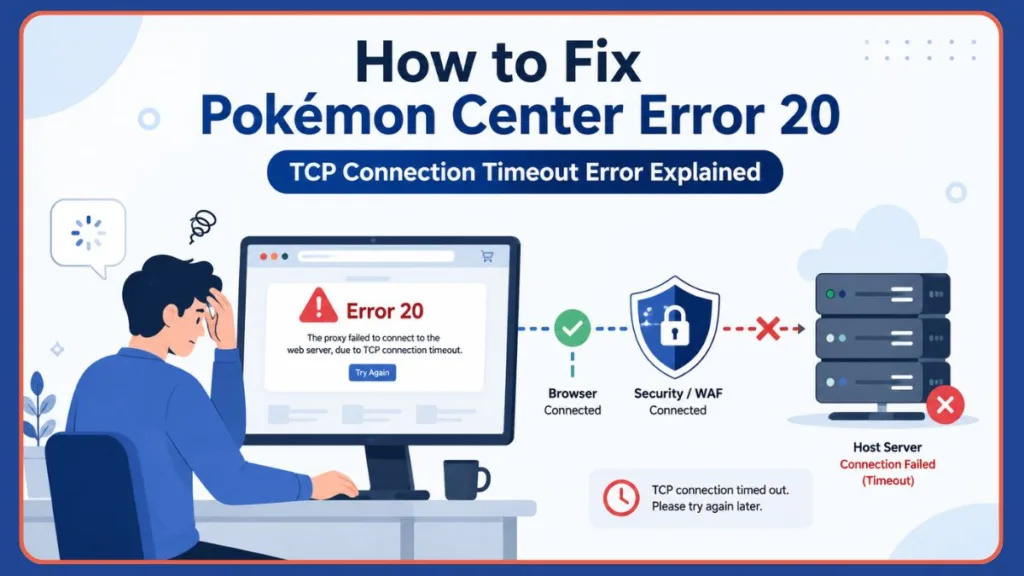
Error 20
The proxy failed to connect to the web server, due to TCP connection timeout.
At first glance, this message can be confusing. You may wonder whether Pokémon Center has blocked your account, whether the website is down, or if there’s something wrong with your internet connection.
Fortunately, Pokémon Center Error 20 is usually a temporary issue and, in many cases, can be resolved without contacting support.
In this guide, you’ll learn what Pokémon Center Error 20 means, why the error occurs, and how it differs from Pokémon Center Error 15. We will also cover common causes behind the timeout and what you can do to regain access quickly. Whether you’re trying to secure a Pokémon TCG restock, purchase exclusive merchandise, or simply browse the store, this guide will help you understand and troubleshoot the issue.
What Is Pokémon Center Error 20?
Pokémon Center Error 20 is a TCP connection timeout error that occurs when the website’s security infrastructure cannot successfully connect to the Pokémon Center’s backend server.
When the error appears, you may see a status page showing that your browser connected successfully and the Web Application Firewall (WAF) connected successfully, but the host server failed to respond. In simple terms, your request successfully reached Pokémon Center’s security system, but the security system could not communicate with the actual web server that hosts the website.
Unlike some Pokémon Center errors that block users due to security restrictions, Error 20 typically indicates a communication failure somewhere between the website’s protection layer and its origin server. This is why many users encounter the error during Pokémon TCG product drops, exclusive merchandise launches, preorder events, high-traffic shopping periods, and unexpected server outages. Because the request reaches Pokémon Center’s security system successfully, Error 20 is generally considered a server-side connectivity issue rather than a user-side access denial issue.
Pokémon Center Error 20 vs Error 15: What’s the Difference?
Many users confuse Pokémon Center Error 20 with Pokémon Center Error 15 because both can prevent access to the website. However, they are caused by very different issues.
| Feature | Error 20 | Error 15 |
| Error Type | TCP Connection Timeout | Access Denied |
| Main Cause | Server Connectivity Problem | Security Rule Triggered |
| Request Reaches Security System | Yes | No |
| Usually Related to IP Restrictions | Rarely | Frequently |
| Common During Product Drops | Yes | Sometimes |
| Often Fixed by Waiting | Yes | Not Always |
| May Require Browser Changes | Sometimes | Frequently |
When you receive Error 15, Pokémon Center’s security system has actively blocked your request. This may happen because of VPN usage, suspicious traffic patterns, region restrictions, browser-related security triggers, or blocked IP addresses. By contrast, Error 20 usually means the security system allowed the request but could not obtain a response from the backend server in time. This distinction is important because the troubleshooting process for each error can be very different. If you’re seeing Error 20, the issue is often temporary and may be related to server load rather than anything you’ve done wrong.
Does Pokémon Center Error 20 Mean You Are Blocked?
Because website errors are frustrating, users frequently search for terms like Pokémon Center keeps blocking me, blocked from Pokémon Center website, and Pokémon Center access denied. Usually, however, the answer is no. Error 20 is different from Error 15. Error 20 generally indicates a server timeout, whereas Error 15 indicates that your request was actively blocked by security rules.
Why Does Pokémon Center Error 20 Occur?
Several factors can trigger Pokémon Center Error 20. While the exact cause may vary, most cases fall into one of the categories below.
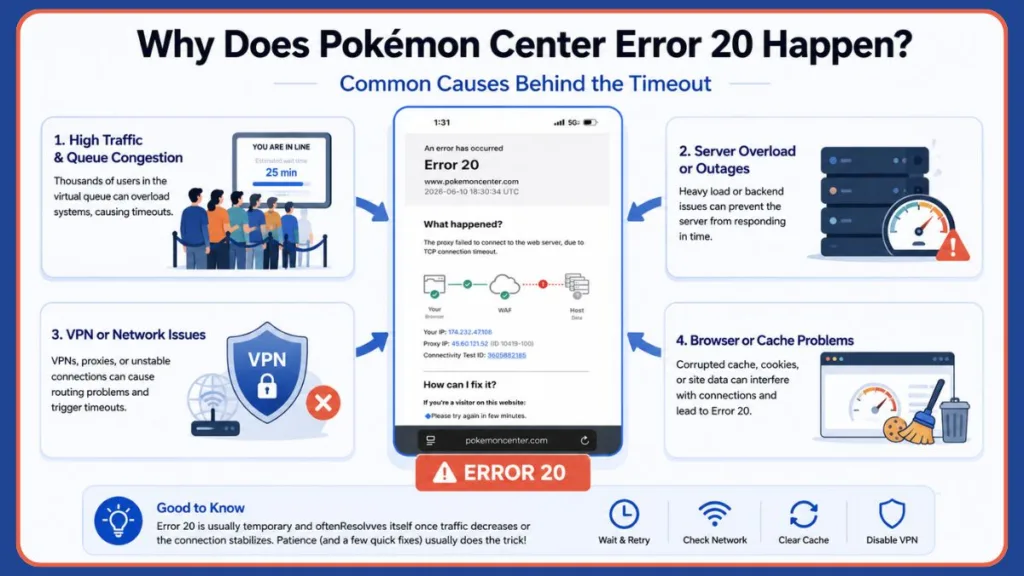
High Traffic During Pokémon TCG Restocks
One of the most common causes of Pokémon Center Error 20 is overwhelming traffic. Whenever Pokémon Center launches Pokémon TCG restocks, Elite Trainer Boxes, exclusive plushies, limited-edition collectibles, or special preorder events, thousands of users may attempt to access the store simultaneously. During these events, the website’s infrastructure can become overloaded. Although the security system continues accepting incoming requests, the backend servers may struggle to respond quickly enough, resulting in a TCP timeout and triggering Error 20. This is why many users search for terms like Pokémon Center queue today, Pokémon Center queue not working, Pokémon Center website not working, and Pokémon Center temporarily unavailable during major product releases.
Pokémon Center Queue Congestion
The Pokémon Center virtual queue exists to manage heavy traffic and ensure fairness during high-demand events. When the queue becomes extremely crowded, several issues can occur, including delayed server responses, session timeouts, checkout interruptions, and temporary connection failures. If thousands of users are progressing through the queue simultaneously, the backend systems responsible for processing requests can experience delays. In some cases, these delays may trigger Error 20 before users even reach the checkout page. Queue-related congestion is especially common during Pokémon card restocks, limited product launches, holiday sales, and collector-exclusive releases.
Temporary Server Outages
Another common reason for Pokémon Center Error 20 is a temporary outage on the website itself. Although the security infrastructure may remain operational, backend services can occasionally experience maintenance periods, database failures, application crashes, server deployment issues, or network disruptions. When this happens, the Web Application Firewall can still receive your request, but it cannot establish a successful connection with the host server. As a result, visitors receive the timeout message associated with Error 20.
VPN or Proxy Interference
Many Pokémon Center users rely on VPNs to browse from different regions or improve privacy. However, VPNs and proxy services can occasionally create routing problems that interfere with communication between your browser and Pokémon Center’s infrastructure. Potential issues include shared IP addresses, network latency, routing delays, and blocked proxy endpoints. Although VPNs are more commonly associated with Error 15 and access-denied messages, they can sometimes contribute to timeout-related problems as well. If you’re using a VPN when Error 20 appears, it’s worth testing the site again with the VPN disabled.
Browser Session Problems
Sometimes the issue isn’t with Pokémon Center’s servers but with the session data stored in your browser. Over time, browsers accumulate cookies, cached files, authentication tokens, and queue session information. If this information becomes outdated or corrupted, communication between your browser and Pokémon Center may fail unexpectedly. Users have occasionally reported that switching from one browser to another immediately resolved connection-related problems. This is why troubleshooting guides often recommend testing Google Chrome, Mozilla Firefox, Microsoft Edge, or Safari before assuming the website itself is down.
ISP or Network Routing Issues
Your internet provider can also play a role in Error 20. In some cases, requests may experience delays due to DNS issues, regional routing problems, ISP congestion, or temporary network outages. If your connection path to Pokémon Center becomes unstable, the request may time out before reaching the server successfully. This is one reason why some users find that switching to mobile data, another Wi-Fi network, or a mobile hotspot can immediately restore access to the Pokémon Center website. While this isn’t the most common cause, it’s worth considering if the website works on one network but not another.
What Pokémon Center Users Report About Error 20
Community insights provide valuable context for troubleshooting this issue. When you look at community discussions where users ask why they are being blocked, it is clear that many see Error 20 during major TCG restocks. Some users regain access after waiting patiently, while others resolve the issue by switching networks entirely or testing alternative browsers.
Additionally, VPN users and those browsing on mobile devices with privacy features like iCloud Private Relay enabled frequently report connection issues. This further suggests that strict network privacy settings play a significant role in triggering the connection timeout. Nothing is more frustrating than clearing a queue error only to hit a wall at the payment screen. If you bypass the error but find you are having trouble successfully placing an order, you may need to double-check that your billing address perfectly matches your card details or switch off guest checkout.
How to Fix Pokémon Center Error 20
If you’re seeing Pokémon Center Error 20, don’t panic. In most cases, the issue is temporary and can be resolved with a few troubleshooting steps. Because Error 20 usually indicates a connection timeout between Pokémon Center’s security system and its backend servers, the goal is to determine whether the problem is on Pokémon Center’s side, your network, or your browser session. Work through the fixes below in order.
Wait and Try Again Later
The Error 20 page itself often recommends that you please try again in a few minutes. This advice may seem overly simple, but it’s often the most effective solution. Pokémon Center Error 20 frequently appears during Pokémon TCG restocks, product launches, limited-edition merchandise drops, and high-traffic queue events. When thousands of users attempt to access the store simultaneously, the backend servers may temporarily become overwhelmed. In these situations, waiting 10–30 minutes and trying again can often resolve the issue without any additional troubleshooting.
Best Practice
Avoid repeatedly refreshing the page every few seconds. Excessive refreshes can create additional server requests and may even trigger anti-bot protections that complicate the issue further.
Check Whether Pokémon Center Is Down
Before changing browser settings or troubleshooting your network, verify whether the issue is affecting everyone. A widespread outage can produce Error 20 for thousands of users simultaneously. Signs Pokémon Center is experiencing an outage include Error 20 affecting multiple devices, the queue system not loading, checkout being unavailable, product pages failing to load, and reports appearing on Reddit and social media.
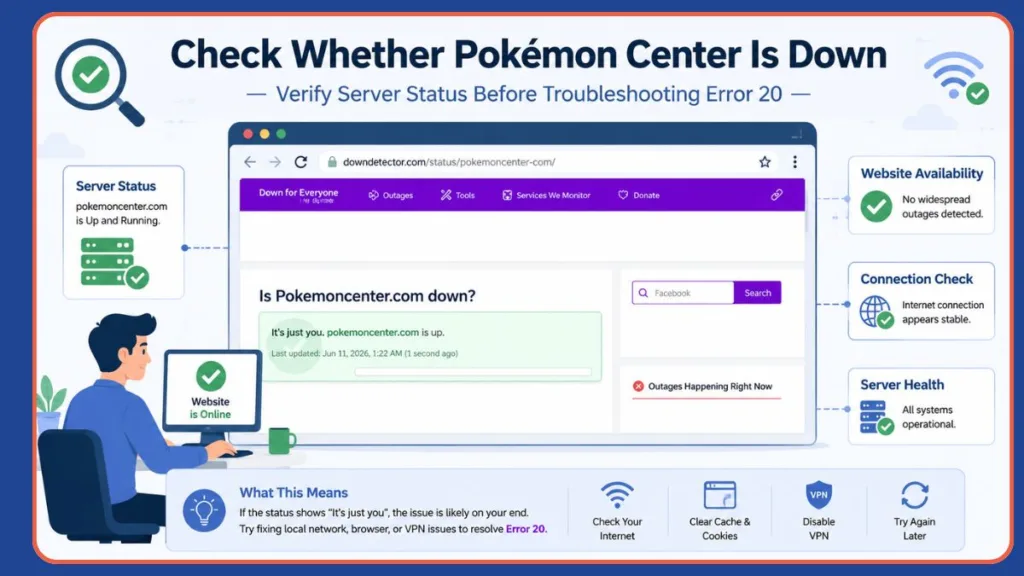
You can check Down for Everyone, Pokémon Center support channels, Pokémon community forums, Pokémon Center Reddit discussions, and official Pokémon social media accounts. If many users are reporting problems at the same time, the best option is usually to wait for Pokémon Center to resolve the issue.
Clear Browser Cache and Cookies
Corrupted browser data can sometimes interfere with Pokémon Center sessions. Stored cookies and cached files may contain outdated session information that causes communication problems with the website. Clearing this data forces your browser to establish a fresh connection.
Google Chrome
- Open Chrome.
- Click the three-dot menu.
- Select Settings.
- Go to Privacy and Security.
- Click Clear Browsing Data.
- Select cookies and other site data, along with cached images and files.
- Click Clear Data.
- Restart Chrome.
Mozilla Firefox
- Open Firefox.
- Click the menu button.
- Select Settings.
- Open Privacy & Security.
- Under Cookies and Site Data, click Clear Data.
- Remove cookies and cached web content.
- Restart Firefox.
Microsoft Edge
- Open Edge.
- Click the three-dot menu.
- Select Settings.
- Choose Privacy, Search, and Services.
- Click Choose What to Clear.
- Select cookies and cached files.
- Clear the data.
Safari
- Open Safari Settings.
- Navigate to Privacy.
- Select Manage Website Data.
- Remove Pokémon Center-related data.
- Restart Safari.
After clearing data, revisit Pokémon Center and check whether Error 20 has disappeared.
Disable VPN or Proxy Services
VPNs can occasionally cause routing issues that contribute to timeout errors. While VPNs are more commonly associated with Error 15 and access-denied problems, they can also affect connection stability. Potential issues include shared IP addresses, increased latency, poor routing paths, and overloaded VPN servers.
If You’re Using a VPN
- Disconnect from the VPN.
- Close your browser.
- Reopen the browser.
- Visit Pokémon Center again.
If You’re Not Using a VPN
In rare cases, users outside supported regions may find that a high-quality VPN improves connectivity. If the site isn’t loading at all, testing another connection path may help determine whether the issue is network-related.
Switch to Another Network
Network routing problems occasionally trigger connection timeouts. Testing a different network helps determine whether the problem originates with your current internet provider. Try using mobile data, a mobile hotspot, another Wi-Fi network, or a different internet provider if available. If Pokémon Center loads correctly on another network, the issue may be related to ISP routing, DNS problems, or temporary network congestion.
Restart Your Router
A simple router restart can often resolve temporary networking problems. Restarting your router may refresh your connection, clear network glitches, obtain a new IP address from your ISP, and improve routing to Pokémon Center servers.
How to Restart Your Router
- Turn off the router.
- Unplug it for 30–60 seconds.
- Reconnect the power.
- Wait for the connection to fully restore.
- Try accessing Pokémon Center again.
This solution is particularly useful if your IP address has been temporarily flagged or if routing issues are causing timeouts.
Try Another Browser
Sometimes the issue is limited to a specific browser session. Browser-specific problems can include corrupted cookies, extension conflicts, security settings, and cached queue sessions. If you’re currently using Chrome, try switching to Firefox, Edge, or Safari. Many users report that Pokémon Center loads normally in one browser while continuing to display errors in another.
Open Pokémon Center in Incognito or Private Mode
Incognito mode starts a fresh browsing session without existing cookies or cached data. This allows you to quickly determine whether your stored browser information is causing the issue.
Chrome
Press Ctrl + Shift + N
Firefox
Press Ctrl + Shift + P
Edge
Press Ctrl + Shift + N
Safari
Select File → New Private Window
If Pokémon Center works in private mode, cached data or extensions are likely contributing to the problem.
Disable Browser Extensions Temporarily
Certain browser extensions can interfere with website functionality. Potentially problematic extensions include ad blockers, privacy tools, script blockers, VPN extensions, and security add-ons. Examples include uBlock Origin, NoScript, Ghostery, and Privacy Badger.
How to Test
- Disable all browser extensions.
- Restart the browser.
- Visit Pokémon Center.
- If the site works, re-enable extensions one at a time.
This process helps identify the specific extension causing the issue.
Avoid Excessive Refreshing
Many Pokémon Center users repeatedly refresh pages during product launches. Unfortunately, this can sometimes make matters worse. The Pokémon Center queue system uses anti-bot protections to maintain fairness during Pokémon TCG restocks, limited-edition releases, and exclusive product launches. Repeated refreshing can trigger rate limits, create session conflicts, cause queue issues, and increase the likelihood of timeout errors.
Important Tip: Instead of refreshing continuously, allow the queue system to update automatically. Patience is often more effective than repeated reload attempts.
Stay on One Device During Queue Events
If you’re waiting in the Pokémon Center virtual queue, avoid switching between devices. Your queue session may be tied to browser cookies, session identifiers, and network information. Switching between a desktop, laptop, mobile phone, or tablet can occasionally disrupt the queue session and create additional connection problems.
Important Tip: For the best experience, stay on one device, maintain a stable connection, and let the queue progress naturally.
Change Your DNS Settings
If DNS routing is causing delays, switching to a public DNS provider may help. Popular options include Google DNS, where the primary is 8.8.8.8 and the secondary is 8.8.4.4, or Cloudflare DNS, where the primary is 1.1.1.1 and the secondary is 1.0.0.1.
After changing DNS settings:
- Restart your browser.
- Flush DNS cache if necessary.
- Retry Pokémon Center.
Although this isn’t a guaranteed fix, it can resolve connectivity issues caused by regional DNS problems.
Contact Pokémon Center Support
If you’ve tried every solution and Error 20 persists for several days, contacting Pokémon Center Support may be necessary. Include the exact Error 20 message, screenshots of the error page, browser information, device information, and steps you’ve already attempted. Providing detailed information can help support agents identify whether the issue is related to your account, network, or an ongoing server problem.
How Pokémon Center’s Virtual Queue Affects Error 20
If you’ve encountered Pokémon Center Error 20 while trying to purchase Pokémon cards, exclusive merchandise, or preorder a limited-edition product, there’s a good chance the virtual queue system played a role. The Pokémon Center queue is designed to manage large volumes of visitors during high-demand events. Instead of allowing everyone to enter the store at once, users are placed into a waiting room and assigned a queue position. This system helps prevent website crashes, reduce server overload, limit bot activity, improve fairness during restocks, and manage checkout traffic efficiently. While the queue itself is helpful, heavy traffic can sometimes create conditions that contribute to Error 20.
What Is the Pokémon Center Waiting Room?
The Pokémon Center waiting room is a virtual queue that activates whenever traffic exceeds normal levels. You’ll commonly see it during Pokémon TCG restocks, Elite Trainer Box launches, limited-edition plush releases, exclusive merchandise drops, and high-demand preorder events. When the queue is active, visitors receive a queue position and must wait until the system grants access to the online store. In recent updates, Pokémon Center has begun displaying queue positions and estimated wait times, allowing shoppers to monitor their progress more effectively.
Why Queue Issues Can Trigger Error 20
Error 20 typically appears when the security infrastructure cannot establish a successful connection with the backend server. During major product launches, several things can contribute to this:
Sudden Traffic Surges
Thousands of shoppers may enter the queue simultaneously. As traffic increases, backend servers must process queue updates, inventory checks, user authentication, and checkout requests. Heavy load can occasionally result in connection timeouts.
Checkout Congestion
The highest server demand usually occurs when large groups of users reach checkout at the same time. During this stage, the system must verify inventory, process payment requests, update stock levels, and manage user sessions. If servers become overwhelmed, Error 20 may appear.
Queue Session Conflicts
Repeated actions such as refreshing the page, opening multiple tabs, or switching devices can interfere with queue sessions and occasionally create connection issues. Although these actions don’t always cause Error 20, they can increase the likelihood of problems during busy events.
Can Refreshing Make Error 20 Worse?
Many users repeatedly refresh Pokémon Center pages when the queue appears stuck. Unfortunately, this is usually not recommended. The queue system updates automatically, meaning manual refreshing is rarely necessary. Excessive refreshing can interrupt your queue session, trigger anti-bot protections, increase server load, and cause additional connection errors.
Important Tip: If you’re waiting in line, it’s generally best to allow the system to update your position automatically.
Does Switching Devices Affect Queue Position?
In many cases, yes. Your queue session may be linked to browser cookies, device information, network details, and session identifiers. Switching between devices or changing networks while waiting may result in session resets, queue placement issues, and additional verification checks.
Important Tip: For the smoothest experience, stay on one device, maintain a stable internet connection, and avoid unnecessary browser changes.
How Long Does Pokémon Center Error 20 Last?
The duration of Pokémon Center Error 20 depends entirely on the underlying cause.
Server Congestion
If the error is caused by heavy traffic, it may disappear within 5–15 minutes, or 30–60 minutes during large drops.
Queue-Related Issues
Queue congestion may continue until traffic decreases. During major Pokémon TCG restocks, delays can persist for several hours.
Maintenance or Outages
If Pokémon Center is performing maintenance or experiencing server problems, the error may remain until engineers restore normal service.
Network-Related Problems
Issues caused by your network, browser, or VPN can often be fixed immediately after troubleshooting. Because Error 20 is usually temporary, waiting and retrying later is often the fastest solution.
Frequently Asked Questions
What does Pokémon Center Error 20 mean?
Pokémon Center Error 20 indicates that the website’s security system could not successfully connect to the backend server due to a TCP connection timeout. This usually points to a temporary connectivity issue rather than a direct account restriction.
Why is Pokémon Center showing a TCP connection timeout?
A TCP connection timeout occurs when the server fails to respond within the expected time limit. Common causes include high traffic, queue congestion, server outages, VPN interference, and network routing problems.
Is Pokémon Center down right now?
Not necessarily. Error 20 can occur even when the website is partially operational. To confirm whether the issue is widespread, check Downdetector, Pokémon Center support channels, Reddit discussions, and official Pokémon social media accounts.
How long does Error 20 last?
Most cases resolve within a few minutes to a few hours. The exact duration depends on whether the issue is caused by server overload, maintenance, network problems, or browser-related issues.
Does Error 20 mean I am banned?
No. Unlike Error 15, Error 20 usually does not indicate a ban or access restriction. It is generally a server connectivity problem rather than a security-related block.
Can VPNs cause Pokémon Center Error 20?
Yes. VPNs may occasionally create routing issues, latency problems, or connectivity delays that contribute to timeout errors. Testing the website without a VPN is recommended.
Why does Pokémon Center keep blocking me?
If you’re seeing an access denied message instead of Error 20, you may be dealing with Error 15 or another security-related restriction. These issues are often associated with VPN usage, suspicious activity, IP reputation problems, and browser security conflicts.
Why is the Pokémon Center queue not working?
Queue problems typically occur during large restocks, product launches, and heavy traffic events. Temporary delays, slow updates, and longer wait times are common when thousands of users enter the waiting room simultaneously.
Can I bypass the Pokémon Center queue?
No. There is no legitimate way to bypass the Pokémon Center queue. The system exists to ensure fair access to high-demand products and prevent bots from purchasing inventory before legitimate customers.
Does clearing cookies fix Error 20?
Sometimes. If corrupted session data is contributing to the problem, clearing cookies and cache can help establish a fresh connection with Pokémon Center. However, server-related causes of Error 20 usually require waiting for the issue to resolve.
Final Thoughts
Pokémon Center Error 20 can be frustrating, especially when you’re trying to secure a Pokémon TCG restock, preorder a limited-edition item, or purchase exclusive merchandise before it sells out. Fortunately, this error is usually temporary and often indicates a connection timeout between Pokémon Center’s security infrastructure and its backend servers rather than a permanent account restriction.
In most cases, you can resolve the problem by waiting for traffic to decrease, checking for server outages, clearing browser data, disabling VPNs, switching networks, and avoiding excessive page refreshes. Understanding how the Pokémon Center queue system works can also help reduce frustration during major product launches and improve your chances of completing a successful checkout. If none of the troubleshooting steps work, contacting Pokémon Center Support may help identify whether a larger technical issue is affecting your connection.
If you’re seeing Pokémon Center Error 20, the good news is that the error usually indicates a temporary connection timeout rather than a permanent restriction. In most cases, waiting for traffic to decrease, checking for outages, or refreshing your browser session is enough to restore access. During major Pokémon TCG restocks and exclusive launches, patience is often the most effective solution.
Visit Our Post Page: Blog Page
Discover more from Izoate
Subscribe to get the latest posts sent to your email.