
Frustrated by the Crimson Desert sleep cooldown? Learn how to wait, pass time quickly, and use the Chapter 8 exploit to bypass the fatigue timer entirely.
Anyone who has spent a few hours surviving the brutal world of Crimson Desert knows exactly how oppressive the night cycle can be. The dynamic lighting is gorgeous, but when you are stumbling through a pitch-black forest filled with high-level ambushes, you usually just want to fast-forward to morning.
But if you’ve ever tried to rest at a camp only to hear Kliff mutter, “Now is not the time to sleep…”, you already know the pain of the game’s strict time-gating.

Whether you are trying to force a vendor to restock, speed up a camp dispatch mission, or simply get some daylight back, mastering how time flows in this game is mandatory. Let’s break down exactly how to wait, how the hidden fatigue mechanics actually work, and the best current exploits to bypass the cooldown entirely.
Pro Tip for Newcomers: The in-game clock is hard-coded to real-world time. One full in-game day takes roughly two hours of real-world gameplay. That means every in-game hour equates to about five actual minutes. If you decide to wait out the night naturally, settle in—it’s going to be a long, dangerous trek.
If you find yourself stuck waiting for the clock to tick over, the community has found a few creative ways to kill time naturally. For instance, a popular workaround when you are locked out of the sleep menu is heading over to the animal park to rob gold bars while waiting out the timer, or standing just outside of an aggro area to grab enemies with your magic Axiom hand for the sheer fun of it.
How to Wait and Advance Time: The Basic Rest Mechanics
The UI doesn’t always do a great job of explaining your options, and a lot of the best mechanics are hidden behind context-sensitive button prompts. Here is how you can reliably advance the clock without just standing around.
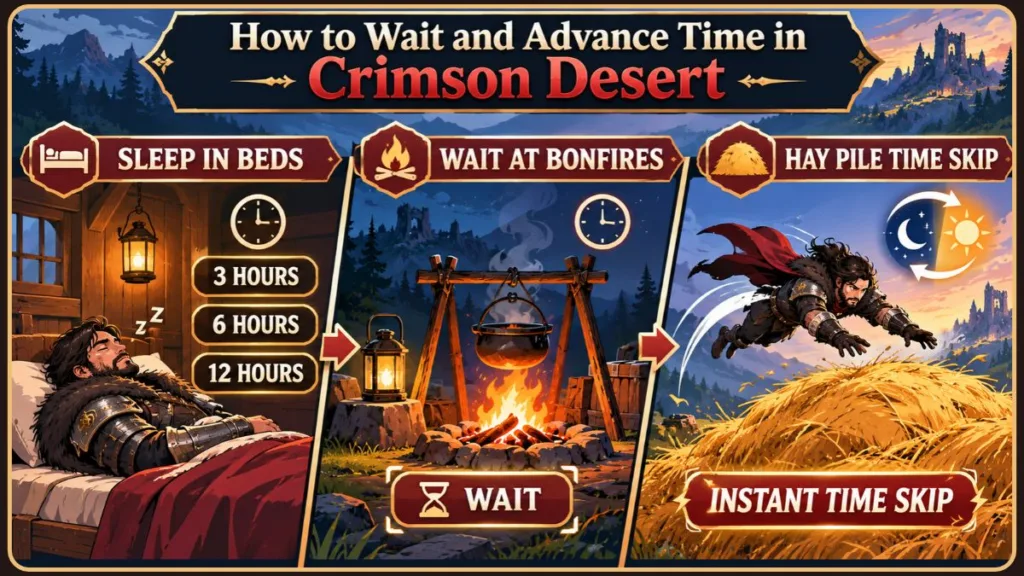
Crimson Desert Sleeping Explained: Skipping Time in Beds
The most straightforward way to change the time of day is to find a bed. You can crash on virtually any bed you find out in the open world, even if it clearly belongs to an NPC. Interacting with one brings up a menu letting you sleep in 3-hour, 6-hour, or 12-hour increments.
To grind efficiently, you should use these specific increments strategically:
- 3-Hour Skip: Perfect for when you arrive at an assassination target or quest marker slightly too early and need to wait for a specific NPC to spawn.
- 6-Hour Skip: The best option for pushing past the absolute darkest hours of the night cycle. If you sleep at midnight, you will wake up right at dawn.
- 12-Hour Skip: Your go-to choice for completely resetting vendor inventories, farming daily tasks, or rushing your mercenaries through their dispatch missions.
If you are stuck out in the wild, your best bets for finding a reliable mattress are the inns located in major hub cities like Hernand, abandoned hunting cabins, or established mercenary camps.
Expert Tip: If you stumble into a cabin and find an NPC already sleeping in “your” bed, you don’t actually have to wait for them to wake up. You can use your focus light on the sleeping NPC to jolt them awake, forcing them out of the bed with zero penalty to your reputation!
Time-Specific Quest Triggers
Sleeping in beds is the absolute easiest way to hit exact timing windows for side quests. For example:
- The “Midnight Circus” Quest: This specific circus event will only trigger and progress if you arrive after 8 PM.
- “Wagon in the Skies”: Earlier in the game, this quest requires you to wait for a balloon ride, which happens strictly at midday.
- “Nightmare of Stage” (Demeniss): A Chapter 7 mission that requires entering an arena that only opens its doors at exactly 12 PM.
How to Pass Time Without Sleeping: Bonfires and Cooking Pots
What happens when you are deep in the wilderness and nowhere near a bed? You can absolutely pass time using campfires, but the prompt is completely hidden if you don’t know the right input.
If you just press the standard interact button, you will only open the cooking menu. To actually wait, you have to use the investigation feature.
How to rest at a fire:
- Light the fire: Make sure the bonfire or cooking pot is actively burning. If it is unlit, you will need to use a fire starter or flint first.
- Pull out your lantern: Approach the flames and press CTRL on your keyboard or LB on your controller. This shifts you into investigation mode.
- Select the Wait Option: Scroll down to the bottom of the radial menu that pops up and select “Wait.”
- Choose your duration: You will get the same 3, 6, and 12-hour options you get at a bed.
A massive detail many players miss is that cooking pots function identically to bonfires. If you are at a camp with a griddle or a hanging pot, you can inspect it and use the wait feature there as well. Interestingly, passing time at a cooking pot will sometimes passively teach you the recipe of whatever meal was bubbling inside it while you waited!
The Hay Pile Trick: A Fast Way to Change the Time of Day
If you are in a pinch and just need daylight immediately, look around for a massive pile of hay. Taking a leap of faith into one of these piles will prompt a quick-skip option (usually by pressing ESC on a PC). Confirming this will instantly spit Kliff back out into the bright sunshine.
Safety Warning: Always make sure the hay pile is large enough to trigger the interaction prompt before jumping from a cliff. These piles will negate fall damage, but missing the center by a few inches means an instant death.
This trick is an absolute lifesaver when you are trying to help NPCs out in the world. For example, during Chapter 2, you will encounter a villager quest where a man needs help, but the game states you need to wait for the right time. Instead of tracking down a bed, you can simply jump into a nearby hay pile, trigger the prompt, and switch instantly to daytime so the villager is ready to talk.
Why Can’t I Sleep in Crimson Desert? The Fatigue Cooldown Explained
This brings us to the biggest headache in the community right now. You walk up to a bed, hit the sleep prompt, and Kliff refuses, claiming he isn’t tired.
Your save file isn’t bugged. This is an intentional, hard-coded feature. Crimson Desert utilizes a strict sleep cooldown that lasts for approximately 10 to 12 in-game hours.
Kliff has a hidden fatigue meter. He must actually spend time awake, exploring and fighting, before the game allows him to rest again. You cannot bypass this cooldown just by running to a different inn or trying a bonfire; the timer is tied to your character, and you simply have to wait it out in real-time.
The Exact Cooldown Math: Players who have rigorously tested this system have confirmed that the exact cooldown for sleeping is 10 in-game hours. Importantly, the amount of time you choose to sleep does not affect this cooldown. Whether you sleep for 3 hours or 12 hours, you still have to wait out the full 10-hour penalty before resting again.
Why Pearl Abyss Added a Rest Cooldown
While it feels incredibly restrictive, the developers added this fatigue mechanic to balance the game’s economy. A lot of your passive income—like dispatching comrades on resource runs or earning compound interest from the bank—is tied directly to the passage of time. If we could just sleep infinitely without a cooldown, it would take about twenty minutes to completely break the in-game economy and buy every endgame item available.
Furthermore, Pearl Abyss wants players to engage with the world rather than constantly skipping it. While stealth isn’t the primary focus of the game, there are mechanics—like the smoke ability or utilizing crouching in the environment—that allow you to survive the brutal night cycle if you choose to push through it stealthily instead of hiding in a bed.
How to Fast Forward Time Quickly: The Chapter 8 Time Skip Exploit
Because grinding out that fatigue timer is tedious, the community quickly hunted down a workaround. There is currently a highly effective time-skip loop that bypasses the cooldown entirely. This is absolutely mandatory if you are playing on a console and want to speed up your progression.
What you need before starting:
- You must reach Chapter 8 of the main campaign.
- You need to accept the quest for the Thunder Mountain.
- The thunder-themed boss in northern Pailune must remain alive.
How to execute the loop:
- Trigger the Quest Prompt: Proceed with the Thunder Mountain quest until you fix the device. The game will ask if you want to “wait for the right moment” before facing the boss.
- Accept the Skip: Hitting yes forces the clock to jump directly to 6 PM.
- Go to Sleep: Immediately fast-travel away to any bed and manually sleep for a full 12 hours. You will wake up at 5 AM.
- Repeat Indefinitely: Because you didn’t actually fight the boss, the quest prompt to “wait for the right moment” will instantly reappear in your menu. Click it, jump back to 6 PM, sleep again, and repeat the cycle as many times as you want.
If you are going to put your main quest progression on hold to abuse this, make it count. Use this loop to rapidly cycle high-tier mercenary missions, refresh vendor stocks to buy out abyss gear recipes, and build a mountain of wealth through Grover’s compound interest.
This exploit is particularly valuable for players attempting to complete the “Wagon in the Skies” quest or the “Midnight Circus”, as it allows you to bounce back and forth between the required daytime and nighttime windows instantly without ever hitting the dreaded 10-hour cooldown.
Patched Time Skip Methods and PC Speed Mods
If you are following older advice, you might be trying to use the Chapter 4 Grimnir method (The Mysterious Pot). Don’t bother—that specific quest skip was patched. While it used to let you skip to 10 AM infinitely, using it now triggers the standard fatigue timer, locking you out for about 10 minutes of real-world time.
The Grover Investment Nerf
When the Grimnir exploit was active, players used it primarily to farm compound interest from Grover. Getting up to 100 gold bars was incredibly fast. Now that the patch enforces a real-world wait time between skips, relying on Grover for infinite early-game wealth is significantly harder, pushing players toward the Chapter 8 exploit instead.
So what do you do if Pearl Abyss patches the Chapter 8 trick?
If you are on PC, the easiest workaround is bypassing the game’s code entirely with CheatEngine speedhacks. Because the game lacks an innate console command to alter the clock, speeding up the entire application forces the 10-12 in-game hour cooldown to pass in a matter of seconds.
A Note on Modding: While speedhacks are incredibly effective for offline grinding, Izoate generally recommends caution when attaching memory-editing software to modern RPGs. It can occasionally corrupt save files or cause bizarre physics glitches. Always back up your save folder before accelerating the game engine.
Why Time Management Matters in Crimson Desert
If you are new to the game, you might be wondering why everyone is so obsessed with manipulating the clock. Mastering world time progression is the key to minimizing your grind.
- Upgrading Your Camp: Your Greymane survivors gather resources in real-time. Skipping days allows you to instantly reap the rewards of these expeditions, which is the only realistic way to max out your camp upgrades quickly. Using glitches, you can get a 3-day camp mission done within 5 minutes.
- Vendor Resets: Merchants restock their wares daily. Fast-forwarding is the most efficient way to hoard rare crafting materials like bismuth spears.
- Quest Spawns: Certain assassination targets and rare mythical beasts will only spawn under the cover of darkness. If you show up at noon, you will be standing around doing nothing.
- The Bare-Handed Arena: In Chapter 7, there is a specific bare-handed fighting arena (“Bared Fang”) that is strictly time-gated. Fast-forwarding is the only way to chain these arena fights together without standing around waiting for the doors to open.
- General Survival: The night cycle is notoriously brutal. Enemies are tougher, ambushes are frequent, and the visibility is terrible. Skipping to morning makes traversing dense forests significantly safer.
Frequently Asked Questions About the Day-Night Cycle
Can I turn off the sleep cooldown in the settings? No. It is a hard-coded gameplay mechanic designed to prevent infinite resource farming. Quest-specific exploits or third-party PC mods are your only workarounds.
Can I use the settings menu to skip time if I’m near a quest marker? No, contrary to some older open-world games, Crimson Desert does not allow you to skip time directly from the settings or pause menu, even if you are standing exactly where a time-gated mission begins. You must use a bed, bonfire, hay pile, or quest prompt.
Do enemies respawn when I pass time? Yes. If you sleep for a full 12 hours, most standard enemy camps and wildlife spawns will completely reset. It’s a fantastic way to farm specific upgrade materials, but be incredibly careful if you decide to take a nap near a hostile zone.
Is there a way to make the day-night cycle longer or shorter permanently? Without mods, the cycle is permanently fixed at approximately two real-world hours per in-game day.
Visit Our Post Page: Blog Page
Discover more from Izoate
Subscribe to get the latest posts sent to your email.