
Base burning? Learn how to stop fire in Minecraft and prevent fire spread. Master water mechanics, the /fill command, and elite Nether survival tricks.
Watching your meticulously crafted spruce mansion burn to the ground because of a stray lightning strike or a careless flint and steel click is a Minecraft rite of passage. But when the flames start jumping and your frame rate plummets, panic isn’t an option—you need to know exactly how to extinguish fire in Minecraft before the damage becomes irreversible.
Because fire behaves fundamentally differently depending on your biome, local block updates, and dimension, your firefighting strategy needs to be flawless. A bucket of water might save your Overworld base, but that same bucket is completely useless when dodging Ghast fireballs in the Nether.
We have analyzed fire propagation mechanics, server console data, and Reddit’s most desperate survival threads to build this comprehensive fire control guide. Whether you are prepping for a perilous Nether raid, saving your server from a lag-inducing jungle inferno, or just trying to manage a cozy campfire, here is the ultimate guide to stopping fire in its tracks.
Quick Answer: How to Put Out Fire Instantly
If you are currently watching your base burn and need an immediate, high-urgency fix, use any of these community-tested methods to extinguish the flames right now:
- Punch the fire: Run directly up to the burning block and spam your attack button (left-click on PC or right trigger on console) to instantly punch out a small, isolated fire entity.
- Deploy a water bucket: Equip a water bucket and place the source block on a surface directly above the flames to wash them away. If you are surviving in the Nether, throw a splash water bottle instead.
- Suffocate the flame: Drop a solid, non-flammable block—like dirt, cobblestone, or deepslate—directly into the exact space the fire occupies to instantly crush the fire entity.
- Let the fire tick expire: Normal fire will eventually burn out on its own once it consumes all nearby flammable blocks. However, this does not apply to fire on Netherrack or Soul Sand.
- Execute the
/fillcommand: If you have operator privileges, open chat and type/fill ~-10 ~-10 ~-10 ~10 ~10 ~10 air replace fire. This is the ultimate firefighting command, clearing all nearby flames without deleting your surrounding architecture. - Disable fire propagation: Type
/gamerule doFireTick falseto freeze fire in place, permanently stopping it from jumping to neighboring blocks.
Pro Tip: Never use the standard
/kill @ecommand in a panic to clear a fire. While fire is an entity, using a blanket kill command will wipe out your pets, armor stands, and dropped items. Always specify@e[type=fire]if you are relying on entity commands!
Understanding How Fire Works in Minecraft
Before you can effectively fight a blaze, you need to understand the underlying mechanics driving it. In Minecraft’s engine, fire acts as a spreading entity that requires a direct ignition source and flammable blocks to propagate.
While careless lava bucket spills or rogue flint and steel clicks are the usual suspects, your base is also under constant threat from environmental hazards. Lightning strikes during localized thunderstorms, Ghast fireballs in the Nether, Blaze attacks, and even the explosive consequences of trying to sleep in a Nether bed will scatter fire entities across your terrain.
Fire propagation is tied to random block ticks. It will only spread if it detects a valid path to flammable blocks like wood, wool, leaves, or vines. If your loadout and base design rely heavily on non-flammable blocks, the fire tick will expire, and the flame will simply burn itself out.
Pro Tip: Do not underestimate fire’s vertical reach. Fire can jump one block sideways, one block downward, and a staggering four blocks upward. If you are building an underground forge, always keep a massive vertical clearance between your lava pools and any wooden floorboards above.
Every Way to Extinguish Fire in Minecraft
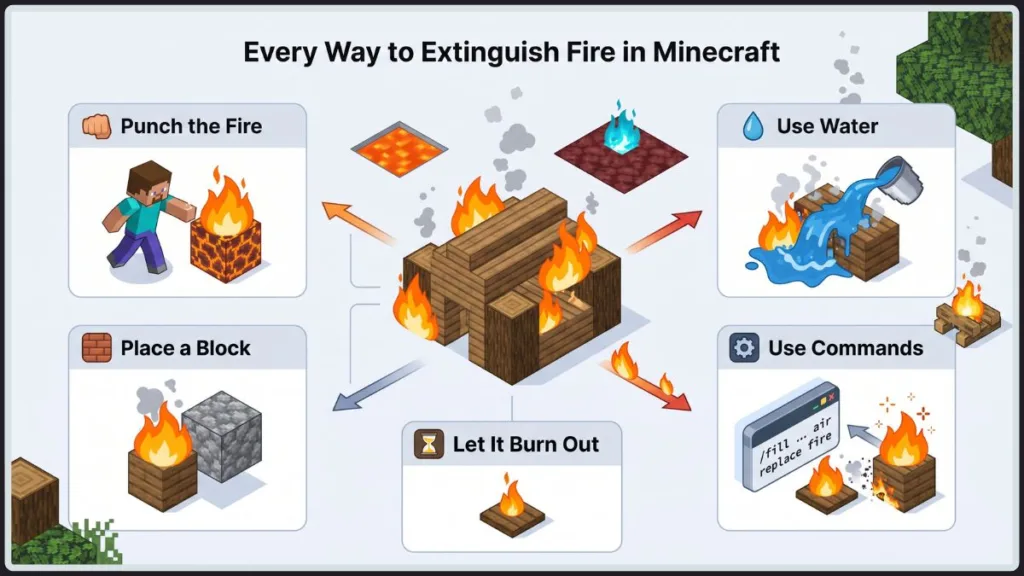
Your firefighting strategy must adapt to your environment. A tactic that saves a wooden fortress in the Overworld will get you killed during a Nether run. Here is the definitive breakdown of every reliable method to kill the flames.
Method 1: Punch the Fire
If a stray ember lands on your floorboards, your bare hands are the most efficient, zero-cost solution.
You don’t need to waste time swapping hotbar slots. Sprint directly to the flame, aim your crosshair at the fire entity itself (not the block underneath), and spam your attack button to instantly clear it. This is incredibly effective for isolated flames or a small campfire accident.
However, this tactic is completely useless against a full-scale forest fire. You cannot physically click fast enough to out-scale the game’s fire propagation mechanics.
Method 2: Use Water
When your infrastructure is fully engulfed, a Water Bucket is your most powerful defensive tool.
By placing a water source block on a high vertical surface above the inferno, you force the game to generate a waterfall that instantly washes away all intersecting fire entities. Once the threat is neutralized, retrieve the water source to prevent catastrophic flooding to your redstone circuits.
Important Limitation: Water mechanics are disabled in the Nether. If a Ghast sets you ablaze, a standard water bucket will instantly evaporate. To survive, you must keep a Splash Water Bottle on your hotbar and throw it directly at your feet to clear the fire radius.
Method 3: Place a Block Over the Fire
If you are strip mining at Y=-58 or navigating a bastion remnant without a dedicated water supply, you have to force-suffocate the flame.
Rapidly equip a solid, non-flammable block—like deepslate, cobblestone, or dirt—and place it directly into the exact coordinate space the fire is occupying. This overwrites the fire entity, crushing it instantly. You can then break the block to clear your path.
Method 4: Wait for the Fire to Burn Out
If an isolated forest fire starts hundreds of blocks away from your base, the optimal strategy is often to let the engine handle it. Normal fire will eventually disappear once it exhausts all flammable blocks within its ticking radius.
However, you cannot wait out specific block interactions. There are a few dangerous exceptions:
- Netherrack and Magma Blocks: Fire ignited on these blocks possesses an infinite burn duration.
- Soul Fire: The blue flames found on Soul Sand or Soul Soil will never expire naturally.
- Continuous Lava: If a hidden lava source block is continuously ticking next to wood, it will infinitely reignite the area, rendering manual punching useless until you seal the lava.
Method 5: Use Commands (Advanced)
If you are an operator managing a multiplayer server, testing mechanics in a Creative world, or utilizing a survival world with cheats enabled, console commands are your ultimate override switch.
Using /fill
This is the community-verified gold standard for deleting massive, GPU-melting wildfires. The /fill command allows you to overwrite the fire with empty air blocks.
- The Command: Execute
/fill ~-10 ~-10 ~-10 ~10 ~10 ~10 air replace firein the chat console. - The Advantage: This instantly wipes all fire within a 21x21x21 coordinate grid around your player character, leaving your valuable wooden architecture completely untouched.
- The Risk: If you forget to append the
replace firesyntax, you will obliterate a massive 21-block chunk of your world, permanently deleting your base along with the flames.
Using /setblock
When you require surgical precision to eliminate a single, inaccessible flame block without risking a massive area-of-effect command, use /setblock.
- The Command: Execute
/setblock X Y Z air(inputting the exact XYZ coordinates of the rogue fire entity).
Using /kill
Because the Minecraft engine classifies fire as an independent entity, you can leverage the /kill command to execute a global wipe.
- The Command: Execute
/kill @e[type=fire]to instantly terminate all fire entities currently loaded in your active chunks. - The Limitation: This command only targets the fire entity. If your structures have already sustained heavy block damage,
/killwill not restore the missing logs or planks.
Creative Tip for Map Makers: To permanently fireproof a custom arena or server spawn, embed the
/fill air replace firecommand inside a Repeating Command Block set to “Always Active.” This establishes an invisible, continuous fire-suppression grid that automatically terminates any unauthorized ignition.
How to Stop Fire from Spreading
If you are fighting a massive blaze or establishing a defensive perimeter around your endgame builds, your absolute priority is cutting off the fire’s propagation vectors.
Fire engines rely on block proximity. The entity requires a direct path to flammable blocks—like wood logs, wool, or leaves—to sustain its spread. By breaking that path, you force the fire tick to expire and the flame will die out.
Here are the elite strategies to contain an active inferno:
- Execute a firebreak: Rapidly excavate a trench or mine out the flammable blocks directly in the fire’s path. Creating a physical void of at least one non-flammable block is usually enough to kill horizontal spread.
- Deploy water barriers: Strategically placing water source blocks around a high-value structure creates an impenetrable barrier that fire entities cannot cross.
- Engineer with safe materials: When constructing near lava pools or designing complex fireplaces, completely eliminate wood from your schematics. Utilize fireproof architecture built from deepslate, cobblestone, or copper blocks.
Pro Tip: If you are administering a multiplayer server and want to permanently neutralize this threat so players don’t accidentally level the server spawn, open your console and execute
/gamerule doFireTick false. This vital command freezes fire states—meaning blocks will ignite, but the flame will never spread or consume the material.
Why Fire Won’t Go Out
There is nothing more rage-inducing than frantically clearing a zone, only to watch the flames instantly respawn. If your fire refuses to die, you are actively fighting against hardcoded environmental mechanics.
Fire on Netherrack
When you ignite Netherrack, the block enters a state of infinite burn. The material itself is never consumed by the fire entity. To neutralize it, you must physically punch out the flame or mine the host block. Do not waste your time with water here.
Soul Fire Dynamics
Igniting Soul Sand or Soul Soil generates Soul Fire. This localized blue flame shares the infinite burn properties of Netherrack, meaning it will never expire naturally. Furthermore, it inflicts double the damage of standard fire. You must navigate Soul Sand Valleys with extreme prejudice.
Lava Reigniting the Cycle
If you punch out a burning log and it instantly catches fire again, you have a hidden lava source ticking nearby. Lava actively scans its immediate radius and will continuously ignite adjacent air blocks touching flammable materials. You must isolate the lava pool and seal it with a solid block to break the ignition cycle.
How to Stop Yourself from Burning
Your infrastructure isn’t the only thing at risk—taking a direct hit from a Ghast or missing a jump over a lava lake puts your endgame gear in immediate jeopardy. When you are taking critical tick damage, you must execute these survival protocols flawlessly:
- Submerge immediately: If you are operating in the Overworld, throwing yourself into a river, a pre-filled cauldron, or dropping a water bucket directly at your feet will instantly terminate the fire entity attached to you.
- Consume a Fire Resistance Potion: This is a non-negotiable requirement for deep Nether operations. A Fire Resistance Potion grants total immunity to both fire and lava damage, turning a lethal hazard into a minor inconvenience.
- Deploy a Splash Water Bottle: Because standard water placement is disabled in the Nether, keeping a Splash Water Bottle on your hotbar is your only manual extinguishing option. Throw it directly at your hitbox to instantly clear the flames.
- Out-heal the damage: If you are caught without potions or water, your only option is brute-force regeneration. Sprint to safety and immediately consume high-tier food (like Golden Apples, Golden Carrots, or Steak). A saturated hunger bar can trigger rapid health regeneration that outpaces the fire tick damage until it naturally expires.
Important Clarification: A persistent community myth claims that drinking a bucket of Milk will put you out. Milk strips status effects (like Poison or Wither), but being on fire is an environmental state, not a status effect. Chugging milk while burning will only waste valuable survival time!
Java vs Bedrock Differences
Version parity is a constant topic in the community, and fire mechanics are no exception. Whether you are grinding on a custom PC Java server or surviving Bedrock on a console, you need to understand how the underlying engine handles fire states:
| Mechanical Feature | Java Edition | Bedrock Edition |
| Fire Spread Speed | Generally slower, allowing for predictable containment. | Spreads highly aggressively and often erratically. |
| Campfire Extinguishing | Responds instantly to shovels, water buckets, and splash bottles. | Responds to shovels and water, though splashing hitboxes feel rigid. |
| Command Syntax | Console commands like /fill demand exact block states (e.g., replace fire). | Syntax varies slightly, often leveraging data values over block states. |
| Soul Fire Damage | Inflicts a consistent, punishing 2 hearts per second. | Matches the high damage output, but visual damage ticks apply differently. |
Best Ways to Fireproof Your Base
Fireproofing isn’t just an aesthetic choice; it is a mandatory survival protocol for endgame players. The most efficient way to survive an inferno is to engineer your base so that a fire entity never has a valid spawn condition. By integrating these preventative measures into your schematics, you secure your hundreds of hours of grinding.
Here is how to permanently fireproof your infrastructure:
- Engineer with stone tiers: Wood is a massive liability in endgame builds. While you don’t have to abandon it entirely, strictly isolate it from heat sources. When constructing a supersmelter, a Nether portal hub, or an automated forge, mandate the use of deepslate, cobblestone, or stone bricks.
- Quarantine your lava: Utilizing lava cauldrons as incinerators or light sources is a classic strategy, but exposing the fluid block is a critical error. Quarantine all lava behind glass blocks or iron bars to eliminate accidental hitbox collision and prevent rogue fire ticks from reaching adjacent wooden architecture.
- Calibrate safe fireplaces: A decorative campfire elevates a base’s aesthetics, but remember: fire mechanics dictate a devastating four-block vertical spread. Ensure your chimney shafts and the flooring radius surrounding your ignition source are lined exclusively with bricks, terracotta, or non-flammable variants.
- Deploy a Lightning Rod: Unpredictable Overworld thunderstorms are the absolute bane of wooden roofing. Forge a Lightning Rod from three copper ingots and mount it on a dedicated, non-flammable spire above your build. It will forcefully redirect all localized lightning entities safely away from your timber structures.
- Wire an emergency flood system: For high-value, high-risk operational zones, embed a Dispenser loaded with a water bucket into the ceiling grid. Wire the circuit to a panic button or lever, allowing you to instantly flood the entire chamber to terminate an emergency blaze.
Common Mistakes Players Make
Even seasoned veterans with fully enchanted Netherite gear occasionally lose a build to sheer negligence. If you want to secure your survival world against catastrophic wipeouts, you must avoid these critical errors:
- Deploying wood near Nether Portals: Ghasts are programmed to aggressively target players near portals with explosive fireballs. If your Nether hub incorporates wooden planks, it is a ticking time bomb. You must construct your Nether staging areas using absolute fire-resistant materials like basalt, blackstone, or reinforced cobblestone.
- Disregarding weather cycles: Leaving a massive wooden structure unfinished and exposed to the sky without a functional lightning rod just as a thunderstorm spawns is a rookie mistake that will cost you everything.
- Neglecting your gamerules: If you are transitioning to Creative mode to construct a sprawling wooden pixel art installation or a custom adventure map, forgetting to execute the
/gamerule doFireTick falsecommand prior to building is a lethal oversight that invites irreversible destruction.
Frequently Asked Questions
Can you extinguish fire without water? Absolutely. You can manually punch out small fire entities, force-suffocate flames by dropping solid blocks (like deepslate or dirt) directly into their coordinate space, or deploy splash water bottles when operating in the Nether.
Does Minecraft fire disappear naturally? Yes, standard Overworld fire will eventually expire once the game engine calculates that all flammable blocks within its tick radius have been consumed. However, fire ignited on Netherrack, Magma Blocks, or Soul Sand possesses infinite duration and will never burn out.
Why won’t my fire go out? If a fire entity instantly respawns the moment you punch it out, you are dealing with a hidden lava source block nearby. Lava continuously scans its immediate vicinity and will force-ignite adjacent air blocks if they intersect with flammable materials.
Can Soul Fire be extinguished? Yes. Despite its infinite burn properties, Soul Fire can be terminated using standard firefighting protocols: manually punching the entity, deploying a water bucket, or suffocating the block space with a solid material.
Can rain extinguish fire? Yes. The Minecraft weather system will automatically neutralize any fire entity that has direct vertical exposure to the sky. If you are battling a server-crashing forest fire, executing /weather rain in the console allows the engine to handle the suppression for you.
Pro Tips for Elite Survivalists
- Mandate a Water Bucket in a dedicated hotbar slot for all Overworld operations.
- Never cross the Nether threshold without a Splash Water Bottle and an active Fire Resistance Potion in your inventory.
- If a catastrophic fire triggers, do not panic and spam clicks—immediately pause the game to assess your inventory and execute a deliberate containment strategy before the lag spikes hit.
Conclusion
There is no singular, universal fix for extinguishing fire in Minecraft. The optimal strategy requires rapid situational awareness and a deep understanding of the game’s core mechanics.
If you accidentally trigger a spark, punch it out immediately. If your infrastructure is fully engulfed, deploy a water bucket to crash the flames. If you are surviving deep in a bastion remnant, rely on splash water bottles or force-suffocation. And if you are an operator managing a massive server project, do not hesitate to override the engine with /fill commands or permanently disable fire spread mechanics.
Want to secure your legacy? Take the time to aggressively fireproof your builds today, so you never have to panic when the next thunderstorm rolls in.
Have you ever lost a legendary base to a careless fire tick? Drop your worst disaster stories and survival strategies in the comments below!
Visit Our Post Page: Blog Page
Discover more from Izoate
Subscribe to get the latest posts sent to your email.