
Stuck on Valorant Error 46 while your friends are playing? Discover how to fix the Platform Downtime error with our 7-step troubleshooting guide.
Valorant error code VAL 46, officially known as “Platform Downtime,” occurs when Riot Games takes the servers offline for scheduled maintenance or to deploy a new patch. If the servers are globally down, there is no fix other than waiting. However, if your friends are successfully playing while you are stuck with this error, the issue is likely tied to a bugged account region or a stuck client session.
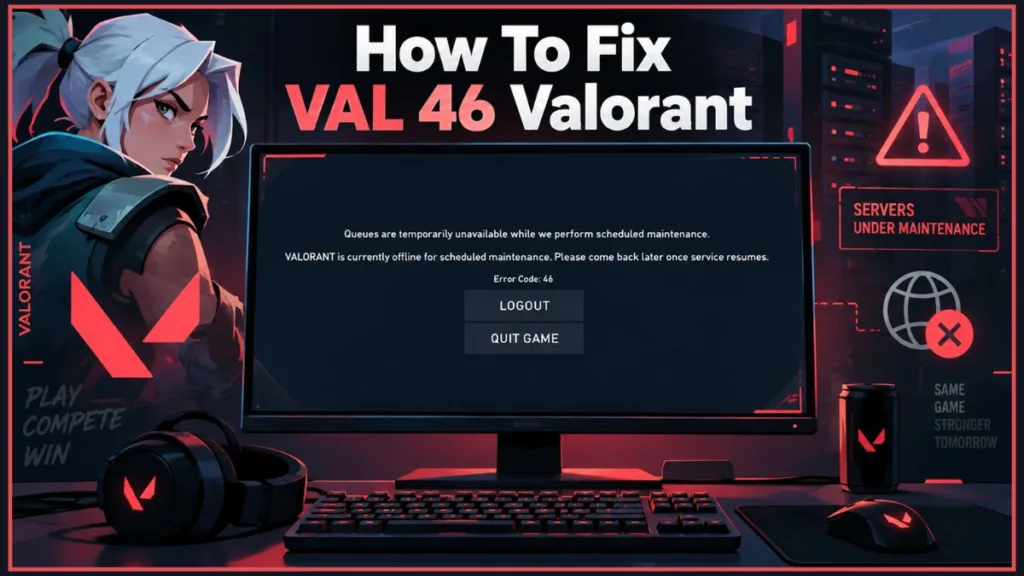
Here is exactly what error code 46 means, why it happens, and how you can get back into the game.
Knowing how to quickly identify whether the problem is on your end or Riot’s end will save you hours of unnecessary troubleshooting.
What Does Valorant Error Code VAL 46 Mean?
According to the official Riot Games support documentation, Error 46 is strictly defined as Platform downtime. This means the backend systems are currently unavailable because engineers are actively working on them.
Typically, you will see this error on patch days (usually Tuesday or Wednesday mornings, depending on your time zone) or during the transition between Acts and Episodes. Routine maintenance generally lasts anywhere from 2 to 4 hours. The official advice from Riot is simply to “try to log in again later.” While patch days are the most common culprit, Riot may also deploy emergency hotfixes to address game-breaking bugs or severe server instability.
You can usually stay ahead of these unexpected downtimes by following the official @ValorantTracker or @RiotSupport accounts on X (formerly Twitter), where community managers post real-time updates regarding emergency maintenance windows.
Why Am I Getting VAL 46 While My Friends Are Playing?
The most frustrating part of Error 46 is getting it when your friends are sitting in a Discord call, actively playing a match. If the servers were truly down, they wouldn’t be playing either.
If this happens to you, the error is being caused by one of three things:
- Regional Maintenance Staggering: Riot Games patches Valorant in waves across different regions (e.g., NA, EU, APAC). If your account is tied to a different region than your friends, your shard might be down for maintenance while theirs is live. For context, NA servers typically go down earlier in the day (around 6:00 AM PT), while EU servers might not go down until several hours later or even the following day.
- The “Ghost Region” Bug: Many players in community forums have reported a bizarre bug where their Riot Account region was inexplicably changed without their input (for example, an NA player suddenly having their account mapped to Brazil or Argentina). If Brazil goes down for maintenance, that player gets locked out with Error 46, even if the NA servers are perfectly fine. If you submitted a support ticket for an unrelated issue in the past, human error during the resolution process might have also accidentally bumped your region settings.
- Client Session Glitches: Sometimes, the Riot Client simply caches the “maintenance mode” flag and fails to realize the servers have actually come back online. This happens because the Riot Client relies heavily on background processes that don’t always terminate correctly when you close the window.
How to Fix Valorant Error Code VAL 46
If you are reasonably certain that the servers should be live, work your way through these steps to bypass the error.
Step 1: Check the Official Riot Server Status
Before you start tinkering with your account, verify the baseline. Head over to the official Riot Games Service Status page and select Valorant. Make sure to check the specific region you normally play in. If there is a big red banner announcing maintenance for your region, no amount of troubleshooting will bypass it. You just have to wait.
If the official page is slow to update, community-driven sites like Downdetector are fantastic secondary resources. A massive spike in user reports on Downdetector usually confirms widespread server outages before Riot officially acknowledges them.
How to check the official status like a pro:
- Open your web browser and go to
status.riotgames.com. - Click on the Valorant icon from the list of games.
- Select your designated language and region from the drop-down menu (e.g., North America, EUW).
- Look for “Current Messages” or “Recently Closed” to see if maintenance is actively being worked on or if it just finished.
Step 2: Check Your Riot Account Region of Residence
If the servers are up but you are locked out, you need to check for the “Ghost Region” bug.
- Log into the Riot Account Management page on your web browser.
- Navigate to Personal Information.
- Look for the Country / Region of Residence section.
If you live in Europe but your region says “Chile,” you have found your problem. You cannot manually change this back yourself; you will need to submit a ticket to Riot Support requesting a Region of Residence change.
Keep in mind that Riot Support tickets for region changes can take up to 48 hours to resolve, though they are usually handled faster during regular business hours. Be prepared to verify your identity and your actual physical location (sometimes via your IP address) to the support agent.
How to submit a Region Change Ticket:
- Go to the official Valorant Support website (
support-valorant.riotgames.com). - Scroll to the very bottom of the page and click the red Submit A Ticket button.
- From the “Choose a Request Type” drop-down menu, select Account Management, Data Requests, or Deletion.
- You may be prompted to log in if you haven’t already. Do so with your bugged account.
- In the Subject line, type: “Region of Residence Change Request.”
- In the Description box, clearly explain that you are experiencing Error 46 while your local servers are live, and you suspect your account is incorrectly mapped to the wrong region.
- Click Submit and monitor the email address associated with your Riot account for the support agent’s reply.
Step 3: Log In with an Alternate Riot Account
While you wait for a support ticket to process, you can test if the issue is account-specific by logging in with a secondary account. Completely log out of the Riot Client and log back in with an alternate account that you know is registered to the correct region. If the game launches perfectly, it confirms your main account’s region settings are bugged.
Just remember that if your alternate account is actually locked to a distant geographic region, you may experience significantly higher ping than you are used to.
How to quickly test with a new alternate account:
- Open the Riot Client and click your profile icon in the top right corner.
- Select Sign Out.
- On the login screen, click Create Account at the bottom.
- Follow the prompts to create a quick free account, ensuring you do this without a VPN active so it correctly registers your local region.
- Log into the Riot Client with this new account and attempt to launch Valorant. If it works, the issue is confirmed to be isolated to your main account.
Step 4: The Community Loading Screen Bypass (The WASD Trick)
It sounds like a joke, but a highly upvoted workaround in the Valorant Reddit community has worked wonders for players experiencing a stuck client session.
If you are stuck on the loading screen and keep getting booted by Error 46:
- Launch Valorant.
- The moment you hit the loading screen, rapidly spam the W-A-S-D keys in sequence on your keyboard.
- Several users report that this forces the client to push past the stuck handshake screen and load directly into the main menu.
From a technical standpoint, inputting rapid keyboard commands during the loading screen can sometimes force the client to interrupt a stalled background process, pushing the game to bypass a looped connection timeout and ping the server anew.
Step 5: Clean Exit & Restart the Riot Client
If standard restarting isn’t working, your client might be stuck running in the background with stale server data.
- Press
Ctrl + Shift + Escto open the Task Manager. - Scroll down and find
RiotClientServices.exeandVALORANT.exe. - Right-click both and select End Task.
- Relaunch the game as an Administrator.
Taking this extra step ensures that no ghost instances of the Riot Client are silently blocking your connection to the live servers.
Step 6: Flush Your DNS Cache
Sometimes, your local network holds onto an outdated server route from when the game was actually down. Flushing your DNS can force a fresh connection.
- Open your Windows start menu, type cmd, and run the Command Prompt as an Administrator.
- Type
ipconfig /flushdnsand hit Enter. - You will see a message saying “Successfully flushed the DNS Resolver Cache.” Close the window and try launching Valorant again.
Step 7: Restart Your Windows Network Adapter
If flushing the DNS cache doesn’t clear the localized routing issue, physically restarting your network adapter in Windows can force a completely fresh handshake with Riot’s servers.
How to restart your network adapter:
- Press the Windows Key + R to open the Run dialog box.
- Type
ncpa.cpland press Enter. This will directly open your Network Connections window. - Locate your active network connection (usually labeled “Ethernet” or “Wi-Fi”).
- Right-click on the adapter and click Disable. Your computer will temporarily lose internet access.
- Wait for about 10 to 15 seconds.
- Right-click the same adapter again and select Enable.
- Wait for your internet connection to fully re-establish, then right-click your Valorant shortcut and select Run as Administrator to test the game.
Troubleshooting Steps You Can Safely Skip
When you just want to play, it’s tempting to try the “nuclear” options. Based on community testing and error code data, you can safely skip these steps for Error 46—they won’t help and will just waste your time:
- Do NOT reinstall the full game: Error 46 is a server and account-handshake issue, not a problem with corrupted local game files.
- Do NOT disable your Firewall: While firewall issues can block Valorant, they typically trigger Error Code 29 (Network Issue), not Error 46.
- Do NOT uninstall Riot Vanguard: Vanguard initialization failures are flagged as Error 44 or 45. Error 46 has nothing to do with the anti-cheat system.
- Do NOT factory reset your router: While a simple router restart is harmless, completely wiping your router’s settings is overkill for a platform downtime error.
Frequently Asked Questions (FAQ)
How long does platform downtime usually last in Valorant? Routine maintenance for patch deployment typically lasts between 2 and 4 hours. Major Episode updates can occasionally take a bit longer.
Can a VPN fix Valorant error 46? Generally, no. Valorant binds your matchmaking and server status to your Riot account’s locked Region of Residence, not your current IP address. Turning on a VPN will not trick the game into bypassing downtime.
Is Error 46 a hardware ban? No. If you have received a hardware ban (HWID ban), the client will explicitly show Error Code 152. Error 46 is strictly related to platform availability and server maintenance.
What happens if I get kicked mid-game by Error 46? Will I lose RR? If the servers go down for emergency or scheduled maintenance while you are in a ranked match, the game will typically result in a draw. You will not lose Ranked Rating (RR), and you will not receive an AFK penalty, as the disconnection was triggered by a server-side shutdown.
Is Error 39 the same as Error 46? They are very similar. Error 39 also indicates an “Unavailable Server,” but it is more commonly associated with server overloads, routing issues, or backend crashes rather than planned, scheduled engineering maintenance (Error 46).
Visit Our Post Page: Blog Page
Discover more from Izoate
Subscribe to get the latest posts sent to your email.