
Need to send a gift in a hurry? Learn how to send an Amazon gift card in 2026 using email, text, printable PDFs, and more. From instant digital delivery to bulk business gifting, here’s every way to get an Amazon eGift card into someone’s hands today.
Gift-giving emergencies happen to everyone. Maybe a birthday completely slipped your mind, you’re celebrating a holiday with someone who lives states (or countries) away, or you just don’t have time to fight crowded store aisles for a physical card. Whatever the situation, you don’t need to panic.
You also don’t need to drive to a store and pick a plastic card off a rack. Sending an Amazon gift card straight from your phone or laptop is one of the fastest, most reliable ways to solve a last-minute gifting dilemma. Since Amazon sells practically everything, your recipient gets total freedom to pick out exactly what they want, and you get to look like you planned ahead all along.
In this guide, we’ll walk through every way you can send an Amazon gift card electronically, including email, text message, print-at-home, physical mail, bulk business gifting, and even popular payment apps like Venmo and Cash App.
Amazon eGift Cards Explained: What They Are and How They Work
If you’re new to digital gifting, you’re probably wondering how virtual gift cards actually work behind the scenes.
An eGift card is simply the digital version of the plastic card you’d find at a checkout counter. Instead of a physical card changing hands, you’re dealing with a secure digital claim code from start to finish.
How virtual gift cards work: When you purchase an eGift card, Amazon generates a unique redemption code or secure link tied to that purchase. That code gets delivered straight to your recipient through email or text. Once they click the link or type the code into their Amazon account, the funds load instantly into their gift card balance, ready to use on their next order.
Amazon eGift Cards vs. Physical Gift Cards
Both formats hold the exact same dollar value, but they differ in a few important ways:
- Delivery speed: Digital gift cards arrive within minutes. Physical cards depend on shipping times.
- Convenience: You can buy and send an eGift card from your couch using your phone or laptop, no trip required.
- Scheduling flexibility: Unlike a mailed card, digital delivery lets you pick the exact date you want the gift to land in someone’s inbox.
Where to Buy Amazon Gift Cards Before You Send One
Before diving into the different delivery methods, it helps to know exactly where to find the gift card storefront. The process is nearly identical whether you’re on a computer or your phone.
On desktop: Open your browser, go to Amazon’s homepage, and look for the Gift Cards link in the main navigation bar under the search box. You can also just type “Gift Cards” into the search bar to land directly on the portal.
On the Amazon app: Tap the menu icon (three horizontal lines) in the bottom corner, select Gifting & Registry, then tap Gift Cards.
Once you’re inside the gift card portal, you’ll see three main formats to choose from:
- eGift Cards — sent by email or text
- Print at Home — generates a downloadable PDF
- Physical Gift Cards — shipped to a mailing address
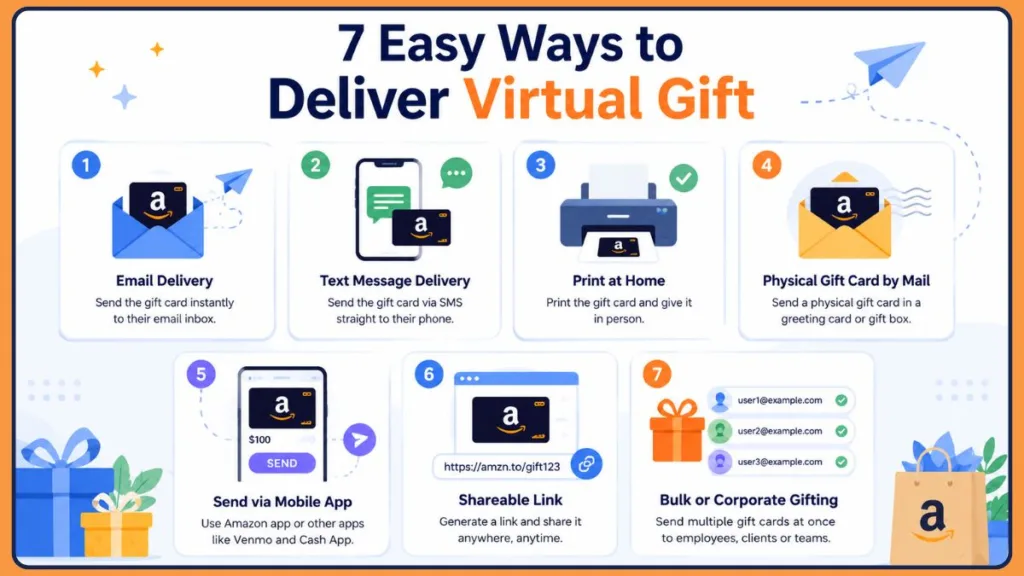
7 Easy Ways to Send Someone an Amazon Gift Card
No matter how your friend or family member likes to communicate, one of these seven methods will fit them perfectly.
Method 1: Send an Amazon Gift Card by Email
Email is still the easiest and most popular way to send an Amazon gift card. The whole process takes just a few minutes, and your recipient usually sees it land in their inbox almost instantly.
- Open the Gift Cards page on Amazon’s website or app.
- Select eGift Card and make sure the delivery method is set to Email.
- Choose a design — pick an animated theme, a seasonal template, or upload your own photo.
- Enter the recipient’s email address carefully. If they don’t yet have an Amazon account tied to that email, that’s fine. They can link the gift card to whichever account they choose later.
- Add a personal message and select your gift amount, anywhere from $5 to $2,000.
- Complete payment and click Buy Now.
Amazon delivers the card to your recipient’s inbox as soon as payment processes (or on your scheduled future date). They’ll see a subject line that reads something like “A Gift for You from [Your Name].”
Tip: If you’re sending an Amazon gift card for a birthday or holiday, schedule it to arrive a day early. That gives you a buffer to fix any email typos before the actual occasion.
Method 2: Send an Amazon Gift Card by Text Message
If your recipient checks their phone far more often than their inbox, text delivery is the better call.
To use Amazon gift card text delivery, simply choose Text Message instead of email during setup, then enter a mobile number instead of an email address. You can still schedule delivery for a future date, just like with email. The recipient receives a secure link by text, which conveniently skips spam filters altogether.
Tip: Text delivery tends to work better for younger recipients who rarely open email at all.
Method 3: Share an Amazon Gift Card Through a Direct Link
Want to send a gift card without needing the recipient’s email or phone number on hand? Amazon’s Anytime Gifts feature (availability can vary by region and account) lets you generate a shareable link instead.
If this option is active on your account at checkout, you can copy the generated URL and drop it directly into a WhatsApp chat, Facebook Messenger conversation, or Instagram DM. It’s a flexible workaround when you only have a social handle and not a contact detail.
Method 4: Print an Amazon Gift Card at Home
If you like the speed of buying online but still want to hand someone a physical present, Print at Home is the answer.
Select the Print at Home option during checkout. Instead of emailing the recipient, Amazon gives you a downloadable PDF containing the claim code. Print it on regular paper, fold it up, and tuck it inside a birthday card or stocking for a more personal touch.
Method 5: Mail a Physical Amazon Gift Card
If timing isn’t tight and you enjoy the experience of handing over an actual card, traditional shipping is still an option.
Amazon offers decorative gift boxes and greeting-card-style packaging — think miniature tin briefcases or pop-up festive boxes — usually at no extra cost. If you have a Prime membership, these mailed gift cards can ship to your recipient’s doorstep with free one-day or two-day delivery.
Method 6: Send Multiple Amazon Gift Cards for Business or Bulk Gifting
Managing an office team or running a customer rewards program? You don’t have to send cards one at a time.
Amazon’s Corporate Gift Card program lets you upload a spreadsheet of recipients and distribute eGift cards to everyone at once by email. It’s built specifically for businesses handling employee rewards, client appreciation, or large-scale incentive campaigns.
Method 7: Send Amazon Gift Cards Through Third-Party Apps
You don’t always have to go through Amazon directly. If you’re already using a peer-to-peer payment app, you may be able to send an Amazon gift card from there too.
- Venmo: Tap Pay or Request, select your friend, enter an amount, then tap the gift icon next to the text field. Choose Amazon and pick a digital wrapper design.
- Cash App: Enter your dollar amount, tap Pay, select Gift Card, then search for Amazon. Cash App is handy for smaller, casual gifts since it allows amounts as low as $1.
- Third-party gift portals (like GiftYa): These sites let you text an Amazon-branded gift card and sometimes give recipients the flexibility to swap the balance for a different retailer if they prefer.
Picking the Right Delivery Method for Your Situation
Still not sure which option fits your situation? Use this quick reference:
| Situation | Best Option |
|---|---|
| Last-minute birthday gift | |
| Recipient rarely checks email | Text message |
| Office or employee rewards | Bulk gift cards |
| Family gathering or party | Print-at-home |
| Holiday gift | Physical gift card |
Email vs. Text Delivery: How to Decide
If you’re torn between the two most common digital options, think about how your recipient actually behaves day to day.
- Email delivery is easy to archive, search later, and print if needed. It works well for formal occasions, coworkers, or older relatives who check their inbox regularly.
- Text delivery has noticeably higher open rates and is far less likely to get lost or ignored. It’s a great fit for close friends, teenagers, or anyone you want to surprise within seconds.
If you want a more heartfelt presentation with a longer personal note, go with email. If you want a quick, casual surprise they’ll see while they’re out and about, text wins.
From Your Order to Their Inbox: How Redemption Works
Once your order is placed, the process shifts over to your recipient. Here’s what happens on their end.
Redeeming the gift card: Your recipient opens the message, clicks the secure link, and reveals a claim code (usually 14–15 characters, a mix of letters and numbers).
Adding the balance to their account: To apply the funds, they copy the code, open the Amazon app or website, go to Your Account > Gift Cards, and select Redeem a Gift Card. Once they paste the code and confirm, the balance sits in their account and automatically applies at their next checkout. From there, they can spend it on virtually anything, including memberships, subscriptions, or everyday essentials.
Troubleshooting Gift Card Delivery Hiccups
Digital delivery is generally smooth, but a few small hiccups can pop up. Here’s how to handle the most common ones.
Gift card email not received: If nothing shows up within 15 minutes, it’s almost always sitting in a Spam, Junk, or Promotions folder. Have your recipient search their full inbox for “A Gift for You.”
Wrong email address entered: Don’t panic if you spot a typo after sending. Go to Your Orders, find the gift card, and check its status. If it hasn’t been claimed yet, you can edit the email address and trigger a resend.
Text message not delivered: This usually happens when the recipient’s mobile carrier has short-code SMS blocking turned on. The fix is simple — go to your Amazon order history, copy the raw claim link, and send it manually through a regular messaging app instead.
Payment failed at checkout: Because gift cards function as cash-equivalent purchases, banks occasionally flag them for fraud review. If your order shows as “Pending,” check your bank app or email for a security alert and clear it from there.
Security note: If you’re buying a gift card from a shared or public device, it’s worth double-checking your recent account activity and updating your password afterward, just to be safe.
Quick Recap Before You Hit Send
- Amazon eGift cards range from $5 to $2,000 and never expire.
- Delivery is nearly instant by email or text, but can be scheduled up to a year in advance.
- Recipients don’t need an Amazon account at the time you send the card.
- You can resend a gift card if it’s unclaimed and was sent to the wrong address.
- Bulk and business gifting is available through Amazon’s Corporate Gift Card program.
Wrapping Up: Your Go-To Gifting Solution
If you need a gift right now, an Amazon eGift card is hard to beat. You can send one by email, text, or a shareable link in just a few minutes, with no shipping wait and no store run required.
To summarize:
- Use email for a formal, easily searchable gift presentation.
- Use text message when you want your recipient to see it instantly.
- Choose Print at Home or a physical card when you want something tangible to hand over.
- Lean on bulk gifting for office rewards or large recipient lists.
- Try Venmo or Cash App if you’re already gifting through a payment app.
Whichever method you choose, your recipient walks away with the freedom to pick out exactly what they want, and you walk away having solved your gifting dilemma in just a few clicks.
Your Amazon Gift Card Questions, Answered
Q1: How do I send an Amazon gift card?
You can send one by choosing email delivery, text messaging, printing a PDF at home, or shipping a physical card directly through Amazon’s gift card portal.
Q2: How do I buy an Amazon gift card online?
Visit Amazon’s website or open the app, go to the Gift Cards category, choose your preferred format, select a dollar amount, and complete checkout with your usual payment method.
Q3: Can I send a gift card by email?
Yes. Email is one of the most reliable ways to deliver a gift code instantly to anyone with an active inbox.
Q4: Can I send an Amazon gift card by text?
Absolutely. Select Text Message as your delivery method during checkout and enter the recipient’s mobile number instead of an email address.
Q5: How do virtual gift cards work?
They function just like a physical card, except a digital claim code is generated and sent to the recipient’s phone or email, ready to apply to their Amazon account balance.
Q6: Can I print an Amazon gift card at home?
Yes. Choosing Print at Home gives you a downloadable PDF containing the active claim code, which you can print and hand over physically.
Q7: Can I schedule when an Amazon gift card is delivered? Yes. During checkout, you can pick a future delivery date, and Amazon automatically sends the card on that day.
Q8: Can I send multiple Amazon gift cards at once?
Yes. Amazon’s Corporate Gift Card portal allows you to upload a bulk list and distribute gift cards to multiple recipients simultaneously.
Q9: What’s the fastest way to send an Amazon gift card?
Email and text message are both nearly instant, typically arriving in under five minutes after checkout.
Q10: What should I do if my recipient never received their gift card?
Check the order status under Your Orders. If it’s unclaimed, you can correct the email or phone number and resend it directly from your account.
Visit Our Post Page: Blog Page
Discover more from Izoate
Subscribe to get the latest posts sent to your email.