
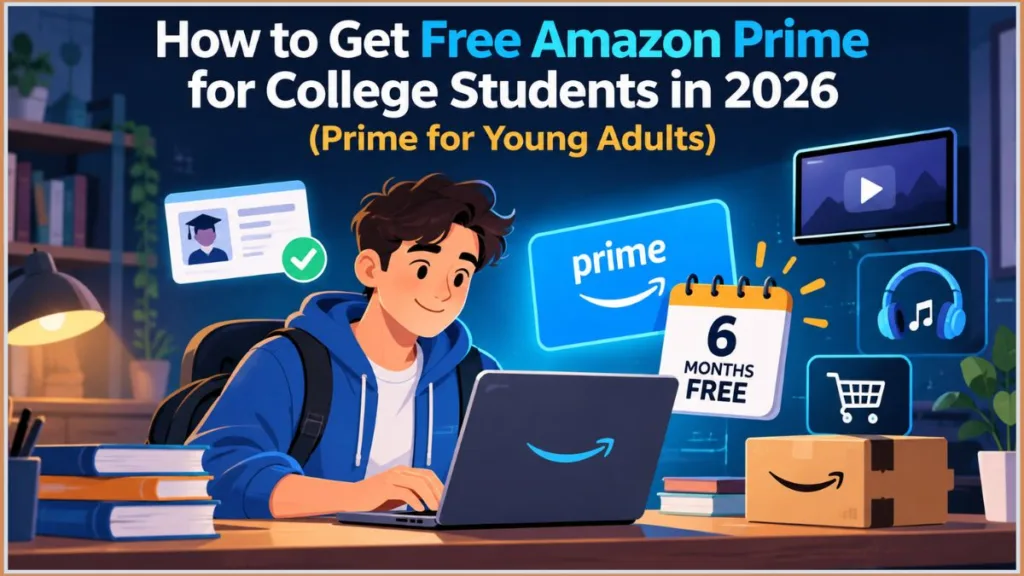
Amazon Prime Student is now Prime for Young Adults. Learn how to get the 6-month free trial, what it costs after trail expire, and how to avoid unexpected charges.
You’re checking out on Amazon, or maybe just scrolling through your account settings, and a banner catches your eye: free Prime for students. Your first reaction is probably skepticism — offers like this usually come with fine print that makes them not quite as good as they sound.
Your second reaction, if you click through, is confusion, because the page that loads doesn’t say “Amazon Prime Student” at all. It says Prime for Young Adults.
That mismatch between what you searched for and what Amazon actually shows you is where most people’s confidence in this offer starts to wobble — and it’s a fair thing to be cautious about. So here’s the direct answer before anything else: the offer is real. Eligible students can get six months of Prime at $0, and the reason the page looks unfamiliar is that Amazon renamed and expanded the program, not that it disappeared.
What actually matters for you isn’t the name, though — it’s whether you qualify, how Amazon verifies that, what you’re genuinely getting for those six months, and, maybe most importantly, what happens the moment that free period ends. That last part is where a lot of students get caught off guard, because this program auto-renews into a paid membership unless you act.
This guide walks through the whole thing in the order you’ll actually run into it. Along the way, we’ll point you to a few of our more detailed guides — on verifying without a .edu email, fixing a stuck verification status, and getting a refund if you get charged the wrong price — if you end up needing them.
Does Amazon Prime Student Offer a Free Trial?
Picture the situation that usually brings someone here: it’s mid-semester, a textbook needs to arrive before tomorrow’s class, and you’re tired of paying full shipping fees for things you need in a hurry. Someone mentions “free Amazon Prime for students,” and the obvious next thought is: if I can get this without paying for a few months, why wouldn’t I?
The hesitation tends to show up right after you click. The page says Prime for Young Adults instead of Prime Student, and Amazon asks you to verify your eligibility before anything activates. Because this is a recurring membership rather than a one-time coupon, it’s reasonable to wonder whether “free” really means free, or whether you’re about to sign yourself up for a charge you’ll forget is coming.
You can put that specific worry to rest: yes, eligible customers genuinely get a free Prime for Young Adults trial, confirmed directly on Amazon’s own signup and help pages. It isn’t a marketing trick where “free” quietly means something else once you read closer.
But it is temporary, and that distinction is worth sitting with for a second. This isn’t a permanent discounted version of Prime that stays at $0 because you happen to be in college. You get a trial period, you use what’s included, and then you make an active decision about whether the paid membership is worth keeping.
Is the Student Offer Actually Free, or Is There a Catch?
The trial itself can genuinely cost you nothing, but Amazon still has a few requirements baked in before that $0 price applies. The one most people don’t expect: you can’t start the free trial using only an Amazon gift card balance.
Amazon requires a valid credit or debit card on file — Visa, Mastercard, American Express, or Discover all work — to unlock the six-month trial. If gift card funds are all you have available, you can still join Prime, but you’d be paying as you go rather than getting the free period. You can check or add a card anytime in your Amazon Account Settings.
Tip: Add your card before you start verification, not after. Getting flagged for a missing payment method partway through signup is an easy, avoidable delay.
The more useful way to frame this offer in your head is: $0 for six months, followed by a paid membership unless you actively decide otherwise. “Free” here doesn’t mean “nothing to manage” — it means the thing you need to manage just isn’t due yet.
How Long Can College Students Use Prime Without Paying?
Six months, for anyone who qualifies — noticeably longer than the standard 30-day trial that regular, non-student Prime offers. That’s genuinely enough time to see whether the membership fits into how you actually live and shop, across most of a full semester.
But length cuts both ways here. A one-week trial stays top of mind without any effort. Six months doesn’t.
It’s entirely possible to activate this in September, get absorbed in coursework, and have no real memory of signing up by the time Amazon is ready to start billing you in March. That’s not a hypothetical — it’s the most common reason people end up surprised by a charge, and it’s why the trial length deserves as much attention as the $0 price tag.
Who Can Claim the Free Trial?
Being enrolled in college doesn’t automatically mean this trial will appear and activate on your account. Amazon has real eligibility requirements behind Prime for Young Adults, and depending on your situation, you may need to complete a verification step before the offer becomes available to you at all.
There are really two separate questions hiding inside “am I eligible,” and it helps to treat them separately: are you the type of customer this program is built for, and can Amazon actually confirm that you are?
That second question is where things get more complicated if you’re already a Prime member, you’ve used a Prime trial before under any name, you don’t have a typical college email address, or you hit an unexpected eligibility message partway through signup.
What Happens When the Free Period Runs Out?
This is genuinely worth understanding before you activate the trial, not after the first charge lands. Once six months pass, the membership doesn’t stay free simply because you’re still enrolled in school — that assumption trips up more people than you’d expect.
If you want to keep using Prime, you’re moved automatically into the paid membership. If you don’t, you need to cancel according to Amazon’s terms before that happens.
Tip: The moment your trial activates, open your membership details in Manage Your Prime Membership and note the renewal date somewhere you’ll actually see it again — a calendar reminder, not a mental note. That turns “keep Prime or don’t” into a decision you make on purpose, rather than one your bank statement makes for you.
And there’s one more piece of confusion worth resolving before you go looking for a signup page yourself, because it’s likely the exact thing that made you hesitate in the first place: Amazon Prime Student hasn’t gone anywhere. Amazon simply presents the same general offer under a different name now.
What Happened to Amazon Prime Student? Understanding Prime for Young Adults
You search “Amazon Prime Student” expecting a familiar student-membership page, and instead Amazon shows you something called Prime for Young Adults. That’s a reasonable moment to wonder whether Amazon quietly discontinued the student discount, folded it into something else, or is showing you an entirely different program by mistake.
It isn’t any of those. “Amazon Prime Student” is still the phrase most people actually type into a search bar — Amazon’s current branding just doesn’t match that phrase anymore. The important thing to take from this section is that you don’t need to abandon your search just because the wording changed underneath it.
Why Does Amazon Use a Different Name Now?
Amazon widened who the program actually covers, and the old “Prime Student” label stopped accurately describing that broader group, according to Amazon’s own official announcement. The current program runs on two separate eligibility paths:
- Anyone 18 to 24 years old, whether or not they’re enrolled in school at all
- Higher-education students of any age, enrolled in an accredited two- or four-year college or university
That second path is more generous than most people assume — there’s genuinely no upper age limit on it, so a 30-year-old graduate student qualifies exactly the same way an 18-year-old freshman does.
That’s a meaningful detail if you’re 22 and not in school, or you’re a nontraditional student well outside the “typical” college age. Under the old framing, one of you might have assumed you weren’t eligible. Under Prime for Young Adults, you both likely are, just through different verification routes.
Is This the Same Student Membership People Used to Sign Up For?
Functionally, for a student specifically, yes — the underlying shape hasn’t changed much. What’s actually different is mostly the label, plus the fact that non-students in the 18–24 range can now qualify too.
What you shouldn’t do is assume every detail from an older Prime Student post — the price, a specific rule, a benefit that’s no longer included — still applies exactly as written somewhere online. Amazon updates eligibility requirements and terms over time, so treat current information from Amazon’s own signup page as the reference point, not a screenshot from a year or two ago.
Can College Students Still Get the Offer in 2026?
Yes. If you’re currently enrolled in an eligible higher-education program, the useful move isn’t to keep hunting for a page that says “Prime Student” — it’s to check whether Prime for Young Adults is showing as available on your specific account, and to be ready to complete whatever verification step it presents.
This also explains something that might otherwise seem odd: two students searching the exact same thing can end up with two very different experiences. One sees the trial immediately; the other gets an eligibility message or a request for more documentation. That’s not one of them stumbling onto a secret deal — it more often just reflects real differences in their accounts or circumstances.
What Should You Look For When Amazon Doesn’t Say “Prime Student”?
Once the naming shift makes sense, stop treating the label as your decision-maker. What actually matters is what’s on the page in front of you:
- Is the offer showing as available on your account?
- Does it ask for student verification or age verification?
- How long is the trial?
- What does it cost afterward?
- When does billing actually start?
Those five details tell you far more than whether a page happens to say “Student” or “Young Adults” at the top.
With the naming question settled, the one that actually matters starts to surface — not whether this exists, but whether it applies to you specifically.
Who Is Eligible for Amazon Prime Student?
You might already be enrolled in college and assume that alone should be enough to unlock the offer. Then Amazon asks you to verify eligibility, or the offer simply doesn’t show up on your account, and you’re left wondering whether it’s your school, your enrollment status, your age, or some quirk of your existing Amazon account that’s the problem.
Sorting this out before you spend time on signup saves you the frustration later. Amazon’s Prime for Young Adults program runs on two qualifying paths, and you only need to satisfy one of them:
- Age-based path: you’re 18 to 24 years old, verified with a driver’s license, passport, or identity card — no school enrollment required at all.
- Student-based path: you’re enrolled in an accredited two- or four-year U.S. college or university, at any age, verified with a .edu email address or alternate proof of enrollment.
Are You Eligible If You’re Currently Enrolled in College?
If you’re enrolled in an eligible two- or four-year program, you fall squarely inside the student path — and there’s genuinely no age ceiling attached to it, which surprises a lot of people who assume this is aimed narrowly at “traditional” college-age students.
What actually determines whether the offer activates isn’t your enrollment in the abstract sense; it’s whether you can complete Amazon’s verification process.
That distinction matters most in a handful of specific situations: you’re starting college soon but haven’t officially enrolled yet, you’re in a program you’re not sure counts as a qualifying two- or four-year institution, you recently graduated, you’re taking a semester off, or your school simply doesn’t issue a .edu address. None of these automatically rule you out — they just mean your path through verification might take a document or two rather than an instant email click.
Two related situations worth flagging specifically. International students enrolled at a U.S. college with a valid U.S. billing address can qualify, too — U.S. citizenship isn’t required, as long as you’re taking at least one course at an institution located within the 50 states or the District of Columbia. And community college students in two-year programs qualify on equal footing with students at four-year universities.
If your situation doesn’t fit either eligibility path — say, you’re not a student and outside the 18–24 range, but you receive SNAP, Medicaid, or another form of government assistance — Amazon runs a separate discounted tier called Prime Access, worth checking as an alternative.
What Kind of Enrollment Does Amazon Accept?
There’s an oversimplified version of this floating around online that goes something like “have a .edu email, you’re in.” That’s not quite accurate, and it can talk eligible students out of even trying.
A .edu address is one verification method, not the only one Amazon accepts. You can also demonstrate enrollment with:
- A current student ID showing the current term or an explicit expiration date (an ID number by itself isn’t sufficient)
- A class schedule or transcript for the current term
- A tuition bill for the current term
- An official acceptance letter that clearly states your matriculation date
Important: Amazon generally wants current-term proof, not documentation for an upcoming term you haven’t started yet. A future-dated acceptance letter for next semester typically won’t satisfy verification on its own.
Does Your Age Affect Whether You Can Join?
It can, but not in the blanket way the old “Prime Student” name implied. Age only becomes a factor if you’re going through the age-verification route.
On the student route, there’s no upper age limit stated anywhere — a 30-year-old enrolled full-time qualifies exactly like an 18-year-old does. If you’ve been assuming this program skews young because of how it’s often marketed, that assumption doesn’t hold on the student side.
What If You’re Enrolled but Amazon Doesn’t Recognize Your Eligibility?
This is a genuinely frustrating moment, and it’s easy to read it as proof that you misjudged your own situation. Usually, that’s not what’s happening.
More often it’s a verification mismatch, an account detail that’s out of date, or documentation that doesn’t quite match what Amazon’s system expects. What you shouldn’t do is create a second Amazon account to try to force the offer to appear — that tends to complicate things further rather than fix anything, since your account history follows you and can affect future eligibility.
Instead, double-check exactly what you submitted, correct anything that’s stale, and if Amazon offers a specific next step for additional verification, take it rather than trying to route around the process.
What Should You Check Before Starting Verification?
Before you move forward, it’s worth running through a short mental checklist:
- Are you currently enrolled, or do you fall within the 18–24 age range?
- Do you have a .edu email, or an alternative like a current student ID or acceptance letter for this term specifically?
- Does the information on your Amazon account — especially your name — exactly match what’s on your verification documents?
- Have you used a Prime trial, student or otherwise, on this account before?
- Do you currently have a paid Prime membership already?
If anything on that list gives you pause, it’s worth resolving now rather than discovering the snag halfway through signup. And one common misconception worth putting to rest before you go any further: you likely don’t need a .edu email specifically. It’s the fastest option among several, not a strict requirement.
How to Verify Your Amazon Prime Student Eligibility
You’ve cleared the bigger question — you’re eligible, or close to it — and now Amazon actually wants proof. This is usually the point where the simple “free Prime for students” idea stops feeling quite so simple.
Here’s a detail worth knowing upfront that most explanations of this process skip entirely: Amazon doesn’t check your student status manually itself. It relies on SheerID, a third-party identity and enrollment verification company that also handles student-discount verification for services like Spotify, Apple Music, and YouTube Premium.
If you’ve ever verified a student discount somewhere else before, the general shape of this process will feel familiar.
Do You Need a .edu Email Address?
Not necessarily, and the honest answer depends on which path you’re using. On the student path, a .edu email is the fastest verification method — Amazon sends a confirmation link to that address, and clicking it typically approves you within minutes.
International students have equivalents available too: a .ac.uk address in the UK, for example, or a university-issued email in Canada. The requirement is really that Amazon’s system recognizes the domain, not that the domain literally ends in “.edu.”
On the age path (18–24), you don’t need a school email at all — a driver’s license, passport, or ID card does the job instead.
What If Your College Doesn’t Provide a .edu Email?
This is a common, entirely fixable situation — it shouldn’t push you toward creating a fake-looking address just to seem more “student-like” to the system. Use the alternate route instead.
If automated verification can’t confirm you, your application typically moves into manual review, which is the exact process behind the “verification is in progress, please wait” message a lot of students see partway through signup.
Here’s how that manual path actually works, step by step:
- Confirm a valid payment method is on file first. Log into your Amazon Account Settings and make sure your card is current and not expired before you go any further.
- Email a clear photo or scan of your document to amazon-student-verification@amazon.com. This matters more than it sounds like it should: send it from the exact email address associated with your active Amazon.com account. Using a different address — even your official school one — can slow Amazon’s team down, since they may not be able to easily match the message to your account.
- Expect to wait 3 to 5 business days. That’s the typical timeline for this manual review process.
- If you’re approved, Amazon sends a custom signup link. You need to complete signup within 5 days of receiving that email, or the link expires and you’ll need to start the application over.
The documents Amazon accepts for this manual path are the same ones mentioned earlier: a student ID showing the current term or an explicit expiration date, a transcript or class list for the current academic term, a tuition bill for the current term, or an official acceptance letter stating your matriculation date for the upcoming term.
Warning: Amazon flags blurry, expired, or mismatched documents as the most common cause of rejection — particularly when the name on your document doesn’t exactly match both your Amazon account name and your payment card. It takes thirty seconds to double-check this before submitting, and it’s worth doing.
What Proof Can You Use to Show That You’re Enrolled?
Practically, your options come down to the same list: a .edu email if you have one, a student ID, a transcript or class schedule, a tuition bill, or an acceptance letter for the current term.
One small but genuinely reassuring detail directly from Amazon’s own documentation: if your .edu address isn’t already attached to your Amazon account, that’s not a problem — the only thing Amazon sends there is the verification email itself, nothing else.
Worth clarifying, since it trips people up: amazon-student@amazon.com and amazon-student-verification@amazon.com are two different addresses serving two different purposes. The first is where automated confirmation emails come from — add it to your contacts so those don’t get filtered into spam. The second is where you send documents to, if you’re going through manual review.
Why Might Amazon Ask for Additional Information?
Usually because SheerID’s automated check simply couldn’t confirm your eligibility from what you first submitted — not because your application has been rejected outright. Realistic timelines vary quite a bit depending on which verification path applies to you:
| Verification Type | Typical Processing Time |
|---|---|
| .edu email confirmation | A few minutes |
| Document review (student ID, transcript, tuition bill) | 24–72 hours |
| Full manual review by Amazon’s team | Several business days |
| Non-.edu enrollment (documents emailed to the verification team) | 3–5 business days |
If your school happens to be in SheerID’s network, verification can clear almost instantly even without a .edu email. If it isn’t in that network, expect the slower document-review path — and expect it to run longer still during high-volume periods like back-to-school season in August and September.
What Should You Have Ready Before Starting Verification?
A little preparation goes a long way here. Before you start, have your .edu email ready, or your current student ID or acceptance letter on hand, and confirm you’re using the Amazon account you actually intend to keep — with a valid payment method already attached to it.
Give yourself a few minutes afterward to check your inbox, spam folder and promotions tab included, for the verification message.
Once verification clears, the hardest part of this whole process is genuinely behind you.
How to Get Amazon Prime Student and Sign Up for Prime for Young Adults
What Do You Need Before You Start?
Mainly, access to the correct Amazon account — your Prime membership attaches to whichever account you complete signup on, so verifying on one and expecting the benefit to appear on another simply doesn’t work.
Have a valid credit or debit card on file (again, gift card balance alone won’t unlock the free trial), and have your age-verification document or student proof within reach so you’re not stopping mid-process to go find it.
Where Do You Begin the Signup Process?
Start from Amazon’s current Prime for Young Adults page rather than an old bookmarked Prime Student link or a third-party site claiming to offer the same thing. On the actual signup form, you’ll choose between two clear paths — verify as a student, or verify as an 18-to-24-year-old — and provide your name, date of birth, and, on the student path, your enrolled university and expected graduation year.
If you already have regular Prime, here’s something worth knowing before you assume you need to cancel it first: you don’t. You can switch directly, and Amazon processes a prorated refund for the remaining balance of your existing membership automatically once you’re enrolled in Prime for Young Adults.
What Happens After You Submit Your Student Information?
Amazon runs what you’ve submitted through SheerID to confirm eligibility. If it checks out, you move on to activating the membership. If Amazon needs more, it’ll tell you specifically what — follow that instruction rather than restarting the whole process from scratch, which tends to create more confusion than it resolves.
The general shape of it: eligibility, then verification, then membership activation, in that order.
How Do You Know You’ve Successfully Claimed the Offer?
Seeing a “Start your free trial” button and clicking it isn’t quite the same thing as confirming the trial is actually active on your account. Go check your membership status directly in Manage Your Prime Membership and look for:
- Your current membership status
- The trial’s end date
- The price that will apply after the trial
- The payment method on file
What Should You Check Before Leaving the Signup Page?
This is your last real chance to catch a mismatch before it becomes part of your account for the next six months. Confirm you’re actually looking at Prime for Young Adults, confirm the trial length reads as six months, confirm the post-trial price matches what you expected ($7.49/month or $69/year), and confirm you’re on the Amazon account you genuinely want to keep long-term.
How Many Months Is Amazon Prime Student Free?
Your membership is active, the price shows $0, and that can feel like the finish line. It isn’t quite — there’s one date worth tracking down before you settle into treating Prime like a normal part of your routine.
The current Prime for Young Adults offer runs a six-month free trial for eligible customers — the longest free trial Amazon offers anywhere, regardless of whether you qualified through the age path or the student path, and meaningfully longer than the 30-day trial standard Prime gives everyone else.
How Long Does the Free Trial Actually Last?
Six months. That’s genuinely enough time to test the membership across most of a semester of ordering, shipping, and streaming.
But as mentioned earlier, it’s also long enough to fade into the background entirely, which is exactly why treating the end date as a real deadline matters more here than it would with a shorter trial.
When Does Your Six-Month Period Begin?
From the moment your trial actually activates on your account — not from whenever you first noticed the offer or started reading an article about it. If you saw the promotion on a Monday but didn’t finish signing up until Wednesday, your account’s own membership page is the accurate reference, not a mental estimate based on when you first heard about it.
What Can You Use While the Membership Is Free?
Most of the core Prime benefits — with one caveat worth knowing about straight from Amazon’s own help documentation: if you sign up for the $0 trial, you may not have access to certain Prime benefits during the trial itself.
Amazon doesn’t spell out every excluded benefit in its general help text, so it’s worth checking the specific offer details shown on your own account rather than assuming full parity with a paid membership from day one.
How Do You Know When Your Trial Is About to End?
Don’t try to hold the date in your head. Check Your Memberships & Subscriptions directly, and set a reminder a few days ahead of whatever date is actually listed there — not the date you vaguely remember signing up.
Is the Free Period Followed by a Paid Membership?
Yes, and it’s worth repeating because it’s the single biggest source of surprise charges: the trial auto-renews automatically into the paid membership unless you cancel it first.
Six months of free Prime isn’t six months with no future decision attached — it’s six months before a decision you need to make on purpose.
What Does Amazon Prime Student Include? Benefits Worth Using
Now that you know what you’ve got for those six months, the more useful question becomes: what are you actually getting out of it, and does that justify paying once the trial ends?
If you’re trying to decide whether Prime is worth keeping, the honest answer isn’t just “fast shipping.” It genuinely depends on which of the included benefits you’d actually use in a normal month.
One student cares most about textbooks and dorm supplies showing up quickly. Another mostly wants Prime Video. A third barely orders from Amazon at all and might find that six free months is pleasant but doesn’t add up to enough ongoing value to pay for.
Which Prime Benefits Can Students Actually Use?
This comes down to your actual habits far more than the length of any benefits list. If you already order from Amazon with some regularity, and you’d genuinely use even two or three of shipping, Prime Video, or Grubhub+, the membership is likely to earn its keep.
If your honest answer is “I’d use it once, for one delivery,” that’s useful information too, and the free trial is a low-stakes way to find that out before any money is on the line.
Do You Get Free Shipping on Eligible Orders?
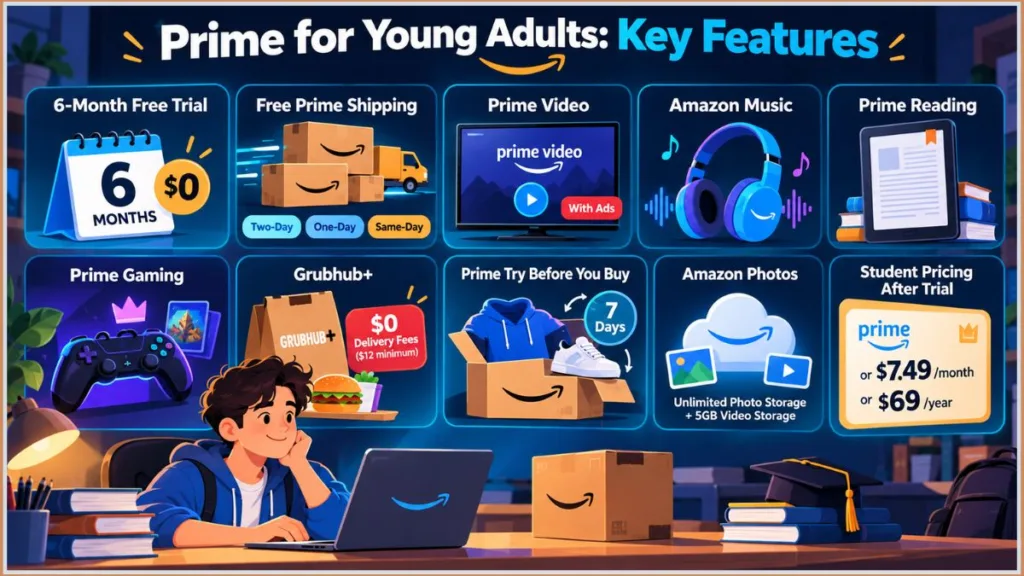
Yes, on eligible items — free two-day, one-day, or same-day shipping depending on the specific item and your location.
Amazon’s Amazon Day feature is worth knowing about here: it lets you schedule all your packages for a given week to arrive on one chosen day, which is a genuinely underused way to cut down on porch packages sitting around a dorm or apartment building.
One qualifier worth remembering: “eligible” is doing real work in that sentence, so check what’s shown at checkout for the specific product rather than assuming every single order arrives next-day just because you have Prime.
Can You Watch Prime Video with the Membership?
Yes, it’s included — but currently with ads by default. Going ad-free costs an additional $2.99/month on top of your membership.
This isn’t specific to the student plan, for what it’s worth: Amazon made ads the default across all of Prime Video back in January 2024, a change that drew a proposed class-action lawsuit in the U.S. (a federal judge dismissed that case in July 2025, ruling that Amazon’s terms allowed the change) and, more recently, a similar case brought by Australia’s Competition and Consumer Commission in June 2026. For a deeper look at why you might see ads even after paying to remove them, see our guide on why you’re getting ads on Amazon Prime.
Even the paid ad-free add-on doesn’t guarantee a completely ad-free experience, and it’s worth understanding why before you assume something’s broken with your account. Amazon’s own guidance notes that free “Watch for Free” ad-supported titles, live sports, live TV, some third-party add-on channels, and pre-roll promotional trailers can still show advertising or can’t be skipped, regardless of your Ad Free subscription.
If you’re seeing ads you didn’t expect on something you thought was covered, check the title’s page for a “Watch with ads” or “Free with ads” label before contacting support.
What Other Prime Services and Perks Are Included?
Beyond shipping and video, the membership includes Amazon Music at the Prime tier — ad-free streaming of roughly 100 million songs in shuffle mode, with the full on-demand Amazon Music Unlimited catalog available as a separate paid upgrade if you want it.
You also get Prime Reading, a rotating library of e-books and magazines, plus occasional early access to new releases through Kindle First, and Prime Gaming, which includes free monthly PC games, in-game loot, and a free monthly Twitch channel subscription — though during the trial specifically, that Twitch subscription is limited to one month rather than the full six.
Grubhub+ is one of the more overlooked perks, and it’s genuinely worth knowing about: it’s included at no extra cost for as long as you’re a Prime for Young Adults member, with $0 delivery fees on eligible restaurant orders over a $12 minimum. Amazon has put the annual value of this at roughly $120, which is real money if you order delivery even occasionally.
A few less commonly mentioned inclusions round out the list:
- Prime Try Before You Buy — order eligible clothing and accessories, try them on at home for 7 days, and pay only for what you keep, with free returns on the rest.
- Amazon Photos — unlimited, full-resolution photo storage plus 5GB of video storage.
- Amazon Pharmacy — discounts of up to roughly 80% off generic medications without insurance, plus free two-day delivery, genuinely useful if you’re managing any prescriptions on a student budget.
Rotating partner perks have periodically included Calm (commonly offered as a few free months followed by a steeply discounted annual rate), Course Hero for homework help, and StudentUniverse, which has offered up to roughly 10% off flights and hotels for eligible members.
Treat these as a bonus layer on top of the core membership rather than a reason to sign up on their own — they change based on timing and promotion, so check what’s currently active on your account.
There’s also a 5% cash back benefit on rotating categories like beauty, apparel, electronics, and personal care, specifically for Prime for Young Adults members who use a Prime Visa card — worth noting this one is tied to having that particular card, not something every member automatically gets.
Which Benefits Require an Additional Subscription?
Ad-free Prime Video (that $2.99/month add-on), Amazon Music Unlimited for Students (the full unlimited catalog beyond what’s included in Prime Music), and unlimited generic-medication fills through Amazon Pharmacy are all upgrades rather than included by default.
Check the price shown for each before assuming everything under the Amazon umbrella comes free with your membership.
Which Student Discounts Are Worth Knowing About, and Can You Share the Membership?
Two things worth being clear-eyed about here.
First: Prime for Young Adults generally can’t be shared the way a regular Prime membership can. Amazon’s Family/Household feature lets a paying Prime member share select digital benefits — Prime Video, for instance — with one other adult and up to four children in the same household. But the discounted student membership itself, including its shipping benefits, is tied to your individually verified account. It isn’t designed to extend to other people’s orders or accounts the way standard Prime sharing works. If your family wants the shipping benefit too, they’d generally need their own membership.
Second, on comparison shopping: Amazon isn’t the only retailer running a discounted student plan.
- Walmart+ Student has run roughly 50% off standard Walmart+ pricing in past promotions and bundles in a Paramount+ subscription, though Amazon’s overall benefit stack — Grubhub+, Amazon Pharmacy, Prime Gaming, Amazon Music — tends to be larger.
- Prime Access is a separate Amazon tier at $6.99/month specifically for SNAP or Medicaid recipients — a different program from Prime for Young Adults entirely, relevant if you don’t fall into the 18–24 or student brackets but do qualify for assistance programs.
It’s also worth knowing that most students who verify one student discount through SheerID end up verifying several: Spotify Premium Student and Apple Music Student (roughly $5.99/month each) and often-free Microsoft 365 Education accounts are common companions to a Prime for Young Adults membership, not competitors to it.
How Much Does Amazon Prime Student Cost After the Free Trial?
This is usually the point where “free Prime” quietly turns into a real budgeting question. You may have started the trial because $0 fit perfectly. Six months later, the question isn’t “can I get this for free” anymore — it’s “am I comfortable paying for this every month or every year.”
Once the trial ends, eligible customers pay $7.49 per month or $69 per year — compared to standard Prime’s $14.99/month or $139/year. That’s a genuine 50% discount that continues for as long as you remain eligible, not a temporary rate that quietly reverts to full price.
Over four years of college, that gap adds up to more than $280 in savings compared to paying full price the entire time.
What Happens to the Price After the Six-Month Trial?
If you don’t cancel, the membership shifts from $0 to $7.49/month, or $69/year if you’ve chosen annual billing.
The math worth doing isn’t “Prime was free for six months” — it’s “I got six months free, and now I need to decide whether $7.49 monthly or $69 annually actually fits what I’m spending elsewhere.”
How Much Will You Pay Each Month?
$7.49, roughly half of standard Prime’s $14.99. Whether that’s worth it depends less on the size of the discount and more on whether you’re actually using shipping, Prime Video, and Grubhub+ often enough that $7.49 feels small next to what you’re getting.
What Does an Annual Membership Cost?
$69/year, which works out to roughly $5.75/month — noticeably cheaper than paying $7.49 monthly across a full year, which would total $89.88.
The annual option only makes sense, though, if you’re reasonably confident you’ll keep the membership that long.
Is the Student Price Still Discounted Compared With Regular Prime?
Yes, and durably so — not a six-month teaser that snaps back to full price:
| Prime for Young Adults | Standard Prime | |
|---|---|---|
| Monthly | $7.49 | $14.99 |
| Annual | $69 | $139 |
| Trial | 6 months free | 30 days |
Which Payment Option Makes More Sense for Your Situation?
If you already know you’ll be using Prime through the full year, annual billing is the cheaper path. If you’re closer to graduation, or genuinely unsure your habits will stay the same, monthly billing costs a bit more in total but doesn’t lock you into a prepaid year you might not end up wanting.
What Happens When You Graduate or Turn 25?
This is a detail worth planning around now rather than discovering later, because it changes the picture over your entire time in school, not just at the six-month mark.
If you qualified through student verification, your discounted rate is capped at a maximum of four years from your first verification date, or the end of your studies — whichever comes first — regardless of how long your particular degree ends up taking.
If you qualified through age verification instead, your rate converts to standard Prime pricing once you turn 25.
Amazon typically sends an advance notice email before either conversion happens, so you’re not caught completely off guard — but it’s still worth treating $7.49 as a rate for this stage of your life, not one you’ll have indefinitely.
Does Amazon Prime Student Automatically Renew?
Underneath the pricing question, there’s usually a bigger, simpler worry: what if I just forget, and Amazon charges me without me really deciding anything? That’s not an unreasonable concern, especially with a trial this long — six months is genuinely enough time for a membership to blend into the background completely.
The honest answer is yes, it auto-renews. Amazon states this directly on its own signup page — the trial converts automatically into the paid membership unless you cancel first.
Treat the trial as something that continues into a paid period by default, not something that quietly disappears on its own when the free months run out.
Will Amazon Charge You When the Free Trial Ends?
If you’re still enrolled in the trial when six months are up, yes — it converts automatically using whatever payment method is on file.
That’s exactly why entering a card during signup wasn’t just a formality; it’s the actual mechanism that makes auto-renewal work at all.
When Does Billing Actually Begin?
The date tied specifically to your own trial, not a general “six months from whenever I think I signed up.” Your account’s Memberships & Subscriptions page is the source of truth here, not your memory.
Where Can You Find Your Renewal Date?
Inside your Amazon account, under Your Memberships & Subscriptions — this is exactly where Amazon itself points customers for checking Prime renewal information.
How Can You Avoid an Unexpected Prime Charge?
Set a reminder before the trial ends, with enough lead time to actually review your account and cancel if you decide to — not a reminder set for the exact day it ends, when your options for a clean cancellation are already narrower.
Treat this renewal date the same way you’d treat any other recurring bill you already keep an eye on.
What Happens If You’re Still a Student When the Trial Ends?
Still being enrolled doesn’t pause billing on its own. If you’re still eligible, you continue as a paying member at the discounted rate — keeping the four-year and graduation conversion point above in mind.
If that’s not what you want, you cancel before renewal, the same as anyone else would.
Do You Need to Re-Verify Your Student Status Each Year?
Yes, and this is genuinely one of the most commonly missed details in the entire process. Prime Student — again, the same program as Prime for Young Adults under a different name — isn’t something you verify once and then forget about.
Within your four-year eligibility window, Amazon periodically asks you to reconfirm that you’re still enrolled. Where you handle this depends on your plan, though both routes ultimately lead to the same hub:
- On an annual plan, go to Manage Your Student Membership inside Your Account.
- On a monthly plan, use Manage Your Prime Membership instead.
You’ll typically need to resubmit proof of eligibility — a current .edu email, or a document like a student ID, transcript, or enrollment letter if your school email isn’t accepted.
Important: If you miss the reverification deadline, or your documents aren’t approved in time, Amazon automatically renews your membership at the standard, non-student Prime price — $14.99/month or $139/year — without waiting for you to notice. This single missed step is, by a fair margin, the most common reason a Prime Student discount quietly disappears from someone’s account.
Tip: Keep a digital copy of your student ID, transcript, or enrollment letter on hand year-round, not just at signup. Treat any “verify your continuing student status” email from Amazon as something to act on immediately — it’s directly tied to whether you keep paying $7.49 or jump to $14.99.
Should You Keep the Membership or Cancel Before Renewal?
The honest way to decide: compare what you actually used during the trial against $7.49 a month or $69 a year. If Prime genuinely became part of how you shop and stream, keeping it is a reasonable call. If you used it once or twice, the size of the discount alone isn’t a great reason to keep paying for it.
If a charge does slip through — whether from a missed renewal you didn’t catch in time, or a failed reverification — you’re not necessarily out that money. Amazon gives you a 60-day window from the date of a full-price charge to reverify your eligibility and request a refund.
Reverifying alone doesn’t automatically trigger the refund, though — you have to submit your eligibility documents and then separately request the refund itself. Amazon calculates what you get back based on usage: if you haven’t used any Prime benefits since the charge went through, a full refund is more likely; if you’ve already used shipping or Prime Video during that period, expect a prorated refund instead.
Our complete guide to getting a refund after a full-price charge walks through this in more detail, including what to do if the overcharge happened right at signup rather than at a later renewal.
One additional wrinkle some readers have run into: unexpected billing, or being enrolled in a shipping-only Prime plan, specifically after signing up through the iOS app. If that happens to you, trying the signup again through a web browser — or contacting Amazon support directly — tends to resolve it.
How to Cancel Amazon Prime Before the Free Trial Ends
If you signed up directly through Amazon, you can cancel your Prime membership at any time by going to Your Account and adjusting your membership settings.
When Should You Cancel If You Don’t Want to Pay?
Before the renewal date, not after you’ve already noticed a charge. If you’re a few weeks out from the end of the trial, that’s a genuinely good window to make the call — you already know how you’ve used it, and you’re not rushing a decision at the last minute.
Can You Cancel Immediately After Starting the Trial?
Yes. Canceling stops the auto-renewal from happening — it doesn’t necessarily mean your access disappears the exact second you click cancel.
Check the cancellation confirmation Amazon shows you, since it’ll tell you specifically what happens to your current access.
What Happens to Your Prime Benefits After Cancellation?
Generally, canceling stops the future renewal rather than instantly cutting off what you currently have. If your confirmation says access continues until a specific date, you can keep using the trial benefits right up through that date instead of assuming they vanish immediately.
How Do You Confirm That Amazon Actually Canceled the Membership?
Go back into your membership status after canceling and make sure it explicitly shows the membership isn’t scheduled to renew.
It’s worth taking a screenshot of that confirmation, too, in case a billing question comes up later and you want something concrete to point to.
What If the Trial Has Already Ended and You Were Charged?
Check Your Payments → Transactions and Manage Your Memberships & Subscriptions to see exactly what was charged and when.
From there, and as covered above, you have a 60-day window from the charge date to reverify your eligibility and request a refund — full if you haven’t used any benefits since, prorated if you have. For the full step-by-step process, see our dedicated refund guide. Closing your entire Amazon account to try to fix a billing issue is a much bigger step than it needs to be; dealing with the Prime membership specifically is the more direct route.
Amazon Prime Student Verification Not Working? Here’s What to Do
Most of what goes wrong here traces back to the SheerID verification layer covered earlier, not a fundamental problem with your eligibility. Seeing “Verification is in progress, please wait” usually doesn’t mean anything failed — it typically just means your application landed in Amazon’s manual review queue instead of clearing instantly. For a much deeper walkthrough of this specific message, see our dedicated guide to fixing a stuck Prime Student verification.
Amazon Can’t Verify Your Student Status — What Now?
Start by checking exactly what you submitted. Make sure your name matches your Amazon account precisely, and that your school information and documents reflect your current status rather than a previous term.
What If Your Verification Email Never Arrives?
Check spam and junk first, and don’t stop there — the Promotions tab and Updates or Social tabs (for Gmail users) are common places Amazon’s confirmation emails end up getting auto-sorted.
Search your inbox directly for “Amazon,” double-check the email address you entered during signup is actually correct, and add amazon-student@amazon.com to your contacts so future messages don’t get filtered.
If you’ve checked everywhere and still can’t find it, go to Amazon’s Verify Your Email page (linked from your Prime for Young Adults signup flow) and request a new confirmation link rather than continuing to wait indefinitely.
Avoid this mistake: Resubmitting your entire application while anxious about a pending verification can actually make things worse. Multiple submissions can create duplicate entries in Amazon’s system and reset your position in the review queue. Submit once, then wait.
Why Isn’t Your .edu Email Being Accepted?
Having a valid .edu address doesn’t automatically guarantee instant verification if SheerID’s automated check can’t confirm the match on its end — your school might simply not be in Amazon’s auto-recognition database yet, which tends to be more common at smaller or newer institutions.
If your school doesn’t use a .edu domain at all, that’s a separate, unrelated issue — the fix is switching to the alternate proof-of-enrollment route covered in Section 4, not trying to force a .edu-based path that was never going to work for your situation. For a full walkthrough of this exact scenario, see our guide to verifying Prime Student without a .edu email.
Why Isn’t the Free Trial Appearing After Verification?
The single most common cause here is being signed into the wrong account — check that first, before anything else.
Beyond that, check whether you’ve used a Prime trial before, under any name, or currently have paid Prime, since your account’s history can affect what’s being offered to it now. Amazon generally allows one Prime Student trial per person — attempting a fresh signup on an account that’s already used one typically won’t qualify for a second free trial.
What If Amazon Says You’re Not Eligible?
Before assuming something is fundamentally wrong, go back and review what you actually submitted for accuracy — including your entered graduation date, which needs to align with what your documentation shows.
A date that’s too far in the future, already passed, or inconsistent with your enrollment proof is a common, easily-fixed trigger for a rejection message. Don’t immediately create multiple accounts in an attempt to get around the message; that tends to complicate your account history rather than resolve anything.
What If You’ve Already Used a Prime Student Trial?
Re-enrolling in college, or the program simply having a new name now, doesn’t reset trial eligibility on an account that’s already used something similar. If Amazon recognizes that your account has previously used a relevant trial, changing your email address won’t reset that either.
Can You Join if You Already Have Regular Prime?
Yes — and importantly, you don’t need to cancel your existing Prime first. Switch directly through Prime for Young Adults signup, and Amazon processes a prorated refund on your prior membership automatically.
When Is It Worth Contacting Amazon Support?
If your status hasn’t moved after roughly five business days, that’s a reliable signal to stop waiting and reach out rather than continuing to refresh the page.
You have a few real options here:
- Email amazon-student-verification@amazon.com with your enrollment documents and account details, sent from your Amazon-registered email address.
- Use Amazon’s live chat through the Help Center.
- Contact Customer Service directly and mention “Prime & Something Went Wrong.”
One practical tip if you’re stuck in an automated loop: if Amazon’s chat assistant keeps routing you to help articles instead of a person, ask specifically for a “customer representative” and select “Need more help” or “Something else” when prompted — that combination tends to connect you with a live agent faster.
Have your account email, the date you submitted verification, and your enrollment document ready before you reach out.
For a considerably deeper walkthrough of this exact situation — including a full symptom-and-fix reference table — our dedicated guide to fixing a stuck Prime Student verification covers it in more depth than makes sense here.
Amazon Prime Student Login: How to Check and Manage Your Membership
Eventually — a few weeks in, or a few months — you’ll want to check on this membership again: is the trial still active, when does billing actually start, did the cancellation you submitted actually go through. It’s natural to go looking for something like a “Prime Student login” page.
There isn’t one. Your membership lives inside the same regular Amazon account you signed up with — there’s no separate student portal hiding somewhere else that you’re missing.
How Do You Know Whether Your Student Membership Is Active?
Sign into the same Amazon account you used to enroll, and check Your Memberships & Subscriptions.
If Prime looks like it’s missing entirely, the first thing to rule out is being signed into a different account than the one you originally used — that’s the most common explanation by a wide margin, far more often than an actual problem with your membership.
Where Can You See Your Renewal Date?
The same place — Your Memberships & Subscriptions. This is exactly where Amazon itself directs customers when they’re checking Prime renewal information.
How Do You Check Your Current Membership Status?
Look specifically for whether you’re still inside the free trial, already on the paid rate, coming up on a reverification requirement, or scheduled to end.
That tells you considerably more than simply noticing that Prime shipping still works at checkout, which isn’t always a reliable signal of where you actually stand.
Where Can You Manage or Cancel Prime?
The same membership page handles this too. When you do cancel, pay close attention to the confirmation screen specifically — it’ll tell you whether access ends immediately or continues through the end of your current period.
What If You Signed Up but Can’t Find Your Student Membership?
Start with the simplest explanation first: you’re likely signed into the wrong account.
If you’re genuinely certain you’re on the right one and it’s still not showing up, check your email for the original signup or verification message — those confirm exactly which account was actually used.
If it’s truly not there after checking, it’s worth contacting Amazon support directly with your account and signup details rather than starting a brand-new trial and potentially complicating things further.
Amazon Prime Student FAQ
Is Amazon Prime Student Still Available in 2026?
Yes, under the current name Prime for Young Adults. Eligible students and 18–24-year-olds can still access the discounted membership and six-month trial.
Is Prime for Young Adults the Same as Amazon Prime Student?
It’s the current version of it — same general idea, broader eligibility now that non-students aged 18–24 qualify too. Go by current Amazon terms rather than older Prime Student pricing or rules you might find elsewhere.
How Long Is the Amazon Prime Student Free Trial?
Six months at $0 — the longest free trial Amazon offers, and longer than the standard 30-day trial regular Prime gives everyone else.
Do You Need a .edu Email for Amazon Prime Student?
Only if you’re going through student verification specifically, and even then it’s one option among several that Amazon’s verification partner, SheerID, accepts.
Can You Get Amazon Prime Student Without a .edu Email?
Yes — either through age verification (18–24, no school requirement at all), or through manual document verification (student ID, transcript, tuition bill, or acceptance letter) submitted to amazon-student-verification@amazon.com. See our full walkthrough for the complete process.
What Happens After the Amazon Prime Student Free Trial?
It auto-renews into the paid membership — $7.49/month or $69/year — unless you cancel first.
How Much Does Amazon Prime Student Cost After the Free Trial?
$7.49/month or $69/year, roughly 50% less than standard Prime’s $14.99/month or $139/year — more than $280 in savings across four years of college.
Does Amazon Prime Student Automatically Renew?
Yes. Student-path members also need to periodically reverify enrollment to keep the discount, up to a four-year cap — missing that reverification window is what most often causes an unexpected full-price charge.
Can You Cancel Amazon Prime Before the Free Trial Ends?
Yes, anytime, through Your Account membership settings. Cancel the membership itself specifically — not just your payment method or your entire account.
Can Existing Prime Members Get the Student Offer?
Yes — you don’t need to cancel existing Prime first. Amazon processes a prorated refund on your prior membership automatically once you switch.
Can I Share Prime Student With My Family?
Not the discounted membership itself — it’s tied to your individually verified account. You can share select digital benefits like Prime Video with one other adult through Amazon Family/Household, but the shipping and pricing benefits of Prime Student don’t extend to other people’s accounts the way standard Prime sharing does.
How Does Amazon Verify Student Status?
Through a third-party service called SheerID — the same verification provider used by Spotify, Apple Music, and YouTube Premium for their own student discounts.
Final Thoughts: What to Know Before You Sign Up for Prime Student
You started with a fairly simple goal: get Amazon Prime without adding another expense to a budget that’s probably already tight. The six-month free trial genuinely can get you there.
But the details that actually matter over your whole time in school go well beyond the headline offer — verification runs through SheerID, not Amazon directly; you’ll need a real payment method on file, not just gift card balance; the student-path discount caps at four years with periodic reverification required to hold onto it; and a missed reverification, not some hidden fee, is the single most common reason people end up charged full price without realizing it.
Start by making sure you actually qualify, either through age or enrollment, and don’t let a missing .edu email talk you out of even trying. Use the six-month trial deliberately: try the shipping, Prime Video, Grubhub+, and Amazon Photos, and pay honest attention to whether they genuinely fit how you actually live, not just whether they sound useful on paper.
Know your real renewal date — not an estimate — and treat any reverification prompt from Amazon as something to handle immediately rather than later. When the trial’s getting close to ending, compare what you actually used against $7.49 a month or $69 a year, and make an active choice either way. And if you do end up hit with an unexpected full-price charge, remember you have 60 days to reverify and request your money back.
Before you commit either way, it’s worth running through this quickly:
- Are you eligible, and through which path?
- Can you complete verification through SheerID — do you have a payment method ready, and current documents if you need them?
- How long is your actual free period, based on your own account?
- Which specific benefits will you realistically use?
- What will you pay afterward — $7.49 monthly, or $69 annually?
- When will Amazon renew the membership, and do you need to reverify to keep the discount?
- Do you know how you’d cancel, or request a refund, if something goes wrong?
Answer those honestly before you sign up, and you’ll get the full value of the free trial without any billing surprise waiting for you on the other side of it. Start here: amazon.com/youngadult.
Visit Our Post Page: Blog Page
Discover more from Izoate
Subscribe to get the latest posts sent to your email.